
Introduction
The Mackie CR-X Series CR8S-XBT 8-inch Multimedia Subwoofer with Bluetooth is designed to provide powerful dedicated bass reinforcement for your studio or home audio setup. This 200W subwoofer features flexible connectivity options, including 1/4" TRS and RCA inputs/outputs, along with convenient Bluetooth pairing for wireless audio streaming. It integrates seamlessly with CR Series monitors and offers precise control over your sound with input/output level adjustments, a variable crossover, and a polarity switch. The included CRDV Desktop Volume Control further enhances user convenience, allowing easy system management.

Figure 1: Mackie CR8S-XBT 8-Inch Multimedia Subwoofer with included CRDV Desktop Volume Control.
Included Components
The following items are included with your Mackie CR8S-XBT Subwoofer:
- CRDV Desktop Remote
- Power Cord
- Quick Start Guide
- RCA to 1/8" Cable
Setup
Proper setup ensures optimal performance and sound quality from your subwoofer. Follow these steps for initial configuration:
- Placement: Position the subwoofer in your desired location. The CR8S-XBT features a down-firing port, so ensure adequate space around it for optimal bass response.
- Power Connection: Connect the provided Power Cord to the subwoofer's power inlet and then to a suitable AC power outlet.
- Audio Inputs: Connect your audio source (e.g., audio interface, mixer, or CR Series monitors) to the subwoofer's rear panel inputs. The CR8S-XBT offers 1/4" TRS (balanced/unbalanced) and RCA (unbalanced) input options.
- Audio Outputs: If connecting to satellite speakers (e.g., CR Series monitors), use the subwoofer's 1/4" TRS or RCA outputs to send the processed audio signal to your main speakers.
- CRDV Desktop Remote: Plug the CRDV Desktop Volume Control into the dedicated CRDV input on the subwoofer's rear panel. This remote allows convenient control over subwoofer and overall system volume.
- Bluetooth Pairing: To pair a Bluetooth device, ensure the subwoofer is powered on. Activate Bluetooth on your audio device and select 'CR8S-XBT' from the list of available devices. The subwoofer's indicator light will confirm successful pairing.
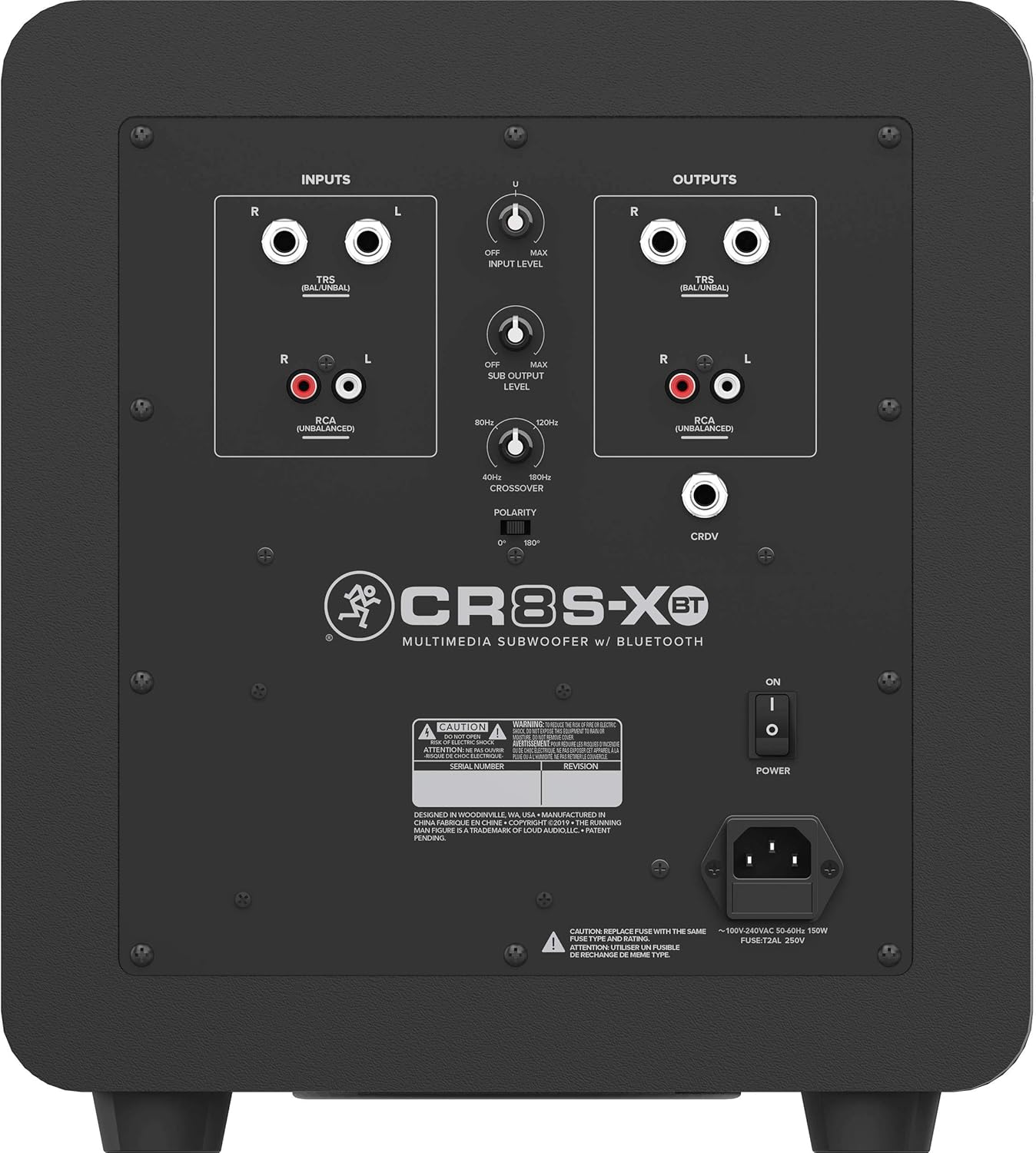
Figure 2: Rear panel of the CR8S-XBT Subwoofer showing various inputs, outputs, and controls.

Figure 3: The CRDV Desktop Volume Control for convenient system adjustment.
Operating
The CR8S-XBT Subwoofer provides several controls to fine-tune its performance:
- Input Level Control: Adjusts the input sensitivity to match the output level of your audio source.
- Sub Output Level Control: Controls the overall volume of the subwoofer.
- Variable Crossover: Allows you to set the frequency point at which the subwoofer handles low-end frequencies, typically between 40 Hz and 180 Hz. This ensures a smooth transition between the subwoofer and your main speakers.
- Polarity Switch: Toggles the subwoofer's phase between 0° and 180°. Adjust this switch to achieve the most cohesive bass response with your main speakers, minimizing phase cancellation.
- CRDV Desktop Remote: This remote features dual knobs to independently adjust the subwoofer's volume and the overall system volume, offering precise control from your desktop.
- Bluetooth Functionality: The subwoofer supports Bluetooth 5.0 for high-quality wireless audio streaming.
Maintenance
To ensure the longevity and optimal performance of your Mackie CR8S-XBT Subwoofer, follow these maintenance guidelines:
- Keep the subwoofer clean by wiping it with a soft, dry cloth. Avoid using harsh chemicals or abrasive cleaners.
- Ensure proper ventilation around the unit to prevent overheating.
- Avoid exposing the subwoofer to extreme temperatures, humidity, or direct sunlight.
- Regularly check all cable connections to ensure they are secure.
Specifications
| Feature | Detail |
|---|---|
| Model Name | CR8S-XBT |
| Speaker Type | Subwoofer |
| Special Feature | Hi Res Audio |
| Recommended Uses For Product | For Surround Sound Systems |
| Compatible Devices | Desktop |
| Subwoofer Diameter | 8 Inches |
| Unit Count | 1.0 Count |
| Surround Sound Channel Configuration | 5.1 |
| Color | Black |
| Included Components | CRDV Desktop Remote, Power Cord, Quick Start Guide, RCA to 1/8" Cable |
| Product Dimensions | 16.15"D x 12.6"W x 14"H |
| Item Weight | 24.2 Pounds |
| Is Waterproof | False |
| Warranty Type | Limited |
| Number of Items | 1 |
| Control Method | Remote |
| Wireless Communication Technology | Bluetooth |
| Speaker Size | 8 Inches |
| Power Source | AC |
| Woofer Diameter | 8 Inches |
| Audio Driver Type | Dynamic Driver |
| Bluetooth Range | 10 Meters |
| Audio Driver Size | 8 Inches |
| Subwoofer Connectivity Technology | Wireless |
| Number of Power Levels | 1 |
| UPC | 663961059601 |
| Style | Bluetooth |
| Global Trade Identification Number | 00663961059601 |
| Manufacturer | Mackie |
| Item Model Number | CR8S-XBT |
| Speaker Maximum Output Power | 200 Watts |
| Connectivity Technology | Bluetooth |
| Audio Output Mode | Surround |
| Mounting Type | Tabletop Mount |
Product Videos
Product Overview Video
This video provides a brief overview of the Mackie CR-X Series Subwoofer, highlighting its key features and design. It offers a quick visual introduction to the product's appearance and basic functionalities.
Mackie - CR series
This video offers a general overview of the Mackie CR-X Series, which includes the CR8S-XBT subwoofer. It showcases the aesthetic and functional aspects common across the series, providing context for the subwoofer's design and integration.
Warranty and Support
The Mackie CR8S-XBT Subwoofer comes with a Limited Warranty. For detailed warranty information or technical support, please refer to the Quick Start Guide included in your package or visit the official Mackie website.