
1. Product Overview
The ALINCO DJ-VX-50-HE is a robust, dual-band portable radio designed for reliable communication across VHF and UHF frequencies. Featuring a multi-color display, VOX function, DTMF, CTCSS/DCS, and an integrated FM radio, this device is built to withstand challenging environments with its IP67 water and dust resistance rating.
1.1 Package Contents
Before use, please verify that all items are present in the package:
- ALINCO DJ-VX-50-HE Portable UHF/VHF Station
- Antenna
- Belt Clip
- User Manual (this document)
- Desktop Charger
- 1 x 1500 mAh Li-Ion Battery (7.4V)
- Lanyard
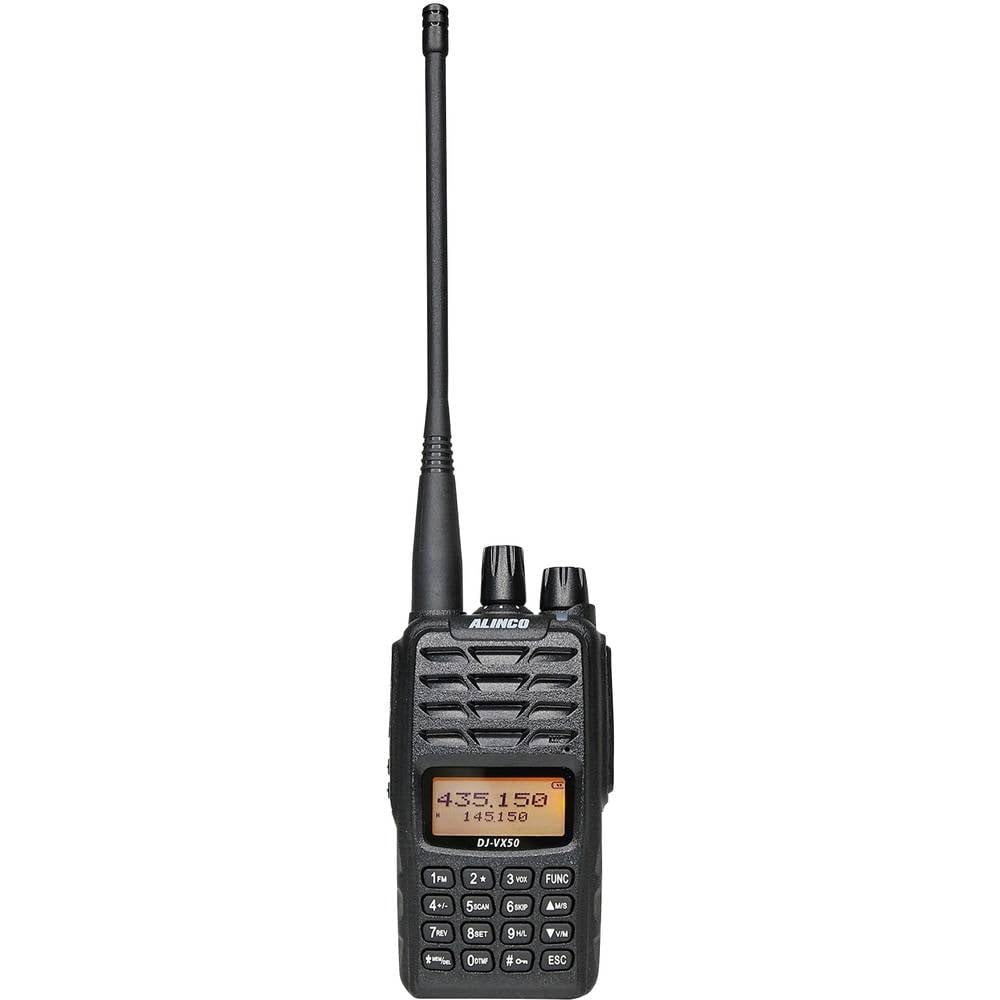
Image 1.1: ALINCO DJ-VX-50-HE Portable Radio with included accessories. This image shows the radio unit, antenna, battery, and charger.
2. Setup
2.1 Battery Installation
- Ensure the radio is powered off.
- Locate the battery compartment on the rear of the radio.
- Align the 1500 mAh Li-Ion battery with the compartment contacts.
- Gently push the battery into place until it clicks securely.
- Close the battery cover, if applicable, ensuring it is latched to maintain IP67 rating.
2.2 Antenna Attachment
- Locate the antenna connector on the top of the radio.
- Screw the provided antenna clockwise onto the connector until it is finger-tight. Do not overtighten.
2.3 Charging the Battery
For optimal performance, fully charge the battery before first use.
- Connect the desktop charger to a power outlet.
- Place the radio (with battery installed) into the charging cradle.
- The charging indicator light on the charger will illuminate (typically red) to show charging is in progress.
- Once fully charged (approximately 12 hours for initial charge), the indicator light will change (typically green).
- Remove the radio from the charger.
3. Operating Instructions
3.1 Power On/Off and Volume Control
- Power On: Rotate the power/volume knob clockwise until a click is heard and the display illuminates.
- Power Off: Rotate the power/volume knob counter-clockwise until a click is heard and the display turns off.
- Volume Adjustment: Rotate the power/volume knob to increase (clockwise) or decrease (counter-clockwise) the audio output.
3.2 Channel Selection and Frequency Bands
The radio supports 200 channels across VHF, UHF, and FM radio bands.
- Use the Up/Down arrow keys to navigate through programmed channels.
- To switch between VHF (144-146 MHz), UHF (430-440 MHz), and FM Radio (87.5-108 MHz) bands, refer to the specific band switch button or menu option as detailed in the full user manual.
- FM Radio: Activate the FM radio function to listen to broadcast stations. Use the channel keys to tune to desired frequencies.
3.3 VOX Function (Voice Operated Transmit)
The VOX function allows hands-free transmission. When enabled, the radio will transmit automatically when it detects your voice.
- Access the radio's menu system.
- Navigate to the VOX setting.
- Enable VOX and adjust the sensitivity level to prevent accidental transmissions or missed voice activation.
3.4 DTMF (Dual-Tone Multi-Frequency)
DTMF tones can be used for various functions, such as remote control of repeaters or selective calling.
- To send DTMF tones, press the PTT (Push-To-Talk) button and then enter the desired DTMF sequence using the keypad.
3.5 CTCSS/DCS (Continuous Tone-Coded Squelch System / Digital Coded Squelch)
CTCSS and DCS codes are used to filter out unwanted signals and allow you to hear only transmissions from users sharing the same code.
- Access the radio's menu system.
- Select the CTCSS or DCS setting for the current channel.
- Choose the desired tone or code. Both transmit (Tx) and receive (Rx) codes can be set independently.
3.6 Key Lock
The key lock feature prevents accidental changes to settings or channels.
- To activate/deactivate the key lock, typically press and hold a designated key (e.g., the '#' key) for a few seconds. Refer to the full manual for the exact key combination.
3.7 Channel Scan
The channel scan function allows the radio to automatically search for active signals across programmed channels.
- Activate the scan function via a dedicated button or menu option.
- The radio will stop on an active channel and resume scanning after a set delay or when the signal disappears.
4. Maintenance
4.1 Cleaning
- Wipe the radio's exterior with a soft, damp cloth.
- Do not use harsh chemicals, solvents, or abrasive cleaners.
- Ensure all port covers are securely closed before cleaning to maintain water resistance.
4.2 Storage
- Store the radio in a cool, dry place away from direct sunlight and extreme temperatures.
- For long-term storage, remove the battery and store it separately, partially charged (around 50%).
4.3 Water and Dust Resistance (IP67)
The ALINCO DJ-VX-50-HE is rated IP67, meaning it is protected from dust ingress and can withstand immersion in water up to 1 meter for 30 minutes. Ensure all port covers, battery cover, and accessory jacks are securely sealed to maintain this rating.
5. Troubleshooting
If you encounter issues with your radio, refer to the following common problems and solutions:
- Radio does not power on:
- Check if the battery is properly installed and charged.
- Ensure the power/volume knob is rotated clockwise past the 'off' position.
- No reception or poor audio:
- Verify the antenna is securely attached.
- Check the volume level.
- Ensure you are on the correct frequency band and channel.
- If CTCSS/DCS is enabled, ensure the correct code is set for the transmitting station.
- Move to an open area, away from obstructions or interference sources.
- Battery drains quickly:
- Ensure the battery is fully charged before use.
- Reduce transmit power if high power is not required.
- Avoid extreme temperatures during operation.
- Keypad unresponsive:
- Check if the key lock function is activated. Deactivate it if necessary.
For issues not covered here, please consult the full user manual or contact customer support.
6. Specifications
| Feature | Specification |
|---|---|
| Brand | ALINCO |
| Model Number | DJ-VX-50-HE |
| Color | Black |
| Frequency Range (VHF) | 144-146 MHz (Rx/Tx) |
| Frequency Range (UHF) | 430-440 MHz (Rx/Tx) |
| Frequency Range (FM Radio) | 87.5-108 MHz (Rx) |
| Number of Channels | 200 |
| Output Power (VHF) | 5 W |
| Output Power (UHF) | 4 W |
| Battery Type | 1500 mAh Li-Ion (7.4V) |
| Battery Life (Average) | Up to 12 hours |
| Water Resistance Rating | IP67 (Immersible up to 1m for 30 min) |
| Dimensions (P x L x H) | 3.5 x 5.5 x 10 cm |
| Weight | 230 Grams |
| Operating Temperature | -20°C ~ +55°C |
| Audio Accessory Connector | 2-pin PNI-M |
| Special Features | CTCSS-DCS, DTMF, VOX, Channel Scan, Key Lock, BCL (Busy Channel Lockout) |
7. Warranty and Support
7.1 Warranty Information
This product comes with a warranty period of 24. Please retain your proof of purchase for warranty claims. The warranty covers manufacturing defects under normal use conditions. It does not cover damage caused by misuse, accidents, unauthorized modifications, or failure to follow instructions in this manual.
7.2 Customer Support
For technical assistance, troubleshooting beyond this manual, or warranty service, please contact your authorized ALINCO dealer or the point of purchase. You may also visit the official ALINCO website for further support resources.
