
Introduction
Thank you for purchasing the Nakamichi MB-10 MusicBank 5-Disc CD Changer. This manual provides essential information for the proper setup, operation, and maintenance of your unit. Please read this manual thoroughly before using the product to ensure optimal performance and longevity.
Key Features
- Nakamichi MusicBank Mechanism: This unique system allows for direct disc insertion and exchange without the need for CD magazines or carousels, offering operation similar to a single-disc CD player. It holds discs only by their edges, preventing contact with the music signal surface and protecting against scratches. A shielded front door prevents dust accumulation.
- High-Precision D/A Conversion: Features a 24-bit D/A converter that re-quantizes 16-bit music signals to 24-bit for enhanced resolution of low-level signals. It incorporates an 8x oversampling digital filter.
- Advanced Analog Filtering: Utilizes a 3rd order Bessel filter for superior audio quality.
- Digital Outputs: Equipped with 75Ω coaxial and optical digital output terminals for versatile connectivity.
- Headphone Output: Includes a headphone jack with adjustable level control for private listening.
- Gold-Plated Terminals: Audio output terminals are gold-plated to ensure reliable signal transmission and prevent corrosion.
- 8cm CD Playback: Compatible with 8cm CDs when used with an 8cm CD adapter (e.g., SONY CSA-8).
- Remote Control Functionality: The unit can be operated using remote controls from compatible Nakamichi receivers. A dedicated wireless remote control is also included.
Setup
Unpacking and Placement
Carefully remove the MB-10 from its packaging. Place the unit on a stable, level surface away from direct sunlight, heat sources, and excessive moisture. Ensure adequate ventilation around the unit.
Connections
- Audio Output: Connect the analog audio output terminals (RCA) on the rear panel of the MB-10 to the corresponding input terminals on your amplifier or receiver using high-quality audio cables. Ensure left and right channels are correctly matched.
- Digital Output (Optional): If using an external D/A converter or a receiver with digital audio input, connect either the coaxial or optical digital output terminal to your external device.
- Power Connection: After all audio connections are made, plug the power cord into a suitable AC outlet (AC100V, 50Hz/60Hz).
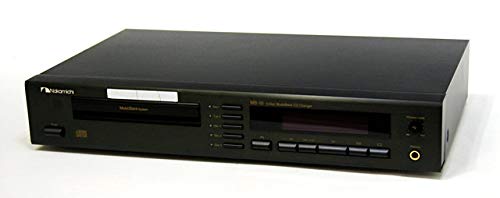
Image: Front view of the Nakamichi MB-10 MusicBank 5-Disc CD Changer, showing the disc insertion slot and primary control buttons.
Operating Instructions
Loading Discs
- Press the OPEN/CLOSE button to open the disc insertion slot.
- Gently insert a CD into the slot with the label side facing up. The MusicBank mechanism will automatically pull the disc in.
- Repeat for up to five discs. The unit will assign a disc number to each loaded CD.
Basic Playback
- Press the POWER button to turn on the unit.
- Select the desired disc by pressing the DISC SKIP buttons or the numbered disc buttons on the remote control.
- Press the PLAY button to start playback.
- Use the PAUSE, STOP, SKIP (forward/backward), and SEARCH buttons for playback control.
Using the Remote Control
The included wireless remote control provides full functionality for the MB-10. Point the remote control towards the front panel of the CD changer. Refer to the remote control diagram (not provided in this manual) for specific button functions.
Maintenance
Cleaning the Unit
Wipe the exterior of the unit with a soft, dry cloth. For stubborn dirt, slightly dampen the cloth with a mild detergent solution, then wipe dry. Do not use abrasive cleaners, solvents, or alcohol, as these can damage the finish.
Disc Care
Handle CDs by their edges. Keep discs clean and free of dust, fingerprints, and scratches. Use a soft, lint-free cloth to wipe discs from the center outwards if cleaning is necessary.
Troubleshooting
| Problem | Possible Cause | Solution |
|---|---|---|
| No power | Power cord disconnected; Power outlet faulty | Check power cord connection; Try a different outlet |
| No sound | Audio cables incorrectly connected; Amplifier/receiver input not selected; Volume too low | Verify audio cable connections; Select correct input on amplifier; Increase volume |
| Disc does not play | Disc inserted incorrectly; Disc is dirty or scratched; Disc format not supported | Re-insert disc correctly; Clean or replace disc; Ensure disc is a standard audio CD |
| Remote control not working | Batteries depleted; Obstruction between remote and unit; Remote not pointed correctly | Replace batteries; Remove obstructions; Point remote directly at the unit's sensor |
Specifications
| Type | CD Changer |
| D/A Conversion Method | 24-bit Dual D/A Converter, 8x Oversampling Digital Filter |
| Wow/Flutter | Below measurement limits |
| Frequency Response | 5Hz to 20kHz ±0.5dB |
| Total Harmonic Distortion | Less than 0.003% (1kHz, 0dB) |
| Total Harmonic Distortion + Noise | 0.004% (1kHz) |
| S/N Ratio | 100dB or more (IHF A-WTD) |
| Dynamic Range | 100dB or more |
| Channel Separation | 90dB or more |
| Power Supply | AC100V, 50Hz/60Hz |
| Power Consumption | 25W (Max) |
| External Dimensions (W x H x D) | 430mm x 70mm x 270mm |
| Weight | Approx. 5.5kg |
Warranty and Support
For warranty information and customer support, please refer to the warranty card included with your product or visit the official Nakamichi website. Keep your purchase receipt as proof of purchase for warranty claims.


