1. Introduction
Thank you for choosing the KATSU Industrial Platform Scale. This digital rechargeable scale is designed for accurate weighing of packages and other items, offering a maximum capacity of 100kg with a precision of 10g. It features a robust 32x42cm steel platform, a clear LED display, and convenient wireless operation. This manual provides essential information for the safe and efficient use of your scale.
Note: This scale is not suitable for commercial trade use.
2. Important Safety Instructions
- Placement: Always place the scale on a firm, level, and stable surface to ensure accurate readings.
- Overload: Do not exceed the maximum weight capacity of 100kg. Overloading can damage the scale's internal components.
- Environment: Operate the scale within the recommended temperature range of 0°C to 40°C. Avoid extreme temperatures, high humidity, or direct exposure to water.
- Cleaning: Use a soft, damp cloth for cleaning. Do not use abrasive cleaners or immerse the scale in water.
- Power: Use only the provided charger for recharging the internal battery. Ensure the power supply voltage (220V / 50Hz) matches the scale's requirements.
- Handling: When moving the scale, use the integrated handle for safe transport. Avoid dropping or subjecting the scale to strong impacts.
- Maintenance: Do not attempt to disassemble or repair the scale yourself. Refer to qualified service personnel for any repairs.
3. Package Contents
Please check the box for the following items:
- KATSU Industrial Platform Scale (Platform Unit)
- Wireless LED Display Unit
- Power Adapter/Charger
- User Manual (this document)
4. Setup
- Unpacking: Carefully remove all components from the packaging. Retain packaging for future storage or transport.
- Placement: Place the scale platform on a flat, stable, and non-vibrating surface. Ensure all four adjustable feet are firmly in contact with the ground.
- Initial Charging: Before first use, connect the power adapter to the scale's charging port and plug it into a 220V / 50Hz power outlet. Allow the scale to charge for approximately 10 hours for a full charge. The battery can last up to 30 days depending on usage. The scale operates on AC power when plugged in and automatically switches to DC (battery) when unplugged.
- Display Unit: The LED display unit connects wirelessly to the platform. Ensure both units are powered on. The wireless reception range is approximately 20-30 meters without obstructions.
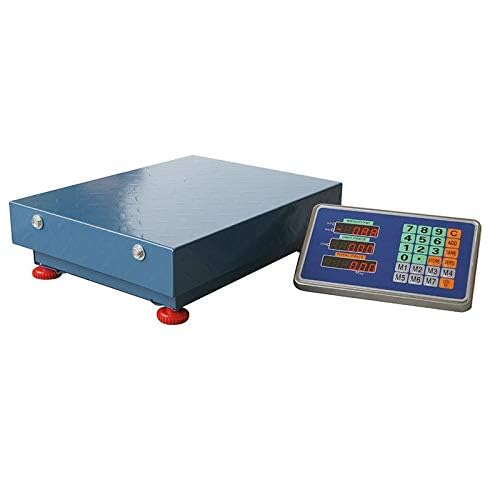
Image 1: Scale platform and detached LED display unit. The display unit can be placed separately from the weighing platform for convenience.
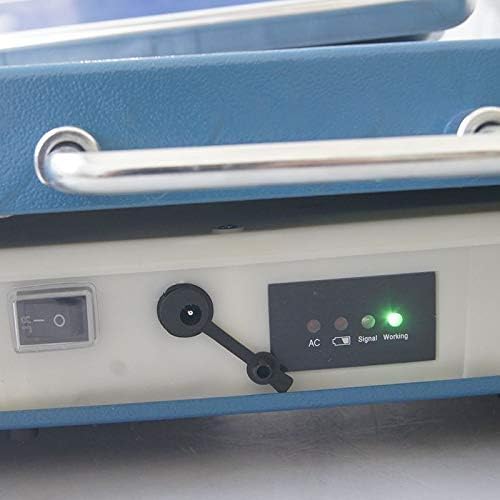
Image 2: Close-up view of the charging port and LED indicators for AC power, signal, and working status.
5. Operating Instructions
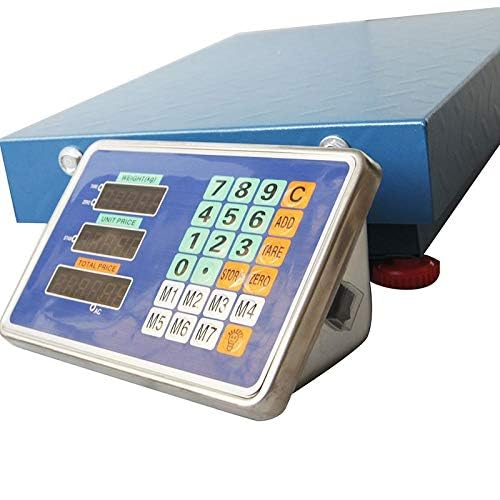
Image 3: The LED display unit showing weight, unit price, and total price, along with a numeric keypad and function buttons.
- Power On/Off: Press the 'ON/OFF' button on the display unit to turn the scale on or off. The LED display will illuminate.
- Zeroing the Scale: Before placing any item on the platform, ensure the display reads '0.00'. If not, press the 'ZERO' button to reset the scale.
- Basic Weighing: Place the item to be weighed gently on the center of the scale platform. The weight will be displayed on the LED screen.
- Tare Function: To weigh an item in a container, first place the empty container on the platform. Press the 'TARE' button. The display will reset to '0.00', effectively subtracting the container's weight. Then, place the item into the container, and only the net weight of the item will be displayed.
- Unit Conversion: The scale supports weight modes in kilograms (kg) and pounds (lb). Refer to the display unit's buttons for unit selection (e.g., 'UNIT' or 'MODE' button, if available, or specific kg/lb buttons).
- Net/Gross Function: The scale supports Net/Gross weight display. Consult the display unit's buttons for switching between these modes. Net weight is the weight of the item itself, while Gross weight includes the weight of the container.
6. Maintenance
- Cleaning: Regularly clean the scale platform and display unit with a soft, dry, or slightly damp cloth. Avoid using harsh chemicals, abrasive materials, or excessive water, which can damage the electronics.
- Battery Care: To prolong battery life, avoid fully discharging the battery frequently. Recharge the battery when the low battery indicator appears. If the scale will not be used for an extended period, charge it fully and store it in a cool, dry place. Recharge every few months to maintain battery health.
- Storage: Store the scale in a dry, dust-free environment away from direct sunlight and extreme temperatures. The scale is designed to be portable with an integrated handle for easy transport.
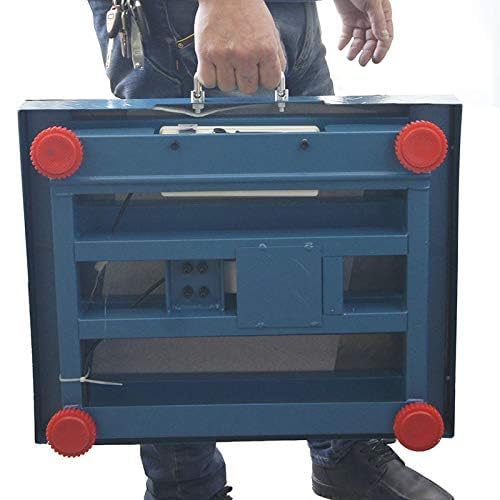
Image 4: The scale features a robust handle for easy portability and transport.
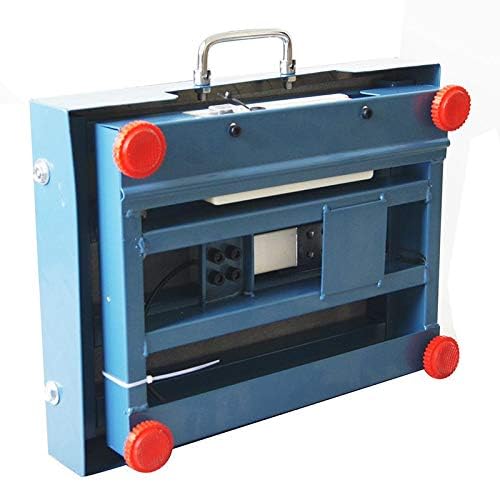
Image 5: The scale's design allows for relatively compact storage when not in use.
7. Troubleshooting
| Problem | Possible Cause | Solution |
|---|---|---|
| Scale does not turn on | Low battery or no power connection. | Charge the battery using the provided adapter or connect to AC power. Ensure the power switch is in the 'ON' position. |
| Inaccurate readings | Scale not on a level surface; overloaded; environmental interference; calibration needed. | Ensure the scale is on a flat, stable surface. Do not exceed 100kg. Avoid strong vibrations or air currents. If issues persist, contact support for calibration guidance. |
| Display shows 'OVERLOAD' | Weight exceeds maximum capacity. | Remove the item immediately to prevent damage. Do not weigh items over 100kg. |
| Wireless display not connecting | Distance too far; obstructions; low battery in either unit. | Move the display closer to the platform. Ensure no major obstructions. Check battery levels of both units. |
| Display is dim or flickering | Low battery. | Recharge the scale's internal battery. |
8. Specifications
| Feature | Detail |
|---|---|
| Model Number | 833180 |
| Maximum Capacity | 100 kg |
| Precision / Readability | 10 g (0.01 kg) |
| Platform Dimensions | 32 x 42 cm |
| Display Type | LED |
| Weight Modes | kg / lb |
| Power Source | AC 220V / 50Hz or Internal Rechargeable Lithium-ion Battery |
| Battery Life (Full Charge) | Up to 30 days (depending on usage) |
| Full Charge Time | Approximately 10 hours |
| Wireless Range | 20-30 meters (without occlusion) |
| Operating Temperature | 0°C to 40°C |
| Material | Alloy Steel |
| Special Features | Portable, Tare Function, Net/Gross Function |
| Package Dimensions | 61.5 x 44.7 x 16.2 cm |
| Package Weight | 9.25 kg |
9. Warranty and Support
For warranty information, technical support, or service inquiries, please refer to the purchase documentation or contact your retailer. Keep your proof of purchase for any warranty claims.


