Introduction
This manual provides detailed instructions for the HONOR xSport PRO AM66-L wireless in-ear earphones. Please read this guide thoroughly to ensure proper use, optimal performance, and longevity of your device. This product is designed for convenience and high-quality audio experience.
What's in the Box
Verify that all items are present in your product packaging:
- HONOR xSport PRO AM66-L Headset
- Warranty Guide
- USB Type-C Charging Cable
- Translucent Silicone Earplugs (Small, Medium, and Large sizes)
- User Manual (this document)
Product Overview
Familiarize yourself with the components of your HONOR xSport PRO AM66-L earphones.
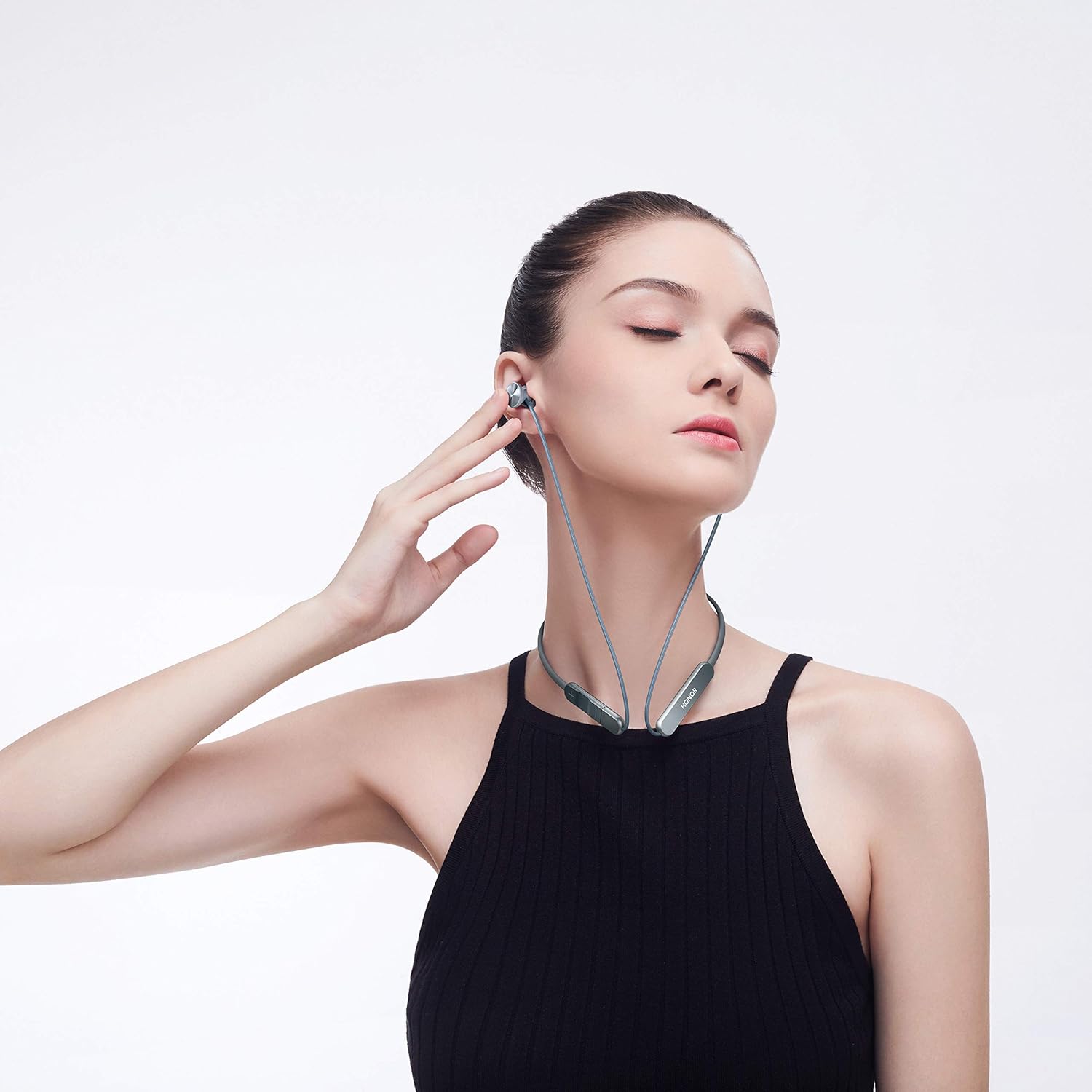
Figure 1: Overall view of the HONOR xSport PRO AM66-L earphones with neckband and earbuds.
The earphones feature a flexible neckband for comfortable wear and magnetic earbuds for secure storage and automatic play/pause functionality.
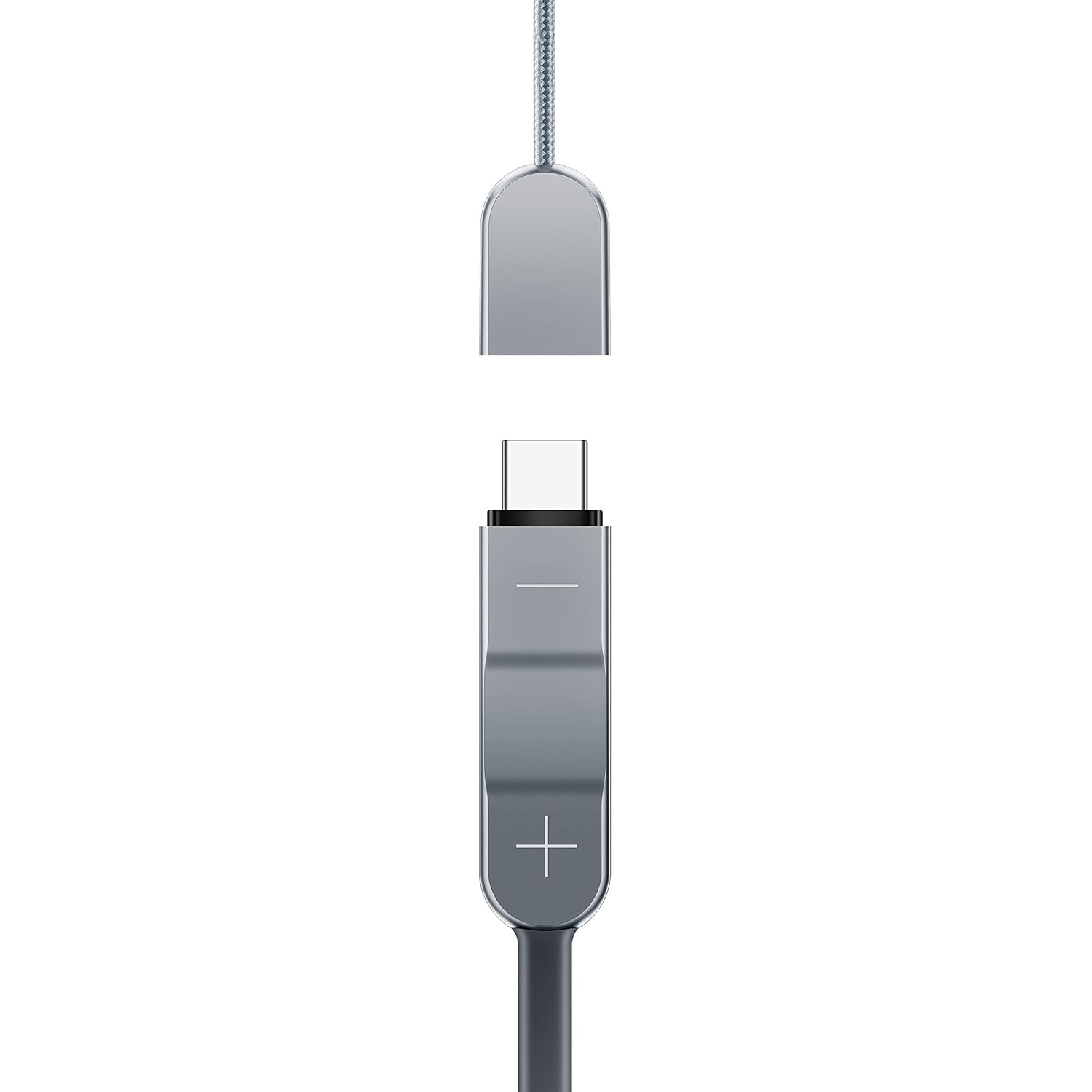
Figure 2: Close-up of the inline control panel, featuring volume buttons and a multi-function button.
The inline control panel allows you to manage audio playback, calls, and volume. The USB Type-C port is integrated for charging.

Figure 3: The USB Type-C charging port, often concealed within one of the control modules.
Setup
1. Charging the Earphones
- Connect the provided USB Type-C charging cable to the charging port on the earphones.
- Connect the other end of the cable to a USB power adapter (not included) or a compatible device with a USB Type-C port, such as a smartphone.
- The indicator light will show the charging status. A full charge typically takes approximately 1 hour.
- The earphones are equipped with two Lithium Polymer batteries.
Note: The earphones can also be charged directly from a Type-C enabled phone without an additional cable.
2. Bluetooth Pairing
- Ensure the earphones are powered off.
- Press and hold the multi-function button (usually the middle button on the inline control) for approximately 5 seconds until the indicator light flashes red and blue, indicating pairing mode.
- On your smartphone or Bluetooth-enabled device, go to the Bluetooth settings.
- Search for available devices and select "HONOR xSport PRO" or a similar name from the list.
- Once connected, the indicator light will flash blue periodically, and you may hear an audible confirmation.
Operating Instructions
Wearing the Earphones
Select the earplugs that provide the most comfortable and secure fit. Insert the earbuds into your ears and adjust the neckband to rest comfortably around your neck.
Basic Controls
| Function | Action |
|---|---|
| Power On/Off | Press and hold the multi-function button. |
| Play/Pause Music | Press the multi-function button once. Alternatively, separate the magnetic earbuds to play, and attach them together to pause. |
| Next Track | Press and hold the Volume + button. |
| Previous Track | Press and hold the Volume - button. |
| Volume Up | Press the Volume + button once. |
| Volume Down | Press the Volume - button once. |
| Answer/End Call | Press the multi-function button once during an incoming call or active call. |
| Reject Call | Press and hold the multi-function button for 2 seconds during an incoming call. |
| Activate Voice Assistant | Double-press the multi-function button. |
Maintenance
Cleaning
- Regularly clean the earplugs with a soft, dry cloth to remove earwax and debris.
- Wipe the neckband and earbud surfaces with a slightly damp cloth if necessary, then dry thoroughly.
- Do not use harsh chemicals or abrasive materials for cleaning.
Storage
- When not in use, store the earphones in a cool, dry place, away from direct sunlight and extreme temperatures.
- Avoid tangling the cables. The magnetic earbuds help keep them organized.
Troubleshooting
If you encounter issues with your earphones, refer to the following common solutions:
| Problem | Possible Solution |
|---|---|
| Earphones do not power on. | Ensure the earphones are fully charged. Connect them to a power source using the USB Type-C cable. |
| Cannot pair with device. | Make sure the earphones are in pairing mode (indicator flashing red and blue). Turn off and on your device's Bluetooth. Try resetting the earphones. |
| No sound or low volume. | Check the volume levels on both the earphones and your connected device. Ensure the earphones are properly connected and not muted. |
| Poor call quality. | Ensure the microphone is not obstructed. Move closer to your connected device to improve signal strength. |
| Earphones unresponsive. | Perform a factory reset: Press and hold the multi-function button for 10 seconds until the indicator light changes or the earphones restart. |
Specifications
| Feature | Detail |
|---|---|
| Model Name | HONOR xSport PRO AM66-L |
| Connectivity Technology | Bluetooth |
| Wireless Communication Technology | Bluetooth |
| Control Method | Touch |
| Ear Placement | In Ear |
| Form Factor | In Ear |
| Microphone Format | Built-In |
| Headphones Jack | USB Type-C (for charging) |
| Battery Type | 2 Lithium Polymer batteries (included) |
| Item Weight | 25 Grams |
| Product Dimensions | 15.5 x 7 x 2.5 cm |
| Manufacturer | Huawei |
| Material | Plastic |
| Color | Phantom Grey |
Warranty Information
The HONOR xSport PRO AM66-L earphones come with a 1-year limited warranty from the date of purchase. This warranty covers manufacturing defects under normal use. Please retain your proof of purchase for warranty claims.
For detailed terms, conditions, and exclusions, refer to the Warranty Guide included in your product packaging.
Support
If you require further assistance or have questions not covered in this manual, please contact HONOR customer support through their official website or the contact information provided in your warranty guide.


