
1. Introduction
This manual provides essential information for the safe and effective operation and maintenance of your Airthereal APH230C Floor Air Purifier. Please read all instructions carefully before use and retain this manual for future reference.
The Airthereal APH230C is designed to improve indoor air quality by filtering airborne particles such as allergens, pollen, dust, smoke, and pet dander, utilizing a True HEPA filtration system.
2. Safety Instructions
To reduce the risk of fire, electric shock, or injury, always follow basic safety precautions:
- Read all instructions before operating the appliance.
- Do not operate any fan with a damaged cord or plug. Discard fan or return to an authorized service facility for examination and/or repair.
- Do not run cord under carpeting. Do not cover cord with throw rugs, runners, or similar coverings. Arrange cord away from traffic area and where it will not be tripped over.
- Use this appliance only for its intended use as described in this manual. Any other use not recommended by the manufacturer may cause fire, electric shock, or injury to persons.
- Always unplug the appliance when not in use, when moving it from place to place, or before cleaning.
- Do not operate the appliance in the presence of explosive and/or flammable fumes.
- Do not place any part of the appliance near an open flame, cooking or other heating appliance.
- Do not operate the appliance with a damaged cord or plug, or after the appliance malfunctions or has been dropped or damaged in any manner.
- Avoid contact with moving parts.
- Do not immerse the appliance in water or other liquids.
- This appliance is not intended for use by persons (including children) with reduced physical, sensory or mental capabilities, or lack of experience and knowledge, unless they have been given supervision or instruction concerning use of the appliance by a person responsible for their safety.
- Children should be supervised to ensure that they do not play with the appliance.
3. Package Contents
- 1 x Airthereal APH230C Air Purifier Unit
- 1 x True HEPA 3-in-1 Filtration Filter (pre-installed)
- 1 x User Manual

4. Product Overview
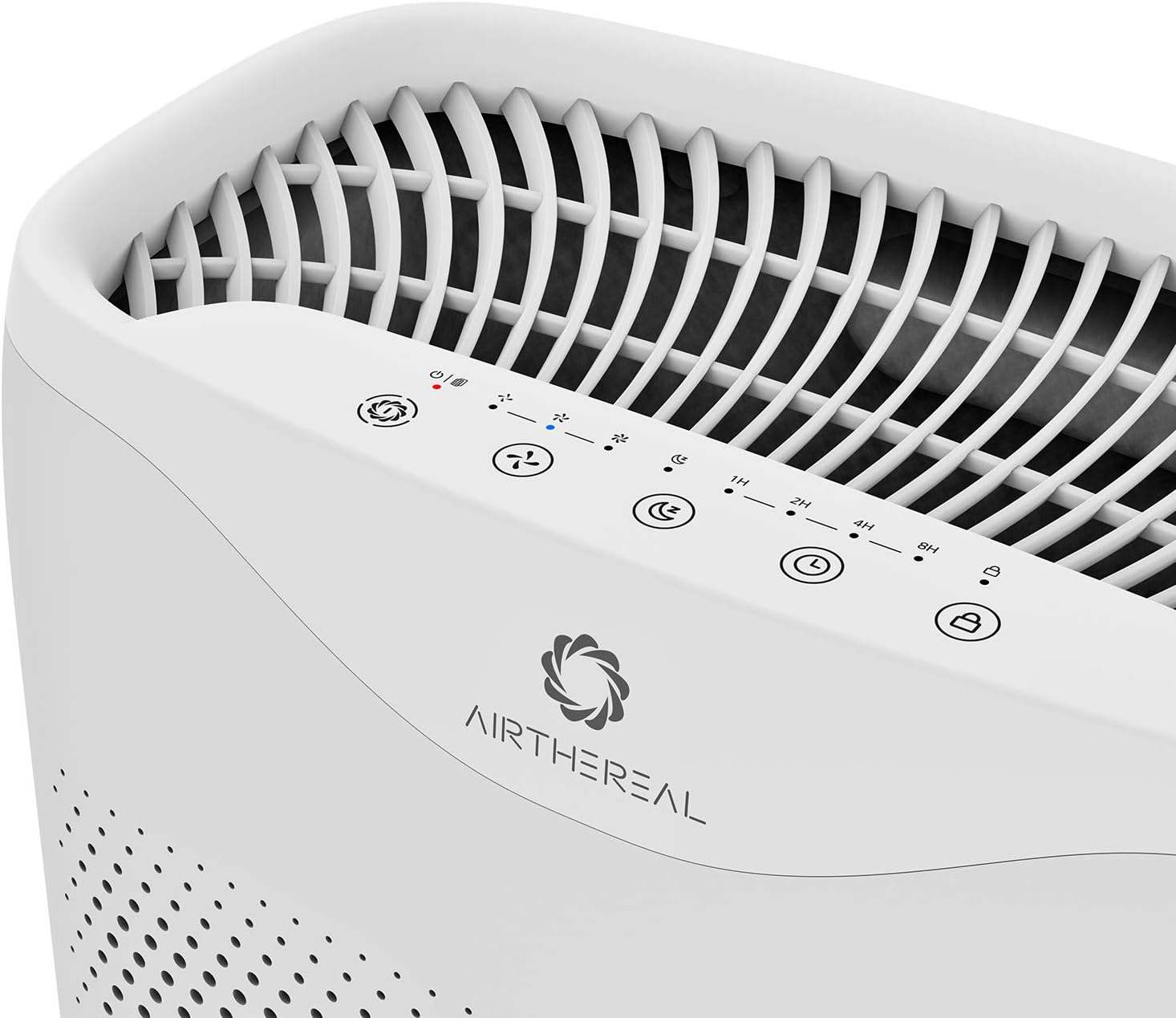
The Airthereal APH230C features a sleek design with intuitive controls and efficient air intake. Key components include the main unit, control panel, air intake vents, and the multi-layer filter.

5. Setup
- Unpack the Unit: Carefully remove the air purifier from its packaging.
- Remove Filter Packaging: Open the front cover of the air purifier. The filter is pre-installed but wrapped in plastic for protection. Remove the plastic packaging from the filter before use.
- Install Filter: Place the filter back into the unit, ensuring it is seated correctly. Close the front cover securely.
- Placement: Place the air purifier on a firm, level surface. Ensure there is at least 6 inches (15 cm) of space around all sides of the unit for optimal airflow.
- Power Connection: Plug the power cord into a standard electrical outlet.
6. Operating Instructions
The control panel is located on the top of the unit.
- Power Button (⏻): Press to turn the unit On or Off.
- Fan Speed Button (🌪): Cycle through fan speeds: Low (1), Medium (2), High (3).
- Sleep Mode Button (🌛): Activates sleep mode, which dims display lights and sets the fan to its lowest, quietest setting (24 decibels).
- Timer Button (⏱): Set the operating time for 2, 4, or 8 hours. The unit will automatically turn off after the set time.
- Auto Mode Button (A): The purifier will automatically adjust the fan speed based on the detected air quality.
- UV Light Button (UV): Activates or deactivates the UV-C light for enhanced sterilization.
- Child Lock Button (🔒): Press and hold for 3 seconds to activate/deactivate the child lock, preventing accidental changes to settings.

7. Maintenance
Regular maintenance ensures optimal performance and extends the lifespan of your air purifier.
Filter Replacement
The "On/Off" button will light up and flash when it's time to replace the filter. It is recommended to replace the filter every six months for optimal performance, though this may vary based on usage and air quality.
- Power Off and Unplug: Turn off the air purifier and unplug it from the power outlet.
- Remove Front Cover: Gently pull the front cover to detach it from the unit.
- Remove Old Filter: Pull the tab on the old filter to remove it from the unit.
- Install New Filter: Unwrap the new filter and insert it into the unit, ensuring the pull tab faces outwards.
- Replace Front Cover: Align the front cover and push it back into place until it clicks securely.
- Reset Filter Indicator: Plug in the unit and turn it on. Press and hold the "On/Off" button for 5 seconds until the light stops flashing, indicating the filter timer has been reset.
Cleaning the Unit
- Wipe the exterior of the unit with a soft, dry cloth.
- Do not use abrasive cleaners or solvents.
- The pre-filter layer of the 3-in-1 filter can be gently vacuumed to remove large dust particles between replacements.
8. Troubleshooting
| Problem | Possible Cause | Solution |
|---|---|---|
| Unit does not turn on. | Not plugged in; power outage; front cover not closed properly. | Ensure power cord is securely plugged in; check power outlet; ensure front cover is fully closed. |
| Airflow is weak. | Filter is dirty or clogged; air intake/outlet blocked. | Replace filter; ensure no obstructions around air intake/outlet. |
| Unusual noise. | Filter not installed correctly; foreign object inside unit. | Reinstall filter correctly; check for and remove any foreign objects (unplug first). |
| Filter indicator light remains on after replacement. | Filter timer not reset. | Press and hold the "On/Off" button for 5 seconds to reset the filter timer. |
9. Specifications
- Model: APH230C
- Brand: AIRTHEREAL
- Product Dimensions: 7.5"D x 13"W x 20"H
- Item Weight: 10 Pounds
- Power Source: Corded Electric
- Color: White
- CADR: 135 CFM (230 m³/h)
- Coverage Area: Up to 600 ft² (55 m²) in 30 minutes, 315 ft² (30m²) in 14 minutes.
- Noise Level (Sleep Mode): < 24 dB
- Filter Type: True HEPA 3-Stage Filtration

10. Warranty and Support
Airthereal products come with a standard manufacturer's warranty. For detailed warranty information, product support, or to purchase replacement filters, please visit the official Airthereal website or contact customer service.
Website: www.airthereal.com
Customer Service: Refer to your product packaging or the official website for contact details.


