
1. Introduction
This manual provides essential instructions for the safe and effective use of your Estry CS-SFM620PW Li-ion battery. This battery is designed as a replacement for Stanley FMC620 and FMC680L power tools. Please read this manual thoroughly before use to ensure proper operation and to prevent damage or injury.
2. Important Safety Instructions
Failure to follow these safety instructions may result in fire, electric shock, or other serious injury.
- Do Not Disassemble: Never attempt to open, disassemble, or service the battery pack. Disassembly voids the warranty and can cause serious injury.
- Use Correct Replacement: Replace the battery only with the battery pack specifically designated for this product (CS-SFM620PW) and compatible tools (Stanley FMC620, FMC680L).
- Avoid Physical Damage: Do not crush, puncture, or drop the battery. Avoid any impact that could damage the battery casing.
- Protect from Elements: Do not short external contacts. Do not expose the battery to fire or water.
- Temperature Control: Do not store the battery above 60°C (140°F). Extreme temperatures can reduce battery life and pose a safety risk.
- Children Safety: Keep the battery out of reach of children.
- Proper Disposal: Dispose of used batteries according to local regulations. Do not dispose of in household waste.
- Charging Safety: Use only chargers specifically designed for Li-ion batteries of this type. Avoid overcharging or deep discharging the battery.
- Protection Features: This battery includes protection against overcharge, over discharge, over voltage, and short circuit for enhanced safety and battery life.
3. Package Contents
Verify that all items are present upon opening the package:
- 1 x Estry CS-SFM620PW Li-ion Battery
4. Product Overview
The Estry CS-SFM620PW battery is a high-performance Li-ion power source designed for reliability and durability. Below are images illustrating the battery from various angles.

Figure 4.1: Top-down view of the Estry CS-SFM620PW battery, showing the yellow release tab and battery contacts.
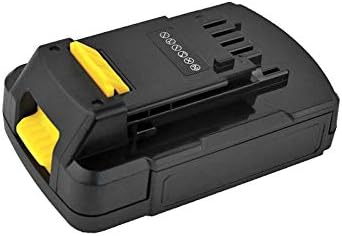
Figure 4.2: Angled view of the battery, highlighting its compact design and yellow release mechanism.
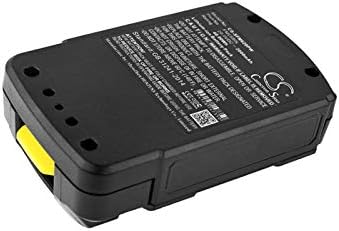
Figure 4.3: Bottom view of the battery, showing the product label with model number and specifications.

Figure 4.4: Side view of the battery, illustrating its robust construction.

Figure 4.5: Close-up of the battery label, displaying detailed model information, voltage, capacity, and safety warnings.
5. Setup and Installation
Follow these steps to properly install the battery into your compatible Stanley power tool.
- Prepare the Tool: Ensure your Stanley FMC620 or FMC680L power tool is turned off and disconnected from any power source before attempting battery installation or removal.
- Locate Battery Compartment: Identify the battery compartment on your power tool. This is typically at the base of the handle or tool body.
- Align Battery: Align the Estry CS-SFM620PW battery with the battery slot, ensuring the battery contacts on the pack match the terminals in the tool.
- Insert Battery: Slide the battery firmly into place until it clicks securely. A distinct click indicates that the battery is properly latched and connected.
- Remove Battery: To remove the battery, press the release button (usually yellow, as shown in the product images) and slide the battery out of the tool.
6. Operating the Battery
6.1 Initial Charge
New battery packs must be fully charged before their first use to ensure optimal performance and lifespan.
6.2 Charging Procedure
Always use a charger that is compatible with Stanley FMC620/FMC680L Li-ion batteries. Refer to your charger's manual for specific instructions.
- Connect Charger: Plug the compatible battery charger into a standard power outlet.
- Insert Battery: Place the Estry CS-SFM620PW battery into the charging slot of the charger. Ensure it is seated correctly.
- Monitor Charging: Observe the charger's indicator lights. These lights typically show the charging status (e.g., charging, fully charged, error).
- Remove When Charged: Once the battery is fully charged, remove it from the charger. Avoid leaving batteries on the charger for extended periods after they are full.
6.3 Usage Guidelines
The battery provides 20.0V power for compatible tools. To maximize battery life, avoid completely draining the battery before recharging. It is generally recommended to recharge Li-ion batteries before they are fully depleted.
7. Maintenance and Storage
Proper care and storage will extend the life of your battery.
- Storage Environment: Store the battery in a cool, dry place, away from direct sunlight, moisture, and extreme temperatures (below 0°C or above 40°C is not recommended for long-term storage).
- Long-Term Storage: For periods of inactivity longer than 30 days, charge the battery to approximately 50-70% capacity before storing. This helps prevent deep discharge and preserves battery health.
- Clean Contacts: Periodically clean the battery contacts with a dry, clean cloth to ensure optimal electrical connection with the tool and charger.
- Avoid Moisture: Do not expose the battery to water or other liquids. If the battery gets wet, discontinue use immediately.
8. Troubleshooting
This section addresses common issues you might encounter with your battery.
| Issue | Possible Cause | Solution |
|---|---|---|
| Battery not charging |
|
|
| Tool not powering on with battery |
|
|
| Reduced run time |
|
|
9. Technical Specifications
Detailed specifications for the Estry CS-SFM620PW battery.
| Feature | Detail |
|---|---|
| Model Number | CS-SFM620PW |
| Compatible Models | Stanley FMC620, Stanley FMC680L |
| Battery Type | Li-ion (Lithium-ion) |
| Voltage | 20.0V |
| Capacity | 2000mAh (40.0Wh) |
| Dimensions (L x W x H) | 125.8 x 77.7 x 51.3mm (4.95 x 3.06 x 2.02 inches) |
| Weight | 500.0g (1.1 pounds) |
| Certifications | ISO9001, RoHS, CE, UN38.3, MSDS |
| Manufacturer | CS |
| Date First Available | January 6, 2020 |
10. Warranty and Support
For warranty details, technical assistance, or customer support regarding your Estry CS-SFM620PW battery, please refer to the documentation provided at the time of purchase. You may also visit the manufacturer's website or contact their customer service department directly.
For general inquiries, you can visit a generic support page: Estry Support Page