
1. Introduction
This manual provides essential instructions for the safe and effective use of your YUSTDA Car Auto Charger. This high-quality power adapter is designed to provide reliable power to compatible Whistler Radar Detectors, including models 1120, 1125SW, and 1140, directly from your vehicle's DC power outlet.
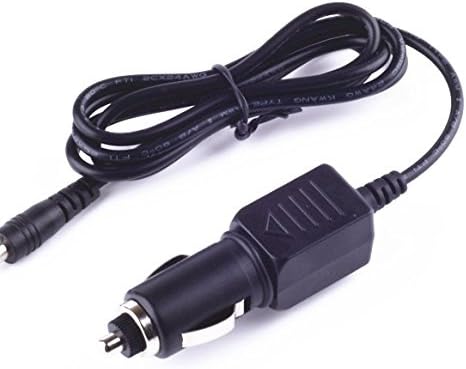
Image: The YUSTDA Car Auto Charger, featuring a cigarette lighter plug on one end and a barrel connector on the other, with the coiled cable in between.
2. Safety Information
Your YUSTDA Car Auto Charger is manufactured with safety as a priority. It incorporates several protection features to ensure safe operation:
- Over Current Protection: Prevents damage from excessive current flow.
- Total Power Protection: Safeguards against overall power surges.
- Over Voltage Protection: Protects devices from high voltage input.
- Short Circuit Protection: Automatically shuts off power in case of a short circuit.
- Over Temperature Protection: Monitors and prevents overheating.
Always ensure the charger is used within its specified voltage range (DC Input 12-24V) and with compatible devices. Do not attempt to disassemble or modify the charger.
3. Setup
Follow these steps to set up your YUSTDA Car Auto Charger:
- Ensure your vehicle's engine is off or the ignition is in the accessory position.
- Insert the cigarette lighter plug end of the YUSTDA Car Auto Charger firmly into your vehicle's 12-24V DC power outlet.
- Connect the barrel connector end of the charger to the power input port of your compatible Whistler Radar Detector (models 1120, 1125SW, or 1140).
- Verify that both connections are secure.
4. Operating Instructions
Once properly connected, the YUSTDA Car Auto Charger will automatically supply power to your Whistler Radar Detector. The charger itself does not have any user-operable controls.
- Start your vehicle's engine if necessary to provide power to the DC outlet.
- Your radar detector should power on. Refer to your radar detector's manual for its specific operation.
- To disconnect, first turn off your radar detector, then gently remove the charger from the radar detector and the vehicle's power outlet.
5. Maintenance
To ensure the longevity and optimal performance of your YUSTDA Car Auto Charger, observe the following maintenance guidelines:
- Keep the charger clean and dry. Avoid exposure to moisture, dust, and extreme temperatures.
- Periodically inspect the cable and connectors for any signs of damage, such as fraying, cuts, or bent pins. Discontinue use if any damage is observed.
- Store the charger in a cool, dry place when not in use.
The charger features a high-quality power cable design with copper wire and PVC insulation for durability.

Image: A diagram illustrating the internal structure of a high-quality power cable, highlighting the copper wire and PVC insulation jacket.
6. Troubleshooting
If your radar detector is not receiving power, consider the following:
- No Power to Radar Detector:
- Check the vehicle's DC power outlet. Ensure it is functioning correctly (e.g., test with another device, check vehicle's fuse box if necessary).
- Ensure the YUSTDA Car Auto Charger is securely plugged into both the vehicle's power outlet and the radar detector.
- Inspect the charger cable for any visible damage. If damaged, discontinue use.
- Verify that your radar detector model (Whistler 1120, 1125SW, or 1140) is compatible with this charger.
- Charger Overheating:
- Immediately disconnect the charger from both the vehicle and the radar detector.
- Allow it to cool down. If overheating persists, discontinue use and contact support.
7. Specifications
| Feature | Detail |
|---|---|
| Brand | YUSTDA |
| Model | Car Auto Charger |
| Compatible Radar Detectors | Whistler 1120, 1125SW, 1140 |
| DC Input | 12-24V |
| DC Output | Specific output voltage/current not provided for this model. |
| Connector Gender | Male-to-Male |
| Special Feature | Short Circuit Protection |
| Certifications | FCC, CE, RoHS |
| ASIN | B083GFK67R |
8. Warranty Information
Warranty details for the YUSTDA Car Auto Charger are typically provided with the product packaging or can be obtained directly from the manufacturer or seller. Please retain your proof of purchase for warranty claims.
9. Support
For any questions, concerns, or technical assistance regarding your YUSTDA Car Auto Charger, please contact customer support:
- Email: epcustomerservice@yahoo.com


