1. Introduction
The RAQUEL Smart Wi-Fi Garage Door Opener Remote (Model RQ-DFT03) provides convenient control over your garage door from anywhere using your smartphone. This device integrates with popular voice assistants like Alexa, Google Assistant, and Siri, offering enhanced security features such as activity logs and customizable alerts. This manual provides detailed instructions for installation, operation, and troubleshooting to ensure optimal performance of your smart garage door opener.
2. Package Contents
Verify that all items are present in your package:
- Smart Wi-Fi Garage Door Opener (Main Unit)
- AC/DC Power Adapter
- Wireless Door Sensor
- Mounting Hardware
- User Manual (This document)
3. Compatibility
The RAQUEL Smart Wi-Fi Garage Door Opener is designed for broad compatibility with most garage door openers that utilize a single-button remote control. This includes popular brands such as Chamberlain, Genie, Liftmaster, Sears Craftsman, Raynor, Wayne-Dalton, Sommer, AccessMaster, Somfy, and Overhead Door.
Important Compatibility Notes:
- Not Compatible With:
- Chamberlain: HD220
- Liftmaster: 45DCBR5A, 41D7675, 8075
- Overhead Door: Odyssey 1000, Odyssey 1200
- Sears Craftsman: 54990, 1D7675, 139.53985
- Incompatible with all yellow learn button openers and some green learn button openers.
- Not compatible with Craftsman openers featuring a round green button.

Image: Compatibility Check Diagram. This diagram illustrates how to identify compatible garage door opener wiring and learn button types. It shows examples of incompatible yellow and green learn buttons, and how to test compatibility by shorting the terminals for the external wall button.
If you are unsure about compatibility, you can perform a simple test: use pliers or an electric wire to create a short circuit between the two terminals for the external wall button of your garage opener. If the garage door activates, it is compatible. If not, please contact customer support for assistance.
4. Setup & Installation
Follow these steps to install your RAQUEL Smart Wi-Fi Garage Door Opener:
- Power the Device: Connect the AC/DC Power Adapter to the Smart Wi-Fi Garage Door Opener and plug it into a power outlet near your garage door opener motor.
- Connect to Garage Door Opener: Identify the terminals for your garage door opener's wall button. Connect the provided wires from the Smart Wi-Fi Garage Door Opener to these terminals. Refer to your garage door opener's manual for specific wiring instructions if needed.
- Install Wireless Door Sensor: Mount the wireless door sensor on your garage door. Ensure the two parts of the sensor are aligned and close enough to detect the door's open/closed status. The sensor is battery-powered (1 CR2032 battery included).
- Download and Configure App: Download the compatible smart home app (e.g., Smart Life, Tuya Smart) from your smartphone's app store. Create an account or log in.
- Pair with Wi-Fi: Open the app and follow the on-screen instructions to add a new device. The RQ-DFT03 requires a 2.4 GHz Wi-Fi network. Bluetooth functionality is included for easier initial setup.
- Test Functionality: Once paired, use the app to open and close your garage door to confirm successful installation and connectivity.

Image: Smart Garage Door Opener Components. This image displays the main unit, power adapter, and wireless door sensor, illustrating how they connect to the garage door opener motor and the door itself.

Image: Wiring Diagram. This image shows a close-up of the wiring connections from the smart opener to the garage door motor's wall button terminals.
5. Operating Instructions
The RAQUEL Smart Wi-Fi Garage Door Opener offers multiple ways to control your garage door:
5.1. App Control
Use the dedicated smartphone app to open or close your garage door from anywhere with an internet connection. The app provides a simple interface to tap and control the door's status.

Image: App Control Interface. A hand holding a smartphone displaying the app interface with a large button to open or close the garage door.

Image: Remote Control via App. A person relaxing indoors, using their smartphone to control the garage door, demonstrating the convenience of remote operation.
5.2. Voice Control
Integrate your smart opener with Alexa, Google Assistant, or Siri for hands-free control. Once linked, you can use voice commands such as "Hey Google, open my garage door" or "Alexa, close the garage door."

Image: Voice Control Integration. This image shows Google Home and Amazon Echo devices, illustrating how users can issue voice commands to open or close their garage door.
6. Smart Features
Leverage the advanced features of your RAQUEL Smart Wi-Fi Garage Door Opener for enhanced security and convenience.
6.1. Real-time Alerts and Notifications
Receive instant notifications on your smartphone when your garage door opens or closes. You can also set up custom alerts to remind you if the garage door has been left open for a specified duration.

Image: Custom Notifications. A smartphone displaying a notification that the garage door has been left open for more than 6 hours, with a car parked in the driveway.
6.2. Activity Log
The app maintains an activity log, allowing you to review when the garage door was opened or closed, providing an additional layer of security and peace of mind.
6.3. Scheduling
Set up schedules for your garage door to automatically open or close at specific times, integrating seamlessly into your daily routine.
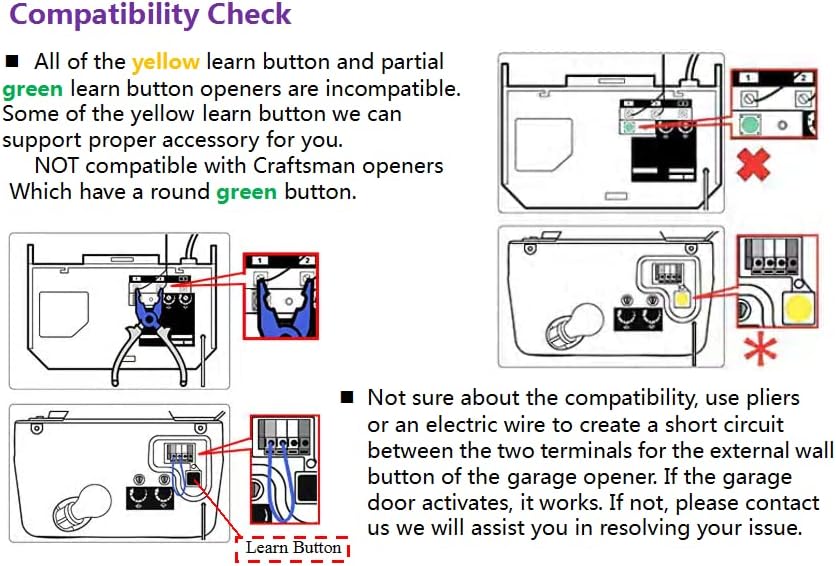
Image: Scheduling Feature. A man checking his watch, symbolizing the ability to set schedules for the garage door to open or close automatically.
7. Troubleshooting
If you encounter issues with your RAQUEL Smart Wi-Fi Garage Door Opener, refer to the following common solutions:
- Device Not Connecting to Wi-Fi: Ensure your Wi-Fi router is within range and broadcasting a 2.4 GHz network. Verify that the Wi-Fi password entered in the app is correct. Try restarting your router and the smart opener.
- Garage Door Not Responding: Check all wiring connections to the garage door opener motor. Confirm that the wireless door sensor is properly installed and aligned, and its battery is functional. Re-check compatibility with your specific garage door opener model (refer to Section 3).
- Voice Control Issues: Ensure your smart opener is correctly linked to your Alexa, Google Assistant, or Siri account within the respective smart home app. Verify that the device name is recognized by the voice assistant.
- Notifications Not Received: Check your smartphone's app settings to ensure notifications are enabled for the smart home app. Verify that the door sensor is reporting status correctly in the app.
- Intermittent Connectivity: This may indicate a weak Wi-Fi signal. Consider relocating the smart opener closer to your router or using a Wi-Fi extender.
For further assistance, please contact customer support.
8. Specifications
| Model Number | RQ-DFT03 |
| Product Dimensions | 3 x 2 x 1 inches |
| Item Weight | 6.7 ounces |
| Batteries | 1 CR2032 battery required (included for sensor) |
| Special Feature | Ergonomic design |
| Color | Black, Silver |
| Max Number of Supported Devices | 1 (per opener unit) |
| Compatible Devices | Garage Door Openers |
9. Warranty and Support
The RAQUEL Smart Wi-Fi Garage Door Opener comes with a 12-month warranty. We offer a free replacement policy for any manufacturing defects or malfunctions within this period. For warranty claims, technical support, or any questions regarding your product, please contact RAQUEL customer service through the retailer's platform or the contact information provided with your purchase.


