
Douk Audio VU56C
Douk Audio VU56C 56-Bit Level Meter Instruction Manual
Model: VU56C
Introduction
The Douk Audio VU56C is a high-resolution 56-bit per channel LED music spectrum display designed to visually represent audio levels. It features 112-bit stereo display, offering real-time visualization of sound changes. This device enhances your listening experience by adding a dynamic visual element to your audio system.

Front view of the Douk Audio VU56C 56-Bit Level Meter, showcasing its LED display.
Key Features
- High-Resolution Display: Adopts MCU to process audio signals, providing 56 bits per channel for a total of 112 bits stereo display.
- Adjustable Input Level (Gain): Easily control input signals for optimal display effects.
- Five Display Effects: Includes Main beam, Main beam + peak point drop, Left and right channel beams mirroring-display, Left and right channel beams mirroring-display + peak point drop, and Spring beam.
- Independent Setting Items: All display parameters (descent speed of main beam, descent speed of peak point, stay time of peak point) are independently adjustable with 16-level speed settings.
- Clean Audio Path: Power supply is isolated from audio input/output circuits to prevent interference with sound quality.
- Wide Compatibility: Standard stereo L/R RCA input and output for connection with mobile phones, computers, CD players, preamps, power amplifiers, and studio mixers.
Package Contents
Please verify that all items are present in the package:
- 1x Finished LED Music Spectrum (Douk Audio VU56C)
- 1x Micro-USB Cable
- 1 Set x Stand
- 1 Set x Isolation Stand Feet
- 1x User Manual

Image showing the Douk Audio VU56C, Micro-USB cable, stand components, and isolation feet included in the package.
Setup
1. Connecting Audio and Power
Connect your audio source (e.g., CD player, computer, phone) to the IN RCA ports on the back of the VU56C. Connect the OUT RCA ports to your audio receiver, amplifier, or mixer. Power the device using the provided Micro-USB cable connected to a DC 5V/100mA power source.

Diagram illustrating the audio input (IN) from sources like phones or computers, and audio output (OUT) to devices such as amplifiers or preamps, along with the GAIN knob, SET button, PREV/NEXT buttons, USB power input, and Ground set switch.
2. Assembling the Stand
The VU56C comes with a stand for vertical placement. Ensure to mount the stand components with the same serrations on the same side for stability. Attach the isolation stand feet to the bottom of the unit or stand as desired.
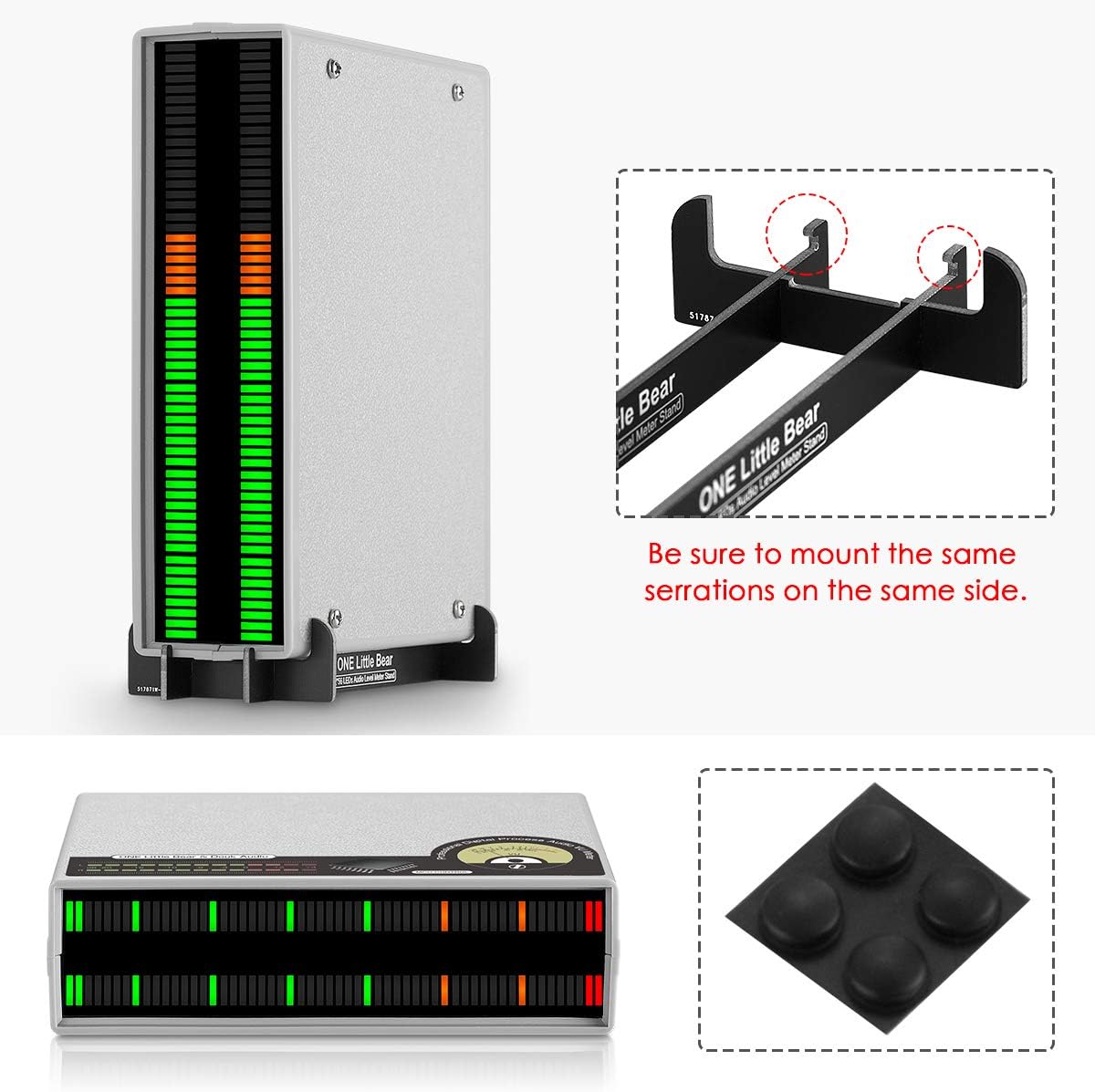
Image showing the vertical stand assembly for the VU56C and the included isolation stand feet.
Operating Instructions
1. Power On/Off
The device supports power on/off functionality and power-off memory. To turn on, press and hold the 'SET' button for 3 seconds. To turn off, press and hold the 'SET' button again for 3 seconds.
2. Adjusting Input Level (GAIN)
Use the GAIN knob on the back of the unit to adjust the input audio level. This helps in achieving the best visual beating effects on the LED display, matching the intensity of your audio signal.
3. Changing Display Effects
The VU56C offers 5 distinct display effects. In normal operating mode (not setup mode), use the PREV and NEXT buttons to cycle through the different display effects:
- Main beam
- Main beam + peak point drop
- Left and right channel beams mirroring-display
- Left and right channel beams mirroring-display + peak point drop
- Spring beam (Note: This effect does not support setting item adjustments.)
4. Setup Mode and Parameter Adjustments
To enter setup mode, press the SET button briefly. In setup mode, the 'Flash LED' indicates the current setting option value. Use the PREV and NEXT buttons to change the value of the selected parameter. Press the SET button again to move to the next option or to exit setup mode.
The adjustable parameters (each with 16-level speed adjustments) include:
- The descent speed of the main beam
- The descent speed of the peak point
- The stay time of the peak point
All setup parameter changes will be displayed in real-time on the 'Preview bar'.

Diagram explaining the main display bar, peak LED, flash LED, and the setup bar with zones for main display falling speed, peak LED falling speed, and peak LED holding time settings. It also shows how to use PREV/NEXT and SET buttons in setup mode.
Official video demonstrating the various display effects and setup mode of the Douk Audio VU56C 56-Bit Music Spectrum Display.
Maintenance
To ensure the longevity and optimal performance of your Douk Audio VU56C, follow these maintenance guidelines:
- Keep the device in a clean, dry environment, away from direct sunlight, high temperatures, and humidity.
- Avoid exposing the unit to water or other liquids.
- Clean the exterior with a soft, dry cloth. Do not use harsh chemicals or abrasive cleaners.
- Ensure proper ventilation around the unit to prevent overheating.
- Handle the device with care to prevent physical damage.
Troubleshooting
If you encounter issues with your Douk Audio VU56C, please refer to the following common problems and solutions:
No Display or Weak Display
- Check Power: Ensure the Micro-USB cable is securely connected to a DC 5V/100mA power source and the unit is powered on.
- Check Audio Input: Verify that the audio source is playing and connected correctly to the IN RCA ports.
- Adjust GAIN: Rotate the GAIN knob to increase the input level. If the input signal is too low, the display may not activate or appear weak.
Audible Noise in Audio System
Some users have reported audible noise (hum or clocking noise) when the unit is connected in pass-through mode or even when splitting the audio signal. This can be due to grounding issues or power supply interference.
- Ground Set Switch: Try adjusting the 'Ground set' switch on the back of the unit. Default is 'I'. If you experience back noise, switch to 'O'.
- Isolate Power Supply: Use a different USB power adapter or a high-quality, isolated power supply.
- Audio Isolation: Consider using an audio isolation transformer or a mixing board between your audio source and the VU56C to electrically isolate the signal path.
Display Inaccuracy Between Channels
Due to the high resolution and MCU signal processing, a slight error of 1-3 bits between left and right channels may occur even with identical input signals. This is considered normal operation for this device.
Specifications
| Number of Bits | 56 bits / per channel |
| Display Color Options | 32 bit green + 16 bit orange + 8 bit red |
| Power Interface | Micro-USB |
| Working Voltage | DC 5V / 100mA |
| Input Voltage | 0 ~ 3Vrms |
| Audio Input | Stereo L/R RCA |
| Audio Output | Stereo L/R RCA |
| Dimensions (L*W*H) | 150 x 120 x 40 mm / 5.91 x 4.72 x 1.57 inches |
| Net Weight | 225g / 0.50lb |
| Material | Acrylonitrile Butadiene Styrene (ABS) |
Warranty and Support
Douk Audio products are designed for reliability and performance. For warranty information or technical support, please refer to the contact details provided with your purchase or visit the official Douk Audio website. Keep your purchase receipt as proof of purchase for any warranty claims.
Ask a question about this manual
Ask about setup, troubleshooting, compatibility, parts, safety, or missing instructions. Manuals+ will review the question and use this page’s manual context to help answer it.