
1. Introduction
Welcome to your Infratech INF Input Regulator 14-4215. This manual provides essential information for the safe and efficient operation of your dual flush mount regulator with weatherproof cover. Please read these instructions thoroughly before installation and use, and retain them for future reference.
2. Safety Information
Failure to follow these safety instructions may result in electric shock, fire, property damage, or injury. Always adhere to local electrical codes and regulations.
- Qualified Personnel: Installation and servicing must be performed by a qualified, licensed electrician in accordance with all local and national electrical codes.
- Power Disconnection: Always disconnect power at the main circuit breaker before installing or servicing the regulator.
- Voltage Compatibility: Ensure the regulator's voltage (240 Volts) matches the supply voltage and the connected heater's requirements.
- Wattage Limit: Do not exceed the maximum wattage of 3,000 watts (15 amps) for single element heaters connected to this regulator.
- Outdoor Use: This regulator is designed for outdoor use and includes a weatherproof cover. Ensure all connections are properly sealed and protected from moisture.
- Grounding: The regulator must be properly grounded to prevent electrical shock.
- Wiring: Use appropriate gauge wiring for the electrical load and distance, as specified by electrical codes.
3. Product Overview
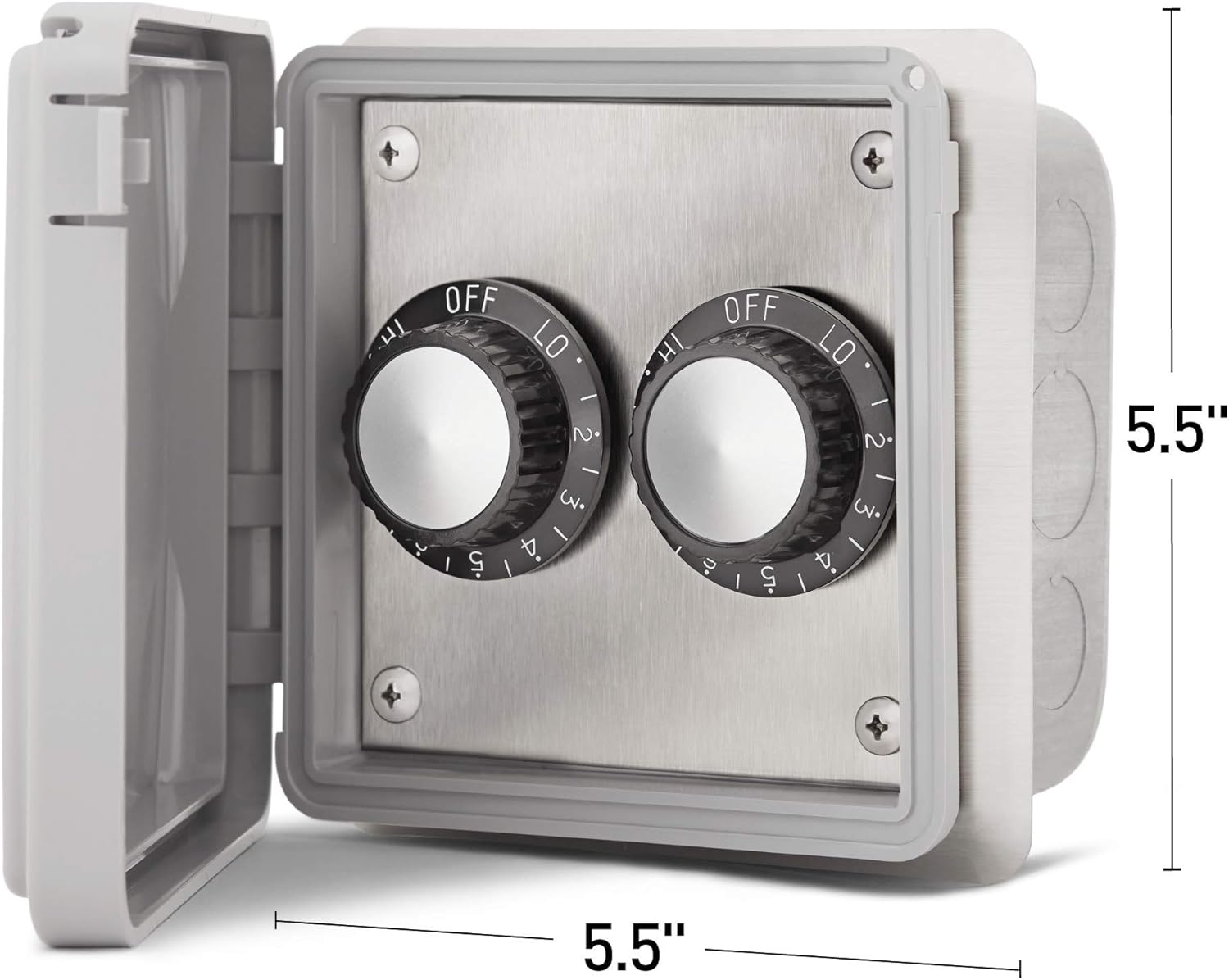
The Infratech INF Input Regulator 14-4215 is a value-focused control option for managing single element electric heaters. It is designed for flush mounting and includes a weatherproof cover for durability in outdoor environments. This dual regulator allows for independent control of two separate heating elements or zones.

Unlike a dimmer, the INF Input Regulator operates by gently cycling the connected heater(s) on and off at regular intervals when not set to full power. This method provides efficient heat management and is compatible with Infratech single element heaters.
4. Setup and Installation
4.1. Before Installation
- Location: Select a suitable flush mount location that is easily accessible but protected from direct impact. Ensure adequate space for wiring and mounting.
- Power Supply: Verify that the electrical circuit intended for the regulator and heater(s) is rated for 240V and can handle the combined amperage of the connected heaters (maximum 15 amps for the regulator).
- Tools Required: Standard electrical tools, screwdriver set, wire strippers, voltage tester, measuring tape.
4.2. Installation Steps
Warning: Installation must be performed by a qualified, licensed electrician.
- Disconnect Power: Turn off the power supply at the main circuit breaker before beginning any installation work. Verify power is off using a voltage tester.
- Prepare Mounting Location: Create the necessary opening for flush mounting the regulator. Refer to the product dimensions for precise measurements.
- Wire Connections: Route the appropriate electrical wiring (line voltage in, load out to heater(s)) to the mounting location. Connect the wires to the regulator terminals as per the wiring diagram provided with the product packaging. Ensure all connections are secure and properly insulated.
- Mount Regulator: Secure the regulator into the flush mount opening using the provided hardware.
- Install Weatherproof Cover: Attach the weatherproof cover securely to the regulator housing. Ensure the gasket forms a tight seal to protect internal components from moisture.
- Restore Power: Once installation is complete and all connections are verified, restore power at the main circuit breaker.
- Test Operation: Test the regulator's functionality by turning the knobs and observing the connected heater(s).
5. Operating Instructions
The Infratech INF Input Regulator 14-4215 features two independent control knobs, each managing a separate heating element or zone.
- Power On/Off: Rotate the knob from the 'OFF' position to any numbered setting (1-5), 'LO', or 'HI' to turn on the connected heater. Rotate back to 'OFF' to power down.
- Heat Settings:
- OFF: Heater is completely off.
- LO: Provides a low heat output.
- 1-5: Incremental heat settings, with 5 being higher than 1.
- HI: Provides maximum heat output.
- Operation Principle: When set to any position other than 'HI', the regulator cycles the heater on and off at regular intervals to achieve the desired heat output. This is not a dimming function; the heater operates at full power during its 'on' cycle.
6. Maintenance
The Infratech INF Input Regulator is designed for low maintenance. Regular inspection and cleaning will ensure optimal performance and longevity.
- Cleaning: Periodically wipe the exterior of the regulator and weatherproof cover with a soft, damp cloth. Do not use abrasive cleaners or solvents. Ensure the cover is closed and sealed after cleaning.
- Inspection: Annually inspect the weatherproof cover for any cracks or damage that could compromise its seal. Check for any loose wiring connections (with power disconnected).
- Environmental Protection: Ensure the weatherproof cover is always properly closed when the regulator is not in use or during adverse weather conditions to protect internal components.
7. Troubleshooting
If you experience issues with your Infratech INF Input Regulator, refer to the following common troubleshooting steps:
- No Power to Heater:
- Check if the circuit breaker for the heater circuit has tripped. Reset if necessary.
- Ensure the regulator knob is turned to an 'ON' position (LO, 1-5, or HI).
- Verify all wiring connections are secure (power off before checking).
- Heater Not Responding to Settings:
- Confirm the heater is compatible with an input regulator (single element, up to 3000W).
- Ensure the regulator is correctly wired to the heater.
- If the heater is cycling on/off, this is normal operation for settings other than 'HI'.
- Visible Damage: If the regulator or its cover shows signs of physical damage, discontinue use and contact a qualified electrician or Infratech customer support.
If these steps do not resolve the issue, contact a qualified electrician or Infratech customer support for further assistance.
8. Specifications
| Feature | Specification |
|---|---|
| Brand | Infratech |
| Model Number | 14-4215 |
| Mounting Type | Flush Mount |
| Configuration | Dual |
| Cover | Weatherproof Cover Included |
| Voltage | 240 Volts |
| Amperage | 15 Amps (Maximum) |
| Wattage | 3000 Watts (Maximum) |
| Indoor/Outdoor Usage | Outdoor |
| Item Weight | 3 pounds |
| Material | Flush Mount / Exposed |
| Special Feature | Fast Heating (referring to heater compatibility) |
| Certifications | UL 508 Listed |
9. Warranty Information
Infratech warrants that this product is designed and manufactured to be free from defects in materials and workmanship for a period of three (3) years from the original date of purchase. This warranty covers normal use and service. For full warranty terms and conditions, please refer to the documentation included with your product or visit the official Infratech website.
10. Customer Support
For technical assistance, warranty claims, or further information regarding your Infratech INF Input Regulator 14-4215, please contact Infratech customer support. Have your model number and date of purchase available when contacting support.
You can typically find contact information on the Infratech official website or within the product packaging.


