
1. Introduction
This manual provides essential information for the safe and effective use of your Estry CS-DPX400SL replacement battery. This battery is designed for compatibility with specific Dranetz HDPQ series devices. Please read these instructions carefully before installation and use.
2. Product Overview
The Estry CS-DPX400SL is a high-quality Ni-MH replacement battery engineered to meet the exact specifications of the original battery for Dranetz HDPQ-Guide, HDPQ-Visa, HDPQ-Xplorer, and HDPQ-Xplorer400 devices. It features built-in protection against overcharge, over-discharge, over-voltage, and short circuits to ensure safe and durable operation.

Figure 1: Estry CS-DPX400SL Ni-MH replacement battery pack. This image shows the full battery pack with its yellow casing and white connector.
3. Safety Information
Please observe the following safety precautions to prevent damage to the battery, device, or personal injury:
- Do not attempt to disassemble, open, or service the battery pack. Unauthorized tampering can lead to hazards.
- Replace only with the battery pack designated for this product. Using incompatible batteries may cause damage or malfunction.
- Do not crush, puncture, short external contacts, or dispose of in fire or water. These actions can cause severe damage, fire, or explosion.
- Do not store above 60°C (140°F). High temperatures can degrade battery performance and safety.
- Keep the battery away from children and pets.
- Dispose of used batteries according to local regulations.

Figure 2: Close-up of the warning label on the Estry CS-DPX400SL battery. The label clearly states safety precautions and specifications.
4. Specifications
| Model Number | CS-DPX400SL |
| Compatible Part Numbers | 118348-G1, BP-HDPQ |
| Compatible Devices | Dranetz HDPQ-Guide, HDPQ-Visa, HDPQ-Xplorer, HDPQ-Xplorer400 |
| Battery Type | Ni-MH (Nickel-Metal Hydride) |
| Voltage | 9.6V |
| Capacity | 2000mAh |
| Watt-Hours (Wh) | 19.2Wh |
| Dimensions | 115.92 x 52.4 x 15.0 mm (approx. 4.56 x 2.06 x 0.59 inches) |
| Weight | 250.0 g (approx. 8.8 ounces) |
| Certifications | ISO9001, RoHS, CE, UN38.3, MSDS |
5. Setup and Installation
Follow these general steps for installing the replacement battery. Refer to your Dranetz device's original manual for specific battery compartment access instructions.
- Power Off Device: Ensure your Dranetz HDPQ device is completely powered off and disconnected from any power source before proceeding.
- Locate Battery Compartment: Identify and open the battery compartment on your device. This may involve unscrewing a cover or releasing a latch.
- Remove Old Battery: Carefully disconnect the old battery from its connector and remove it from the compartment.
- Insert New Battery: Align the Estry CS-DPX400SL battery with the compartment. Ensure the connector is oriented correctly.
- Connect Battery: Firmly plug the battery connector into the device's battery port. Do not force the connection.
- Secure Compartment: Close and secure the battery compartment cover.
- Initial Charge: It is recommended to fully charge the new battery before its first use.
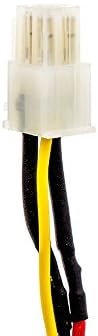
Figure 3: Close-up of the battery connector. Ensure this connector is properly aligned and securely plugged into your device.
6. Operating Instructions
Once installed, the battery operates as a standard power source for your compatible Dranetz HDPQ device. The device's power management system will control charging and discharging.
- Charging: Charge the battery using the original charger and power adapter supplied with your Dranetz HDPQ device.
- Discharging: The battery will discharge during device operation. Monitor your device's battery indicator for remaining power.
- First Use: For optimal performance, fully charge the battery before its initial use.
7. Maintenance
Proper maintenance can extend the life of your battery:
- Storage: If storing the battery for an extended period, store it in a cool, dry place at approximately 50% charge. Avoid extreme temperatures.
- Cleaning: Keep battery contacts clean and free of dust or debris. Use a dry, soft cloth if cleaning is necessary.
- Avoid Deep Discharge: While the battery has protection, try to avoid completely draining the battery frequently, as this can reduce its overall lifespan.
8. Troubleshooting
If you experience issues with your battery, consider the following:
- Battery Not Charging:
- Ensure the battery is correctly installed and the connector is secure.
- Verify that your device's charger and power adapter are functioning correctly.
- Check for any visible damage to the battery or charging port.
- Short Battery Life:
- Ensure the battery has been fully charged.
- Environmental factors (extreme cold/heat) can affect battery performance.
- Over time, all rechargeable batteries experience a reduction in capacity.
- Device Not Powering On:
- Confirm the battery is charged and properly connected.
- Test the device with another known working battery if available, or connect it directly to a power source (if supported) to rule out a device issue.
If problems persist, please contact the seller for further assistance.
9. Warranty and Support
This Estry replacement battery is manufactured with quality assurance certifications including ISO9001, RoHS, CE, UN38.3, and MSDS. For any questions, technical support, or warranty claims, please contact the seller directly through your purchase platform. Provide your order details and a clear description of the issue for prompt assistance.