Introduction
The Blufree Floating Pool Speaker is a versatile and durable audio device designed for both indoor and outdoor use, especially in aquatic environments. With its IP68 waterproof rating, it can be submerged up to 3 feet for 30 minutes, making it ideal for pools, hot tubs, and showers. This portable speaker features Bluetooth 5.0 connectivity, a built-in microphone for hands-free calls, and vibrant multi-colored LED lights to enhance your listening experience.
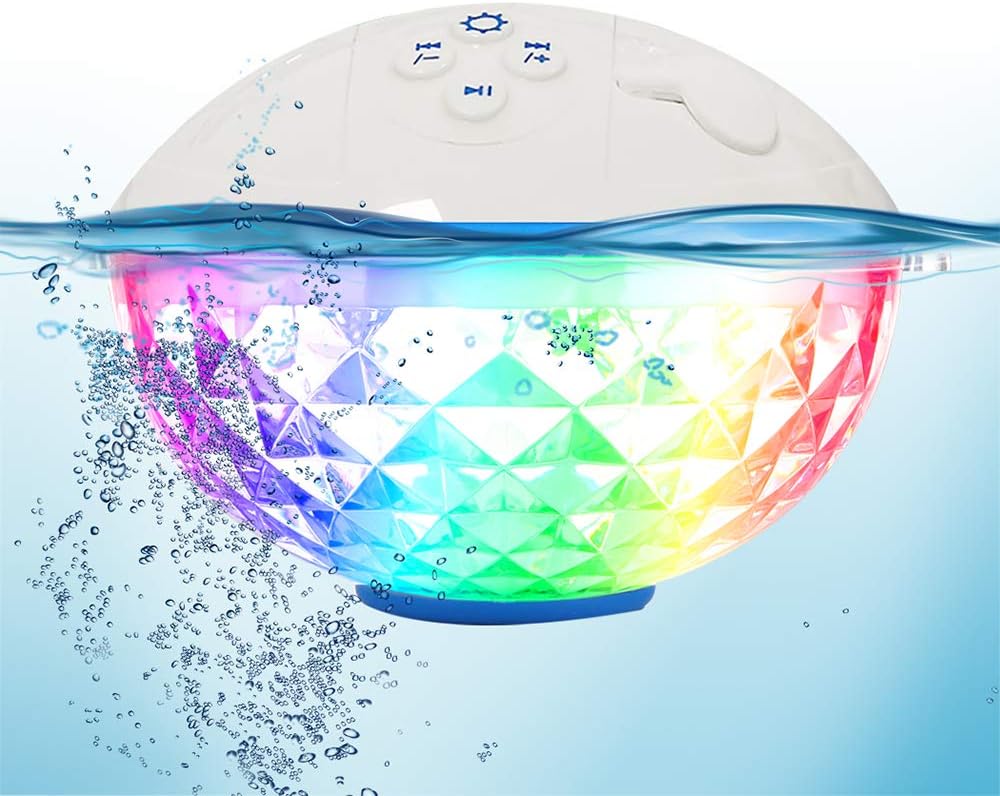
Image: The Blufree Floating Pool Speaker showcasing its colorful LED lights while partially submerged in water, demonstrating its waterproof capability.
What's in the Box
- Blufree compact waterproof speaker (BT601W)
- USB charging cable
- User guide
Setup
1. Charging the Speaker
Before first use, fully charge the speaker. Connect the provided USB charging cable to the DC Charging Port on the speaker and to a compatible USB power source. A full charge takes approximately 8 hours. The charging indicator light will provide status.
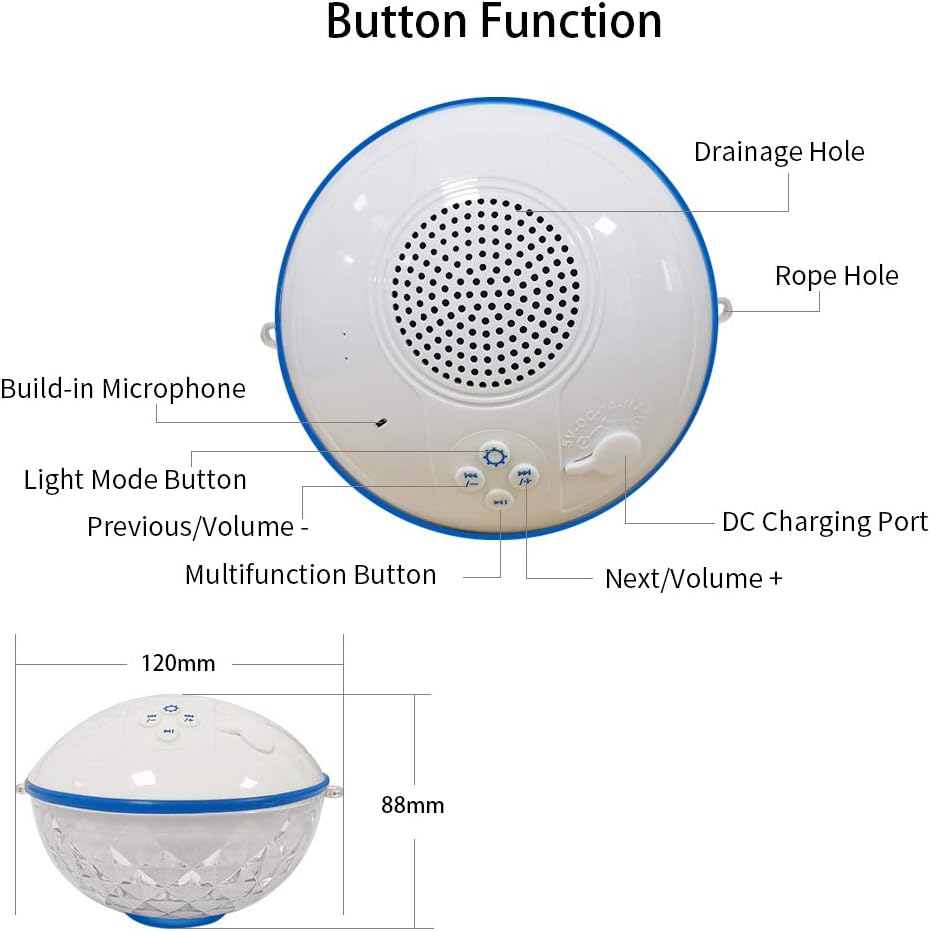
Image: A detailed diagram illustrating the various button functions and physical dimensions of the Blufree Floating Pool Speaker, including the location of the DC Charging Port.
2. Bluetooth Pairing
- Ensure the speaker is charged and powered on.
- Activate Bluetooth on your smartphone, tablet, or other Bluetooth-enabled device.
- Search for "BT601W" or "Blufree Speaker" in your device's Bluetooth settings.
- Select the speaker to pair. A confirmation sound will indicate successful pairing.
The speaker utilizes Bluetooth 5.0 technology, providing a stable wireless connection up to 15 meters (approximately 49 feet).

Image: This image demonstrates the hands-free call feature of the Blufree Floating Pool Speaker, showing a phone connected via Bluetooth and a call in progress, with a grandmother and child nearby.
Operating Instructions
Power On/Off
Press and hold the Multifunction Button (usually indicated by a power icon or play/pause) to turn the speaker on or off.
Music Playback
- Play/Pause: Short press the Multifunction Button.
- Next Track: Short press the "Next/Volume +" button.
- Previous Track: Short press the "Previous/Volume -" button.
- Volume Up: Long press the "Next/Volume +" button.
- Volume Down: Long press the "Previous/Volume -" button.
Light Modes
Press the Light Mode Button (usually indicated by a gear or light icon) to cycle through the 7 different color changing themes and slow/fast flashing light modes. The lights can add a vibrant ambiance to your environment.

Image: Two Blufree Floating Pool Speakers are shown, highlighting their multi-colored RGB LED light capabilities, with various single-color light options displayed below.
Hands-Free Calling
With the built-in microphone, you can answer incoming calls directly from the speaker when connected to your phone via Bluetooth.
- Answer Call: Short press the Multifunction Button.
- End Call: Short press the Multifunction Button during a call.
- Reject Call: Long press the Multifunction Button.

Image: The Blufree Floating Pool Speaker is shown floating in a swimming pool, demonstrating its ability to be used in water, with a mother and baby enjoying the pool in the background.
Maintenance
- After use in water, wipe the speaker dry with a soft cloth.
- Ensure the charging port cover is securely closed when using the speaker near water to maintain its waterproof integrity.
- If water enters the speaker grille and muffles sound, gently shake the speaker to dislodge water and allow it to air dry.
- Store the speaker in a cool, dry place when not in use.
- Avoid exposing the speaker to extreme temperatures or direct sunlight for prolonged periods.
Troubleshooting
| Problem | Possible Cause | Solution |
|---|---|---|
| Speaker does not turn on. | Low battery. | Charge the speaker fully. |
| Cannot pair with Bluetooth device. | Speaker not in pairing mode; device Bluetooth off; too far from speaker. | Ensure speaker is on and discoverable. Turn Bluetooth on/off on your device. Move device closer to speaker (within 15m). |
| No sound or muffled sound. | Volume too low; water in speaker grille; not connected. | Increase volume on speaker and device. Gently shake speaker to remove water and allow to dry. Re-establish Bluetooth connection. |
| Lights not working. | Light mode off; low battery. | Press the Light Mode Button. Charge the speaker. |
Specifications
| Feature | Detail |
|---|---|
| Model Name | BT601W |
| Water Resistance Level | IP68 Waterproof (Immersion up to 3 feet for 30 minutes) |
| Wireless Communication Technology | Bluetooth 5.0 |
| Maximum Range | 15 Meters (approx. 49 feet) |
| Speaker Maximum Output Power | 5 Watts |
| Battery Life | Up to 8 hours (after full charge) |
| Charging Time | 8 Hours |
| Product Dimensions | 4.72"D x 4.72"W x 3.46"H |
| Item Weight | 339 Grams (12 ounces) |
| Special Features | Built-in Microphone, LED Light, Portable, Floatable |
Warranty and Support
This Blufree product comes with a Limited Warranty. For detailed warranty information, please refer to the warranty card included in your product packaging or visit the official Blufree website. For technical support, troubleshooting assistance, or to inquire about replacement parts, please contact Blufree customer service through their official channels.
You can often find support information on the manufacturer's website or through the retailer where the product was purchased.