
Joyroom JR-T03 Pro
Contents
Joyroom JR-T03 Pro Earbuds User Manual
Model: JR-T03 Pro
Brand: Joyroom
Introduction
Thank you for choosing the Joyroom JR-T03 Pro Earbuds. These advanced True Wireless Stereo (TWS) earbuds are designed to provide a superior audio experience with features like Active Noise Cancellation (ANC), comfortable in-ear fit, and intuitive controls. This manual will guide you through the setup, operation, and maintenance of your new earbuds to ensure optimal performance and longevity.
Package Contents
Please check the package contents to ensure all items are present:
- Joyroom JR-T03 Pro Earbuds (Left and Right)
- Charging Case
- USB Charging Cable
- Multiple Sizes of Eartips (Small, Medium, Large)
- User Manual
Product Overview
Familiarize yourself with the components of your Joyroom JR-T03 Pro Earbuds.

Figure 1: Joyroom JR-T03 Pro Earbuds securely placed within their charging case. The case features a smooth, white finish and a small LED indicator for charging status.

Figure 2: A close-up view of the individual left and right Joyroom JR-T03 Pro earbuds, highlighting their ergonomic design and the distinct "L" and "R" markings for easy identification.
Key Features:
- Active Noise Cancellation (ANC): Reduces ambient noise for an immersive listening experience.
- Physical Noise Reduction: The design of the earbuds provides passive noise isolation.
- IPX5 Waterproof & Sweatproof Design: Protects the earbuds from sweat and light rain, making them suitable for exercise and outdoor activities.
- Smart In-Ear Detection: Automatically pauses audio when an earbud is removed and resumes when re-inserted.
- Wireless Connectivity: Utilizes Bluetooth 5.0 for stable and efficient connection.
- Integrated Microphone: Allows for clear hands-free calls.

Figure 3: An earbud worn in the ear, illustrating how its design contributes to physical noise reduction by creating a seal within the ear canal, enhancing sound quality and passive noise isolation.

Figure 4: An earbud shown with water splashes, visually representing its IPX5 waterproof and sweatproof rating, indicating resistance to water jets and sweat for active use.
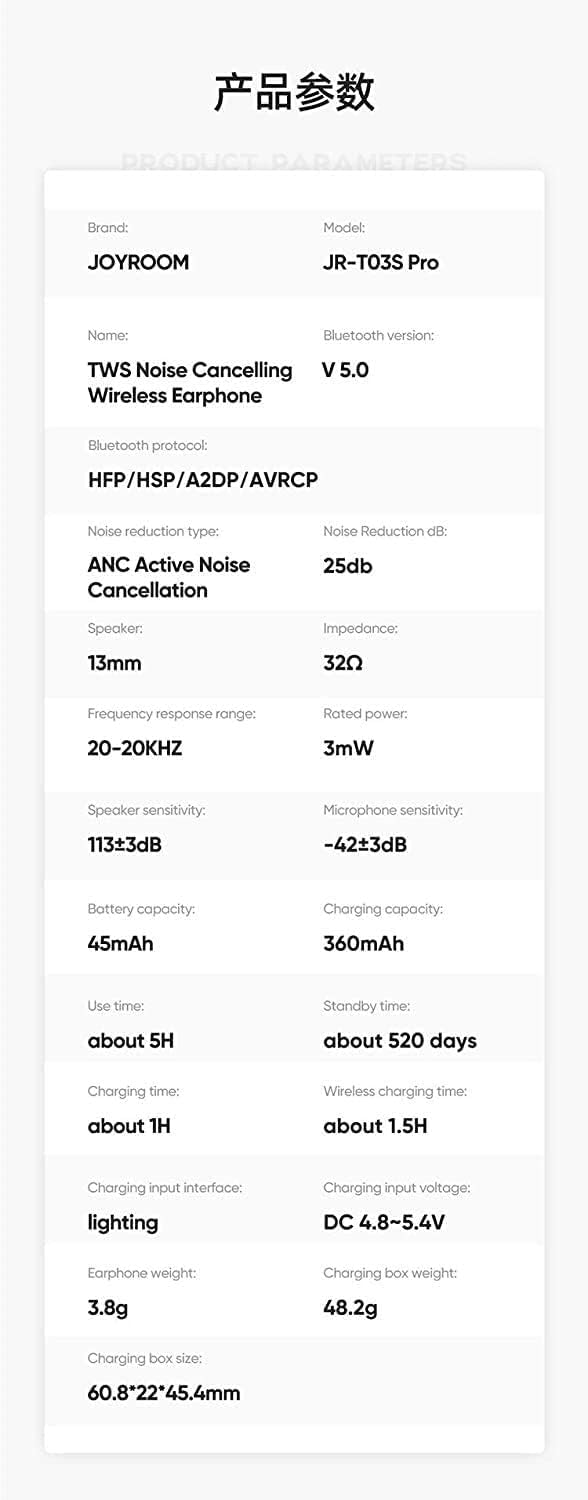
Figure 5: A diagram illustrating the smart in-ear detection feature. When an earbud is taken off, audio playback stops, and when worn again, playback resumes automatically.
Setup
1. Initial Charging
Before first use, fully charge the earbuds and the charging case. Place both earbuds into the charging case. Connect the USB charging cable to the charging port on the case and a power source. The indicator light on the case will show charging status and turn off when fully charged. A full charge takes approximately 1 hour for the earbuds and 1.5 hours for the case via wireless charging.
2. Pairing with Your Device
- Ensure the earbuds are in the charging case and the case has sufficient battery.
- Open the charging case lid. The earbuds will automatically enter pairing mode.
- On your device (smartphone, tablet, etc.), enable Bluetooth.
- Search for "JR-T03 Pro" in the list of available Bluetooth devices and select it to connect.
- Once connected, a voice prompt will confirm successful pairing.
Note: The earbuds will automatically reconnect to the last paired device when taken out of the case, if Bluetooth is enabled on the device.
3. Fitting the Earbuds
Proper fit is crucial for sound quality and noise cancellation. The Joyroom JR-T03 Pro comes with multiple sizes of eartips. Experiment with different sizes to find the most comfortable and secure fit for your ears. A good seal will enhance bass response and noise isolation.

Figure 6: An illustration showing the three different sizes of silicone eartips (Small, Medium, Large) provided with the earbuds, allowing users to choose the best fit for personal comfort and optimal audio performance.
Operating Instructions
Touch Controls
The Joyroom JR-T03 Pro Earbuds feature intuitive touch controls on each earbud. The specific functions may vary slightly based on the number of taps or long presses.
| Action | Function |
|---|---|
| Single Tap (Left/Right) | Play/Pause Music, Answer/End Call |
| Double Tap (Right) | Next Track |
| Double Tap (Left) | Previous Track |
| Triple Tap (Left/Right) | Activate Voice Assistant (Siri, Google Assistant) |
| Long Press (Left/Right) | Toggle Active Noise Cancellation (ANC) / Transparency Mode (if applicable) |
| Incoming Call Long Press | Reject Call |
Active Noise Cancellation (ANC)
The earbuds feature Active Noise Cancellation to reduce ambient noise. To activate or deactivate ANC, perform a long press on either earbud (refer to the touch controls table). You may hear a subtle change in the sound profile as the ANC engages or disengages.
Automatic Play/Pause
The earbuds are equipped with smart sensors that detect when they are in your ears. Music playback will automatically pause when you remove one or both earbuds and resume when you put them back in.
Maintenance
To ensure the longevity and optimal performance of your Joyroom JR-T03 Pro Earbuds, follow these maintenance guidelines:
- Cleaning: Regularly clean the earbuds and charging case with a soft, dry, lint-free cloth. Do not use abrasive cleaners or solvents. For the eartips, remove them and clean with a damp cloth, then dry thoroughly before reattaching.
- Charging Contacts: Periodically clean the charging contacts on both the earbuds and inside the charging case using a dry cotton swab to ensure a good connection.
- Storage: When not in use, always store the earbuds in their charging case to protect them and keep them charged. Store in a cool, dry place away from extreme temperatures.
- Avoid Water Exposure: While the earbuds are IPX5 rated, avoid submerging them in water or exposing them to strong water jets. Dry them completely if they get wet.
- Battery Care: To preserve battery life, avoid fully discharging the earbuds and case frequently. Charge them regularly, even if not used for extended periods.
Troubleshooting
If you encounter any issues with your earbuds, refer to the following common problems and solutions:
| Problem | Possible Solution |
|---|---|
| Earbuds not pairing with device. |
|
| Only one earbud is playing sound. |
|
| Earbuds not charging. |
|
| Sound quality is poor or distorted. |
|
Specifications
Detailed technical specifications for the Joyroom JR-T03 Pro Earbuds:
| Feature | Detail |
|---|---|
| Model Number | JR-T03 Pro |
| Brand | Joyroom |
| Connectivity | Wireless (Bluetooth 5.0) |
| Bluetooth Protocols | HFP/HSP/A2DP/AVRCP |
| Noise Reduction Type | ANC Active Noise Cancellation |
| Noise Reduction (dB) | 25dB |
| Speaker Size | 13mm |
| Impedance | 32Ω |
| Frequency Response | 20-20KHz |
| Speaker Sensitivity | 113±3dB |
| Microphone Sensitivity | -42±3dB |
| Earphone Battery Capacity | 45mAh |
| Charging Case Battery Capacity | 360mAh |
| Music Playback Time | About 5 hours |
| Standby Time | About 520 days |
| Earphone Charging Time | About 1 hour |
| Wireless Charging Time | About 1.5 hours |
| Charging Input Interface | Lighting (USB) |
| Charging Input Voltage | DC 4.8-5.4V |
| Earphone Weight | 3.8g |
| Charging Box Weight | 48.2g |
| Charging Box Dimensions | 60.8 x 22 x 45.4mm |
| Color | White |
| Form Factor | In-Ear |
| Included Components | Eartips |
| Age Range | Adult |
Warranty and Support
Joyroom products are manufactured to high quality standards. For information regarding warranty coverage, please refer to the warranty card included in your product packaging or visit the official Joyroom website. If you encounter any issues that cannot be resolved using the troubleshooting guide, or require further assistance, please contact Joyroom customer support through their official channels.
For the latest information, FAQs, and support, please visit the Joyroom Official Store Page.
Documents and downloads
Ask a question about this manual
Ask about setup, troubleshooting, compatibility, parts, safety, or missing instructions. Manuals+ will review the question and use this page’s manual context to help answer it.