
1. Introduction
This manual provides essential information for the safe and effective use of your Fitkit FT200 Series DC-Motorized Treadmill. Please read all instructions carefully before assembly and operation to ensure proper function and user safety. Retain this manual for future reference.

Figure 1.1: The Fitkit FT200 Series DC-Motorized Treadmill, showcasing its overall design and structure.
2. Safety Information
Adherence to these safety guidelines is crucial to prevent injury and ensure the longevity of your treadmill.
- Maximum User Weight: The treadmill supports a maximum user weight of 110 Kgs. For optimal safety and performance, select a treadmill that can support at least 20 kilograms more than your current body weight, accounting for impact forces during exercise.
- Electrical Safety: Always connect the treadmill to a power point with adequate earthing. It is advised to use a voltage stabilizer to protect the motor from power fluctuations and extend its lifespan.
- Emergency Stop: Familiarize yourself with the safety key and its function. In case of an emergency, pull the safety key to immediately stop the treadmill.
- Clearance: Maintain adequate clear space around the treadmill during operation.
- Children and Pets: Keep children and pets away from the treadmill, especially during operation.
- Medical Conditions: Consult a physician before starting any exercise program, especially if you have pre-existing medical conditions.
3. Product Overview
3.1. Treadmill Components

Figure 3.1: Key components of the Fitkit FT200SX Treadmill, including the Console, LCD Display, Safety Key, Heart Rate Sensor, Upright Column, Motor Cover, Running Belt, Side Rail, and End Cap.
3.2. Console Functions
The control console provides access to all treadmill functions and displays workout data.

Figure 3.2: Detailed view of the console, showing the LCD Display, control buttons (Start, Stop, Prog, Mode, Speed+/-, Volume+/-), AUX IN port, USB port, Bottle Holders, and Heart Rate Sensor.
- LCD Display: Shows time, speed, distance, calories, and heart rate.
- Start Button: Initiates the workout.
- Stop Button: Halts the workout.
- Prog (Program) Button: Selects pre-set workout programs.
- Mode Button: Toggles display modes or settings.
- Speed +/- Buttons: Adjusts the running belt speed.
- Volume +/- Buttons: Controls audio volume (if connected via AUX/USB).
- AUX IN: Audio input for external devices.
- USB Port: For charging devices or playing media.
- Bottle Holder: Convenient storage for water bottles.
- Heart Rate Sensor: Integrated sensors on handlebars to monitor pulse.
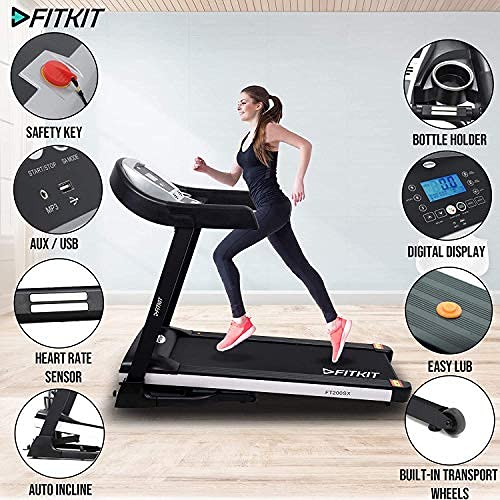
Figure 3.3: Overview of additional features including Safety Key, Bottle Holder, Digital Display, AUX/USB ports, Heart Rate Sensor, Easy Lubrication port, Auto Incline, and Built-in Transport Wheels.
4. Setup and Assembly
Your Fitkit FT200 Series Treadmill is designed for convenient setup.
- Professional Installation: Free at-home installation services are available in over 650+ cities across India. After delivery, please contact customer support to schedule your installation. Service schedules may vary by location.
- Placement: Place the treadmill on a flat, stable surface with adequate clearance around it.
- Folding Mechanism: The treadmill features a hydraulic folding mechanism for easy storage. To fold, lift the running deck until it locks into place. To unfold, gently release the lock and lower the deck.
- Transportation: Built-in transportation wheels allow for easy movement of the folded treadmill.
5. Operating Instructions
5.1. Basic Operation
- Power On: Connect the power cord and switch on the treadmill. The display will illuminate.
- Attach Safety Key: Clip the safety key to your clothing and insert the other end into the console's designated slot. The treadmill will not operate without the safety key in place.
- Start Workout: Press the 'Start' button. The belt will begin moving at a low speed.
- Adjust Speed: Use the 'Speed +/-' buttons to increase or decrease the running belt speed (range: 0.8-14 km/hr).
- Adjust Inclination: Use the 'Inclination +/-' buttons (if available on console, otherwise controlled via programs) to adjust the auto inclination level (up to 18 levels).
- Select Program: Press the 'Prog' button to cycle through pre-set workout programs. Follow the on-screen instructions for program details.
- Monitor Heart Rate: Grip the heart rate sensors on the handlebars to display your pulse on the LCD.
- End Workout: Press the 'Stop' button to gradually bring the belt to a halt. Alternatively, pull the safety key for an immediate stop.
5.2. Smart Features and Connectivity
The Fitkit FT200 Series Treadmill offers enhanced connectivity for a more interactive workout experience.
- cultsport App Integration: Connect your treadmill to the cultsport App for trainer-led sessions, immersive fitness games (cultsport play), and to earn Healthcoins. The app transforms your fitness routine with daily sessions from state-of-the-art Fitness Studios.
- OneFitPlus App Connectivity: Sync your workout data with the OneFitPlus app for tracking progress and accessing additional services.
- Amazon Alexa Voice Control: Use voice commands to control your treadmill. Examples include:

Figure 5.1: Examples of Amazon Alexa voice commands for controlling the treadmill, such as 'Alexa, Increase Speed to 8' or 'Alexa, Increase Inclination to 6'.
- "Alexa, Open FitPlus Health"
- "Alexa, Increase Speed to 8"
- "Alexa, Increase Inclination to 6"

Figure 5.2: The treadmill integrated with a professional personal coaching application, offering live sessions and interactive workout experiences.
6. Maintenance
Regular maintenance ensures the optimal performance and longevity of your treadmill.
- Lubrication: The treadmill features semi-auto lubrication. Refer to the specific instructions in the included user manual for the lubrication schedule and procedure. Proper lubrication of the running belt is essential for smooth operation and to prevent wear.
- Cleaning: Regularly wipe down the treadmill with a damp cloth to remove dust and sweat. Avoid using abrasive cleaners.
- Belt Adjustment: Periodically check the running belt for proper tension and alignment. If the belt slips or drifts to one side, consult the detailed instructions in the included user manual for adjustment procedures or contact customer support.
- Power Off: Always unplug the treadmill from the power outlet before performing any maintenance or cleaning.
7. Troubleshooting
If you encounter issues with your Fitkit FT200 Series Treadmill, refer to the following common problems and solutions. For complex issues, contact customer support.
| Problem | Possible Cause | Solution |
|---|---|---|
| Treadmill does not power on | Power cord not connected, circuit breaker tripped, safety key not inserted. | Check power connection, reset circuit breaker, ensure safety key is fully inserted. |
| Running belt slips | Belt too loose, insufficient lubrication. | Adjust belt tension (refer to manual), apply lubrication. |
| Unusual noise during operation | Loose parts, motor issue, belt friction. | Inspect for loose components, lubricate belt, contact support if noise persists. |
| Heart rate monitor inaccurate | Improper hand placement, dry hands. | Ensure firm and consistent grip, moisten hands slightly if dry. |
If troubleshooting steps do not resolve the issue, please contact Fitkit customer support for assistance.
8. Specifications
Key technical specifications for the Fitkit FT200 Series DC-Motorized Treadmill.

Figure 8.1: Visual representation of key specifications including 4.5HP Motor Power, 110kg Max User Weight, 0.8-14 km/hr Speed, 1220x420mm Running Belt, and Easy Lubrication.
- Motor Horsepower: 4.5HP (Peak)
- Motor Type: DC-Motorized
- Running Belt Size: 1220 x 420 MM
- Speed Range: 0.8 - 14 km/hr
- Maximum Weight Support: 110 Kgs
- Lubrication: Semi-Auto
- Inclination Type: Auto
- Inclination Levels: 18
- Foldable: Hydraulic
- Transportation Wheels: Present
- Assembled Dimensions (L x W x H): 1579mm x 730mm x 1258mm
- Item Weight: 55 Kilograms

Figure 8.2: Visual representation of the treadmill's assembled dimensions (1579mm length, 730mm width, 1258mm height) and maximum user weight (110kg).
9. Warranty and Support
Fitkit provides comprehensive support and warranty for your treadmill.
- Warranty Details:
- 1 Year warranty on Motor and Manufacturing Defect.
- 3 Year warranty on Frame.
- Post-Sales and Customer Support: Active support is available across 650+ cities in India. For installation support or any queries, please contact Fitkit customer service (Working hours: Monday to Saturday from 9am to 6pm).
- Additional Services: Your purchase includes a 1-month Free Diet & Fitness Plan, 1 Doctor Consultation, and trainer-led sessions.

Figure 9.1: Overview of OneFitPlus services, including Free at-home Installation, OneFitPlus App Connectivity, Personal Dietitian, Online Doctor Consultation, and Personal Trainer Video Sessions.
