
NICREW N16960
NICREW Automatic Fish Feeder Instruction Manual
Model: N16960
Introduction
The NICREW Automatic Fish Feeder is designed to simplify fish care by providing automated feeding for your aquarium. This programmable electric fish food dispenser ensures your fish are fed regularly, even when you are away for vacation or busy with weekend activities. It supports various types of fish food and offers flexible programming options to suit your specific needs.

Image: The NICREW Automatic Fish Feeder in action, dispensing food into an aquarium with goldfish.
Product Overview
Familiarize yourself with the components of your NICREW Automatic Fish Feeder:

Image: A detailed diagram illustrating the various parts of the feeder, including the Feed Drum Cover, Feed Drum, Portion Control Slider, Battery Cover, Feeder Clamp, Active Screw, Power Button, Rotating Indicator, Battery Indicator, Meal and Rotating Times display, Manual Release Button, and Setting Button.
- Feed Drum: Holds the fish food.
- Feed Drum Cover: Protects the food and allows for refilling.
- Portion Control Slider: Adjusts the amount of food dispensed.
- LCD Digital Panel: Displays time, feeding schedules, and battery status.
- Control Buttons: Used for setting time, programming, and manual feeding.
- Feeder Clamp: For mounting the feeder to the aquarium rim.
- Battery Compartment: Houses the required AA batteries.
Key Features
- Can be set for up to 4 daily feeding times, ensuring your fish are fed consistently. Each feeding time can have up to three rotations if desired.
- Adjustable clamp allows for mounting on almost any style of aquarium.
- Manual feeding button provides instant snacks for your fish.
- Adjustable slider for precise control over food portions.
- LCD digital panel for easy programming and monitoring.
- 200 mL capacity, suitable for most flake foods.
- Food drum adjusts to dispense various types of fish food, including flakes and pellets, making it versatile for different fish species.
Setup and Installation
1. Battery Installation
The feeder requires two (2) AA batteries (not included). Open the battery cover located on the side of the unit and insert the batteries, ensuring correct polarity.

Image: The feeder with its battery compartment open, showing where to insert two AA batteries.
2. Mounting the Feeder
There are two primary methods for installing your feeder:
- Method 1: Clamp Installation
Attach the feeder to the rim of your aquarium using the adjustable clamp. Tighten the active screw until the feeder is securely in place. Ensure the feeder is positioned so that food dispenses directly into the water. - Method 2: Adhesive Installation
For aquariums without a suitable rim, use the included adhesive pad to attach the feeder to the aquarium lid or a flat surface above the water. Ensure the surface is clean and dry before applying the adhesive.
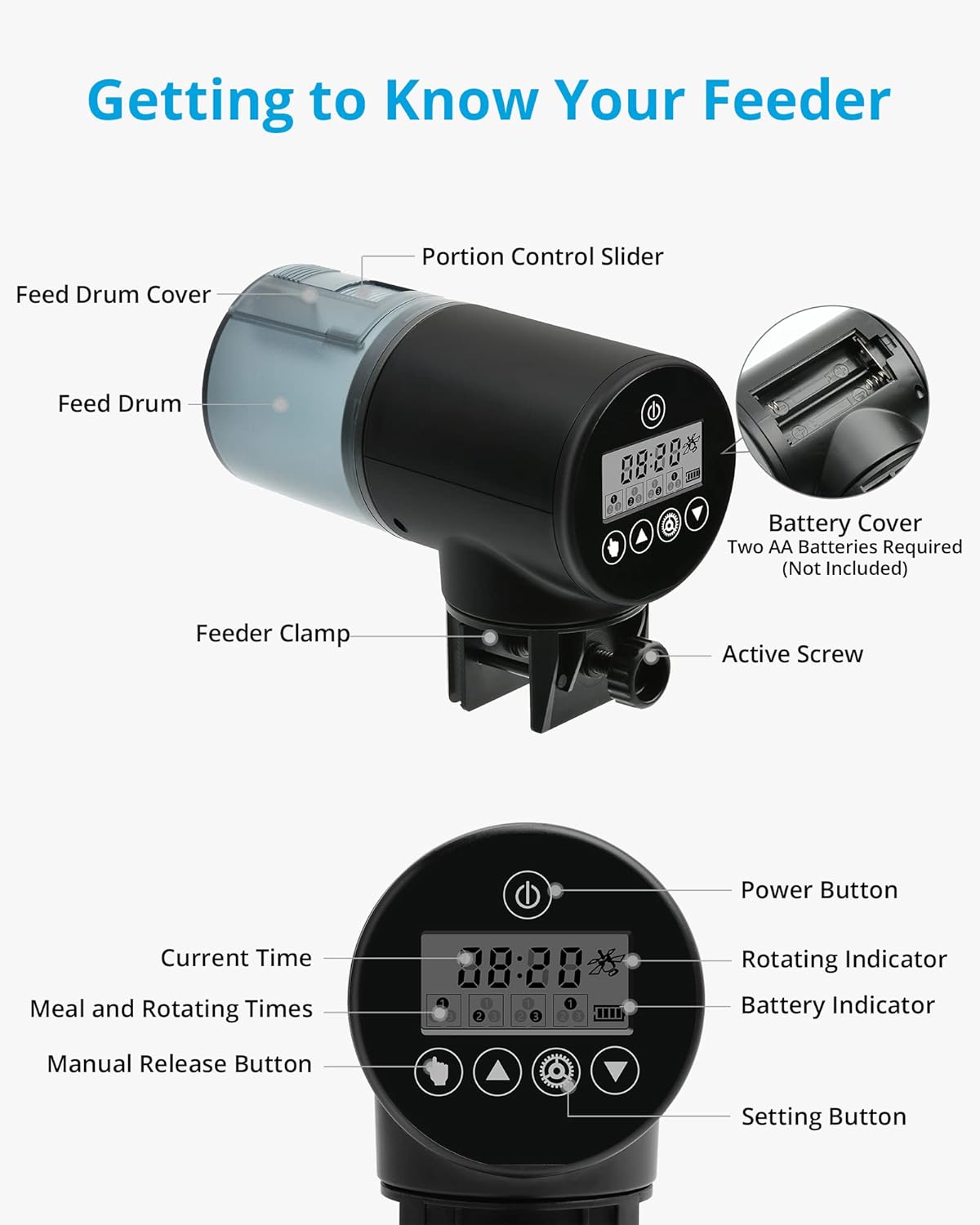
Image: Visual representation of the two installation methods: clamping onto the aquarium rim and attaching with an adhesive pad to a flat surface.
3. Filling the Food Drum
Slide open the feed drum cover. Fill the drum with your desired fish food (flakes, pellets, granules, or strips). The 200 mL capacity is ample for most standard fish foods. Close the cover securely after filling.
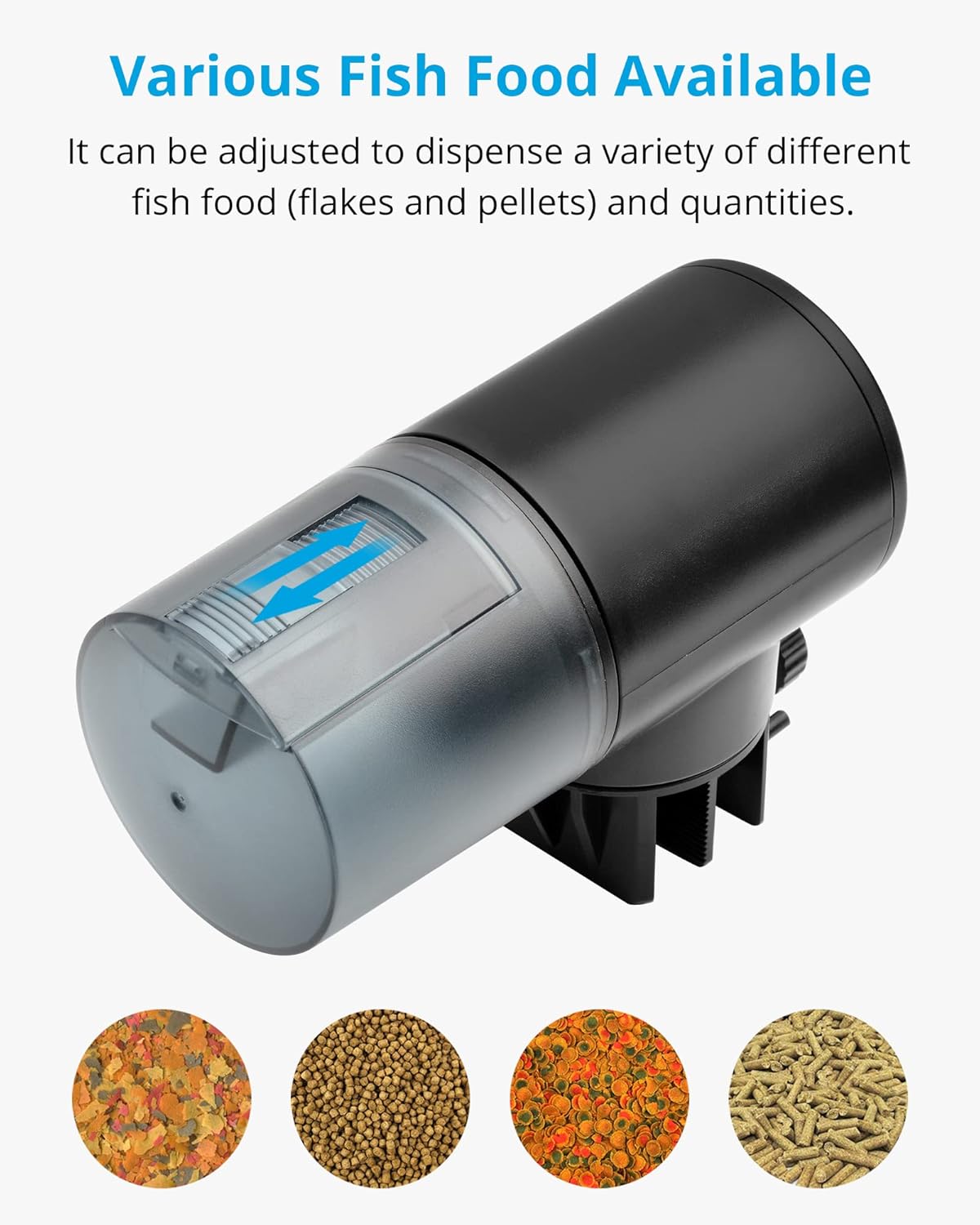
Image: Examples of various fish food types (pellets, flakes, strips, granules) that can be used with the feeder.
Operating Instructions
1. Setting the Time and Feeding Schedule
Use the LCD digital panel and control buttons to program your feeding schedule. The feeder allows for up to 4 daily feeding times, with up to 3 rotations per feeding time.

Image: A close-up view of the LCD display, showing the current time and indicators for programmed feeding times (1, 2, 3, 4) and rotations.
- Press the Setting Button (gear icon) to enter programming mode.
- Use the Up and Down arrows to adjust the time and feeding parameters.
- Press the Setting Button again to confirm each setting and move to the next.
- A default program of 2 feedings a day (8:00 and 20:00) with 1 drop per feed is set by pressing the Up button for 5 seconds.
2. Adjusting Feed Amount
The portion control slider on the feed drum allows you to regulate the quantity of food dispensed. Slide it to the left for smaller portions and to the right for larger portions. This is particularly useful for feeding small fish fry or ensuring precise amounts for different fish populations.
3. Manual Feeding
To dispense food manually at any time, simply press the Manual Release Button (hand icon). The feeder will dispense one portion of food immediately.
Maintenance and Care
To ensure the longevity and proper functioning of your NICREW Automatic Fish Feeder, follow these maintenance guidelines:
- Cleaning: The manufacturer recommends hand washing only for the feeder components that come into contact with food. Do not submerge the main electronic unit in water. Use a damp cloth to wipe the exterior.
- Food Drum: Periodically empty and clean the food drum to prevent food buildup and ensure smooth dispensing.
- Battery Replacement: Replace batteries when the battery indicator on the LCD panel shows low power to avoid interruption of feeding schedules.
- Storage: If storing the feeder for an extended period, remove the batteries to prevent leakage.
Troubleshooting
If you encounter issues with your feeder, refer to the following common problems and solutions:
| Problem | Possible Cause | Solution |
|---|---|---|
| Feeder not dispensing food. | Food drum empty; food jammed; low batteries; incorrect programming. | Refill food drum; clear any blockages; replace batteries; check programmed feeding times. |
| LCD display is blank or dim. | Dead or low batteries. | Replace with fresh AA batteries. |
| Food gets wet or clogs. | High humidity; feeder positioned too close to water surface. | Ensure food is dry before loading; reposition feeder further from water; consider using a desiccant packet in the food drum if humidity is an issue. |
| Feeder falls off aquarium. | Clamp not tightened sufficiently; adhesive not properly applied. | Re-tighten clamp securely; re-apply adhesive to a clean, dry surface. |
Specifications
| Feature | Detail |
|---|---|
| Model Number | N16960 |
| Item Weight | 9.7 ounces |
| Product Dimensions | 5.7 x 2.7 x 4.2 inches |
| Material | Plastic |
| Color | Black |
| Power Source | 2 x AA Batteries (not included) |
| Food Drum Capacity | 200 mL (approx. 0.05 gal) |
| Feeding Times | Up to 4 daily, with up to 3 rotations per feeding |
| Special Features | Adjustable Clips for Easy Install, Adjustable Food Dispensed, LCD display, Ultra-Quiet Operation |
| Care Instructions | Hand Wash Only (for food contact parts) |
Warranty and Support
NICREW is dedicated to making fish keeping easier and more enjoyable. We provide quality products and pay close attention to small details for a better fish keeping experience.
This product comes with a hassle-free 12-Month Warranty. For any questions, concerns, or support needs, please contact our 24-Hour Friendly Customer Service. Refer to your product packaging or the NICREW official website for specific contact details.
Ask a question about this manual
Ask about setup, troubleshooting, compatibility, parts, safety, or missing instructions. Manuals+ will review the question and use this page’s manual context to help answer it.