
Introduction
This manual provides detailed instructions for the Nobsound HiFi 2.1 Channel Bluetooth 5.0 Power Amplifier Board. This amplifier is designed to deliver high-fidelity audio with versatile input options, including Bluetooth 5.0, 3.5mm AUX, and U-disk. It features a 2.1 channel output, providing stereo sound for left and right speakers, and a dedicated channel for a subwoofer. The amplifier utilizes two TPA3116D2 chips for efficient power delivery, offering up to 50W per stereo channel and 100W for the subwoofer. Its compact design and wide voltage compatibility (DC 12-24V) make it suitable for various applications, from home audio setups to portable outdoor use.
Please read this manual thoroughly before operating the device to ensure proper usage and optimal performance.

Safety Information
- Ensure the power supply voltage is within the specified range (DC 12-24V) to prevent damage.
- Do not expose the device to moisture, rain, or extreme temperatures.
- Avoid disassembling or modifying the amplifier board, as this may void the warranty and pose electrical hazards.
- Keep the device away from strong magnetic fields.
- Always disconnect the power before making any connections or adjustments.
Package Contents
Verify that all items are present in the package:
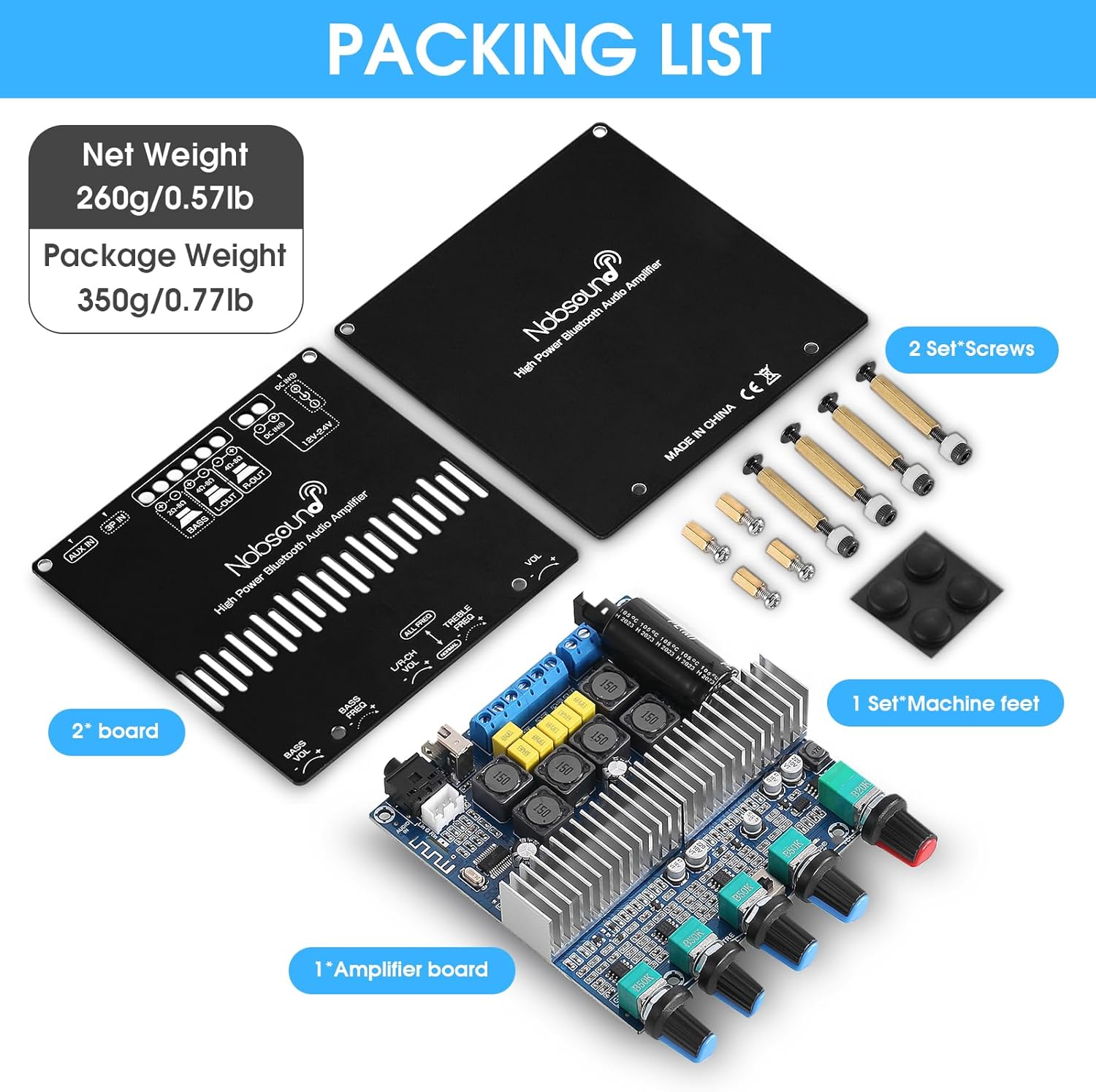
- 1x Nobsound 2.1 Channel Bluetooth Power Amplifier Board
- 2x Top and Bottom Plates (for case assembly)
- 2 Sets of Screws (for assembly)
- 1 Set of Machine Feet
Product Overview
Front Panel Controls

- Bass Volume Knob: Adjusts the output level of the subwoofer channel.
- Bass Frequency Knob: Adjusts the cutoff frequency for the subwoofer channel.
- L/R Channel Volume Knob: Adjusts the output level for the left and right stereo channels.
- Treble Frequency Knob: Adjusts the high-frequency response of the stereo channels.
- Function Knob (Main Volume / Input Selection / Play & Pause):
- Rotate to adjust the overall main volume.
- Press briefly to switch between input modes (Bluetooth, AUX, U-disk).
- Press and hold to power on/off.
- In Bluetooth mode, press briefly to Play/Pause.
Rear Panel Connections

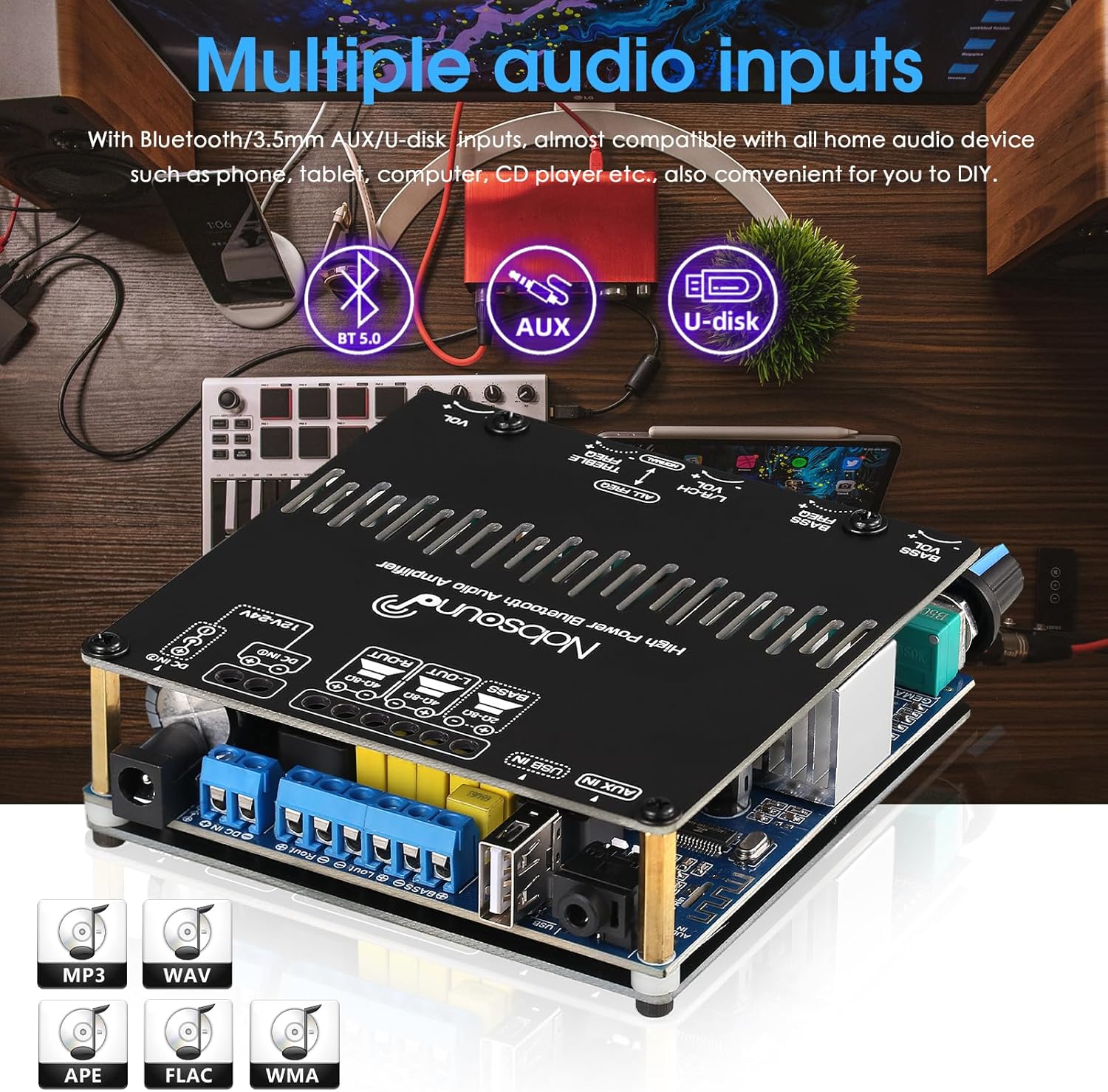
- DC Power Input: Connect a DC 12-24V power adapter (center positive, 2.1mm jack).
- Speaker Outputs (Right, Left, Bass): Connect passive stereo speakers to the 'L-OUT' (Left) and 'R-OUT' (Right) terminals. Connect a passive subwoofer to the 'BASS' terminals. Ensure correct polarity.
- U-disk Input: Connect a USB flash drive for audio playback.
- 3.5mm AUX Input: Connect audio sources via a 3.5mm audio cable.
Setup
- Assemble the Case (Optional): If your amplifier board came with a case, follow the provided diagram to assemble it using the screws and machine feet.

Figure 5: Case Assembly Diagram. Illustrates the placement of top and bottom screws for securing the amplifier board within its case. - Connect Speakers: Connect your passive stereo speakers to the "L-OUT" (Left) and "R-OUT" (Right) terminals. Connect your passive subwoofer to the "BASS" terminals. Ensure correct polarity (+ to + and - to -) for all speaker connections.
- Connect Audio Source:
- For Bluetooth: No physical connection needed initially.
- For AUX: Connect your audio device (e.g., phone, tablet, computer) to the 3.5mm AUX input using an audio cable.
- For U-disk: Insert a USB flash drive containing audio files into the U-disk input.
- Connect Power: Connect a DC 12-24V power adapter to the DC Power Input jack. The amplifier will power on automatically or can be powered on by pressing and holding the Function Knob.
Operating Instructions
Power On/Off
The amplifier typically powers on automatically when connected to a power source. To manually power on or off, press and hold the Function Knob for a few seconds.
Input Selection
Briefly press the Function Knob to cycle through the available input modes: Bluetooth, AUX, and U-disk. An indicator light will typically show the active input.
Bluetooth Connection
- Switch the amplifier to Bluetooth mode using the Function Knob.
- On your audio device (phone, tablet, etc.), enable Bluetooth and search for available devices.
- Select "Nobsound Amplifier" (or similar name) from the list to pair.
- Once paired, you can play audio from your device through the amplifier.
Audio Playback (AUX/U-disk)
- For AUX input, ensure your device is connected via the 3.5mm cable and the amplifier is in AUX mode.
- For U-disk playback, insert a USB flash drive with compatible audio files (MP3, WAV, APE, FLAC, WMA). The amplifier should automatically detect and play files in U-disk mode.
Adjusting Sound
Use the dedicated knobs on the front panel to adjust Bass Volume, Bass Frequency, Left/Right Channel Volume, and Treble Frequency to achieve your desired sound profile.

Maintenance
- Clean the device with a soft, dry cloth. Do not use liquid cleaners or aerosols.
- Ensure adequate ventilation around the amplifier to prevent overheating.
- Store the device in a cool, dry place when not in use for extended periods.
Troubleshooting
| Problem | Possible Cause | Solution |
|---|---|---|
| No sound output. |
|
|
| Bluetooth connection unstable or not pairing. |
|
|
| Distorted sound. |
|
|
Specifications
| Feature | Detail |
|---|---|
| Brand | Nobsound |
| Model Number | GFB1388 |
| Number of Channels | 2.1 (2 stereo, 1 subwoofer) |
| Output Power | 50W x 2 (L/R), 100W (Subwoofer) |
| Bluetooth Version | 5.0 |
| Audio Inputs | Bluetooth, 3.5mm AUX, U-disk |
| Supply Voltage | DC 12-24V |
| Amplifier Chip | 2x TPA3116D2 |
| Item Weight | 12 ounces (approx. 340g) |
| Package Dimensions | 6.1 x 6 x 2.2 inches |
Official Product Video
This video provides a visual overview of the Nobsound HiFi 2.1 Channel Bluetooth Amplifier, showcasing its design and features. It demonstrates the physical appearance and various angles of the amplifier board.
Warranty and Support
Nobsound products are designed for reliability and performance. For warranty information, technical support, or service inquiries, please refer to the official Nobsound website or contact your retailer. Keep your purchase receipt as proof of purchase for warranty claims.
For further assistance, you may visit the Nobsound Store on Amazon.


