
1. Introduction
This manual provides detailed instructions for the ZdalaMit BN59-01312A Universal Voice Control Remote. This remote is designed as a replacement for various Samsung Smart TV models, offering voice control capabilities and direct access buttons for popular streaming services. Please read this manual thoroughly to ensure proper setup and optimal use of your new remote control.

Figure 1: ZdalaMit BN59-01312A Universal Voice Control Remote.
2. Setup
2.1 Battery Installation
The remote requires two (2) 1.5V AA alkaline batteries (not included). To install the batteries:
- Locate the battery compartment cover on the back of the remote control.
- Slide the cover downwards to open the compartment.
- Insert two AA batteries, ensuring the positive (+) and negative (-) terminals align correctly with the indicators inside the compartment.
- Slide the cover back into place until it clicks securely.

Figure 2: Back view of the remote control, showing the battery compartment.
2.2 Pairing the Remote with Your TV
This remote control must be paired with your Samsung Smart TV to enable full functionality, including voice control. Follow these steps to pair your remote:
- Turn on your Samsung TV and navigate to its home screen.
- Simultaneously press and hold the Return button (
 ) and the Play/Pause button () on the remote control for 3 to 10 seconds.
- A message indicating "Completed Pairing" or similar will appear on your TV screen upon successful pairing.
- If pairing fails, please repeat steps 1-3.

Figure 3: Remote pairing instructions, highlighting the Return and Play/Pause buttons.
Video 1: A brief demonstration of the ZdalaMit BN59-01312A remote control, showcasing its design and basic functionality. This video is provided by the seller, Delighted inc.
3. Operating the Remote
3.1 Button Functions
- Power Button: Turns the TV on or off.
- Directional Pad (Circular Button): Navigates menus and selects items.
- Return Button: Goes back to the previous screen or menu.
- Home Button: Accesses the TV's Smart Hub or home screen.
- Play/Pause Button: Controls media playback.
- Volume Rocker (VOL CC/VD): Adjusts the TV volume. Pressing the button mutes/unmutes.
- Channel Rocker (CH): Changes TV channels. Pressing the button displays the channel list.
3.2 Voice Control
The remote features a built-in microphone for voice commands. After successful pairing, press the Microphone Button ( ) and speak your command clearly into the remote. This allows for hands-free navigation, search, and control of your TV.

Figure 4: The remote's voice control feature, activated by the microphone button.
3.3 Quick Access Buttons
The remote includes dedicated buttons for quick access to popular streaming services:
- NETFLIX: Launches the Netflix application.
- Prime Video: Launches the Amazon Prime Video application.
- Hulu: Launches the Hulu application.
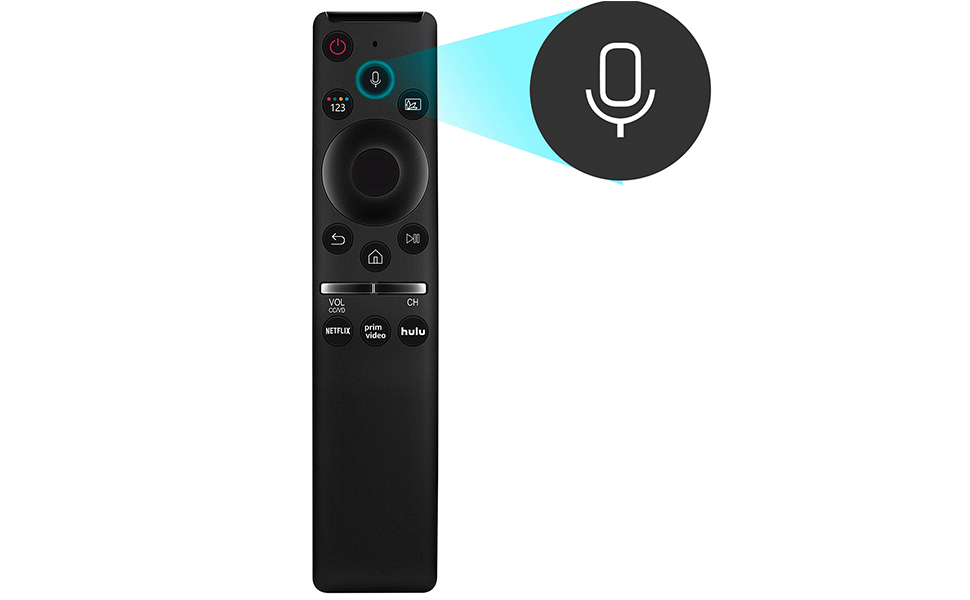
Figure 5: Quick access buttons for streaming services.
4. Maintenance
4.1 Battery Replacement
When the remote's performance degrades or it stops responding, it is likely time to replace the batteries. Follow the battery installation steps in Section 2.1 to replace the two (2) AA alkaline batteries. Always use fresh batteries and dispose of old batteries responsibly according to local regulations.
5. Troubleshooting
- Remote not responding or intermittent response:
Ensure batteries are correctly installed and have sufficient charge. Replace batteries if necessary. Re-pair the remote with your TV by holding the Return and Play/Pause buttons for 3-10 seconds. - Buttons require hard pressing:
This can sometimes indicate low battery power or wear. Try replacing the batteries. If the issue persists, the remote may have internal wear. - Remote hangs or becomes unresponsive:
Remove the batteries for a few seconds, then reinsert them. This can reset the remote and resolve temporary issues. - "Remote needs to be paired" message appears frequently:
While this message may sometimes resolve itself, re-pairing the remote as described in Section 2.2 can establish a more stable connection. - Voice control not working:
Ensure the remote is properly paired via Bluetooth. Voice control functionality relies on a Bluetooth connection, not just infrared. - Remote does not work with cable box:
This remote is specifically designed for Samsung Smart TVs and does not support direct control of cable boxes.
6. Specifications
| Feature | Detail |
|---|---|
| Model Number | BN59-01312A (Zdala10) |
| Brand | ZdalaMit |
| Product Dimensions | 5 x 1.2 x 0.55 inches |
| Item Weight | 1.41 ounces |
| Power Supply | 2 x 1.5V AA Alkaline Batteries (not included) |
| Special Feature | Voice Search |
| Color | Black |
| Max Number of Supported Devices | 1 |
| Compatible Devices | Samsung LCD, LED, QLED, 4K, 8K UHD, Crystal, Frame, HDR, Curved Smart TVs (models including Q60, Q70, Q80, Q90, 8 Series, 9 Series, TU8000, AU8000, CU7000, CU8000, and specific models like QN82Q70RAFXZA, QN49LS03RAFXZA, etc.) |
7. Warranty and Support
For any queries or assistance regarding your ZdalaMit BN59-01312A remote control, please contact the seller or manufacturer directly. Refer to your purchase documentation for specific warranty details and contact information.