
Introduction
This manual provides essential information for the proper installation, operation, and maintenance of your PLUSPOE 40mm x 10mm DC 12V Brushless Cooling Fan. Designed for efficient heat dissipation, this fan is suitable for a variety of electronic devices and small appliances. Please read this manual thoroughly before use to ensure optimal performance and longevity of the product.
Product Features
- Compact Design: Dimensions of 40mm x 40mm x 10mm for versatile integration.
- Efficient Cooling: Features a 9-blade design for enhanced airflow.
- Low Noise Operation: Rated at 27.5 dB(A) for quiet performance.
- Durable Construction: Housing and fan blades made from Black PBT (UL94V-0) material.
- Reliable Bearing: Equipped with a dual ball bearing system for extended life expectancy.
- Standard Connectivity: Utilizes a 2-pin connector (PH2.5) for easy power integration.
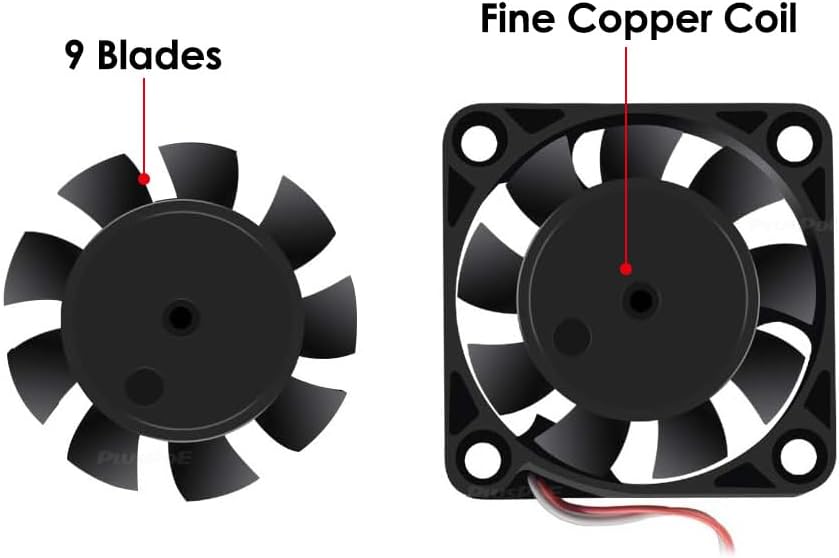
Figure 1: Illustration highlighting the 9-blade design and the fine copper coil within the fan motor.
Package Contents
- 2 x PLUSPOE 40mm x 10mm DC 12V Brushless Cooling Fans
Specifications
| Attribute | Value |
|---|---|
| Model Number | PF001 |
| Dimensions | 40mm x 40mm x 10mm (1.57" x 1.57" x 0.39") |
| Rated Voltage | DC 12V |
| Operating Voltage Range | 10.8V - 13.2V DC |
| Start-up Voltage | 6V DC |
| Rated Current | 0.04A (Max. 0.10A) |
| Rated Power | 0.48W (Max. 1.2W) |
| Maximum Rotational Speed | 6800 RPM |
| Air Flow Capacity | 7.56 CFM |
| Air Pressure | 3.19 mmH2O |
| Noise Level | 27.5 dB(A) |
| Bearing System | Dual Ball Bearing |
| Life Expectancy | 50,000 hours at 25°C |
| Connector Type | 2-Pin (PH2.5) |
| Housing & Blade Material | Black PBT (UL94V-0) |
| Item Weight (per fan) | 18.7g (0.66 oz) |
| Safety Approvals | CE, RoHS |
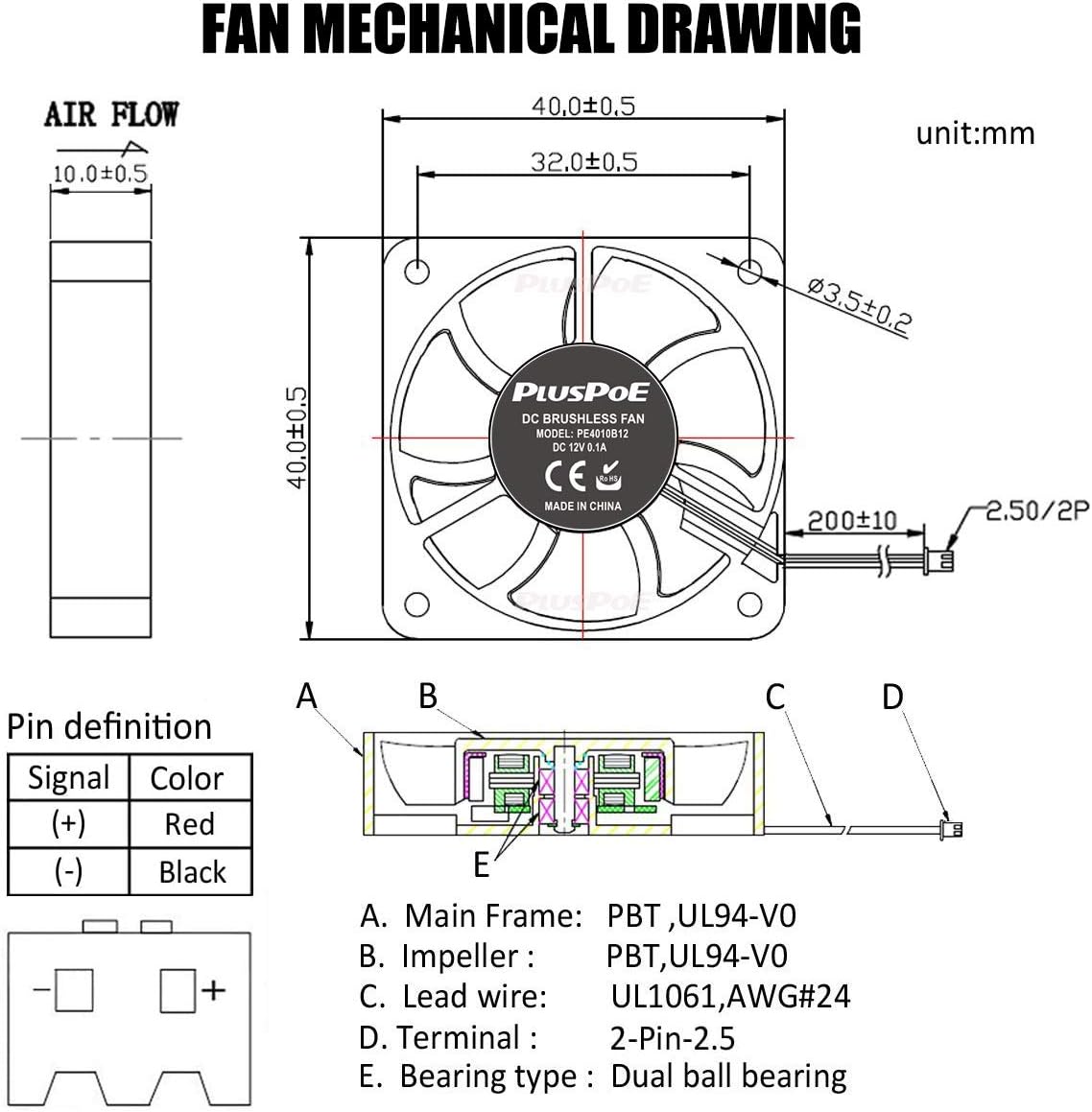
Figure 2: A detailed mechanical drawing of the fan, showing dimensions (40x40x10mm), airflow direction, and internal components with a pin definition for the 2-pin connector.
Setup
- Identify Mounting Location: Determine the optimal position for the fan within your device or enclosure. Ensure there is sufficient space for the fan and proper airflow.
- Determine Airflow Direction: The fan is designed to push air in a specific direction. Refer to the mechanical drawing (Figure 2) or the arrow on the fan housing to ensure the desired airflow (intake or exhaust) is achieved.
- Secure the Fan: Mount the fan securely using appropriate screws or fasteners through the mounting holes. Avoid over-tightening, which can damage the fan housing.
- Connect Power: Connect the fan's 2-pin connector (PH2.5) to a compatible DC 12V power source. Observe the correct polarity: the Red wire is positive (+) and the Black wire is negative (-). Incorrect polarity can damage the fan.

Figure 3: Close-up views of the 2-pin connector (PH2.5) and its dimensions, along with the fan's label showing model and voltage.
Operating Instructions
Once properly installed and connected to a stable DC 12V power source, the fan will begin operation. The fan is designed for continuous use in various applications requiring active cooling.
Typical Applications:
- Computer cases and components (e.g., CPU cooling, server cooling)
- 3D printers
- Humidifiers and aromatherapy devices
- Small electronic appliances and communication equipment
- Intelligent industrial control equipment
- High-precision medical equipment

Figure 4: Visual examples of common applications for the 40mm cooling fan, including power banks, USB chargers, network routers, and laptops.
Maintenance
Regular maintenance helps ensure the fan's efficiency and extends its lifespan.
- Cleaning: Periodically inspect the fan blades and housing for dust accumulation. Gently clean with a soft brush or compressed air. Ensure the fan is powered off and disconnected before cleaning.
- Inspection: Check for any physical damage, loose connections, or obstructions that might impede the fan's rotation.
- Avoid Lubrication: The dual ball bearing system is designed for long-term, maintenance-free operation. Do not attempt to lubricate the bearings.
Troubleshooting
Fan Not Spinning:
- Verify that the fan is correctly connected to a DC 12V power source.
- Check the power source for proper voltage output.
- Ensure the polarity of the connection is correct (Red to positive, Black to negative).
- Inspect for any obstructions preventing the fan blades from rotating freely.
Excessive Noise:
- Ensure the fan is securely mounted and not vibrating against other components.
- Check for any foreign objects or dust buildup on the fan blades.
- If the noise persists and is unusual, the fan may be faulty and require replacement.
Insufficient Cooling:
- Confirm that the fan's airflow direction is appropriate for your cooling needs.
- Ensure there are no obstructions blocking the intake or exhaust of the fan.
- Verify that the fan is receiving adequate power (DC 12V).
Warranty
This PLUSPOE cooling fan comes with a 1-year warranty from the date of purchase. This warranty covers defects in materials and workmanship under normal use. It does not cover damage caused by misuse, accident, unauthorized modification, or improper installation. Please retain your proof of purchase for warranty claims.
Support
For further assistance, technical support, or warranty inquiries regarding your PLUSPOE 40mm x 10mm DC 12V Brushless Cooling Fan, please contact PLUSPOE customer service through the retailer where the product was purchased or refer to the official PLUSPOE website for contact information.

Figure 5: A general view of the PLUSPOE 40mm x 10mm DC 12V Brushless Cooling Fan.