
1. Introduction
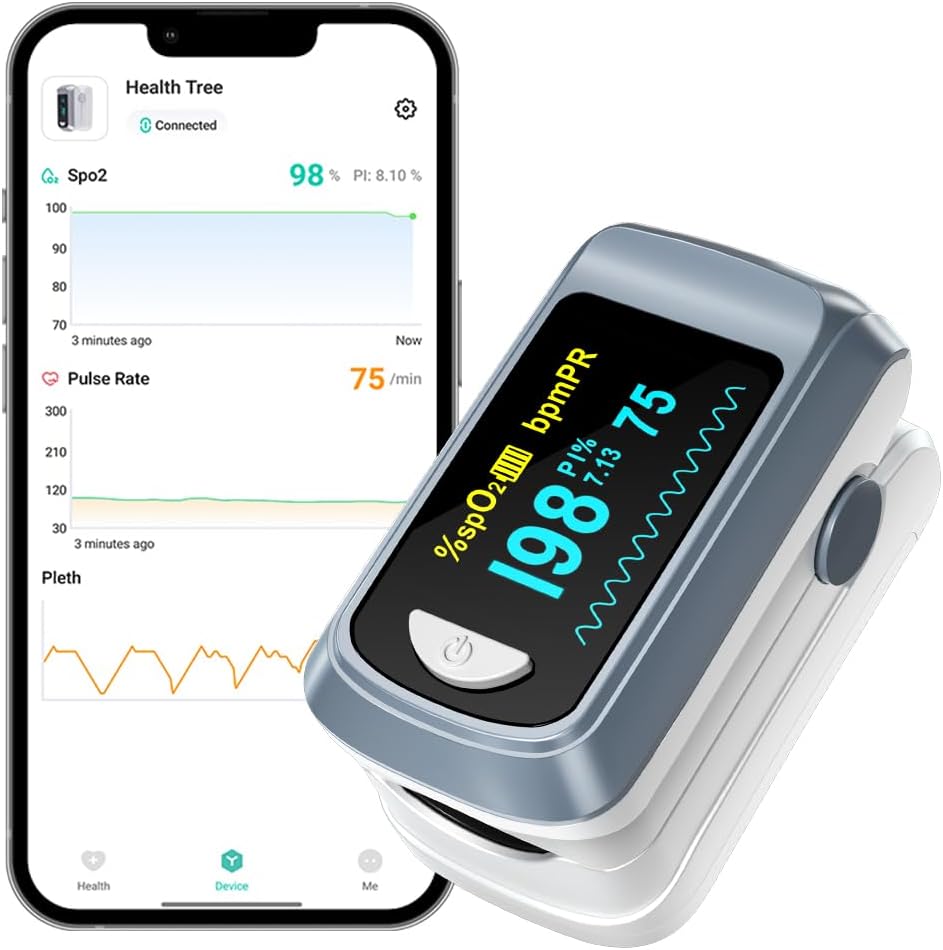
The HealthTree Bluetooth Pulse Oximeter is a compact, easy-to-use device designed for measuring blood oxygen saturation (SpO2) levels, pulse rate (PR), and perfusion index (PI). It features Bluetooth connectivity for seamless data synchronization with a dedicated mobile application, allowing for continuous monitoring, historical data tracking, and customizable alarm settings. This manual provides essential information for proper setup, operation, maintenance, and troubleshooting to ensure accurate and reliable readings.
2. What's Included
Upon opening the package, please ensure all items listed below are present and in good condition:
- 1x HealthTree Bluetooth Pulse Oximeter
- 2x AAA Batteries
- 1x Lanyard
- 1x User Manual (this document)

3. Setup
3.1. Battery Installation
To power on your pulse oximeter, you will need to install the two AAA batteries provided. Open the battery compartment cover on the back of the device, insert the batteries according to the polarity indicators (+/-), and then close the cover securely.

3.2. Attaching the Lanyard
The included lanyard can be attached to the device for convenient carrying. Locate the lanyard hole on the side of the oximeter, thread the thin loop of the lanyard through the hole, and then pass the larger part of the lanyard through the loop to secure it.
3.3. Mobile App Download and Bluetooth Connection
To utilize the full features of your HealthTree Pulse Oximeter, download the companion "HealthTree" app from your device's app store (Apple App Store or Google Play Store). Once installed, enable Bluetooth on your smartphone or tablet, open the HealthTree app, and follow the on-screen prompts to connect to your oximeter. The app allows for real-time data viewing, historical data tracking, and customizable settings.

4. Operating Instructions
4.1. Taking a Measurement
- Ensure the batteries are correctly installed.
- Open the clamp of the oximeter.
- Insert one of your fingers (preferably the index finger) into the rubber opening of the oximeter until it touches the stop.
- Release the clamp.
- Press the power button once to turn on the device.
- Keep your hand still and avoid movement during the measurement.
- The readings for SpO2, Pulse Rate, and PI will appear on the display within a few seconds.
4.2. Interpreting Readings
- SpO2: Blood Oxygen Saturation level, displayed as a percentage. Normal range is typically 95-100%.
- PR: Pulse Rate, displayed in beats per minute (bpm).
- PI: Perfusion Index, indicates the strength of the pulse signal.
4.3. Alarm Function
The HealthTree app allows you to set custom high and low thresholds for SpO2 and Pulse Rate. If your measured values fall outside these preset limits, the app will trigger an audible alarm on your phone, and the values on the oximeter screen will flash continuously. This feature helps you monitor abnormal readings effectively.

4.4. Data Synchronization and Historical Data
With the Bluetooth function enabled, your oximeter automatically records and stores readings for up to 10 hours continuously. The HealthTree app provides real-time data, graphic reports, and trends of your blood oxygen saturation and heart rate. You can view detailed historical data, analyze trends, and even share reports with your private doctor or healthcare provider.

4.5. Auto Shutdown
The pulse oximeter is designed to conserve battery life. It will automatically switch off when a finger is removed from the unit for more than 10 seconds.

5. Maintenance
Proper maintenance ensures the longevity and accuracy of your HealthTree Pulse Oximeter.
- Cleaning: Use a soft cloth dampened with either a commercial, non-abrasive cleaner, or a solution of 70% alcohol in water, to lightly wipe the surfaces of the oximeter.
- Storage: Store the device in a cool, dry place away from direct sunlight, extreme temperatures, and moisture.
- Battery Replacement: Replace batteries when the low battery indicator appears on the display to ensure continuous operation.
6. Troubleshooting
If you encounter any issues with your pulse oximeter, refer to the table below for common problems and their solutions:
| Problem | Possible Cause | Solution |
|---|---|---|
| The button cannot be pressed to its position. | Button jammed or obstructed. | Ensure that the button is fully depressed and free of obstructions. |
| Battery capacities are low. | Batteries are low, missing, discharged, or oriented incorrectly. | Replace with new batteries. Check positive and negative directions. |
| No response to the function button. | Battery installation error or device malfunction. | Please check whether the positive and negative directions of the battery are consistent with the indicators. If issue persists, contact support. |
| Display is dark or bright. | Brightness setting. | Adjust the brightness of the screen from 1 to 5 by long pressing the power switch. |
| Reading is inaccurate or unreliable. | Excessive ambient light, movement during measurement, false nails/nail polish, or dark skin. | Ensure proper placement, minimize movement, avoid direct sunlight, and remove nail polish if necessary. |
| Why does the reading always change? | The pulse oximeter measures data in real time. Body changes dynamically. | The results also change over time. Please use it with confidence. |
7. Specifications
| Specification | Value |
|---|---|
| Product Dimensions | 0.39 x 0.39 x 0.39 inches; 2.4 ounces |
| Item Model Number | JKS50B |
| Batteries | 2 AAA batteries required. |
| Date First Available | December 26, 2019 |
| Manufacturer | HealthTree |
| ASIN | B083592QSD |
| Brand | HealthTree |
| Color | Gray |
| Measuring Range (SpO2) | [90-100]% |
| Measuring Range (Pulse Rate) | [60-100] bpm |
| Number of Batteries | 2 AAA batteries required. |
| Battery Life | 3 months |
8. Warranty and Support
For warranty information and customer support, please refer to the documentation included with your product or visit the official HealthTree website. Keep your purchase receipt as proof of purchase.
Legal Disclaimer
Statements regarding dietary supplements have not been evaluated by the FDA and are not intended to diagnose, treat, cure, or prevent any disease or health condition.


