1. Safety Information
Read all instructions carefully before installation and operation. Failure to follow these instructions may result in personal injury or damage to the product or vehicle. Always consult a qualified professional for installation if you are unsure.
- Do not operate the unit in a way that distracts you from driving.
- Ensure all wiring is correctly connected to prevent short circuits and damage.
- Avoid blocking ventilation openings to prevent overheating.
- Do not disassemble or modify the unit. This may cause damage or malfunction.
2. Package Contents
Verify that all items are present in the package:
- JVC KW-M150BT Digital Media Receiver Unit
- Wiring Harness
- Microphone
- Mounting Hardware (screws, brackets)
- User Manual (this document)
3. Installation
Proper installation is crucial for optimal performance and safety. It is recommended to have this unit installed by a professional car audio technician.
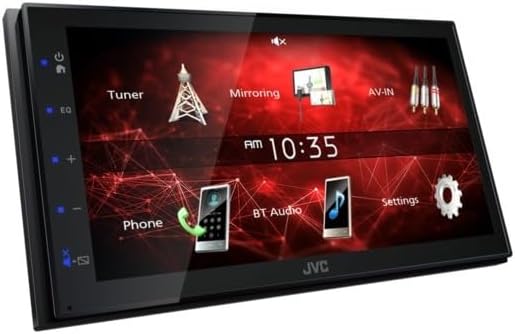
Image: Angled view of the JVC KW-M150BT unit, showing its compact design suitable for in-dash installation.
- Preparation: Disconnect the vehicle's negative battery terminal to prevent electrical shorts.
- Remove Existing Unit: Carefully remove the factory or existing car stereo from the dashboard.
- Wiring: Connect the supplied wiring harness to the vehicle's wiring. Ensure correct connections for power, ground, speakers, and accessories. Refer to the wiring diagram provided with the unit.
- Mounting: Secure the KW-M150BT unit into the dashboard using the provided mounting brackets and screws.
- Connect Peripherals: Connect the microphone, USB cable, AV input/output, and rear view camera input as needed.
- Final Check: Reconnect the battery terminal and test the unit before fully reassembling the dashboard.
4. Setup
After installation, perform the initial setup steps:
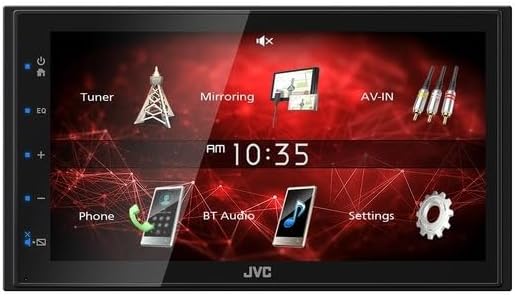
Image: Front view of the JVC KW-M150BT display, showing the main user interface with icons for Tuner, Mirroring, AV-IN, Phone, BT Audio, and Settings.
- Initial Power On: Turn on your vehicle's ignition. The unit should power on and display the JVC logo.
- Language Selection: Follow the on-screen prompts to select your preferred language.
- Time and Date: Set the correct time and date through the system settings menu.
- Bluetooth Pairing:
- On the KW-M150BT, navigate to the Bluetooth settings.
- Enable Bluetooth on your mobile device and search for available devices.
- Select "KW-M150BT" from the list on your phone and confirm the pairing code.
- Audio Settings: Access the audio menu to adjust the 13-Band Graphic EQ, Time Alignment, Bass Boost, and High/Low-Pass Filters to your preference.
5. Operating
This section covers the basic operation of your JVC KW-M150BT Digital Media Receiver.
- Touch Panel: The 6.8-inch capacitive touch panel allows for intuitive control. Tap icons to select functions, swipe to navigate menus.
- Radio (Tuner): Select the 'Tuner' icon to access FM/AM radio. Use the on-screen controls to scan for stations, save presets, and enable RDS functions.
- Media Playback:
- USB: Connect a USB device to the rear USB port. The unit will automatically detect and play compatible audio/video files (MP3, WMA, WAV, AAC, FLAC, H.264, MPEG 1/2, MPEG 4, AVI/MKV).
- Bluetooth Audio: Once paired, select 'BT Audio' to stream music wirelessly from your smartphone.
- iPod/iPhone: Connect via USB or Bluetooth for music playback.
- Mirroring for Android: Connect your Android smartphone via USB to mirror its screen content onto the receiver's display.
- Hands-Free Calling: With a paired Bluetooth phone, you can make and receive calls directly through the unit using the included microphone.
- Rear View Camera: If a rear view camera is connected, the display will automatically switch to the camera view when the vehicle is in reverse.
- AV Input: Connect external audio/video sources to the RCA AV input.
- Steering Remote Control: The unit is compatible with steering wheel remote controls (adapter may be required, sold separately).
6. Maintenance
To ensure longevity and optimal performance of your KW-M150BT:
- Cleaning the Screen: Use a soft, dry cloth to gently wipe the capacitive touchscreen. For stubborn smudges, slightly dampen the cloth with water or a screen cleaner designed for electronics. Avoid harsh chemicals.
- General Care: Keep the unit free from dust and debris. Avoid exposing it to extreme temperatures or direct sunlight for extended periods.
- Firmware Updates: Check the official JVC website periodically for any available firmware updates to improve performance and add new features.
7. Troubleshooting
If you encounter issues with your unit, refer to the following common problems and solutions:
| Problem | Possible Cause | Solution |
|---|---|---|
| No power | Incorrect wiring, blown fuse, vehicle battery issue. | Check power and ground connections. Inspect vehicle fuses. Ensure battery is charged. |
| No sound | Speaker wiring incorrect, volume too low, mute activated. | Verify speaker connections. Increase volume. Check if mute function is active. |
| Bluetooth connection fails | Device not in pairing mode, interference, incorrect pairing process. | Ensure both devices are in pairing mode. Delete previous pairings and try again. Move closer to the unit. |
| Touch screen unresponsive | Temporary software glitch, screen dirty. | Perform a soft reset (refer to specific reset instructions if available). Clean the screen. |
| USB device not recognized | Incompatible format, damaged USB device, faulty cable. | Ensure USB device is formatted correctly (FAT32). Try a different USB device or cable. |
If problems persist after attempting these solutions, please contact JVC customer support or a qualified service technician.
8. Specifications
Detailed technical specifications for the JVC KW-M150BT Digital Media Receiver:
- Monitor:
- Screen Size: 6.8" Wide VGA
- Touch Panel: Capacitive
- Key Illumination Color: Blue
- Media Playback: MP3, WMA, WAV, AAC, FLAC, H.264, MPEG 1/2, MPEG 4, AVI/MKV
- Bluetooth Control: Built-in Bluetooth Version 4.2 (Wired-Mic included), Hands-Free Call (HFP1.6 Wideband Speech), Audio Streaming & Control (A2DP, AVRCP), Voice Dialing, Phone Book Access Profile (PBAP)
- Android Control: Mirroring for Android (via USB), Android Music Playback (via Bluetooth®)
- iPod/iPhone Control: Music Playback (via USB or Bluetooth®)
- USB: x1 Rear USB Port (High Speed), USB Power Supply (1.0A)
- Radio Tuner: Radio Data System, 30 Preset Stations (6ch x 5band), Automatic Presetting
- FM Frequency Range: 87.5-108.0MHz
- AM Frequency Response: 531-1,611kHz
- Audio:
- Maximum Power Output: 45W x 4
- Full Bandwidth Power: 16W x 4 (at less than 1% THD)
- EQ: 13-Band Graphic EQ (7 Preset + 3 User)
- Bass Boost: Yes
- High-Pass Filter/Low-Pass Filter: Yes/Yes
- Time Alignment: Yes
- Inputs and Outputs:
- AV Input: RCA x 1
- Video Out: RCA
- Rear View Camera Input: Yes
- Line Output Terminals: 3 Pairs (Front L/R, Rear L/R, Sub.W Mono x1)
- Pre-output Level/Impedance: 2V / 10k ohms
- Subwoofer Output with Level/Frequency Control: Yes
- General: Fixed Face Type, Steering Remote Control Ready, ISO Connector, Installation Size: 178 x 100 x 75 (mm)
9. Warranty and Support
JVC products are manufactured to high-quality standards and are backed by a limited warranty. For specific warranty terms and conditions, please refer to the warranty card included with your product or visit the official JVC website.
For technical assistance, troubleshooting, or service inquiries, please contact JVC customer support. You can find contact information and additional resources on the JVC Official Store or their corporate website.


