Introduction
This instruction manual provides essential information for the proper use and maintenance of your xingzhihua RAV521 ZJ66500 remote control. This remote is specifically designed as a replacement for various Yamaha Audio/Video Receiver models, ensuring seamless compatibility and functionality.
The remote control is pre-programmed and requires no additional setup. Simply insert batteries, and it will function with compatible Yamaha receivers. It is an ideal replacement for original or broken remote controls, offering full functionality for models such as RX-V377, YHT-4910U, HTR-3067, YHT-4910UBL, and VD-199.
Setup
Battery Installation
The remote control requires two AAA batteries (not included) for operation. Follow these steps to install the batteries:
- Locate the battery compartment on the back of the remote control.
- Press down on the latch and slide the battery cover downwards to open it.
- Insert two AAA batteries, ensuring the positive (+) and negative (-) terminals align correctly with the markings inside the compartment.
- Slide the battery cover back into place until it clicks securely.
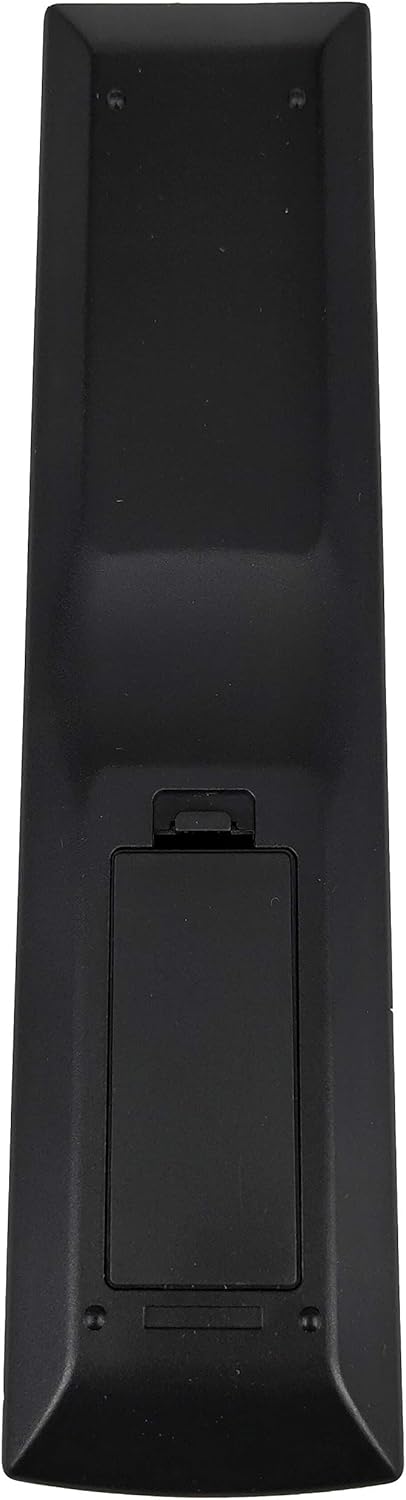
Image: Rear view of the remote control with the battery compartment visible. The compartment cover is located at the bottom half of the remote's back.
Initial Use
Once batteries are installed, the remote control is ready for immediate use with compatible Yamaha Audio/Video Receivers. No programming or pairing is required.
Operation
The xingzhihua RAV521 ZJ66500 remote control provides comprehensive control over your Yamaha Audio/Video Receiver. Ensure a clear line of sight between the remote's infrared emitter and your receiver's sensor for optimal performance.

Image: Front view of the remote control, displaying its full array of buttons for various functions including power, input selection, volume, and playback controls.
Key Functions Overview
- Power (RECEIVER): Turns the receiver on or off.
- HDMI 1-4, AV 1-4, AUDIO, AUX, USB: Selects the corresponding input source.
- TUNER (FM, AM, PRESET, TUNING): Controls radio functions.
- MOVIE, MUSIC, SUR.DECODE, STRAIGHT, BASS, ENHANCER: Selects various sound modes and audio enhancements.
- SCENE (BD/DVD, TV, CD, RADIO): One-touch access to pre-configured scene settings.
- SETUP, OPTION: Accesses receiver settings and options menus.
- Navigation (Arrow buttons, ENTER, RETURN, DISPLAY, POP-UP MENU, TOP MENU): Navigates through menus and confirms selections.
- VOLUME (+/-), MUTE: Adjusts the audio volume and mutes sound.
- Playback Controls (MODE, Play, Pause, Stop, Skip, Fast Forward/Rewind): Controls media playback.
Maintenance
- Cleaning: Wipe the remote control with a soft, dry cloth. Do not use liquid cleaners or abrasive materials, as they may damage the surface or internal components.
- Battery Replacement: Replace batteries when the remote's responsiveness decreases or it stops functioning. Always replace both batteries at the same time with new ones of the same type (AAA).
- Storage: If the remote control will not be used for an extended period, remove the batteries to prevent leakage and potential damage. Store in a cool, dry place.
Troubleshooting
| Issue | Possible Cause | Solution |
|---|---|---|
| Remote is not responding. | Dead or incorrectly installed batteries. | Replace batteries with new AAA batteries, ensuring correct polarity. |
| Remote has limited range or intermittent response. | Obstruction between remote and receiver; weak batteries. | Ensure a clear line of sight. Replace batteries if they are old. |
| Specific functions do not work. | Remote not compatible with all functions of your specific receiver model. | Verify your receiver model is listed as compatible. Some advanced functions may require the original remote. |
Specifications
| Feature | Detail |
|---|---|
| Model Number | RAV521 |
| Compatible Devices | Yamaha Audio/Video Receivers (RX-V377, YHT-4910U, HTR-3067, YHT-4910UBL, VD-199) |
| Power Source | 2 x AAA Batteries (not included) |
| Color | Black |
| Product Dimensions | 1.97 x 1.97 x 1.97 inches |
| Item Weight | 3.38 ounces |
| Special Feature | Universal (for specified Yamaha models) |
Warranty Information
This product is covered by a standard manufacturer's warranty against defects in materials and workmanship. Please retain your proof of purchase for any warranty claims. For specific warranty terms and conditions, refer to the documentation provided at the time of purchase or contact customer support.
Customer Support
For further assistance, technical support, or inquiries regarding your xingzhihua RAV521 ZJ66500 remote control, please contact the seller or refer to the contact information provided with your purchase. Our support team is available to help with any questions or issues you may encounter.
Product Overview Video
Video: A 360-degree rotating view of the xingzhihua RAV521 ZJ66500 remote control, showcasing its design and button layout from all angles.