
1. Introduction
Thank you for choosing the ovios Ergonomic Office Chair, Model KL102. This manual provides detailed instructions for the assembly, operation, and maintenance of your new chair. Please read this manual thoroughly before assembly and use to ensure proper function and safety.
Safety Information
- For indoor use only.
- Do not exceed the maximum weight capacity of 250 pounds.
- Assembly is required. Follow all steps carefully.
- Caution: Upholstery is flammable. Keep away from open flames and heat sources.
- Ensure all screws and bolts are tightened securely before use. Periodically check and re-tighten as necessary.
2. Package Contents
Please verify that all components are present before beginning assembly. If any parts are missing or damaged, please contact customer support.
- Backrest (1)
- Seat Cushion (1)
- Armrests (2)
- Base (1)
- Casters (5)
- Gas Lift Cylinder (1)
- Mechanism Plate (1)
- Hardware Pack (Screws, Washers, Allen Wrench)
- Instruction Manual (1)

Figure 2.1: Upgraded Components - Stable Mechanism, Certified Gas Lift, Strong Steel Base, Durable Casters.
3. Setup & Assembly Instructions
Follow these steps carefully to assemble your ovios office chair. It is recommended to have a second person assist with some steps.
- Attach Casters to Base: Insert each of the five casters into the holes at the end of the chair base until they click securely into place.
- Insert Gas Lift: Place the gas lift cylinder into the center hole of the chair base. Ensure it is firmly seated.
- Attach Mechanism Plate to Seat: Align the mechanism plate with the pre-drilled holes on the underside of the seat cushion. Secure it using the provided screws and Allen wrench. Ensure the front of the mechanism plate faces the front of the seat.
- Attach Armrests: Align each armrest with the corresponding holes on the sides of the seat cushion and backrest. Secure them using the provided screws. Do not overtighten initially.
- Connect Backrest to Seat: With the armrests loosely attached, align the backrest with the remaining holes on the armrests. Secure the backrest to the armrests using the provided screws. Once all screws are in place for both armrests and backrest, tighten all screws firmly.
- Connect Seat Assembly to Gas Lift: Carefully place the assembled seat and backrest onto the gas lift cylinder, ensuring the center hole of the mechanism plate aligns with the top of the gas lift. Press down firmly to secure.
Your ovios office chair is now assembled and ready for use.
4. Operating Instructions
Your ovios office chair offers several adjustment features for personalized comfort.
Height Adjustment
To adjust the seat height, locate the lever on the right side beneath the seat. While seated, pull the lever up to lower the seat. To raise the seat, stand up and pull the lever up. Release the lever at your desired height.
Tilt Adjustment & Tension
The chair features a 90° to 120° tilt adjustment. To recline, pull the lever on the left side beneath the seat outwards. To lock the chair in an upright position, push the lever inwards. The tilt tension can be adjusted by rotating the round knob located at the front center beneath the seat. Turn clockwise to increase tension (making it harder to recline) or counter-clockwise to decrease tension (making it easier to recline).
360° Swivel & Rolling Casters
The chair is designed with a 360° swivel function for easy rotation and durable rolling casters for smooth movement across various floor surfaces without scratching.

Figure 4.1: Tilt and Swivel Functions
Video 4.1: Official ovios demonstration of the office chair's features, including its ergonomic design, material, and adjustable functions.
5. Maintenance & Care
Proper care will extend the life and appearance of your ovios office chair.
- Cleaning: Wipe clean with a damp cloth. For tougher stains on the faux suede leather, use a mild soap solution and a soft cloth, then wipe dry. Avoid harsh chemicals or abrasive cleaners.
- Inspection: Periodically check all screws and bolts to ensure they are tight. Re-tighten as needed to maintain stability and safety.
- Avoid Direct Sunlight: Prolonged exposure to direct sunlight can cause the faux leather to fade or crack.
- Protect from Sharp Objects: Avoid contact with sharp objects to prevent scratches or tears in the upholstery.

Figure 5.1: Soft Touch Suede Leather Features - Breathable, Non-Pilling, Scratch-Resistant, Easy to Clean.
6. Troubleshooting
If you encounter any issues with your chair, refer to the following common problems and solutions:
- Chair is Wobbly: Ensure all assembly screws are fully tightened. Check the connection between the gas lift and the base/seat mechanism.
- Chair Does Not Adjust Height: Verify that the gas lift lever is functioning correctly and the gas lift cylinder is properly inserted into the base and seat mechanism. If the gas lift is faulty, it may need replacement.
- Chair Squeaks: Apply a small amount of lubricant (e.g., silicone spray) to moving parts, especially where metal components meet, such as the tilt mechanism and the base of the gas lift.
- Difficulty Rolling: Check casters for any trapped debris (hair, lint) and clean them. Ensure casters are securely inserted into the base.
If problems persist, please contact ovios customer support.
7. Specifications
| Feature | Detail |
|---|---|
| Brand | ovios |
| Model Name | KL102 |
| Color | Brown, Suede Leather |
| Product Dimensions | 27.55"D x 28.74"W x 40"H |
| Seat Height | 18 Inches |
| Seat Depth | 20.07 inches |
| Back Style | Cushion Back |
| Material | Faux Leather, Sponge Fill |
| Special Features | Arm Rest, Ergonomic, Rolling, Seat Lock, Swivel |
| Maximum Weight Recommendation | 250 Pounds |
| UPC | 791348344665 |

Figure 7.1: Product Dimensions and Key Features
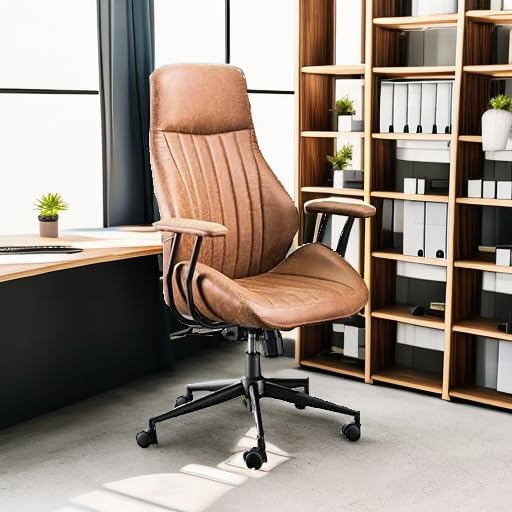
Figure 7.2: Ergonomic Design for Spinal Support
8. Warranty & Support
For warranty information or technical support, please refer to the documentation included with your purchase or contact ovios customer service directly. Contact details can typically be found on the product packaging or the official ovios website.
