
1. Introduction
The KLARUS HC3 is a versatile and lightweight LED clip-on cap light designed for various outdoor activities such as hunting, camping, and fishing. It features COB LED technology, multiple lighting modes, motion sensor control, and a durable, waterproof design. This manual provides detailed instructions for the proper use and maintenance of your HC3 light.

Image 1.1: KLARUS HC3 LED Clip-On Cap Light with included USB charging cable.
2. Package Contents
Please check the package to ensure all items are present:
- KLARUS HC3 Visor Clip Lamp x 1
- Headband x 1
- USB Charging Cable x 1
- User Manual x 1

Image 2.1: The KLARUS HC3 package contents, showing the clip light, headband, USB cable, and user manual.
3. Product Features
- High Output & Lightweight COB Light: Maximum output of 100 lumens. Weighs only 37g (1.31 ounces) and is 0.91 inches thick, ensuring user comfort. COB technology provides natural, uniform light without flickering or color distortion, reducing eye strain.
- 5 Lighting Modes: Features Medium, High, Low white light modes, plus Red light and Red Strobe modes.
- Hands-Free Operation with Motion Sensor: Control the light with a simple hand wave. Equipped with twin sensors for enhanced gesture recognition. Can be worn directly on the head with the comfortable headband or easily clipped onto a cap.
- Quick Charge & Long Runtime: The built-in 500 mAh battery charges in approximately 1 hour via USB-C and provides up to 27 hours of runtime on the lowest setting.
- Weather Resistance: IPX5 waterproof rating ensures reliable performance in rain or snow, making it suitable for various outdoor conditions.
- 180° Adjustable Angle: The light head can be tilted up to 180 degrees, allowing you to direct the beam precisely where needed.

Image 3.1: The HC3's lightweight design, weighing only 37g.

Image 3.2: The HC3 features a 180-degree adjustable angle for flexible illumination.

Image 3.3: The HC3 is USB rechargeable, offering convenience and efficiency.

Image 3.4: The HC3's IPX5 waterproof rating ensures durability in wet conditions.
4. Setup
4.1 Charging the Battery
- Locate the USB-C charging port on the side of the HC3 light.
- Connect the provided USB charging cable to the light and to a standard USB power source (e.g., computer, wall adapter).
- The charging indicator light will show the charging status. A full charge typically takes about 1 hour.
4.2 Attaching the Light
The HC3 can be used in two ways:
- Clip-On to a Cap: Use the integrated clip to securely attach the light to the brim of a cap or hat. Ensure the light is facing forward and is stable.
- Headband Use: Insert the HC3 light into the designated slot on the included headband. Adjust the headband for a comfortable and secure fit around your head.
5. Operating Instructions
5.1 Manual Control
- Power On/Off: Press the main power button once to turn the light on. Press and hold the button for 3 seconds to turn it off.
- Mode Switching: While the light is on, short press the power button to cycle through the white light modes: Medium → High → Low.
- Red Light Modes: From any white light mode, double-press the power button to activate Red High mode. Double-press again to switch to Red Strobe. Short press to return to the previous white light mode.
5.2 Motion Sensor Control
- Activate Sensor: Press the sensor switch button (usually located next to the power button) to enable motion sensing. An indicator light may illuminate to confirm activation.
- Hands-Free On/Off: Once activated, wave your hand approximately 10-15 cm (4-6 inches) in front of the headlight to turn the light on or off.
- Deactivate Sensor: Press the sensor switch button again to disable motion sensing.
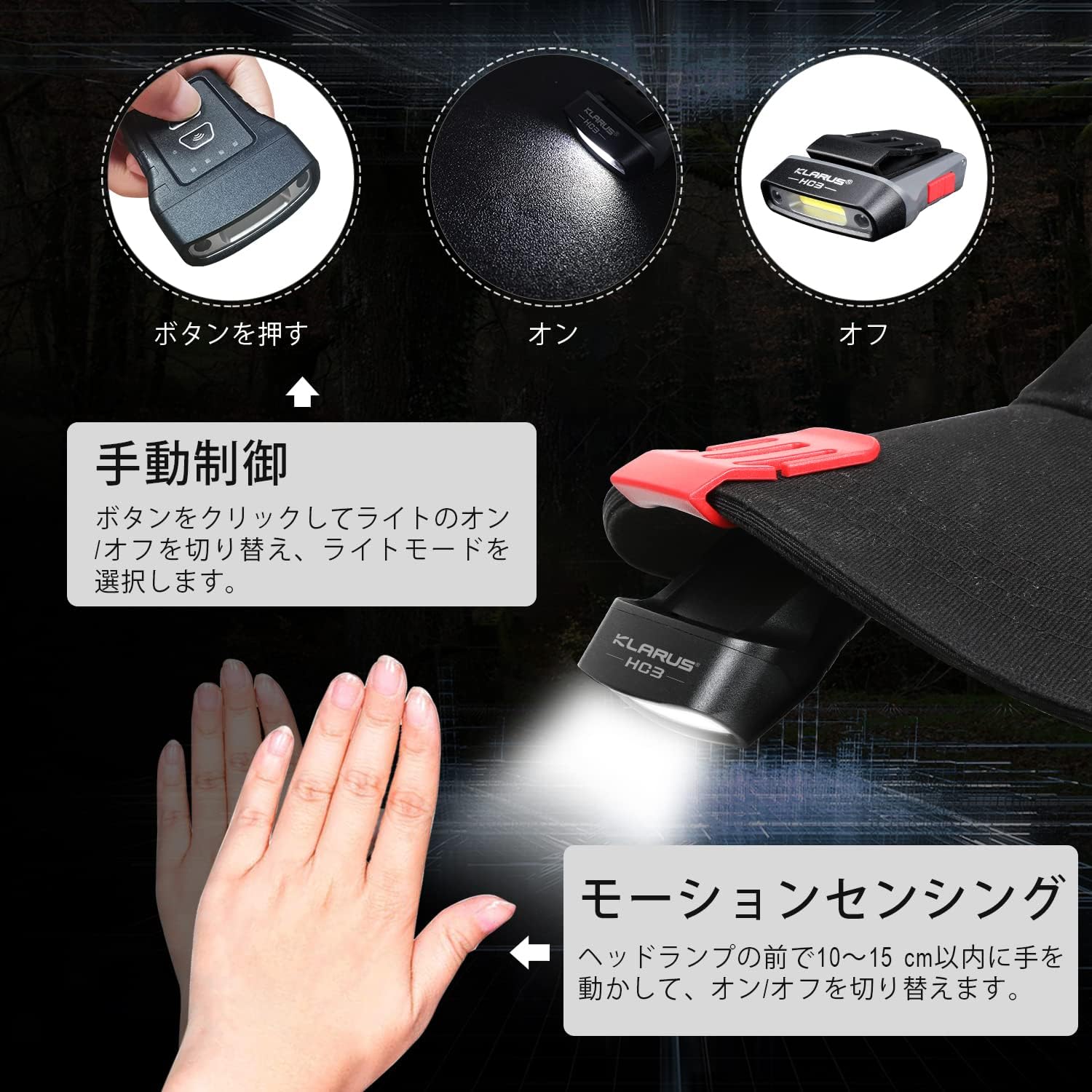
Image 5.1: Illustration of manual button control and motion sensing for the HC3 light.

Image 5.2: The five adjustable lighting modes of the KLARUS HC3.
6. Maintenance
- Cleaning: Wipe the light with a soft, damp cloth. Do not use abrasive cleaners or solvents.
- Storage: Store the light in a cool, dry place when not in use. If storing for extended periods, charge the battery every 3-6 months to maintain battery health.
- Water Exposure: While IPX5 rated, avoid prolonged submersion. After exposure to water, ensure the charging port is dry before charging.
7. Troubleshooting
- Light not turning on: Ensure the battery is charged. Check if the power button is pressed correctly.
- Motion sensor not responding: Ensure the motion sensor is activated. Check for obstructions in front of the sensor.
- Short battery life: Ensure the battery is fully charged. High brightness modes consume more power. Consider using lower modes for extended runtime.
- Charging issues: Verify the USB-C cable is properly connected to both the light and the power source. Try a different cable or power source.
8. Specifications
| Specification | Detail |
|---|---|
| Manufacturer | KLARUS |
| Product Model Number | HC3 |
| Product Dimensions | 5 x 5 x 5 cm; 37 g |
| Battery | 1 Lithium Metal battery (included) |
| Features | Waterproof function |
| Color | HC3-FBA |
| Power Source | Battery powered |
| Light Source Type | LED |
| Included Components | 1 |
| First Available Date | 2020/12/31 |
| Country of Origin | China |
9. Warranty and Support
For warranty information and customer support, please refer to the contact details provided with your purchase or visit the official KLARUS website. Keep your proof of purchase for any warranty claims.


