
1. Important Safety Information
Read all instructions carefully before assembly and use. Keep this manual for future reference.
- Do not exceed the maximum weight capacity of the stand. Refer to the specifications section for details.
- Ensure all screws are securely tightened before use. Do not overtighten.
- Use the included anti-tip cable to secure the TV stand to furniture or a wall, especially in households with children or pets, to prevent accidental tipping.
- This stand is designed for indoor use only.
- Do not attempt to modify the stand or use it for purposes other than its intended use.
- If any parts are missing or damaged, contact customer support immediately.
2. Package Contents
Verify that all components are present and undamaged before beginning assembly. If any parts are missing or defective, please contact PERLESMITH customer service.

Image: All components of the PERLESMITH TV stand, including the base, support column, TV brackets, and various hardware.
Typically includes:
- Tempered Glass Base
- Support Column
- TV Mounting Brackets (Left and Right)
- Connecting Plate
- Various Screws, Washers, and Spacers for TV attachment
- Anti-Tip Safety Cable
- Assembly Tools (e.g., Allen wrench)
- Instruction Manual
3. Compatibility
This universal swivel TV stand is designed to fit a wide range of flat-screen televisions.
- Screen Size: Compatible with most 32 to 65 inch LCD, LED, OLED, and 4K flat-screen TVs.
- VESA Compatibility: Supports VESA mounting patterns from 200x100mm (8x4 inches) up to 600x400mm (24x16 inches). Common VESA patterns include 200x100, 200x200, 200x300, 300x200, 300x300, 400x300, 400x400, 600x200, and 600x400mm.
- Weight Capacity: Please refer to your TV's manual for its weight. Ensure your TV's weight does not exceed the stand's maximum capacity (not explicitly stated, but ensure the stand feels stable with your TV).

Image: Visual representation of TV sizes (37" to 70") that can be mounted on the stand. Note: This stand is officially compatible with 32-65 inch TVs.
Image: Detailed diagram showing supported VESA patterns (200x100mm to 600x400mm) and key dimensions of the stand.
4. Setup and Assembly Instructions
Follow these steps carefully for proper assembly. It is recommended to have a second person assist with mounting the TV.
Step 4.1: Assemble the Base and Support Column
- Attach the support column to the tempered glass base using the provided screws and tools. Ensure the column is oriented correctly.
- Tighten all screws firmly but do not overtighten.

Image: The wide tempered glass base connected to the central support column, highlighting stability.
Step 4.2: Attach TV Brackets to Your TV
- Identify the correct screws, washers, and spacers for your TV's VESA mounting holes. Refer to your TV's manual for VESA pattern and screw size.
- Attach the left and right TV mounting brackets to the back of your TV. Ensure the brackets are level and securely fastened.
- Note: Some TVs may require specific spacers to ensure proper fit and prevent damage to the TV's internal components.
Step 4.3: Mount TV to the Stand
- With assistance, carefully lift the TV and hook the attached brackets onto the connecting plate of the stand.
- Ensure the TV is securely seated on the stand.
- Fasten any safety screws or locking mechanisms on the brackets to prevent the TV from accidentally dislodging.
Step 4.4: Install Anti-Tip Safety Cable
- Locate the anti-tip safety cable included in the package.
- Attach one end of the cable to the back of the TV or the stand's support column.
- Secure the other end of the cable to a sturdy piece of furniture or a wall stud using appropriate hardware (not always included, may require separate purchase depending on wall material).
- Ensure the cable is taut but not overly tight, allowing for slight movement if the swivel feature is used.
This step is crucial for preventing accidental tipping, especially in dynamic environments.
5. Operating Instructions
5.1 Swivel Function
The stand allows for a convenient swivel motion to optimize your viewing angle.
- Gently push the TV to the left or right to adjust its angle.
- The stand supports a swivel range of up to ±35 degrees (35 degrees to the right or 35 degrees to the left).
- Avoid forcing the TV beyond its intended swivel range.

Image: Visual representation of the TV swiveling left and right by 35 degrees.
5.2 Height Adjustment
The TV mounting brackets offer multiple height settings to achieve your preferred viewing height or accommodate a soundbar.
- The stand provides 12 levels of height adjustment for the TV.
- To adjust the height, you will need to unmount the TV from the stand.
- Re-position the TV mounting brackets on the support column to the desired height level.
- Securely re-attach the TV to the stand, ensuring all connections are tight.
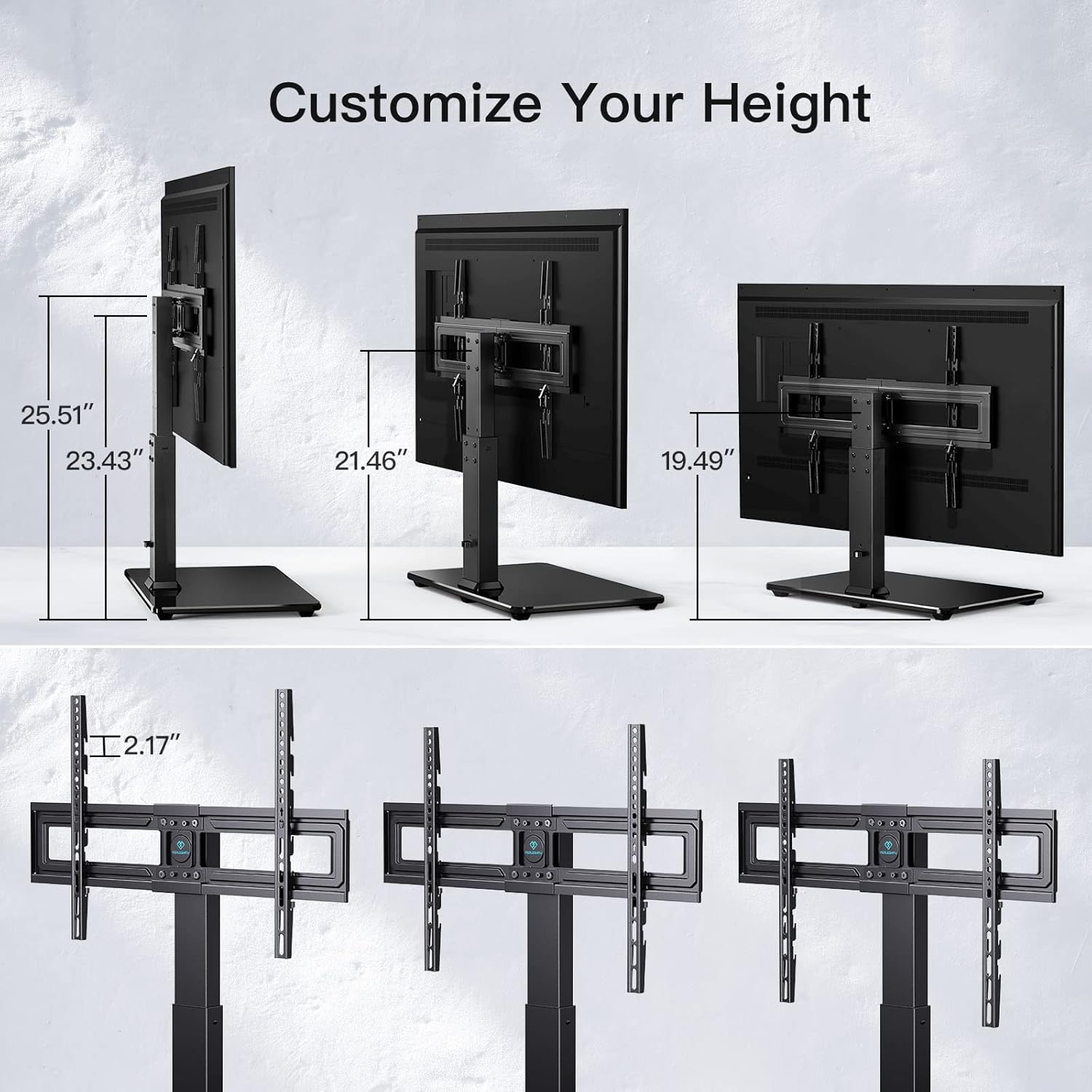
Image: Illustration of the various height settings available for the TV mounting brackets on the stand.
6. Maintenance
- Cleaning: Use a soft, dry cloth to clean the stand. For the glass base, a mild glass cleaner can be used. Avoid abrasive cleaners or solvents.
- Periodic Checks: Periodically check all screws and connections to ensure they remain tight. Re-tighten if necessary.
- Cable Management: Ensure TV cables are neatly managed and do not interfere with the swivel mechanism or pose a tripping hazard.
7. Troubleshooting
| Problem | Possible Cause | Solution |
|---|---|---|
| TV is not level after mounting. | Brackets or connecting plate not perfectly aligned during assembly. | Loosen the screws connecting the TV brackets to the stand's connecting plate. Adjust the brackets until the TV is level, then re-tighten securely. Use a spirit level for accuracy. |
| TV feels unstable or wobbly. | Screws are not fully tightened; TV weight exceeds capacity; anti-tip cable not installed. | Check and tighten all assembly screws. Verify your TV's weight against the stand's capacity. Ensure the anti-tip safety cable is properly installed and secured. |
| Difficulty swiveling the TV. | Cables are snagged; mechanism is stiff. | Check for any cables obstructing the swivel path. Ensure the stand is on a flat, stable surface. Apply a small amount of silicone lubricant to the swivel mechanism if it remains stiff (avoid oil-based lubricants). |
| Missing parts or damaged components. | Manufacturing defect or shipping damage. | Do not proceed with assembly. Contact PERLESMITH customer support immediately for replacement parts. |
8. Specifications
| Model Number | PSTVS03 |
| Compatible TV Sizes | 32 - 65 inches |
| VESA Compatibility | 200x100mm to 600x400mm |
| Swivel Range | ±35 degrees |
| Height Adjustment | 12 levels |
| Material | Alloy Steel, Tempered Glass |
| Color | Black |
| Product Dimensions (Packaged) | 44.56 x 31.6 x 5.99 cm; 7.64 kg |
9. Warranty and Support
PERLESMITH products are designed for durability and performance. This product is covered by a warranty. For specific warranty details, please refer to the documentation included with your purchase or contact PERLESMITH customer support.
If you encounter any issues during assembly or use, or if you have questions about your product, please contact our customer support team for assistance. Our team is dedicated to providing prompt and helpful solutions.
Customer Support: Please visit the official PERLESMITH website or refer to your purchase receipt for contact information.


