
Introduction
Thank you for choosing the Rockville RVCS2 Heavy-Duty Tripod Speaker Stand. This manual provides essential information for the safe and effective setup, operation, and maintenance of your speaker stand. The RVCS2 is designed for robust support of PA speakers, featuring a convenient crank-up height adjustment and a stable tripod base, suitable for various professional audio applications.
Safety Instructions
- Maximum Load Capacity: Do not exceed the maximum weight capacity of 100 lbs (45 kg). Overloading can cause instability and damage.
- Stable Surface: Always place the speaker stand on a flat, level, and stable surface. Uneven surfaces can lead to tipping.
- Leg Spread: Ensure the tripod legs are fully extended and locked into position before mounting any equipment.
- Secure Speaker: Verify that the speaker is securely seated on the stand's pole.
- Height Adjustment: Exercise caution when adjusting the height, especially with a speaker mounted. Use both hands to operate the crank mechanism smoothly.
- Clearance: Maintain a safe distance from the stand during operation to prevent accidental bumps or falls.
- Inspection: Regularly inspect the stand for any signs of wear, damage, or loose components. Do not use if damaged.
Package Contents
Please ensure all items are present upon unpacking:
- 1 x Rockville RVCS2 Heavy-Duty Tripod Speaker Stand
- 1 x Carry Bag

Image: The included carry bag for the Rockville RVCS2 speaker stand, featuring the Rockville logo.
Setup
- Unfold the Tripod Base: Place the stand on the ground and gently pull the legs outwards until they are fully extended and the base spread is maximized. Ensure the locking mechanism for the legs is engaged for stability.
- Position the Stand: Place the fully extended stand on a firm, level surface where the speaker will be used.
- Adjust Initial Height (Optional): Before mounting the speaker, you may pre-adjust the stand to a lower, manageable height using the crank mechanism.
- Mount the Speaker: Carefully lift your PA speaker and slide its pole mount receptacle onto the top pole of the RVCS2 stand. Ensure the speaker is fully seated and stable.

Image: Close-up view of the fully extended tripod base of the speaker stand, showing the stable leg configuration.
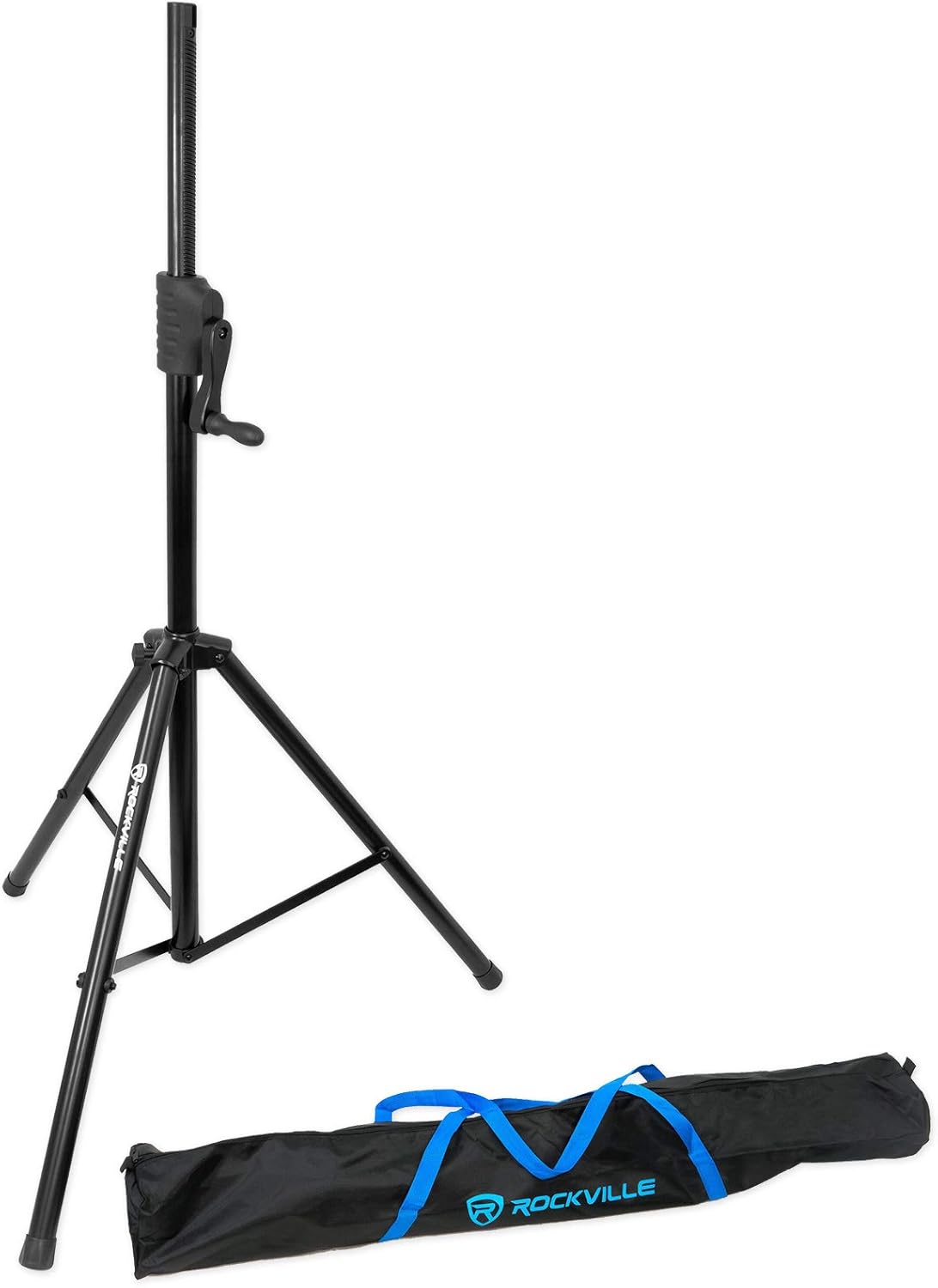
Image: The Rockville RVCS2 speaker stand with a PA speaker securely mounted on top, ready for use.
Operating the Crank Mechanism
The RVCS2 features a hand crank for easy and precise height adjustment.
- To Raise the Speaker: Turn the hand crank clockwise. The internal gear mechanism will smoothly lift the upper shaft, raising the speaker to your desired height.
- To Lower the Speaker: Turn the hand crank counter-clockwise. The upper shaft will descend smoothly. Always maintain control of the crank during descent.
- Secure Height: Once the desired height is reached, ensure the crank is not under tension and the stand is stable. The crank mechanism is designed to hold the position securely.

Image: A person's hand turning the crank handle on the Rockville RVCS2 speaker stand to raise the speaker.

Image: A person's hand gripping the crank mechanism of the Rockville RVCS2 speaker stand, preparing to adjust the height.
Maintenance
- Cleaning: Wipe down the stand with a soft, dry cloth to remove dust and dirt. For stubborn grime, a slightly damp cloth can be used, followed by immediate drying.
- Lubrication: Periodically inspect the crank mechanism and telescopic pole for smooth operation. If movement becomes stiff, a small amount of silicone-based lubricant can be applied to the moving parts, avoiding excessive application.
- Storage: When not in use, collapse the stand, place it in its carry bag, and store it in a dry, cool environment to prevent corrosion and damage.
Troubleshooting
| Problem | Possible Cause | Solution |
|---|---|---|
| Stand is unstable or wobbles. | Uneven surface; legs not fully extended; speaker not centered. | Move stand to a level surface. Ensure legs are fully spread and locked. Re-center the speaker on the pole. |
| Crank mechanism is stiff or difficult to turn. | Dirt or debris in mechanism; lack of lubrication. | Clean the crank and telescopic pole. Apply a small amount of silicone lubricant to moving parts. |
| Speaker does not sit securely on the pole. | Speaker pole mount is damaged or incompatible; speaker not fully seated. | Ensure the speaker's pole mount is compatible with the stand's pole diameter. Verify the speaker is pushed down completely onto the stand. |
Specifications
- Model: RVCS2
- Type: Heavy-Duty Tripod Speaker Stand
- Adjustable Height Range: 48 inches – 78 inches (122 cm – 198 cm)
- Maximum Height: 80 inches (203 cm)
- Weight Capacity: 100 lbs (45 kg)
- Base Spread: 39 inches (99 cm)
- Upper Shaft Construction: Extruded Aluminum
- Bottom Tube Construction: Steel
- Telescopic Tube Diameter: 1.38 inches (3.5 cm)
- Outer Tube Diameter: 1.61 inches (4.1 cm)
- Leg Tube Diameter: 1.38 inches (3.5 cm)
- Product Weight: 9.5 lbs (4.31 kg)
- Color: Black
- Material: Metal
- Finish: Powder Coated
Warranty and Support
For warranty information or technical support, please refer to the product warranty card included in your package or visit the official Rockville website. Keep your purchase receipt as proof of purchase.


