
1. Introduction
This manual provides essential information for the proper installation, operation, and maintenance of your HTZSAFE T704 Extra Solar Wireless Outdoor Weatherproof Motion Sensor. This sensor is designed to detect motion from people, vehicles, or large animals and is compatible with the HTZSAFE wireless alarm system. Please note that this sensor cannot function independently and requires an HTZSAFE alarm receiver to operate.

Figure 1.1: Front view of the HTZSAFE T704 Solar Wireless Motion Sensor.
2. Safety Information
- Ensure the sensor is installed in a location where it is not directly exposed to extreme physical impact.
- Do not attempt to disassemble or repair the unit yourself. Refer to qualified personnel for service.
- Keep the solar panel clean to ensure optimal charging performance.
- Operating temperature range is -30°F to 150°F (-34°C to 65°C). Avoid operating outside this range.
3. Product Overview
The HTZSAFE T704 sensor features a solar panel for continuous charging, a motion detection eye, and various controls for operation and installation.

Figure 3.1: Labeled components of the HTZSAFE T704 Solar Wireless Motion Sensor.
Key Components:
- Solar Panel: Charges the internal rechargeable battery.
- Sensor Eye: Detects motion.
- Drain Hole: Allows for water drainage.
- ON/OFF Switch: Powers the device on or off.
- Charge Jack: For optional wired charging.
- Ball-Joint: Allows for adjustable mounting angle.
- Mounting Plate: For secure installation.
4. Setup and Installation
Proper placement and installation are crucial for optimal performance of your motion sensor.
4.1 Pairing with HTZSAFE Receiver
This sensor is an extra unit designed to work with an existing HTZSAFE wireless alarm system. Refer to your HTZSAFE receiver's manual for specific pairing instructions. Generally, you will put the receiver into pairing mode and then activate the sensor to link them.
4.2 Mounting the Sensor
- Choose a suitable location: The sensor is weatherproof and can be installed outdoors. Consider areas like driveways, walking paths, yards, garages, or gates.
- Ensure clear line of sight: For optimal wireless transmission (up to 1/4 mile in ideal conditions), minimize obstructions between the sensor and the receiver.
- Secure the mounting plate: Use appropriate screws and anchors (not included) to securely attach the mounting plate to a wall, post, or tree.
- Attach the sensor: Connect the sensor to the ball-joint on the mounting plate.
- Adjust the angle: Position the sensor to cover the desired detection area. The ball-joint allows for flexible adjustment.

Figure 4.1: Side view illustrating the mounting bracket and adjustable ball-joint.

Figure 4.2: Example of sensor placement for driveway monitoring.
5. Operating the Sensor
5.1 Powering On/Off
Locate the ON/OFF switch on the back of the sensor (refer to Figure 3.1). Slide the switch to the 'ON' position to activate the sensor. Slide to 'OFF' to power down.

Figure 5.1: Back view of the sensor, highlighting the ON/OFF switch and charge jack.
5.2 Adjusting Sensitivity
The sensor offers three adjustable sensitivity levels to suit different environments and reduce false alarms:
- High: Up to 50 feet detection range.
- Medium: Up to 30 feet detection range.
- Low: Up to 25 feet detection range.
To adjust sensitivity, refer to the specific instructions provided with your HTZSAFE receiver, as sensitivity settings are typically managed through the receiver unit.
5.3 Solar Charging
The sensor is equipped with a solar panel that continuously charges the internal rechargeable battery. This eliminates the need for frequent battery replacement. The battery can charge even on cloudy or rainy days, though direct sunlight provides the most efficient charging.

Figure 5.2: Illustration of the solar charging capability of the sensor.
6. Maintenance
Regular maintenance ensures the longevity and optimal performance of your HTZSAFE T704 sensor.
6.1 Cleaning
Periodically wipe the solar panel and sensor eye with a soft, damp cloth to remove dust, dirt, or debris that may obstruct charging or detection. Do not use harsh chemicals or abrasive materials.
6.2 Battery Care
The sensor uses a rechargeable battery that is continuously charged by the solar panel. No user replacement is typically needed. If the sensor is stored for an extended period without sunlight, it may require a full charge via the charge jack before re-deployment.
6.3 Weather Resistance Tips
While the sensor is designed to be weatherproof, for enhanced long-term durability in harsh conditions, some users have found it beneficial to apply a clear silicone sealant around the edges of the solar panel and the back panel after installation. This can provide an extra layer of protection against moisture intrusion over time.
7. Troubleshooting
If you encounter issues with your HTZSAFE T704 sensor, try the following troubleshooting steps:
- Sensor not detecting motion:
- Ensure the sensor is powered on.
- Check the sensor's line of sight for any obstructions.
- Verify the sensitivity setting is appropriate for the detection range needed.
- Ensure the sensor's battery is charged (allow sufficient sunlight exposure).
- Confirm the sensor is properly paired with your HTZSAFE receiver.
- False alarms:
- Adjust the sensitivity to a lower setting (Medium or Low).
- Reposition the sensor to avoid detecting small animals, swaying branches, or reflective surfaces.
- Check for any signs of moisture inside the sensor, which can sometimes cause erratic behavior. If moisture is suspected, power off the unit and allow it to dry thoroughly in a warm, dry place.
- Poor wireless transmission range:
- Reduce the distance between the sensor and the receiver.
- Minimize physical obstructions (walls, large metal objects) between the sensor and receiver.
- Ensure both units are placed at an adequate height.
- Sensor not charging:
- Ensure the solar panel is clean and free of debris.
- Verify the sensor is receiving adequate direct sunlight.
- If necessary, use the charge jack to manually charge the battery.
8. Specifications
Technical specifications for the HTZSAFE T704 Solar Wireless Motion Sensor:
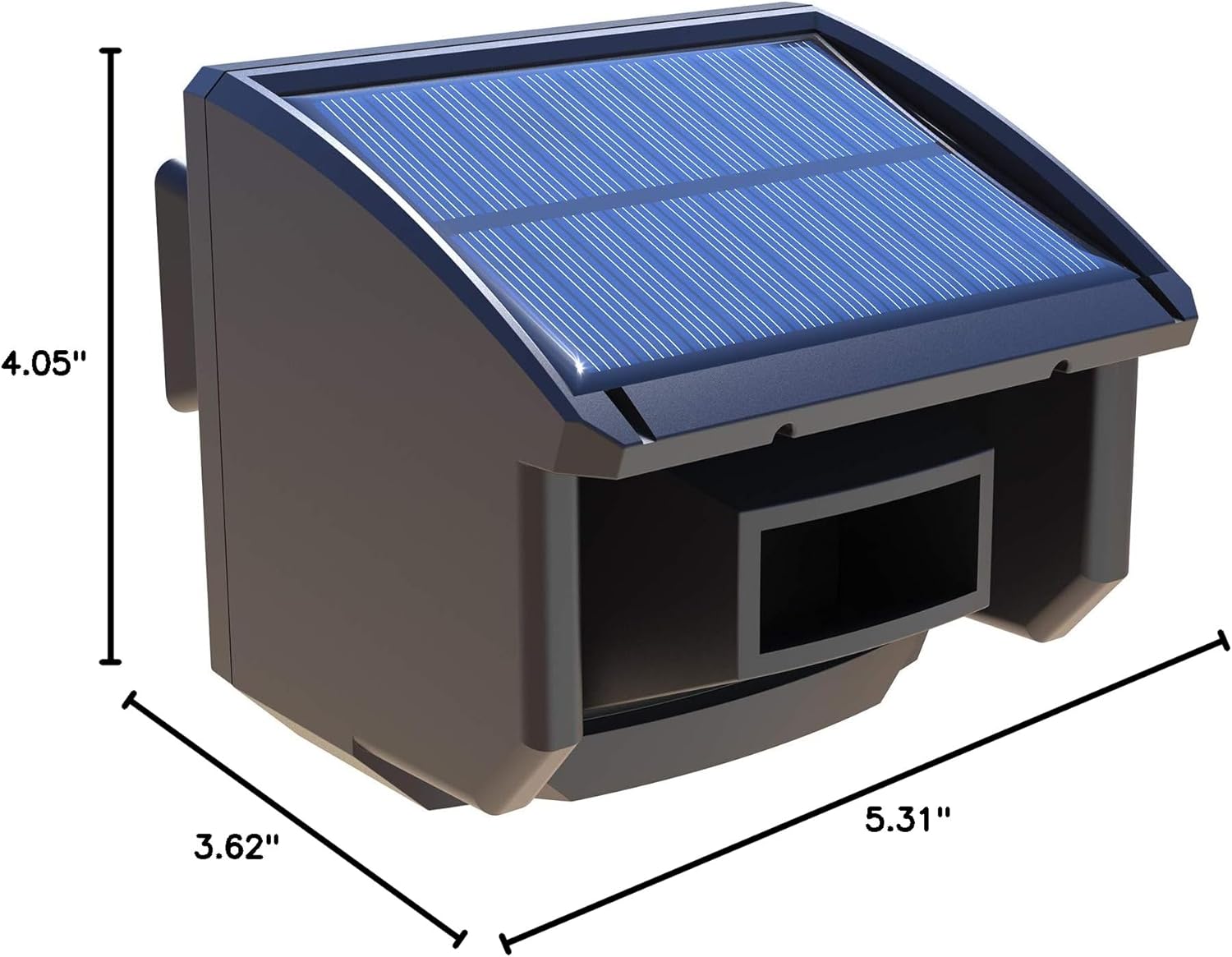
Figure 8.1: Dimensions of the HTZSAFE T704 Solar Wireless Motion Sensor.
| Feature | Specification |
|---|---|
| Brand | HTZSAFE |
| Model Number | T704 |
| Power Source | Solar, Battery Powered |
| Battery Type | Rechargeable Battery (1 AA required, included internally) |
| Wireless Transmission Range | Up to 1/4 mile (ideal conditions) |
| Sensor Detection Range | Up to 50 feet (adjustable) |
| Adjustable Sensitivities | High (50ft), Medium (30ft), Low (25ft) |
| Operating Temperature | -30°F to 150°F (-34°C to 65°C) |
| Item Weight | 12 Ounces (approx. 340g) |
| Product Dimensions (L x W x H) | 5.31" x 3.62" x 4.05" (approx. 13.5cm x 9.2cm x 10.3cm) |
| Mounting Type | Wall Mount |
| Compatible Devices | HTZSAFE wireless alarm system |
9. Warranty and Support
9.1 Warranty Information
The HTZSAFE T704 Solar Wireless Motion Sensor comes with a Guaranteed 2-Years Warranty. Please retain your proof of purchase for warranty claims. The warranty covers defects in materials and workmanship under normal use.
9.2 Customer Support
For technical assistance, troubleshooting beyond this manual, or warranty inquiries, please contact HTZSAFE customer service. You can typically find contact information on the official HTZSAFE website or through the retailer where you purchased the product.
For more information and product updates, visit the official HTZSAFE store: HTZSAFE Store on Amazon


