
Introduction
Thank you for choosing the IREENUO Aquarium LED Light. This full-spectrum LED light is designed to provide optimal illumination for your aquarium, promoting healthy plant growth and enhancing the vibrant colors of your fish. It features an adjustable stand, a 24-hour automatic sunlight cycle, and various weather effects, all controllable via a wireless remote. Please read this manual carefully before use to ensure proper installation and operation.
Important Safety Note: This aquarium light is not waterproof and must not be submerged in water.

Figure 1: IREENUO Aquarium LED Light with remote control and adjustable stand.
Setup Instructions
- Unpack Components: Carefully remove all items from the packaging. Verify that all components are present: LED light fixture, adjustable metal stands, power adapter, and remote control.
- Attach Adjustable Stands: Insert the metal adjustable stands into the slots on both ends of the LED light fixture. Ensure they are securely fitted.
- Position the Light: Place the light fixture on top of your aquarium. Adjust the length of the stands to fit your aquarium's dimensions (for 18W model, suitable for 73-100 cm aquariums). The stands are designed to rest on the edges of the aquarium or a glass cover.
- Connect Power: Connect the power adapter to the light fixture's power input. Then, plug the power adapter into a suitable electrical outlet.
- Remote Control Battery: Ensure the remote control has a working battery installed.

Figure 2: Dimensions of the 18W IREENUO Aquarium LED Light and its power adapter.
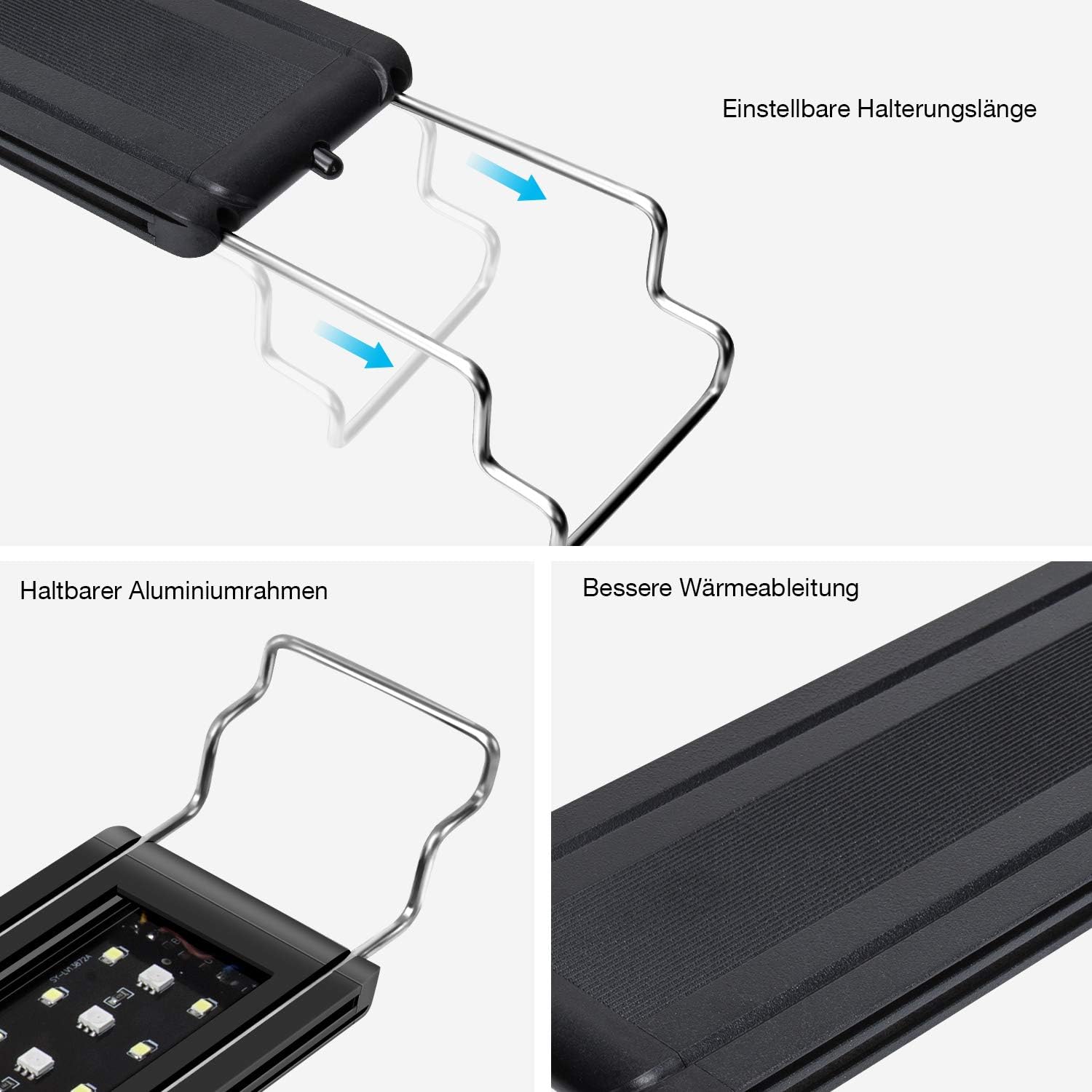
Figure 3: Adjustable mounting bracket and aluminum frame details.
Operating Instructions
The IREENUO Aquarium LED Light is controlled using the provided wireless IR remote control. Point the remote directly at the light fixture's IR receiver for optimal response.

Figure 4: Wireless IR Remote Control Layout.
Remote Control Functions:
- Power Button (On/Off): Turns the light on or off.
- MAX Button: Sets all LEDs to their brightest setting.
- 24/7 Button: Activates or deactivates the pre-programmed 24-hour automatic sunlight cycle mode. This mode simulates natural day-night transitions.
- DEMO Button: Demonstrates the natural light cycle changes over 24 hours at an accelerated pace.
- Time Buttons (9AM, 12PM, 3PM, 6PM, 3AM, 12AM): Allows manual adjustment of the current time within the 24/7 cycle.
- Weather Effect Modes: Buttons for Cloudy, Thunder, Sunny, and Moon effects. Press to activate the desired weather simulation.
- Manual Color Adjustment (W, R, G, B buttons with Up/Down arrows): Adjusts the intensity of White, Red, Green, and Blue LEDs independently. Use the corresponding arrow buttons to increase or decrease intensity.
- Memory Keys (M1, M2, M3, M4): Used to save and recall custom color settings. To save, adjust colors as desired, then press one of the M buttons. The system will automatically save the current settings. To recall, simply press the desired M button.

Figure 5: 24-hour Automatic Sunlight Cycle Simulation.
Maintenance
Regular maintenance ensures the longevity and optimal performance of your IREENUO Aquarium LED Light.
- Cleaning: Before cleaning, always unplug the light fixture from the power outlet. Use a soft, dry cloth to gently wipe the surface of the light and the LED panel. Do not use abrasive cleaners or immerse the light in water.
- Inspection: Periodically check the power cord and adapter for any signs of damage. If any damage is found, discontinue use immediately and contact customer support.
- Water Exposure: As the light is not waterproof, ensure it is protected from splashes and condensation. If water accidentally comes into contact with the electrical components, immediately unplug the unit and allow it to dry completely before attempting to use it again.
Troubleshooting
If you encounter issues with your IREENUO Aquarium LED Light, refer to the following common problems and solutions:
- Remote Control Not Responding:
Solution: Ensure the remote control is pointed directly at the light fixture's IR receiver. Check if the remote control battery needs replacement. When the remote and light are properly connected, the lights will flash once. - Some Remote Keys Are Unresponsive:
Solution: If the 24/7 automatic cycle mode is active, other function keys may be locked. Press the "24/7" button again to deactivate the mode and enable other functions. - Cannot Store Custom Color Combinations:
Solution: To store a custom color setting, first adjust the White, Red, Green, and Blue intensities to your desired levels. Then, press one of the Memory (M1, M2, M3, M4) buttons. The system will automatically save the current settings to that memory slot. - How to Restore 24/7 Day/Night Cycle Mode:
Solution: Simply press the "24/7" button once to resume the automatic day/night cycle. - Light Does Not Turn On:
Solution: Check if the power adapter is securely plugged into both the light fixture and the electrical outlet. Ensure the outlet is functional.
Specifications
| Feature | Detail |
|---|---|
| Model | HDIL-DE-AL-HY-3080F-DE |
| Wattage | 18 Watts |
| Aquarium Size Compatibility | 73-100 cm (adjustable) |
| Light Dimensions (18W) | 72.5 x 6.5 x 1 cm |
| Max Luminous Flux | 1500 Lumens |
| Voltage | 24 Volts |
| Material | Aluminum, Aluminum Alloy, Glass |
| Power Source | Wired |
| Light Source Type | LED (Infrared remote control capability) |
| Batteries Included | Yes (for remote control) |
| Brand | IREENUO |
| UPC | 745302293964 |
| ASIN | B0832KSFZW |
Warranty Information
IREENUO products are manufactured to high-quality standards. For specific warranty details regarding your aquarium LED light, please refer to the product packaging or contact your retailer. Keep your proof of purchase for any warranty claims.
Customer Support
If you have any questions, require technical assistance, or encounter issues not covered in this manual, please contact IREENUO customer support through the platform where you purchased the product or visit the official IREENUO website for contact information.