
VANGUARD VEO3T+234AB
Vanguard VEO3T+234AB Aluminum Travel Tripod with Ball Head
User Manual
Introduction
This manual provides detailed instructions for the safe and effective use of your Vanguard VEO3T+234AB Aluminum Travel Tripod with Ball Head. Please read this manual thoroughly before operating the product to ensure optimal performance and longevity.

Figure 1: Vanguard VEO3T+234AB Tripod in standard configuration.
Package Contents
Verify that all items are present in the package:
- Vanguard VEO3T+234AB Tripod with VEO 2 BH-110S Ball Head
- QS-62v3 Quick-Release Plate
- Spiked Feet (set of 3)
- VEO MA-1 Adapter
- Premium Tripod Bag
- Allen Keys (2 sizes)
Setup
1. Unfolding the Tripod Legs
The tripod features reversible legs for compact folding. To unfold:
- Release the leg locks on each leg.
- Extend the legs fully.
- Adjust the leg angles using the angle adjustment tabs at the top of each leg. There are three easy-set leg angles available.
- Ensure all leg locks are securely tightened before mounting equipment.

Figure 2: Tripod legs showing various angle adjustments and folded position.
2. Attaching the Ball Head and Quick Release Plate
The VEO 2 BH-110S dual-axis ball head is pre-attached. To use the quick-release plate:
- Ensure the quick-release clamp knob on the ball head is loosened.
- Slide the QS-62v3 quick-release plate onto your camera or other equipment. Tighten the screw securely.
- Align the quick-release plate with the clamp on the ball head and slide it in until it clicks into place.
- Tighten the quick-release clamp knob firmly to secure your equipment.
3. Multi-Angle Central Column (MACC) Setup
The MACC allows for versatile positioning, including horizontal and inverted setups.
- Vertical Adjustment: Loosen the central column lock knob, adjust the column height, and re-tighten.
- Horizontal Positioning: To convert the central column to a horizontal arm, loosen the central column lock knob and the pivot lock. Pull the column out, pivot it to the desired horizontal angle, and then re-lock both knobs securely.
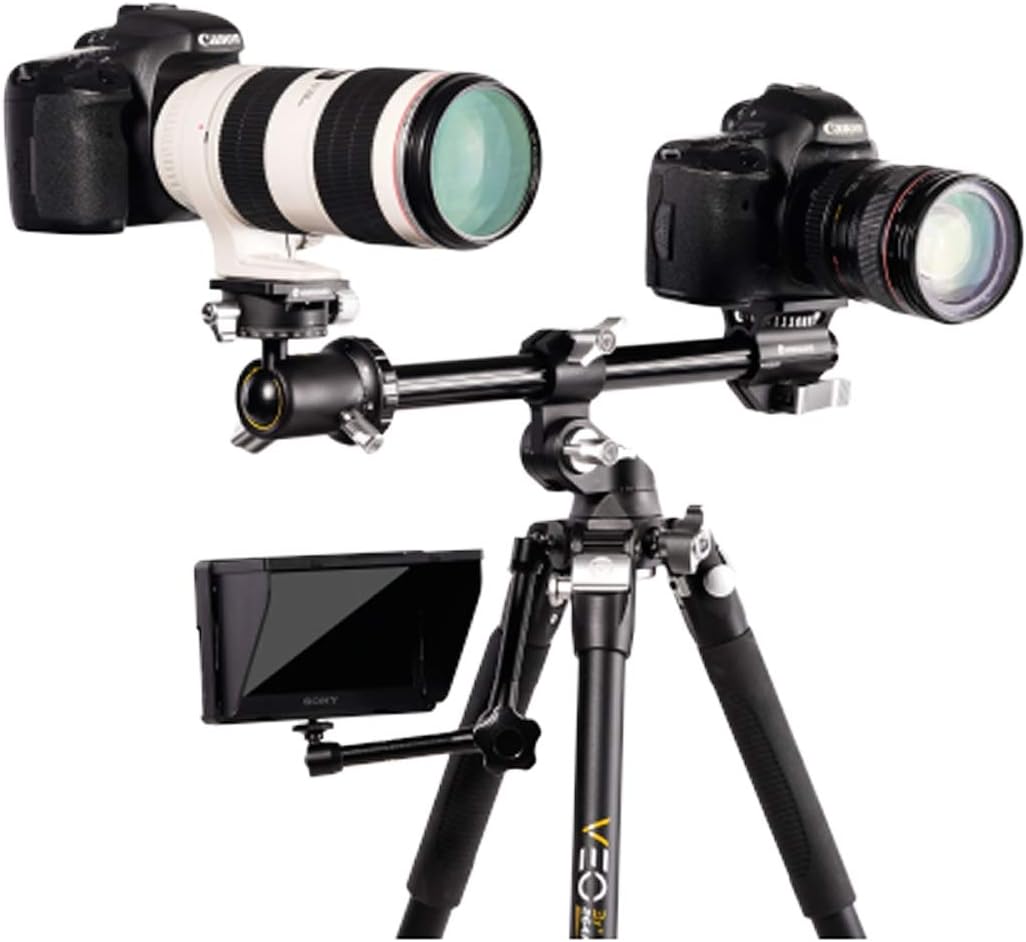
Figure 3: Multi-angle central column configured horizontally.
4. Monopod Conversion
One of the tripod legs can be detached and converted into a monopod.
- Identify the leg with the foam grip.
- Unscrew this leg from the tripod canopy.
- Remove the central column from the tripod and attach it to the detached leg.
- The ball head can then be attached to the top of the monopod.

Figure 4: Tripod leg detached and assembled as a monopod.
5. Spiked Feet Installation
For enhanced stability on soft ground, replace the rubber feet with the included spiked feet. Simply unscrew the rubber feet and screw in the spiked feet.
Operating Instructions
1. Adjusting Leg Sections
The tripod legs feature twist locks. To extend a leg section, twist the lock counter-clockwise to loosen, pull the section to the desired length, and twist clockwise to tighten securely. Ensure all sections are fully locked before use.
2. Using the VEO 2 BH-110S Ball Head
The ball head provides smooth and precise adjustments:
- Ball Lock Knob: Loosen to adjust the camera angle freely, then tighten to secure.
- Panoramic Base Lock: Loosen to rotate the camera horizontally for panoramic shots, then tighten. The dual-axis design allows for independent panoramic movement even when the ball is locked.
3. Attaching Additional Accessories
A 3/8” threaded hole is located on the side of the tripod canopy, allowing for the attachment of accessories such as articulating arms, monitors, or lights. The VEO MA-1 adapter can be used with the horizontal central column to mount a second camera or accessory.

Figure 5: Example of multiple devices mounted on the tripod.
4. Official Product Video
Watch this video for a visual guide on the features and operation of the VEO3T+ Tripod.
Video 1: VEO3T+ Tripod Features and Setup Guide by Vanguard USA Inc.
Maintenance
- Cleaning Leg Locks: The easy-clean twist leg locks can be disassembled to remove sand, dust, or other debris. Refer to the detailed diagram in the included printed manual for disassembly and reassembly instructions. Regular cleaning extends the life of the leg mechanisms.
- General Cleaning: Wipe the tripod with a soft, damp cloth. Avoid harsh chemicals.
- Storage: Store the tripod in its premium bag in a dry, cool place when not in use.
- Periodic Checks: Periodically check all screws and connections for tightness. Use the provided Allen keys for any adjustments.
Troubleshooting
| Issue | Possible Cause | Solution |
|---|---|---|
| Tripod instability | Leg locks not fully tightened; central column over-extended or not locked; uneven ground. | Ensure all leg locks and central column locks are secure. Adjust leg angles for stability on uneven surfaces. Avoid over-extending the central column, especially with heavy loads. |
| Quick-release plate feels loose | Quick-release clamp knob not fully tightened; plate not seated correctly. | Ensure the quick-release plate is fully inserted into the clamp and the knob is tightened firmly. Always double-check security before leaving equipment unattended. |
| Leg sections difficult to extend/retract | Debris inside twist locks; insufficient lubrication. | Disassemble and clean the twist leg locks as per maintenance instructions. Apply a small amount of silicone grease if necessary (consult Vanguard support). |
| Central column cannot be positioned horizontally | Pivot lock or central column lock not fully disengaged. | Ensure both the central column lock knob and the pivot lock are completely loosened before attempting to reposition the column. |
Specifications
| Feature | Detail |
|---|---|
| Brand | VANGUARD |
| Model Name | Vanguard VEO3T+234AB Aluminum Travel Tripod with Ball Head |
| Model Number | VEO3T+234AB |
| Material | Aluminum |
| Item Weight | 4.8 pounds (2.18 kg) |
| Weight Limit | 22 pounds (10 kg) |
| Maximum Height | 57.5 inches (146 cm) |
| Minimum Height | 5 inches (12.7 cm) |
| Folded Length | 18 inches (45.7 cm) (approximate) |
| Leg Sections | 4 |
| Leg Diameter | 23 millimeters |
| Tripod Head Type | Ball Heads (VEO 2 BH-110S dual-axis) |
| Special Features | Adjustable, Compact, Rotatable, Multi-Angle Central Column, Monopod Conversion |
Warranty Information
The Vanguard VEO3T+234AB Tripod comes with a 5-year warranty. For detailed terms and conditions, please refer to the warranty card included with your product or visit the official Vanguard website.
Support
For further assistance, technical support, or to inquire about replacement parts, please contact Vanguard customer service through their official website or the contact information provided in your product packaging.
You can visit the Vanguard Store on Amazon for more product information and accessories.
Related documentsVEO3T+234AB


Ask a question about this manual
Ask about setup, troubleshooting, compatibility, parts, safety, or missing instructions. Manuals+ will review the question and use this page’s manual context to help answer it.