1. Introduction
Thank you for purchasing the Koopman 4-Port HDMI 2.0 Switcher Selector. This device allows you to connect up to four HDMI input sources to a single HDMI display, such as a TV, monitor, or projector. It supports high-resolution video up to 4K@60Hz, HDR10, 3D, and is compatible with HDCP 2.2, ensuring a seamless and high-quality audio-visual experience. This manual provides detailed instructions for setup, operation, and troubleshooting to help you get the most out of your device.
2. Safety Information
- Do not expose this unit to water, moisture, or excessive humidity.
- Do not place the unit on an unstable surface.
- Use only the provided power adapter or a compatible 5V DC power source.
- Avoid blocking ventilation openings to prevent overheating.
- Do not attempt to disassemble or repair the unit yourself. Refer all servicing to qualified personnel.
- Keep the device away from direct sunlight, heat sources, and strong magnetic fields.
3. Package Contents
Please check the package contents carefully. If any items are missing or damaged, contact your retailer.
- Koopman 4-Port HDMI 2.0 Switcher Selector Unit
- IR Remote Control (2 AAA batteries required, not included)
- USB Power Cable (DC 5V)
- User Manual
4. Product Overview
Familiarize yourself with the ports and indicators on your Koopman HDMI Switch.

Image: The Koopman 4-Port HDMI Switch unit shown with its included IR remote control. The switch is black with a brushed metal finish, featuring input and output ports on the back and indicators and a switch button on the front.

Image: A detailed diagram illustrating the front and rear panels of the Koopman HDMI Switch. The front panel shows Input Indicators (1-4), Output Indicator, Power Indicator, IR receiver, and a Switch button. The rear panel displays the DC5V power input, HDMI Output port, and four HDMI Input ports (IN1-IN4).
Front Panel:
- Input Indicators (1-4): LEDs illuminate to show the currently selected HDMI input.
- Output Indicator: LED illuminates when there is an active HDMI output signal.
- Power Indicator: LED illuminates when the device is powered on.
- IR: Infrared receiver for the remote control.
- Switch: Button to manually cycle through HDMI inputs.
Rear Panel:
- DC5V: Power input port for the USB power cable.
- OUTPUT: HDMI output port to connect to your display (TV, monitor, projector).
- IN1-IN4: HDMI input ports to connect your source devices (PS4, Xbox, Blu-ray player, PC, etc.).
5. Setup Instructions
Follow these steps to connect your Koopman HDMI Switch:
- Connect HDMI Input Devices: Using high-quality HDMI 2.0 cables, connect your HDMI source devices (e.g., PS4, Xbox, Apple TV, Blu-ray player, PC) to the HDMI IN1, IN2, IN3, and IN4 ports on the rear of the Koopman HDMI Switch.
- Connect HDMI Output to Display: Connect one end of an HDMI 2.0 cable to the HDMI OUTPUT port on the rear of the Koopman HDMI Switch and the other end to an HDMI input port on your TV, monitor, or projector.
- Connect Power: Connect the provided USB power cable to the DC5V port on the switch and the other end to a USB power source (e.g., a USB port on your TV, a USB wall adapter, or a power bank). The Power indicator LED on the front panel will illuminate.
- Prepare Remote Control: Open the battery compartment of the IR remote control and insert two AAA batteries (not included), ensuring correct polarity.

Image: A diagram illustrating the wide compatibility of the Koopman HDMI Switch, showing various input devices (Laptop, Apple TV, Xbox, PS4) connected to the switch's input ports and the output connected to a TV, display, or projector.

Image: A visual guide demonstrating the ease of setup for the Koopman HDMI Switch, showing a TV connected to the switch's output and multiple devices (Laptop, TV Box, PS4, Xbox) connected to its inputs, with the remote control also depicted.
6. Operating Instructions
The Koopman HDMI Switch offers three methods for switching between input sources:

Image: A graphic illustrating the three switching methods for the Koopman HDMI Switch: Automatic switch, Manual switch (via button on unit), and Remote Control. It also shows various devices like Laptop, Xbox, TV Box, and Blu-ray Player as potential inputs.
6.1. Manual Switching
Press the 'Switch' button on the front panel of the HDMI switcher to cycle through the connected input devices (IN1, IN2, IN3, IN4). The corresponding input indicator LED will light up.
6.2. Remote Control Switching
Point the IR remote control towards the IR receiver on the front panel of the switch. Press the corresponding number button (1, 2, 3, or 4) on the remote to directly select the desired HDMI input source.
6.3. Automatic Switching
The switch supports automatic input detection. When a new HDMI source is powered on or becomes active, the switch will automatically switch to that input. If the current active source is turned off, the switch will attempt to find the next active source. Note that auto-switching behavior can vary depending on the source device's HDMI signal behavior (e.g., some devices in sleep mode may not trigger auto-switch reliably).
7. Key Features
- 4K@60Hz UHD Resolution: Supports resolutions up to 3840x2160 at 60Hz, ensuring crisp and clear visuals. Compatible with lower resolutions such as 4K@30Hz, 1080P Full HD, and 720P.
- HDR10 Support: Enjoy enhanced contrast and a wider range of colors with HDR10 compatibility.
- 3D Compatible: Supports 3D video formats, allowing you to enjoy immersive 3D content.
- HDCP 2.2 Support: Fully compliant with HDCP 2.2, 1.4, and 1.3, ensuring compatibility with the latest content protection standards.
- High Bandwidth: Supports up to 18Gbps data throughput for lossless transmission of high-resolution video and audio.
- Advanced Audio Support: Compatible with DTS, DTS-HD, Dolby Atmos, and Dolby compressed audio formats.
- Wide Compatibility: Works with a broad range of HDMI-enabled devices including Amazon Fire TV, Apple TV, STB/IPTV, LCD TVs, DVD Players, Blu-Ray players, PS3/PS4, Xbox 360, Roku, Nintendo, and more.

Image: A television screen displaying a high-resolution racing game, demonstrating the 4K@60Hz capability of the Koopman HDMI Switch. A PlayStation console and controller are visible below the TV.
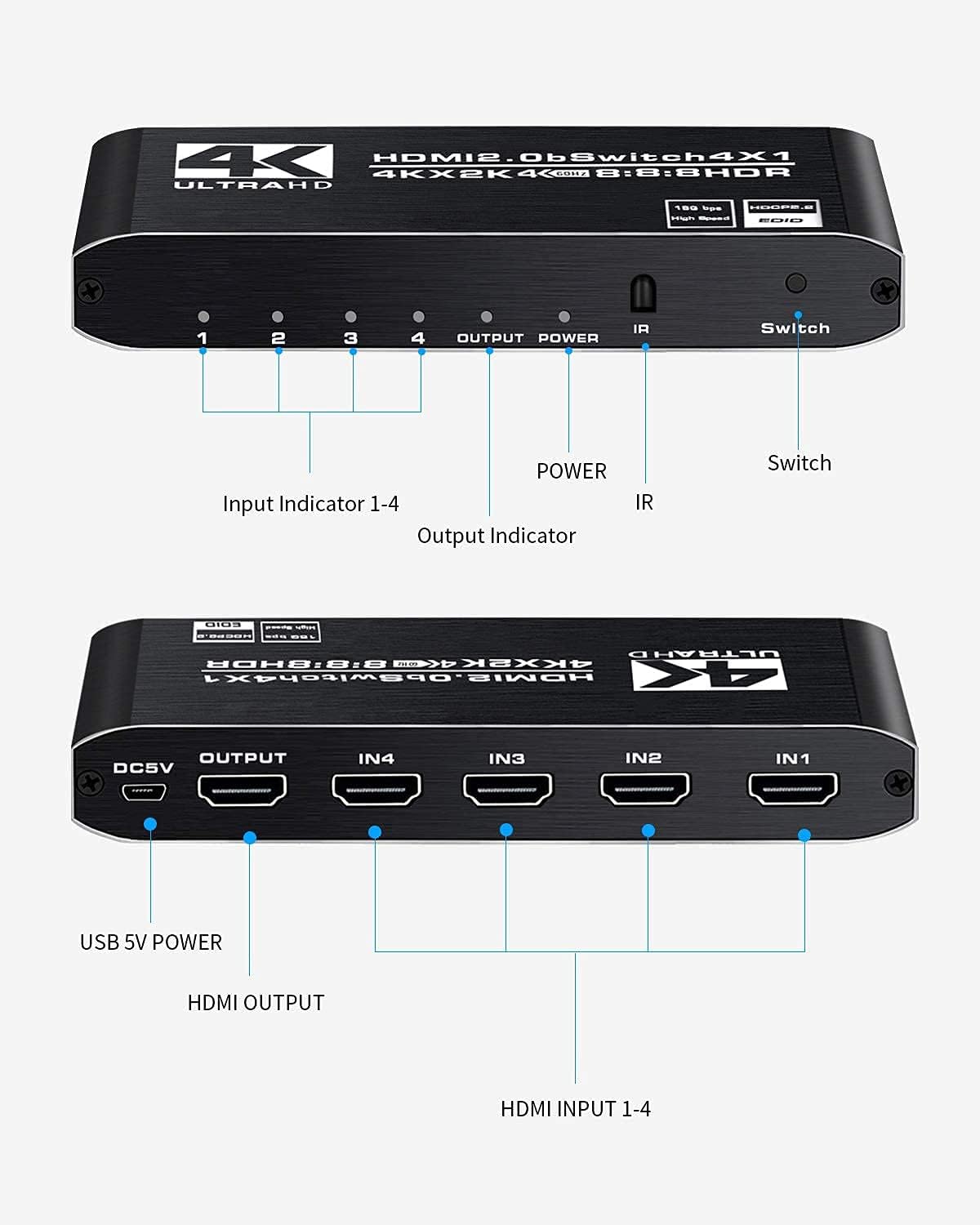
Image: A television screen displaying vibrant 4K HDR content from a video game, showcasing the switch's ability to support high dynamic range. A PlayStation console and controller are visible in the foreground.

Image: A television screen displaying a 3D image of Iron Man, indicating the switch's 3D compatibility. The switch unit is visible in the foreground with a '3D' graphic.
8. Maintenance
- Keep the device clean by wiping it with a soft, dry cloth.
- Do not use liquid or aerosol cleaners.
- Ensure the device is placed in a well-ventilated area to prevent overheating.
- Disconnect power when the device is not in use for extended periods.
9. Troubleshooting
If you encounter issues, please refer to the following common problems and solutions:
No Picture or Sound:
- Ensure all HDMI cables are securely connected to both the switch and your devices/display.
- Verify the USB power cable is connected and the Power indicator LED on the switch is illuminated.
- Check that your TV/display is set to the correct HDMI input source where the switch is connected.
- Try restarting the source device and the display.
- Test with different HDMI cables, as faulty cables can cause issues.
Flickering Picture or Poor Quality:
- Ensure you are using high-quality HDMI 2.0 cables, especially for 4K@60Hz and HDR content.
- Check the resolution settings on your source device. Some older cables may not support higher resolutions.
- Reduce the cable length if possible, as longer cables can sometimes degrade signal quality.
Remote Control Not Working:
- Ensure the batteries are inserted correctly and are not depleted. Replace with new AAA batteries if necessary.
- Make sure there are no obstructions between the remote control and the IR receiver on the switch.
- Ensure you are within the effective range of the remote control.
Auto-Switching Issues / Slow Switching:
- The auto-switching feature relies on the source device's HDMI signal behavior. Some devices, especially when entering/exiting sleep mode, may not reliably trigger the auto-switch.
- If auto-switching is inconsistent, use the manual button on the switch or the IR remote control for reliable input selection.
- A switching time of 7-11 seconds is normal for some HDMI switches, especially when negotiating high-resolution signals. This is not necessarily a fault of the device.
10. Specifications
| Feature | Specification |
|---|---|
| Model Number | MOSOY |
| HDMI Version | HDMI 2.0 |
| Max Resolution | 4K@60Hz (3840x2160) |
| Bandwidth | 18Gbps |
| HDCP Compliance | HDCP 2.2 / 1.4 / 1.3 |
| HDR Support | HDR10 |
| 3D Support | Yes |
| Deep Color | 36-bit |
| Audio Support | DTS, DTS-HD, Dolby Atmos, Dolby compressed audios |
| Input Ports | 4 x HDMI |
| Output Ports | 1 x HDMI |
| Power Supply | DC 5V (via USB cable) |
| Control Methods | Manual button, IR Remote Control, Auto-switching |
| Item Weight | 7.8 ounces |
| Package Dimensions | 5.87 x 5 x 1.54 inches |
11. Warranty and Support
Koopman-Tech products are designed and manufactured to the highest standards. This product comes with a limited warranty against defects in materials and workmanship under normal use. For specific warranty terms and conditions, please refer to the warranty card included with your purchase or contact Koopman-Tech customer support.
For technical support, troubleshooting assistance, or any questions regarding your Koopman HDMI Switch, please contact our customer service team. Contact information can typically be found on our official website or on the product packaging.


