
SuperEye MD6100
SuperEye Junior Metal Detector MD6100 User Manual
Model: MD6100
Introduction
Congratulations on your purchase of the SuperEye Junior Metal Detector MD6100! This user-friendly metal detector is designed for children and adults, offering an exciting way to discover hidden treasures. Featuring an IP68 waterproof coil, LED flashlight, and an adjustable stem, it's perfect for outdoor adventures in various environments.

Image: The SuperEye Junior Metal Detector MD6100 shown with its retail packaging.
What's in the Box
Before assembly, please ensure all components are present:
- Main Metal Detector Unit (Control Panel, Stem, Search Coil)
- Handle
- User Manual
- Screwdriver (for battery compartment)
Refer to the installation video below for a visual guide on unboxing and assembly.
Setup
Follow these steps to assemble your SuperEye Junior Metal Detector:
- Step 1: Take all parts out. Carefully remove all components from the packaging.
- Step 2: Install the handle. Attach the handle to the main stem of the metal detector. Ensure it clicks securely into place.
- Step 3: Install the 9V battery (NOT INCLUDED). Open the battery compartment on the control panel using the provided screwdriver. Insert a 9V battery, ensuring correct polarity, then close the compartment securely.
- Step 4: Adjust the length. The stem is adjustable from 28 to 36 inches. Loosen the locking mechanism, extend or retract the stem to your desired length, and then tighten the lock to secure it.
For a detailed visual guide on assembly, please watch the official installation video:
Video: SuperEye MD6100 Kids Metal Detector Installation. This video demonstrates the step-by-step assembly process of the metal detector, including unboxing, attaching the handle, installing the battery, and adjusting the stem length.

Image: A child using the metal detector, highlighting its adjustable stem for different heights.
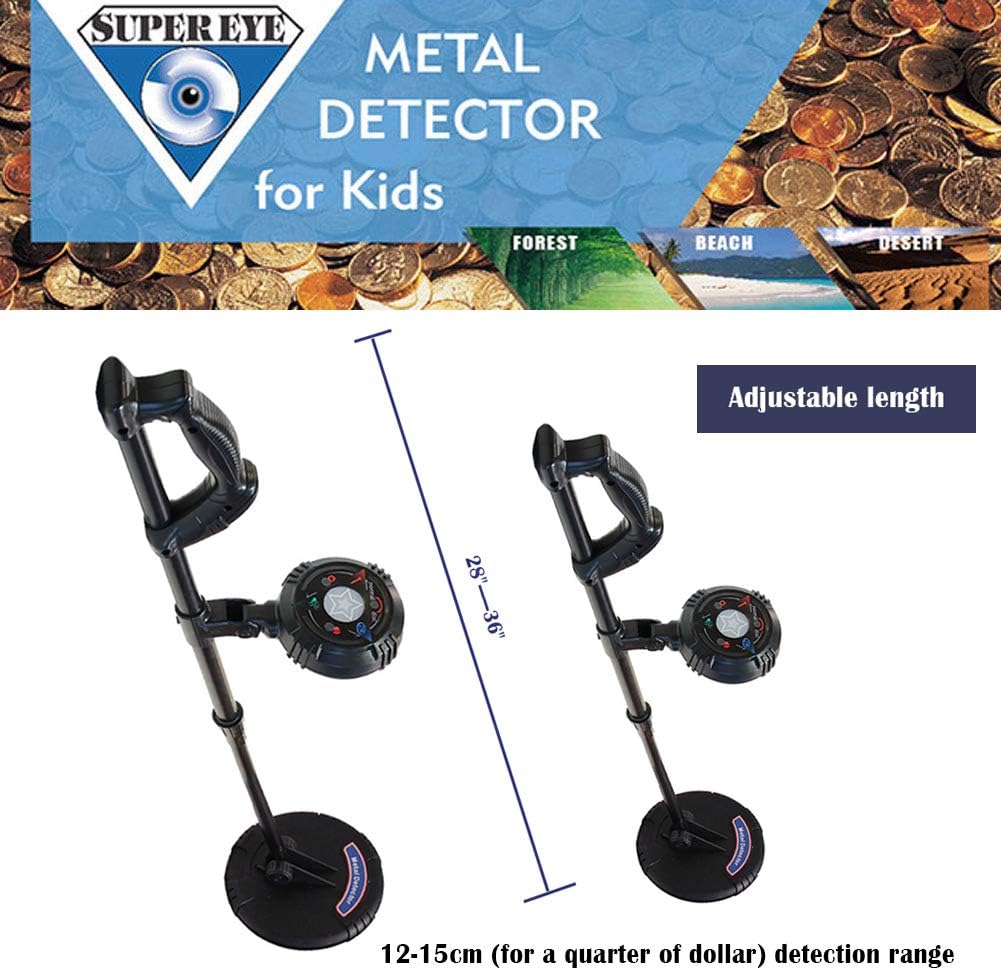
Image: A diagram illustrating the adjustable length feature of the metal detector, ranging from 28 to 36 inches.
Operating Instructions
Power On/Off
To power on the device, press and hold the power button located on the control panel. The LED indicators will light up, and you will hear a voice prompt. To power off, press and hold the power button again.
Operation Modes
The metal detector features 2 operation modes. Use the mode button on the control panel to switch between them. Refer to the control panel diagram for button identification.
Adjustable Sensitivity & Pinpointing
Adjust the sensitivity of the detector to optimize performance for different ground conditions and target sizes. The adjustable sensitivity range is 4.7" - 6". The precise positioning function helps you accurately locate detected metal objects.
LED Indicators and Voice Prompts
The control panel features Red, Green, and Blue LED indicators along with voice prompts. These visual and auditory cues help you identify and understand the type of metal detected, making operation easy and intuitive.
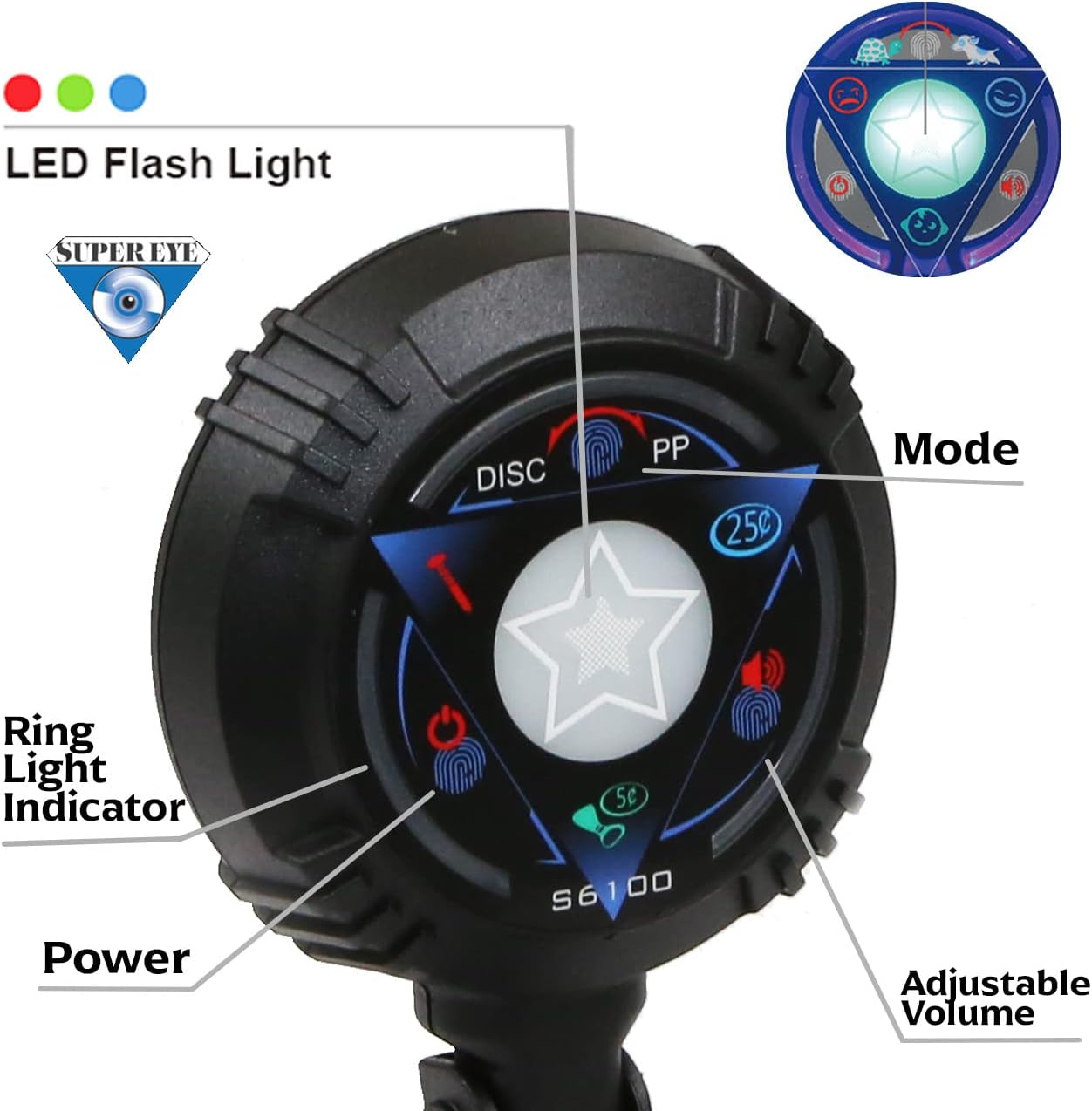
Image: A detailed view of the control panel, showing the LED flash light, ring light indicator, power button, adjustable volume, and mode selection.
Waterproof Coil
The IP68 waterproof 6.5-inch coil allows for use in various environments, including lawns, parks, and beaches, without concern for water damage to the coil. This feature makes treasure hunting possible in almost any season and weather condition.

Image: A collage demonstrating the metal detector's ability to detect metals through sand, soil, and near water, highlighting its versatility.
Detection Capabilities
This metal detector is designed to find various metal objects such as coins, iron, silver, jewelry, and artifacts. It can detect different metals up to 4 inches deep.

Image: Visual examples of items that can be found with the metal detector, including gold flakes, screws, coins, and various pieces of jewelry.

Image: A cross-section diagram showing the metal detector's ability to detect objects up to 4 inches deep in the ground.
Maintenance
- Cleaning: After each use, especially in sandy or wet conditions, wipe down the search coil and stem with a damp cloth. Ensure the coil is dry before storage.
- Battery Care: Always remove the 9V battery if the detector will not be used for an extended period to prevent battery leakage and damage to the electronics.
- Storage: Store the metal detector in a cool, dry place away from direct sunlight and extreme temperatures.
Troubleshooting
No Power
- Ensure a fresh 9V battery is correctly installed with proper polarity.
- Check that the battery compartment is securely closed.
No Detection or Weak Signals
- Adjust the sensitivity setting. Higher sensitivity may be needed for smaller or deeper objects.
- Ensure the search coil is parallel to the ground and swept slowly.
- Check for electromagnetic interference from power lines, other electronic devices, or large metal structures nearby.
False Signals
- Lower the sensitivity setting.
- Avoid areas with high mineralized ground or excessive trash metal.
Specifications
| Feature | Specification |
|---|---|
| Brand | SuperEye |
| Model Number | MD6100 |
| Color | Multiple |
| Material | Metal |
| Power Source | Battery Powered (1 x 9V battery required, not included) |
| Item Weight | 1 Pounds |
| Product Dimensions | 24"L x 8"W x 6"H |
| Adjustable Length | 28" - 36" |
| International Protection Rating | IP68 (Waterproof coil) |
| Operating Frequency | 6 KHz |
| Display Type | LED |
| Search Coil Size | 6.5 Inches |
Warranty & Support
The SuperEye Junior Metal Detector MD6100 comes with a 2-year limited warranty in the US. SuperEye is committed to providing reliable customer service, including fast diagnosis and replacement for any issues covered under warranty.
If you have any questions, require assistance with troubleshooting, or need to inquire about warranty service, please feel free to contact our customer support team. Refer to the product packaging or the SuperEye official website for specific contact information.
Related documentsMD6100


Ask a question about this manual
Ask about setup, troubleshooting, compatibility, parts, safety, or missing instructions. Manuals+ will review the question and use this page’s manual context to help answer it.