
1. Introduction
Thank you for choosing the SIVGA P-II Open-Back Planar Magnetic Headphones. These headphones are engineered to deliver a high-fidelity audio experience, combining advanced planar magnetic technology with exquisite craftsmanship. This manual provides essential information for the proper setup, operation, and maintenance of your SIVGA P-II headphones to ensure optimal performance and longevity.
2. Product Overview
2.1 Key Features
- Design: Features a 97mm x 76mm ultra-nano double-sided magnetic planar diaphragm driver housed in a black walnut chamber, optimized for superior acoustic performance.
- Sound Profile: Offers a comprehensive and balanced sound signature with natural bass, detailed mids, and rich treble. The sound is characterized by its warmth, depth, and clarity, providing optimal layering and transparency.
- Craftsmanship: The P-II maintains a classic aesthetic, utilizing premium natural solid walnut wood for the ear cup shells, crafted with traditional techniques to enhance sound quality and durability.
- Comfort: Designed for extended listening comfort, the headband and earcups are covered with high-protein leather, ensuring a snug and pleasant fit.
2.2 Package Contents
The SIVGA P-II headphones come with the following items:
- SIVGA P-II Headphones
- 1x 2.5mm to 4.4mm Dual Cable
- 1x 4.4mm to 3.5mm Adapter
- 1x Leather Carrying Bag
- 1x Linen Bag

Figure 1: SIVGA P-II headphones with carrying case, cables, and adapter.
2.3 Headphone Components

Figure 2: Front view of the SIVGA P-II headphones, showcasing the wooden earcups and open-back design.

Figure 3: Detailed view of an earcup, highlighting the natural wood grain and grille.

Figure 4: Close-up of the high-protein leather earpad, designed for comfort.

Figure 5: Detail of the adjustable headband and suspension system.
3. Setup
3.1 Connecting the Cable
- Identify the left (L) and right (R) connectors on the dual cable.
- Gently insert the 2.5mm connectors into the corresponding L and R jacks located at the bottom of each earcup until they click into place.
- Connect the 4.4mm balanced plug of the cable to your audio source (e.g., digital audio player, amplifier).
- If your audio source uses a 3.5mm jack, attach the provided 4.4mm to 3.5mm adapter to the cable's 4.4mm plug, then connect it to your device.

Figure 6: The detachable cable with 2.5mm earcup connectors and a 4.4mm source connector, along with a 3.5mm adapter.
3.2 Adjusting for Comfort
- Place the headphones on your head.
- Adjust the headband by sliding the earcups up or down until they rest comfortably over your ears and the headband sits securely on your head.
- The earcups can swivel 90 degrees to conform to your head shape and for flat storage.
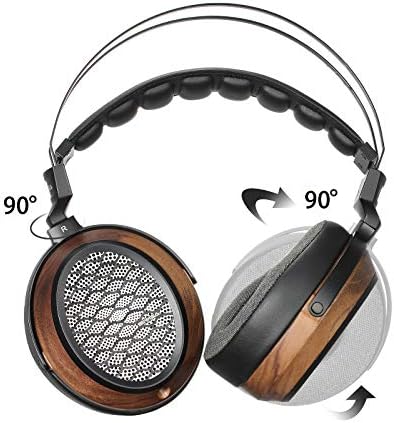
Figure 7: Illustration of the 90-degree earcup swivel for optimal fit and portability.
4. Operating Instructions
4.1 Basic Playback
- Ensure the headphones are properly connected to your audio source.
- Start playback on your audio device.
- Adjust the volume on your audio device to a comfortable listening level.
The SIVGA P-II headphones are designed for Hi-Fi audio and music listening, compatible with laptops, desktops, smartphones, and tablets.
4.2 Media Control
The headphones feature wired media control. Depending on your cable and source device, you may be able to control playback (play/pause) and track selection directly from the cable's remote.
5. Maintenance
5.1 Cleaning
- Wipe the wooden earcups and headband with a soft, dry cloth.
- For the leather ear pads, use a slightly damp cloth and mild soap if necessary, then wipe dry immediately. Avoid excessive moisture.
- Do not use harsh chemicals, solvents, or abrasive cleaners, as these can damage the materials.
5.2 Storage
- When not in use, store the headphones in the provided leather carrying bag or linen bag to protect them from dust and physical damage.
- Store in a cool, dry place away from direct sunlight and extreme temperatures.
5.3 Cable Care
- Handle the detachable cable gently. Avoid sharp bends or excessive pulling.
- Disconnect the cable by gripping the connector, not the cable itself.
6. Troubleshooting
6.1 No Sound or Intermittent Sound
- Check Connections: Ensure the headphone cable is securely plugged into both earcups (L and R) and your audio source.
- Volume Level: Verify that the volume on your audio source is turned up and not muted.
- Audio Source: Test the headphones with a different audio source to rule out issues with your device.
- Cable Integrity: Inspect the cable for any visible damage. If possible, try a different compatible cable.
6.2 Sound Distortion
- Volume Level: Reduce the volume on your audio source. Excessive volume can cause distortion.
- Audio Source Quality: Ensure your audio files or streaming quality are high. Low-quality audio can sound distorted.
- Cable: Check the cable for damage or loose connections.
6.3 Uncomfortable Fit
- Adjust Headband: Re-adjust the headband and earcup positions to find a more comfortable fit.
- Earpad Orientation: Ensure the ear pads are correctly seated around your ears.
7. Specifications
| Feature | Specification |
|---|---|
| Brand | SIVGA |
| Model | P-II |
| Color | Black |
| Headphone Type | Open-Back, Over-Ear |
| Driver Type | Planar Magnetic Driver |
| Driver Size | 97mm x 76mm |
| Impedance | 32 Ohms |
| Sensitivity | 98 dB |
| Frequency Range | 20Hz - 20,000Hz |
| Connectivity | Wired (3.5mm Jack, 4.4mm Balanced) |
| Cable Features | Detachable |
| Control Type | Wired Media Control |
| Product Weight | 1.01 pounds (approx. 458g) |
| Materials | Natural Walnut Wood, High-Protein Leather |
| Waterproof | No |
8. Warranty and Support
8.1 Warranty Information
SIVGA provides a 12-month warranty service for the P-II headphones from the date of purchase. This warranty covers manufacturing defects and workmanship under normal use. It does not cover damage caused by misuse, accidents, unauthorized modifications, or normal wear and tear.
8.2 Customer Support
If you encounter any issues with your SIVGA P-II headphones or have questions not addressed in this manual, please contact SIVGA customer support. You can typically find contact information on the official SIVGA website or through your retailer.