
Introduction
This manual provides essential information for the safe and efficient installation, operation, and maintenance of your Philips Hue Nyro White & Colour Ambiance LED Smart Outdoor Pedestal. Please read these instructions thoroughly before use and retain them for future reference.
Safety Information
- Ensure the power supply is disconnected before installation, maintenance, or cleaning.
- Installation must be performed by a qualified electrician in accordance with local wiring regulations.
- This product is designed for outdoor use and is rated IP44 for protection against splashing water.
- Do not attempt to modify or disassemble the product. This will void the warranty and may cause damage or injury.
- Keep packaging materials away from children.
Package Contents
Verify that all components are present before beginning installation.
- 1 x Philips Hue Nyro White & Colour Ambiance Smart Outdoor Pedestal
- Installation hardware (screws, connectors)
- Instruction manual

Image: The Philips Hue Nyro Pedestal shown alongside its retail packaging, illustrating the product as received.
Setup
1. Pre-installation Requirements
- A Philips Hue Bridge (sold separately) is required for smart control functionality.
- Ensure a suitable outdoor power supply (AC/DC, 230 Volts) is available at the installation location.
- Tools required: Screwdriver, wire strippers, mounting hardware (if not included or specific to your surface).
2. Physical Installation
- Disconnect Power: Turn off the main power supply to the circuit where the pedestal will be installed.
- Mount the Pedestal: Secure the pedestal to a stable surface using the provided mounting hardware. Ensure it is firmly attached.
- Wire Connection: Connect the electrical wires from your outdoor power supply to the pedestal's wiring terminals. Follow local electrical codes and ensure proper grounding.
- Secure Wiring: Ensure all wiring is properly insulated and secured within the pedestal's housing.
- Restore Power: Once installation is complete and all connections are secure, restore power to the circuit.

Image: A composite image illustrating the installation process, including wiring connections and securing the pedestal to the ground.
3. Initial Pairing with Philips Hue Bridge
- Download App: Download the Philips Hue app from your device's app store.
- Open App: Open the Philips Hue app and navigate to the 'Settings' tab.
- Add Lights: Select 'Lights' and then tap the '+' icon to add a new light.
- Search: The app will search for new Hue lights. Ensure your Nyro pedestal is powered on.
- Pair: Once detected, follow the on-screen prompts to name and assign your new light to a room or zone.
Operating
1. Basic Control via Philips Hue App
Once paired, your Philips Hue Nyro pedestal can be controlled directly from the Philips Hue app.
- On/Off: Toggle the light on or off.
- Dimming: Adjust brightness levels from 1% to 100%.
- Color Selection: Choose from 16 million colors and various shades of white light (warm to cool).
- Scenes: Apply pre-set or custom light scenes for different moods or occasions.

Image: A smartphone screen displaying the Philips Hue app, demonstrating the interface for controlling smart lights.
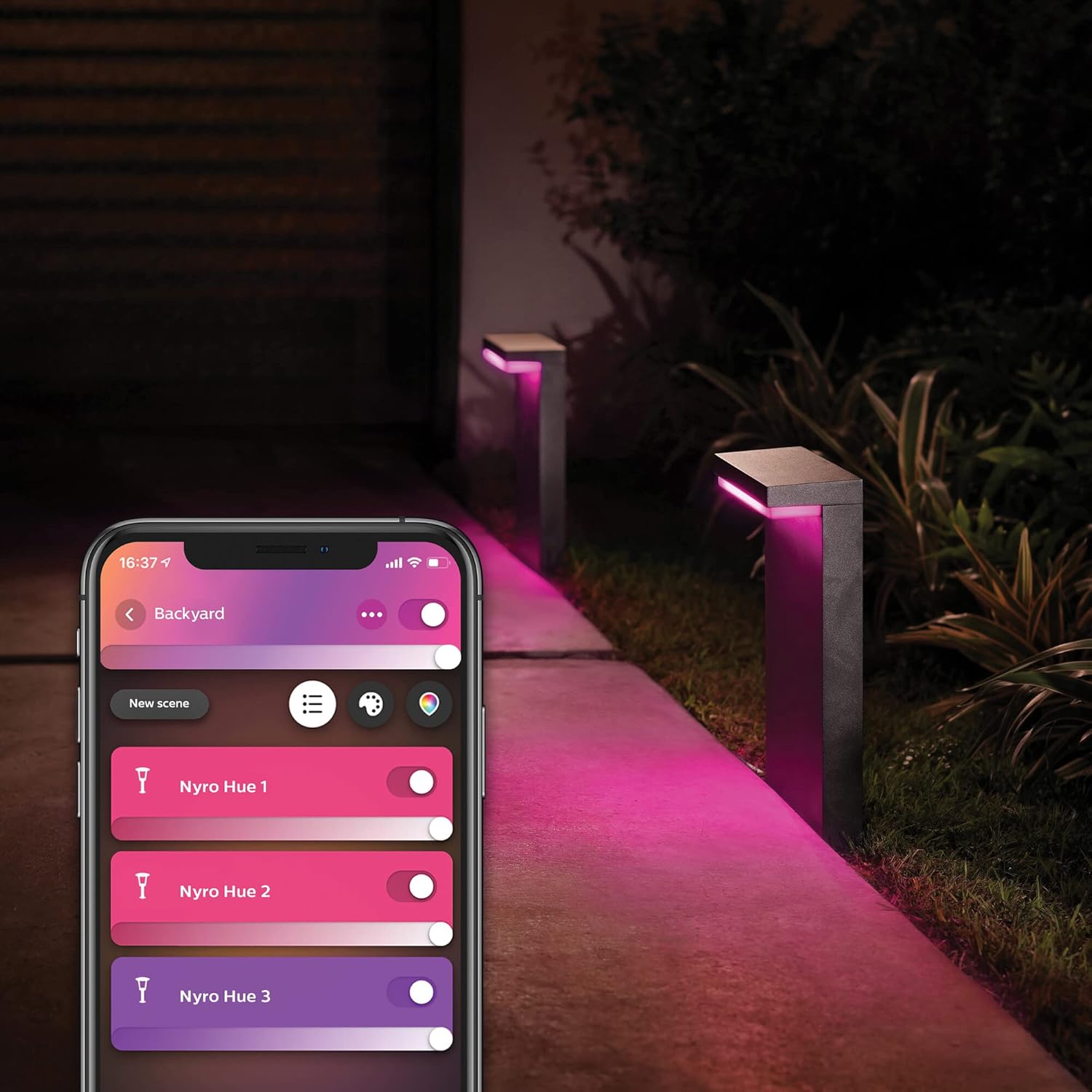
Image: An outdoor pathway illuminated by multiple Philips Hue Nyro pedestals, with a smartphone displaying the Hue app controlling their colors.
2. Smart Features
- Schedules: Set timers for your lights to turn on or off at specific times.
- Home & Away Control: Configure lights to automatically turn on when you arrive home and off when you leave, or mimic your presence when you are away.
- Automation: Create custom automations based on time, sunrise/sunset, or other triggers.
3. Voice Control Integration
The Philips Hue Nyro pedestal is compatible with leading smart home platforms for hands-free voice control.
- Amazon Alexa: Link your Philips Hue account in the Alexa app to control lights with commands like "Alexa, turn on the patio lights."
- Google Assistant: Connect your Hue system to Google Home for commands such as "Hey Google, set the garden lights to blue."
- Apple HomeKit: Use the Apple Home app to add your Hue Bridge and control lights with Siri, e.g., "Hey Siri, dim the outdoor lights to 50%."

Image: A woman interacting with smart home devices, highlighting compatibility with Amazon Alexa, Apple HomeKit, and Google Assistant for voice control.
Maintenance
1. Cleaning
- Ensure the power is off before cleaning.
- Wipe the exterior of the pedestal with a soft, damp cloth.
- Do not use abrasive cleaners, solvents, or harsh chemicals, as these can damage the finish.
2. Environmental Considerations
- Regularly check for any debris or obstructions around the light source to ensure optimal performance.
- Ensure proper drainage around the base of the pedestal to prevent water accumulation.
Troubleshooting
| Problem | Possible Cause | Solution |
|---|---|---|
| Light does not turn on. | No power supply; loose wiring; light not paired. | Check power connection; verify wiring; re-pair with Hue Bridge. |
| Light is unresponsive to app/voice commands. | Hue Bridge offline; poor Zigbee signal; app issue. | Check Hue Bridge connection; move light closer to Bridge or add a Hue extender; restart app. |
| Inconsistent color or brightness. | Software glitch; interference. | Restart the light by cycling power; check for firmware updates in the Hue app. |
Specifications

Image: A technical drawing illustrating the length, width, and height dimensions of the Philips Hue Nyro Pedestal.
| Feature | Detail |
|---|---|
| Model Number | 915005841601 |
| Brand | Philips Hue |
| Light Source Type | LED |
| Light Color | White & Colour Ambiance (16 million colors, warm to cool white) |
| Brightness | 1000 Lumens (maximum) |
| Wattage | 13.5 watts |
| Voltage | 230 Volts |
| Connectivity Protocol | Zigbee (requires Philips Hue Bridge) |
| Control Method | Voice (Alexa, Google Assistant, Apple HomeKit), Philips Hue App |
| Indoor/Outdoor Usage | Outdoor |
| IP Rating | IP44 (protection against splashing water) |
| Material | Nyro |
| Color | Black |
| Product Dimensions | 15.75"L x 3.9"W x 10.04"H (400mm L x 99mm W x 255mm H) |
| Item Weight | 2.43 Kilograms (5.35 pounds) |
Warranty and Support
For warranty information and technical support, please refer to the official Philips Hue website or contact Philips Hue customer service. Keep your proof of purchase for warranty claims.
Online Support: www.philips-hue.com/support


