1. Introduction
This user manual provides comprehensive instructions for the QIACHIP KR1204 Universal 12V 4-Channel Wireless RF 433MHz Relay Remote Control Switch Module. This device is designed to control a variety of electronic devices wirelessly, offering stable and reliable performance with high receive sensitivity. It supports a maximum range of up to 50 meters (164 feet) without obstacles. The module features adjustable working modes including Momentary, Toggle, and Latched, and incorporates a learning code for enhanced security.
2. Package Contents
- 1 x QIACHIP KR1204 4-Channel Wireless Relay Receiver Module
- 2 x 4-Button RF 433MHz Remote Control Key Fobs
3. Safety Information
- Ensure the power supply voltage matches the module's requirements (DC 12V).
- Disconnect power before performing any wiring or maintenance to prevent electric shock.
- Do not exceed the maximum current rating of 10 Amps for the relays.
- Keep the device away from water and extreme temperatures.
- Professional installation is recommended for complex wiring scenarios.
4. Specifications
| Feature | Detail |
|---|---|
| Brand | QIACHIP |
| Model | KR1204 |
| Input Voltage | DC 12V |
| Operating Frequency | RF 433MHz |
| Number of Channels | 4 Channels |
| Relay Current Rating | 10 Amps |
| Contact Material | Silver Copper |
| Contact Type | Normally Open (NO) |
| Mounting Type | Wall Mount (mounting holes provided) |
| Remote Control Range | Up to 50m (164ft) in open areas |
| IC Storage Capacity | Up to 20 remote controllers |
| Receiver Module Dimensions | Approx. 75mm x 54mm x 25mm (2.92in x 2.11in x 0.97in) |
Note: Remote control key fobs require 2 CR2032 batteries (not included).

Figure 4.1: Dimensions of the QIACHIP KR1204 receiver module, showing approximate measurements of 75mm length, 54mm width, and 25mm height.
5. Product Overview
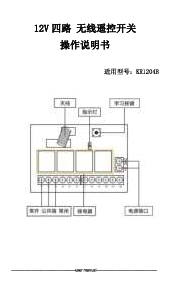
The QIACHIP KR1204 system consists of a 4-channel relay receiver module and two 4-button remote control key fobs. The receiver module is housed in a protective casing and features screw terminals for easy wiring.

Figure 5.1: The QIACHIP KR1204 wireless relay receiver module (inside its casing and exposed) alongside two 4-button remote control key fobs.

Figure 5.2: Detailed view of the KR1204 receiver board, highlighting the 10A relays, LED indicator, highly sensitive receiver modules, and the learning button. Terminal labels for 4NO, 4COM, 4NC, 3NO, 3COM, 3NC, 2NO, 2COM, 2NC, 1NO, 1COM, 1NC, +V, and GND are also visible.
6. Setup and Installation
The KR1204 module is designed for versatile applications. Below are general wiring guidelines and example diagrams. Always ensure power is disconnected before wiring.
6.1 Wiring the Receiver Module
Connect the DC 12V power supply to the +V and GND terminals on the receiver board. The output terminals (1NO, 1COM, 1NC, etc.) are for connecting your devices. Each relay has Normally Open (NO), Common (COM), and Normally Closed (NC) contacts.

Figure 6.1: Example wiring diagrams for the KR1204 module, illustrating connections for DC motor control, AC motor control, and general load control (e.g., lamps, curtain motors, garage motors).
7. Operating Modes and Programming
The KR1204 module supports three operating modes: Momentary, Toggle, and Latched. To change modes or pair new remotes, you must first reset the module. After a reset, all previously paired remote controls are temporarily deactivated until re-programmed.
7.1 Resetting the Module (Clearing Codes)
To clear all learned remote control codes from the receiver module:
- Press the Learning button on the receiver board 8 times.
- The LED indicator will flash several times, then turn off, indicating that all codes have been cleared.
7.2 Momentary Mode Programming
In Momentary mode, the relay activates only while the remote button is pressed and held. It deactivates when the button is released.
- Perform a Reset (clear all codes) as described in Section 7.1.
- Press the Learning button 1 time. The LED indicator will turn on.
- Press and hold the desired button on your remote control (e.g., 'A' button). The LED on the receiver will flash, then turn off.
- Release the remote button. The programming for Momentary mode is complete.

Figure 7.1: Visual guide for programming the KR1204 module into Momentary mode. This involves clearing codes, pressing the learning button once, then pressing and holding a remote button.
7.3 Toggle Mode Programming
In Toggle mode, pressing the remote button once activates the relay, and pressing it again deactivates it.
- Perform a Reset (clear all codes) as described in Section 7.1.
- Press the Learning button 2 times. The LED indicator will turn on.
- Press the desired button on your remote control (e.g., 'A' button). The LED on the receiver will flash, then turn off.
- The programming for Toggle mode is complete.

Figure 7.2: Visual guide for programming the KR1204 module into Toggle mode. This involves clearing codes, pressing the learning button twice, then pressing a remote button.
7.4 Latched Mode Programming
In Latched mode, pressing one remote button activates the relay, and pressing another remote button deactivates it. This mode typically uses two buttons for one relay (e.g., 'A' for ON, 'B' for OFF).
- Perform a Reset (clear all codes) as described in Section 7.1.
- Press the Learning button 3 times. The LED indicator will turn on.
- Press the first desired button on your remote control (e.g., 'A' button for ON). The LED on the receiver will flash.
- Press the second desired button on your remote control (e.g., 'B' button for OFF). The LED on the receiver will flash, then turn off.
- The programming for Latched mode is complete.

Figure 7.3: Visual guide for programming the KR1204 module into Latched mode. This involves clearing codes, pressing the learning button three times, then pressing two different remote buttons sequentially.
8. Troubleshooting
- Device not responding:
- Check power connections to the receiver module.
- Ensure remote control batteries are functional (see Maintenance for battery replacement).
- Verify that the remote is paired correctly to the receiver in the desired operating mode. If unsure, try re-programming.
- Reduced remote range:
- Ensure the receiver's antenna is fully extended and not obstructed.
- Check for sources of RF interference (e.g., other wireless devices, metal structures).
- Replace remote control batteries if they are low.
- Incorrect mode operation:
- Perform a full reset (clear all codes) and re-program the remote in the desired mode, following the instructions carefully.
9. Maintenance
9.1 Remote Control Battery Replacement
The remote control key fobs use CR2032 coin cell batteries. To replace them:
- Carefully open the remote control casing.
- Remove the old CR2032 battery.
- Insert a new CR2032 battery, ensuring correct polarity (+ side up).
- Close the remote control casing securely.

Figure 9.1: An opened QIACHIP remote key fob, illustrating the location of the CR2032 coin cell battery for replacement.
9.2 General Care
- Keep the receiver module and remote controls clean and dry.
- Avoid dropping the devices or subjecting them to strong impacts.
10. Warranty and Support
For warranty information or technical support, please refer to the product packaging or contact QIACHIP customer service directly. Keep your purchase receipt for warranty claims.