
Introduction
This manual provides essential information for the safe and effective use of your Squad Hero Rechargeable Laser Tag set. Please read these instructions thoroughly before operating the product.

Image: Cover of the Squad Hero Battle Action Laser Tag 2.0 Instruction Manual.
What's in the Box
- 4 Laser Tag Guns
- 4 Laser Tag Vests
- 1 Charging Station & Adapter
- 1 Instruction Guide
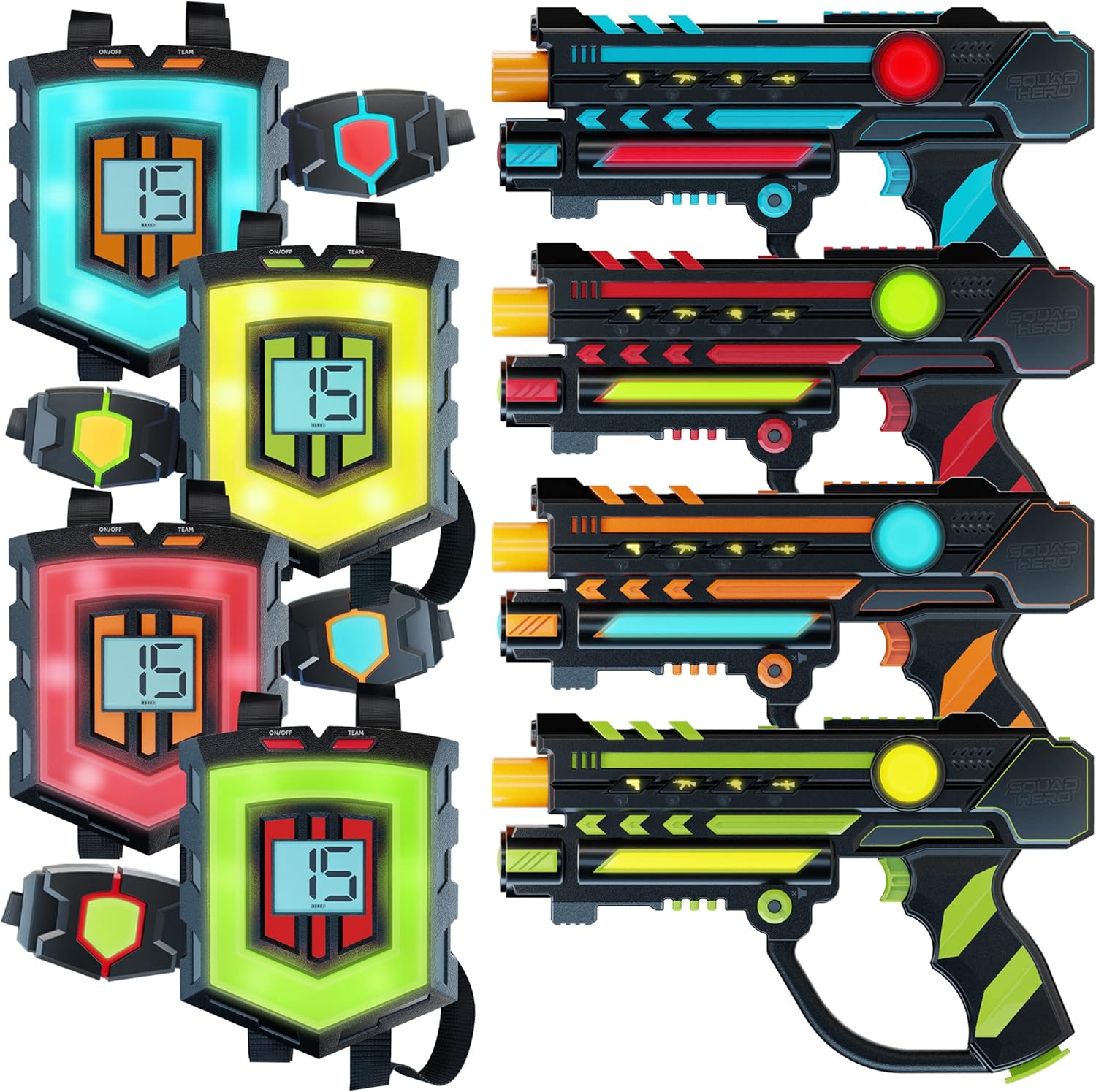
Image: The complete Squad Hero Laser Tag set, including four colorful guns, four vests, and the central charging station.
Setup
- Unpack: Carefully remove all components from the packaging.
- Charge All Gear: Connect the charging station to a power outlet using the provided adapter. Place all four laser tag guns and connect the four vests to the charging station. Ensure all units are charging until fully powered. The charging station features blue indicator lights for charging status.
- Power On: Turn on each laser tag gun and vest using their respective power buttons.
- Pairing: The guns and vests are designed to pair automatically using HeroSync technology. Once powered on, the gun will prompt "Please Pair". Aim the gun at the vest and fire to establish a connection. The vest will then prompt "Please Select a Team".
- Team Selection: On the vest, press the "Team" button to cycle through the available team colors (Blue, Red, Yellow, Green). The gun will automatically sync to the selected team color.
- Adjust Lives: Use the "Add Lives" or "Subtract Lives" buttons on the vest to set the desired number of lives per game (from 1 to 99).
- Strap On: Adjust the neck and waist straps of the vests for a comfortable and secure fit.

Image: Illustration of HeroSync technology, demonstrating how the laser tag gun automatically syncs with the vest.
Operating Instructions
Game Modes & Features
- 360° Combat: Targets are located on the gun, chest, and back of the vest, providing a comprehensive combat experience.
- LCD Displays: Both guns and vests feature LCD screens that show real-time status, including ammo count, remaining lives, and team data.
- 4 Weapon Modes: Cycle through Pistol, Automatic, Laser, and Rocket modes using the weapon mode buttons on the gun. Each mode has distinct sound effects, shot capacity, and impact on opponent's lives.
- Reloading: When your ammo runs out, press the reload button on the gun to replenish your shots.
- Stealth Mode: Activate Stealth Mode for a period of silence, making your movements less detectable. The gun will not make noise during this period.
- Solo Mode: Play individually against others, where each player is their own "team."
- Night Flashlight: Use the built-in flashlight on the gun to illuminate dark areas during gameplay.
- Child-Safe Infrared: The system uses child-safe infrared emission, not actual lasers.
- Expandable: All Squad Hero Laser Tag sets are compatible, allowing you to add unlimited guns and vests for larger games.
Visual Guides

Image: Close-up of the laser tag gun highlighting its various features and controls.
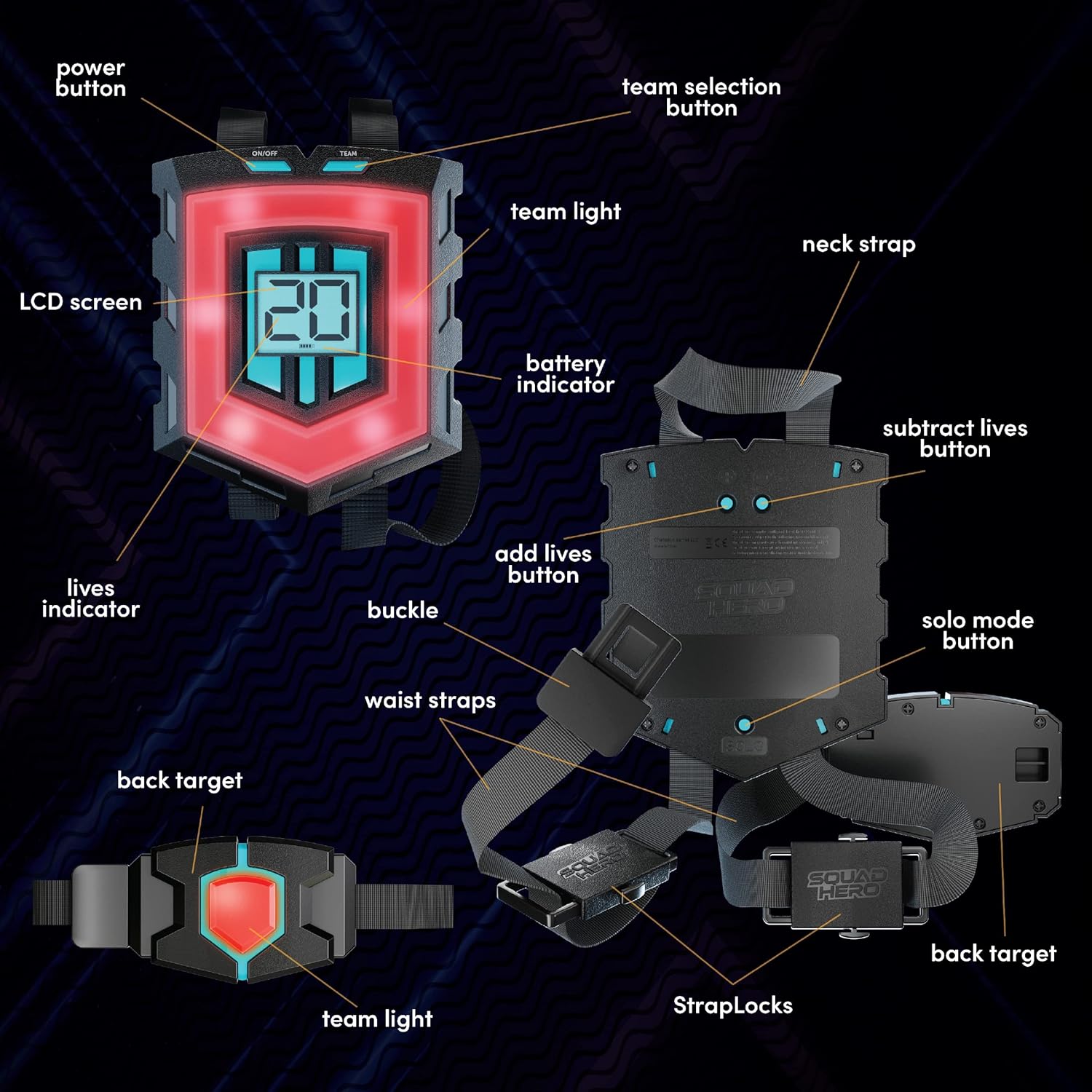
Image: Close-up of the laser tag vest, detailing its components and functions.
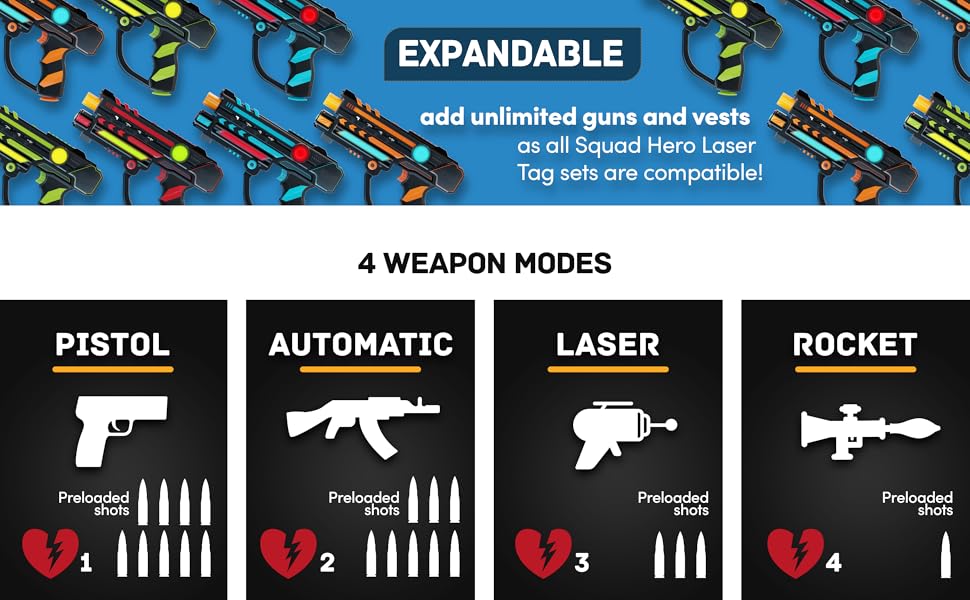
Image: Visual representation of the four distinct weapon modes available in the game.
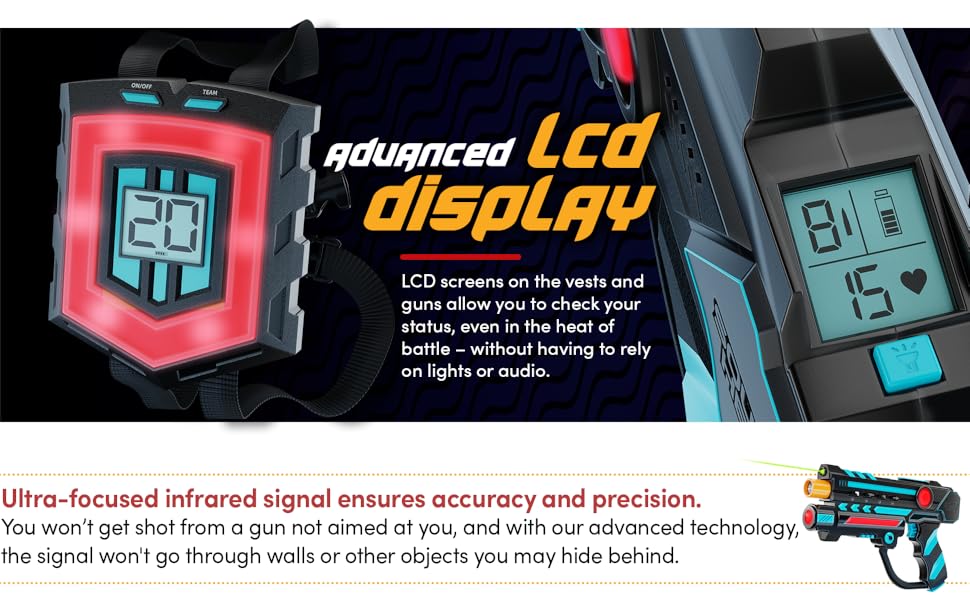
Image: Advanced LCD screens on both the vest and gun provide clear status updates during gameplay.
Charging
The Squad Hero Laser Tag set features fully rechargeable guns and vests. The included charging station allows all gear to be charged simultaneously. A full charge typically provides approximately 8 games of 30 minutes each. Blue indicator lights on the charging station confirm active charging.

Image: The charging station with all four laser tag guns and vests connected, showing the charging process.

Image: The charging station illuminated with blue lights, indicating that the laser tag units are charging.
Specifications
| Feature | Detail |
|---|---|
| Brand | Squad Hero |
| Model Number | SH-001 |
| Age Range | 8+ Years |
| Number of Players | 2-4 (expandable) |
| Maximum Range | 150 Feet |
| Power Source | Rechargeable Lithium-Ion Batteries |
| Material Type | Plastic |
| Special Features | 360° Combat, HeroSync & LCD HUD, 4 Weapon Modes, Adjustable Lives, Stealth Mode, Team/Solo Mode, Night Flashlight, Compatibility with Other Sets |
| Included Components | 4 Laser Tag Guns, 4 Laser Tag Vests, Charging Station & Adapter, Instruction Guide |
Maintenance
- Cleaning: Wipe down guns and vests with a soft, dry cloth after each use. Avoid using harsh chemicals or abrasive cleaners.
- Storage: Store the laser tag set in its original packaging or a dry, cool place away from direct sunlight when not in use. Ensure all units are fully charged before long-term storage to maintain battery health.
- Battery Care: Always use the provided charging station and adapter. Do not attempt to open or replace the internal rechargeable batteries.
Troubleshooting
- Units Not Powering On: Ensure units are fully charged. Check the charging station connection and power adapter.
- Guns/Vests Not Pairing: Make sure both the gun and vest are powered on. Re-attempt the pairing process by aiming the gun at the vest and firing. Ensure there are no obstructions between the gun and vest during pairing.
- Inaccurate Hits: Direct sunlight can sometimes affect infrared performance; try playing in shaded areas or indoors for optimal accuracy. Ensure the target zones on the vest (chest, back) and gun are not obstructed.
- Sound Issues: Check if Stealth Mode is activated on the gun. Adjust volume settings if available.
Official Product Videos
Squad Hero Laser Tag Overview
Video: An official overview of the Squad Hero Laser Tag system, demonstrating gameplay, features, and the overall experience.
Laser Tag at Home - Quick Demo
Video: A short demonstration of the laser tag set in a home environment, showcasing quick setup and immediate play.
Warranty and Support
For warranty information or technical support, please refer to the contact details provided in your product packaging or visit the official Squad Hero website. Keep your purchase receipt as proof of purchase for any warranty claims.


