
PINEWORLD L5
PINEWORLD L5 Smart Door Lock Instruction Manual
Model: L5
1. Introduction
This manual provides comprehensive instructions for the installation, operation, and maintenance of your PINEWORLD L5 Smart Door Lock. The L5 is an advanced keyless entry system designed for residential and apartment doors, offering multiple unlocking methods and enhanced security features. Please read this manual thoroughly before installation and use to ensure proper functionality and safety.
2. Product Features
The PINEWORLD L5 Smart Door Lock integrates various advanced features for convenience and security:
- Multiple Unlocking Methods: Supports fingerprint, password, RFID card, mobile app (WiFi & Bluetooth), mechanical key, and combination unlocking.
- Advanced Security: Features include anti-copy fingerprint technology, C-class lock cylinder, force open alarm, card encryption, and electromagnetic interference protection.
- Smart Connectivity: Control and manage your lock remotely via the mobile application using WiFi and Bluetooth connectivity.
- Privacy Protection: Includes a scramble PIN code function to prevent peeping during password entry.
- Fast Recognition: Fingerprint recognition in as fast as 0.3 seconds.

Figure 2.1: Overview of the PINEWORLD L5 Smart Door Lock highlighting its 6+1 unlocking methods, including Fingerprint, Password, App Control, RFID Card, Bluetooth, Keys, and Combination method. The lock supports both WiFi and Bluetooth for mobile app control.

Figure 2.2: Diagram illustrating the professional and reliable features of the PINEWORLD L5 Smart Door Lock, such as App Control, Anti-copy fingerprint, Force Open Alarm, Card Encryption, C-class Lock Cylinder, Prevent Peeping Password, Electromagnetic Interference Protection, Dynamic Password, and Fingercrystal Smart Chip.
3. Appearance Description
Familiarize yourself with the components of your PINEWORLD L5 Smart Door Lock:

Figure 3.1: Detailed view of the PINEWORLD L5 Smart Door Lock's internal and external panels, labeling key components such as the FPC Fingerprint Sensor, Password Touchpad, Handle, Speaker Hole, Anti-lock knob, and Battery Case.
- FPC Fingerprint Sensor: For fingerprint recognition.
- Password Touchpad: Numeric keypad for password entry.
- Handle: Ergonomic handle for opening the door.
- Speaker Hole: For audio prompts and alarms.
- Anti-lock knob: For manual locking/unlocking from the inside.
- Battery Case: Located on the interior panel for battery installation.
4. Specifications
Technical specifications of the PINEWORLD L5 Smart Door Lock:
| Feature | Description |
|---|---|
| Dimensions | 350 * 73.5 * 25 mm |
| Unlocking Methods | Fingerprint, RFID card, Password, APP, Bluetooth, Keys, Combination unlock |
| Material | Aluminum alloy (main body), 304 stainless steel (lock tongue) |
| Lock Body Type | 6068 |
| Lock Cylinder | C-class Anti-theft lock cylinder |
| Mechanical Keys | 2 included |
| Compatible Door Types | Wooden door, security door, copper door, steel door |
| Capacity | 100 fingerprint + Cards + Password entries |
| Password Length | 6-8 numbers |
| Battery Type | 4pcs AA battery |
5. Setup and Installation
The PINEWORLD L5 Smart Door Lock is designed for straightforward installation. It is recommended to follow the detailed installation guide provided in the product packaging. Key steps include:
- Preparation: Ensure your door meets the specified dimensions and material requirements (wooden, security, copper, or steel doors).
- Mortise Installation: Install the 6068 lock body mortise into the door.
- Panel Mounting: Secure the exterior and interior panels to the door using the provided mounting hardware.
- Handle Reversibility: The handle is reversible to accommodate left or right-handed door configurations. Adjust as needed during installation.
- Battery Installation: Insert 4 AA batteries into the battery case on the interior panel. Ensure correct polarity.
- Initial Setup: Follow the instructions to register the administrator fingerprint/password and connect the lock to the mobile application via Bluetooth and WiFi.
6. Operating Instructions
The PINEWORLD L5 offers multiple ways to unlock your door:
6.1. Fingerprint Unlocking
Place your registered finger on the FPC Fingerprint Sensor. The lock will recognize your fingerprint in approximately 0.3 seconds and unlock.

Figure 6.1: Illustration of the PINEWORLD L5 Smart Door Lock's fast fingerprint recognition, capable of unlocking in 0.3 seconds.
6.2. Password Unlocking
Enter your 6-8 digit password on the touchpad. The lock supports a scramble PIN code feature where you can enter random numbers before or after your actual password to prevent others from peeping.
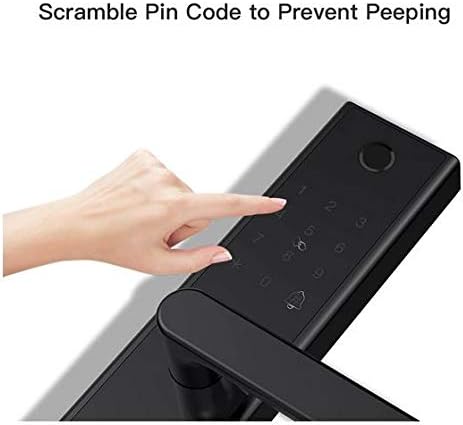
Figure 6.2: Image demonstrating the 'Scramble Pin Code to Prevent Peeping' feature, where extra digits can be entered before or after the actual password.
6.3. Mobile App Control (WiFi & Bluetooth)
The PINEWORLD L5 can be controlled via a dedicated mobile application. Ensure Bluetooth is enabled on your phone for initial connection, then configure WiFi for remote access.
- Download App: Download the official PINEWORLD app from your device's app store.
- Pairing: Turn on Bluetooth on your phone, search for the door lock within the app, and complete the pairing process.
- Remote Management: Once connected, you can unlock the door, manage users (add/delete fingerprints, passwords, RFID cards), view access logs, and set temporary passwords (e.g., Password Aging Settings) from anywhere with an internet connection.
- Alarm Notifications: The app will send alerts for events such as forced entry attempts or when the door lock is shaken.

Figure 6.3: Visual representation of the mobile app control features, including the three-step connection process (Bluetooth on, search, connection succeeded), Password Aging Settings for time-limited access, and app notifications for forced entry or lock tampering.
6.4. RFID Card Unlocking
Present a registered RFID card to the card reader area on the lock's exterior panel to unlock.
6.5. Mechanical Key Unlocking
In case of emergency or battery depletion, use the provided mechanical keys to unlock the door manually.
6.6. Combination Unlocking
The lock supports a combination of methods for unlocking, as configured in the mobile application.
6.7. Locking the Door
The lock will automatically secure itself after a set period, or you can manually lock it from the inside using the anti-lock knob.
7. Maintenance
To ensure the longevity and optimal performance of your PINEWORLD L5 Smart Door Lock, follow these maintenance guidelines:
- Cleaning: Wipe the lock's surface with a soft, dry cloth. Avoid using abrasive cleaners or solvents that could damage the finish or electronic components.
- Battery Replacement: Replace all four AA batteries when the low battery indicator appears or when the lock's performance degrades. Always use new, high-quality alkaline batteries.
- Fingerprint Sensor: Keep the fingerprint sensor clean and dry for accurate recognition.
- Mechanical Parts: Do not lubricate the lock cylinder or other mechanical parts with oil, as this can attract dust and cause malfunctions.
- Firmware Updates: Regularly check the mobile application for available firmware updates to ensure your lock has the latest features and security enhancements.
8. Troubleshooting
If you encounter issues with your PINEWORLD L5 Smart Door Lock, refer to the following common problems and solutions:
| Problem | Possible Cause / Solution |
|---|---|
| Lock does not respond. | Low batteries. Replace all four AA batteries. Check battery polarity. |
| Fingerprint not recognized. | Finger is wet, dirty, or improperly placed. Clean sensor and try again. Re-register fingerprint if issue persists. |
| Password not accepted. | Incorrect password entered. Ensure correct digits and order. Try using the scramble PIN code feature. |
| App connection issues. | Bluetooth/WiFi is off on phone or lock. Ensure lock is within range. Restart app or lock. Check router settings for WiFi connection. |
| Lock makes unusual noises. | Mechanical obstruction or internal issue. Do not force the handle. Contact customer support. |
| Alarm sounds unexpectedly. | Possible tampering attempt or sensor malfunction. Check the lock for any signs of forced entry. Review app logs. |
If the problem persists after attempting these solutions, please contact PINEWORLD customer support.
9. Warranty and Support
For specific warranty terms and conditions, please refer to the warranty card included with your product or contact PINEWORLD customer service directly. Typically, smart locks come with a limited manufacturer's warranty covering defects in materials and workmanship.
For technical support, troubleshooting assistance, or inquiries regarding your PINEWORLD L5 Smart Door Lock, please visit the official PINEWORLD website or contact their customer support channels. Keep your purchase receipt and product serial number handy when seeking support.
Ask a question about this manual
Ask about setup, troubleshooting, compatibility, parts, safety, or missing instructions. Manuals+ will review the question and use this page’s manual context to help answer it.