
ASA JWM41
Jensen JWM41 Wallmount Stereo User Manual
Model: JWM41
1. Introduction
The Jensen JWM41 is a versatile wall-mount stereo system designed for various applications, offering a comprehensive range of audio and video playback options. This unit features AM/FM radio, DVD/CD player, USB and AUX inputs, and Bluetooth connectivity for wireless audio streaming. It supports two speaker zones and provides four speaker outputs, making it suitable for multi-room or multi-area audio setups.
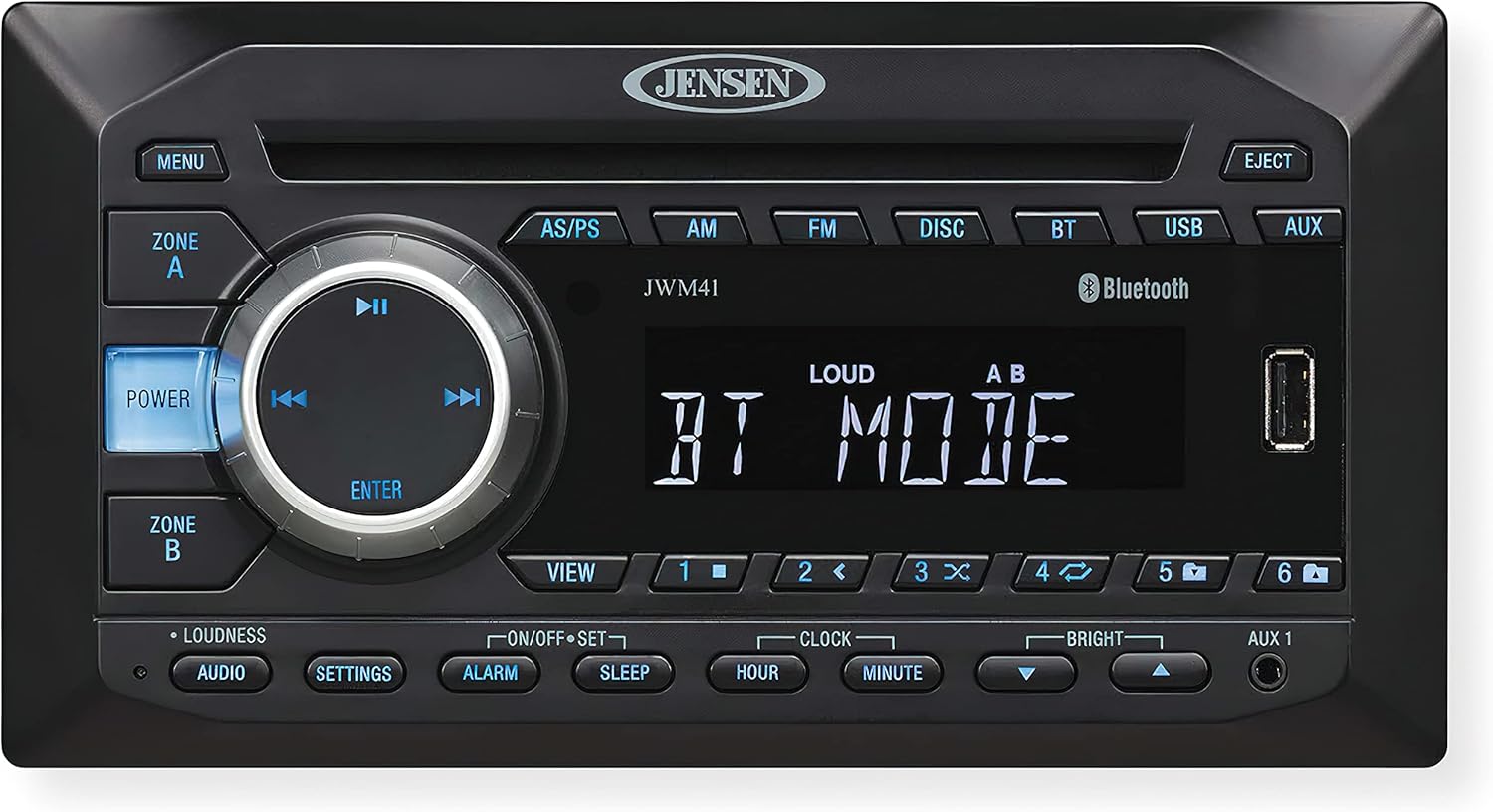
This image displays the front panel of the Jensen JWM41 Wallmount Stereo. Key features visible include the central display screen, the disc slot, a large rotary control knob with integrated playback buttons (Play/Pause, Skip), and various function buttons such as Power, Menu, Zone A/B, AM, FM, Disc, BT (Bluetooth), USB, and AUX. A USB port is also visible on the right side of the unit. The Jensen logo is prominently displayed at the top center.
2. Safety Information
Please read all instructions carefully before operating the unit. Keep this manual for future reference.
- Do not expose the unit to water or moisture.
- Ensure proper ventilation to prevent overheating.
- Use only the specified power supply (DC 12 Volts, Negative Ground).
- Do not attempt to service the unit yourself. Refer all servicing to qualified personnel.
- Before installation, ensure all shipping screws are removed from the unit. Failure to do so may cause damage.
3. Setup and Installation
3.1 Unpacking and Initial Preparation
- Carefully remove the unit from its packaging.
- Important: Before installation, locate and remove any shipping screws. These are typically small screws designed to secure internal components during transit.
- Verify all accessories are present, including the wireless remote control.
3.2 Mounting the Unit
The JWM41 is designed for wall-mount installation. Ensure the mounting surface is stable and can support the unit's weight (approximately 2.41 pounds). The overall dimensions are 8.23" (W) x 6.56" (D) x 4.37" (H), with mounting dimensions of 7.09" (W) x 5.24" (D) x 3.47" (H).
- Mark the desired mounting location.
- Drill pilot holes as necessary.
- Secure the unit using four M3x20mm screws (not included with the unit).
3.3 Wiring Connections
Ensure all power is disconnected before making any wiring connections.
- Power: Connect the unit to a DC 12 Volt, negative ground power source. Operating voltage is 11-16 VDC.
- Speakers: Connect up to four speakers. The unit supports 2 speaker zones and 4 speaker outputs. It is compatible with 4-8 ohm speakers, with a 4 ohm load minimum.
- Front AUX A/V Input: Use the 3.5mm jack for connecting external audio/video devices.
- Rear Audio RCA Input/Output: One rear audio RCA input and one rear RCA output are available.
- RCA Composite Video Output: One RCA composite video output is provided. Note: This unit does NOT have an HDMI port.
- USB Port: The front USB port supports MP3/WMA playback.
4. Operating Instructions
4.1 Basic Controls
- POWER Button: Press to turn the unit on or off.
- MENU Button: Access various settings and options.
- ZONE A / ZONE B Buttons: Control audio output for independent speaker zones.
- Rotary Knob (Volume/ENTER): Rotate to adjust volume. Press to confirm selections in menus.
- Playback Controls (▶▶ / ◀◀ / ▶▶): Use for Play/Pause, Skip Forward, and Skip Backward during media playback.
- EJECT Button: Ejects a disc from the disc slot.
4.2 Source Selection
Press the corresponding button on the front panel to select an audio/video source:
- AM / FM: Selects AM or FM radio tuner.
- DISC: Selects the DVD/CD player.
- BT (Bluetooth): Activates Bluetooth mode for wireless audio streaming.
- USB: Selects the USB input for media playback.
- AUX: Selects the Auxiliary input (front 3.5mm or rear RCA).
4.3 Radio Operation
- Tuning: Use the skip buttons (◀◀ / ▶▶) to manually tune or seek for stations.
- Presets: The unit features 30 preset stations (12 AM / 18 FM). Use the AS/PS button to auto-store or scan presets.
4.4 Disc Playback
The JWM41 supports CD, CD-R, CD-RW, DVD, DVD+RW, DVD-RW, DVD-Video, MPEG-4, VCD, JPEG, CD-DA, MP3, and WMA formats.
- Insert a disc into the slot. The unit will automatically switch to DISC mode.
- Use the playback controls for Play/Pause, Skip Track, and Fast Forward/Rewind.
- Press EJECT to remove the disc.
4.5 Bluetooth Operation
The unit supports Bluetooth streaming audio (A2DP) and control (AVRCP).
- Press the BT button to enter Bluetooth mode.
- On your Bluetooth device, search for "JWM41" and pair with it.
- Once paired, you can stream audio wirelessly from your device to the stereo.
4.6 Audio Settings
Access audio settings via the AUDIO or SETTINGS buttons.
- Loudness: Enhances bass and treble at low volumes.
- Electronic Bass, Treble, Balance, Fader Controls: Adjust these settings to customize your audio output.
4.7 Clock and Timer Functions
The unit includes a clock with alarm and sleep timer functions.
- Setting Clock: Use HOUR and MINUTE buttons to set the time.
- Alarm: Set an alarm time using the ALARM button.
- Sleep Timer: Use the SLEEP button to set a timer for the unit to automatically turn off.
4.8 Display Brightness
Adjust the brightness of the white LED backlight LCD panel using the BRIGHT controls.
5. Maintenance
- Cleaning: Use a soft, dry cloth to clean the unit's exterior. Do not use abrasive cleaners or solvents.
- Disc Care: Handle discs by their edges. Keep them clean and free of scratches.
- Ventilation: Ensure the ventilation openings are not blocked to prevent overheating.
6. Troubleshooting
| Problem | Possible Cause | Solution |
|---|---|---|
| No power | Incorrect wiring; Blown fuse; Shipping screws not removed. | Check power connections; Replace fuse if necessary; Ensure all shipping screws are removed. |
| No sound | Volume too low; Mute activated; Incorrect speaker wiring; Incorrect source selected. | Increase volume; Deactivate mute; Check speaker connections; Select correct source. |
| Disc error / Disc not playing | Dirty or scratched disc; Unsupported disc format; Disc inserted incorrectly. | Clean disc; Use supported disc format; Re-insert disc correctly. |
| Bluetooth not connecting | Unit not in pairing mode; Device too far; Device already paired with another unit. | Ensure unit is in BT mode; Move device closer; Disconnect from other devices and try again. |
| Radio reception poor | Antenna not connected or damaged; Weak signal area. | Check antenna connection; Try repositioning antenna or unit. |
7. Specifications
| Category | Detail |
|---|---|
| General | |
| Power Supply Requirements | DC 12 Volts, Negative Ground |
| Operating Voltage | 11-16 VDC |
| Overall Dimensions (W x D x H) | 8.23" x 6.56" x 4.37" |
| Mounting Dimensions (W x D x H) | 7.09" x 5.24" x 3.47" |
| Weight | 2.41 pounds |
| FM Tuner | |
| Frequency Coverage (USA) | 87.5 to 107.9 MHz |
| Sensitivity | <4 µV |
| Stereo Separation@1 kHz | >25 dB |
| AM Tuner | |
| Frequency Range (USA) | 530-1710 kHz |
| Sensitivity (S/N=20dB) | <63 µV |
| Amplifier | |
| Output Power | 6W x 4 |
| Output Impedance | Compatible with 4-8 Ω speakers, 4 Ω load minimum |
| DVD | |
| Frequency Response | 20-20,000 Hz |
| Channel Separation | 50 dB |
| S/N Ratio | 65 dB |
| Distortion | 0.5% |
8. Warranty and Support
For detailed warranty information, please refer to the warranty card included with your product or visit the official ASA Electronics website. Keep your proof of purchase for warranty claims.
For technical support or service inquiries, please contact ASA Electronics customer service. Contact information can typically be found on the manufacturer's website or in the product packaging.
Related documentsJWM41


Ask a question about this manual
Ask about setup, troubleshooting, compatibility, parts, safety, or missing instructions. Manuals+ will review the question and use this page’s manual context to help answer it.