
Introduction
The TRESANTI Coastal Adjustable Height Desk in White is designed to enhance your workspace with its blend of functionality and modern aesthetics. This electric desk allows for seamless transitions between sitting and standing positions, promoting a more active and comfortable work environment. Featuring integrated charging solutions and a durable glass top, it is an ideal addition to any home or office.

Figure 1: The TRESANTI Coastal Adjustable Height Desk in a typical office setup.
Key Features
- Electric Automatic Height Adjustment: Smoothly transition between sitting and standing positions with the touch of a button. Height adjustable from 29.4 inches to 47 inches.
- Integrated USB Inputs: Includes two 2.4 amp USB inputs for convenient device charging.
- Dry Erase Compatible Glass Top: The durable glass surface can be used with dry erase markers for quick notes and brainstorming.
- Wireless Desktop Charging Station: Built-in wireless charging pad for compatible devices, reducing cable clutter.
- Spacious Storage Drawer: A full-extension drawer provides ample space for office supplies, keeping your workspace organized.
Setup Guide
1. Unpacking and Inspection
Carefully unpack all components from the packaging. Inspect all parts for any damage. Report any damaged or missing parts to customer support immediately.
2. Assembly
While the desk is largely pre-assembled, some minor assembly may be required for the legs and frame. Follow the detailed instructions provided in the separate assembly manual for proper installation. Ensure all screws and fasteners are securely tightened.
3. Placement
Place the desk on a flat, stable surface. Ensure there is adequate clearance around the desk for height adjustment and to prevent obstruction of cables.
4. Power Connection
Connect the power cord to a grounded electrical outlet. Ensure the cable is routed safely to avoid tripping hazards or damage during height adjustments.
Operating Instructions
1. Height Adjustment
The desk features an integrated touch control panel on the glass top. Use the Up (▲) and Down (▼) arrows to manually adjust the desk height. The current height will be displayed digitally on the panel.

Figure 2: Touch control panel for height adjustment and presets.
2. Memory Presets (H1, H2, H3)
The desk allows you to save up to three preferred height settings for quick recall:
- Adjust the desk to your desired height using the Up/Down arrows.
- Press and hold one of the preset buttons (H1, H2, or H3) until the display flashes or beeps, indicating the height has been saved.
- To recall a saved height, simply press the corresponding preset button (H1, H2, or H3). The desk will automatically move to the saved position.
3. Wireless Charging Station
Place your Qi-compatible smartphone or other device on the designated wireless charging pad located on the desk surface. Ensure the device is centered on the pad for optimal charging.

Figure 3: Integrated wireless charging pad.
4. USB Charging Ports
Two 2.4 amp USB ports are located on the side of the desk for charging devices via USB cable. Simply plug your device's USB cable into one of the available ports.

Figure 4: USB charging ports for wired device charging.
5. Drawer Usage
The full-extension drawer provides convenient storage. Pull the drawer gently to open and push to close. The drawer is designed with internal compartments for organization.

Figure 5: The desk's integrated storage drawer.
Maintenance
- Cleaning the Glass Top: Use a soft, damp cloth and a mild glass cleaner to wipe the glass surface. Avoid abrasive cleaners or materials that could scratch the glass. For dry erase marks, use a dry erase board cleaner or a damp cloth.
- General Cleaning: Wipe down the desk frame and legs with a soft, dry cloth.
- Cable Management: Periodically check and organize cables to prevent tangling or interference with the desk's movement.
- Motor Care: The electric motor is designed for durability. Avoid overloading the desk beyond its weight capacity. If the motor makes unusual noises or struggles to adjust, refer to the troubleshooting section.
Troubleshooting
| Problem | Possible Cause | Solution |
|---|---|---|
| Desk does not adjust height. | Power cord disconnected; motor overload; safety lock engaged. | Check power connection. Reduce weight on desk. Check if safety lock button (if present) is disengaged. Unplug for 30 seconds and plug back in to reset. |
| Wireless charger not working. | Device not Qi-compatible; device not properly aligned; foreign objects on pad. | Ensure device supports Qi wireless charging. Re-position device on the center of the pad. Remove any objects between device and pad. |
| USB ports not charging. | Power issue; cable fault; device incompatibility. | Verify desk is powered on. Try a different USB cable. Test with another device. |
| Desk makes unusual noises. | Loose components; motor strain. | Check all assembly screws for tightness. Reduce weight on the desk. If noise persists, contact customer support. |
Specifications
- Brand: TRESANTI
- Model Number: 300-WH
- Product Dimensions: 25.6"D x 47.2"W x 47"H
- Color: White
- Style: Coastal
- Finish Type: Glass
- Item Weight: 42 Kilograms
- Minimum Height: 29.4 Inches
- Maximum Height: 47 Inches
- Included Components: Wireless Desktop Charging Station, Height adjustment mechanism
- Power: Electric Automatic
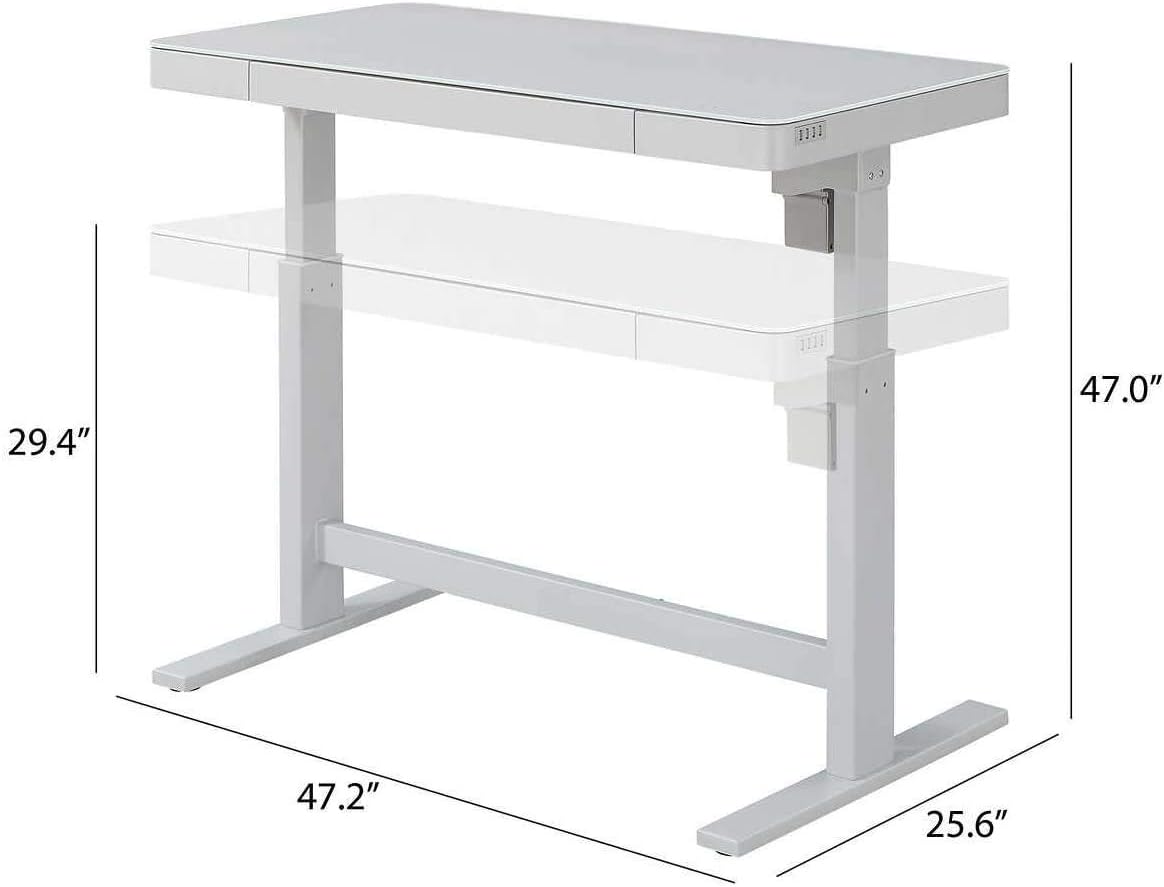
Figure 6: Detailed dimensions of the desk.
Warranty & Support
This product is backed by a standard return policy. For specific warranty details, please refer to your purchase documentation or contact the seller directly. For any product inquiries, technical assistance, or to report issues, please reach out to customer support.
Returns: 30-day easy returns are available for this product.
Customer Support: For assistance, please visit the Amazon Customer Service page or contact the seller, EVER RETAIL, directly through your order details.