
Comfast CF-WR754AC
Comfast CF-WR754AC Wireless Extender User Manual
Model: CF-WR754AC
Brand: Comfast
Product Overview
The Comfast CF-WR754AC is a versatile AC1200 dual-band wireless Wi-Fi extender, repeater, router, and access point designed to eliminate Wi-Fi dead zones and extend wireless coverage. It features four high-performance 3dBi omnidirectional antennas, providing enhanced wireless performance and transmission rates for both 2.4GHz and 5GHz bands.
This device is ideal for providing Wi-Fi service in large areas such as homes, offices, or public spaces. It supports simultaneous 2.4G and 5G wireless network connections, with transmission speeds up to 867Mbps on 5GHz and 300Mbps on 2.4GHz, totaling 1200Mbps.

Image: Comfast CF-WR754AC device illustrating its dual-band capabilities with 2.4GHz and 5GHz signal indicators.
Product Components and Features
Familiarize yourself with the key components and features of your Comfast CF-WR754AC device:

Image: Detailed diagram of the Comfast CF-WR754AC highlighting its components including High Gain Antennas, Signal Indicator, Three Mode Switch Button, Power Light/WPS Button, Reset Button, Power Switch, WAN port, and LAN port.
- High Gain Antennas: Four omnidirectional dual-frequency antennas for strong signal reception and transmission.
- Signal Indicator: LEDs that show the working conditions and signal strength of the device, aiding in optimal placement.
- Three Mode Switch Button: Allows easy switching between Repeater, AP, and Router modes.
- Power Light + WPS Button: Indicates power status and initiates Wi-Fi Protected Setup for easy encryption.
- Reset Button: Press for 5 seconds to restore factory default settings.
- Power Switch: Turns the device on or off.
- RJ-45 Ethernet Ports (WAN/LAN): Two 10/100Mbps Ethernet ports for wired connections, supporting both WAN and LAN functions depending on the operating mode.
Setup Guide
The Comfast CF-WR754AC is designed for easy setup. The factory default mode is Repeater mode. You can complete the setup using a smartphone, laptop, or tablet.

Image: Visual guide demonstrating the three simple steps to set up the Comfast CF-WR754AC using a mobile device interface.
Three Easy Steps for Setup:
- Connect to the Repeater: Use your cellphone or computer to connect to the Wi-Fi network broadcast by the repeater (e.g., "COMFAST-E356A-5G").
- Access Setup Page: Open a web browser and enter 192.168.10.1 in the address bar. Set a password for your device when prompted.
- Select Mode and Configure: Select "Repeater Mode" (or desired mode), choose the SSID (Wi-Fi network name) you wish to extend, input the password of your router, and save the settings.
Important Setup Tips:
- The Wi-Fi extender mode can be set up wirelessly using a smartphone or laptop.
- For optimal performance, set up the repeater mode successfully while the device is close to your main router. Once configured, you can then move the repeater to another location to extend coverage, minimizing potential issues.
- WPS Function: Click the repeater's WPS button, then activate the WPS function on your phone's wireless settings. Your phone will automatically connect to the repeater. Note: iPhones do not support the WPS function, and the WPS light on the device will remain blue without blinking.
Operating Modes
The Comfast CF-WR754AC supports multiple operating modes to suit various networking needs:
- Wi-Fi Range Extender (Repeater) Mode:
Extends the Wi-Fi coverage of an existing wireless network, eliminating dead zones. This is the default mode and is ideal for expanding your current Wi-Fi signal to areas with weak reception.
- Wireless Access Point (AP) Mode:
Converts a wired network connection into a wireless network. Connect an Ethernet cable from your router or modem to the CF-WR754AC's WAN/LAN port, and it will broadcast a new Wi-Fi network.
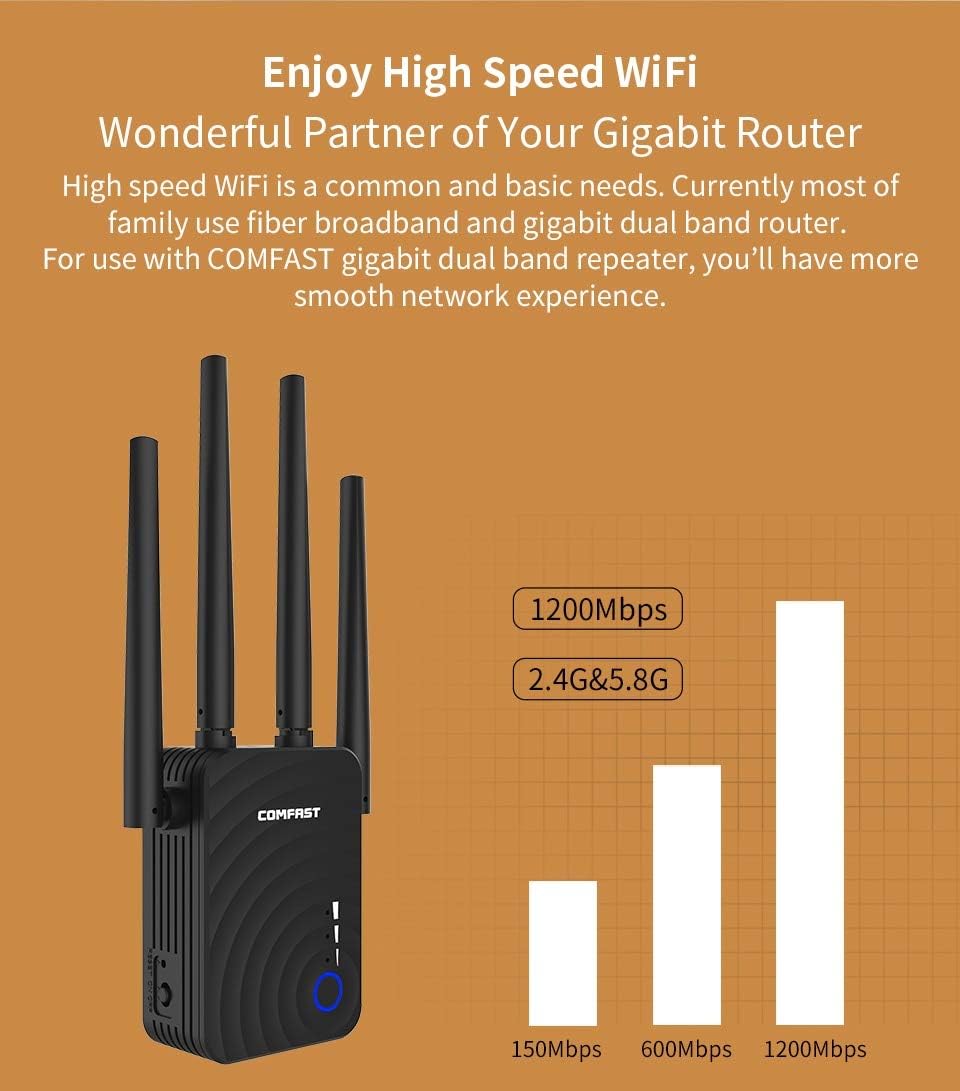
Image: Illustration of the Comfast CF-WR754AC plugged into a wall outlet, connected via Ethernet to a wired network, and broadcasting Wi-Fi signals to devices, demonstrating its Access Point functionality.
- Wireless Router Mode:
Creates an instant private wireless AC1200 network. This mode is suitable if you have a modem and want the CF-WR754AC to act as your primary router, managing network addresses and connections.
Performance and Features
Strong Expansion & Wall-Through Ability
The CF-WR754AC is equipped with four omnidirectional dual-frequency high-gain antennas, providing robust Wi-Fi signal receiving and transmitting capabilities. This design helps overcome obstacles like walls, extending signal coverage to every corner of your house without significant signal degradation.

Image: The Comfast CF-WR754AC device with text highlighting its superb antenna structure, ability to penetrate walls easily, and 180-degree rotating antennas for optimal signal direction.
High-Speed Dual-Band Wi-Fi
Enjoy a smooth network experience with high-speed Wi-Fi. The device supports 2.4GHz and 5GHz bands simultaneously, offering up to 1200Mbps (900Mbps on 5GHz + 300Mbps on 2.4GHz) ultra-fast data transfer speed to multiple devices. This makes it an excellent partner for your gigabit router, ensuring sufficient bandwidth for demanding applications.

Image: The Comfast CF-WR754AC with two individuals using laptops, illustrating how the dual-band capability (5GHz at 900Mbps and 2.4GHz at 300Mbps) provides 1200Mbps ultra-fast data transfer to multiple users.
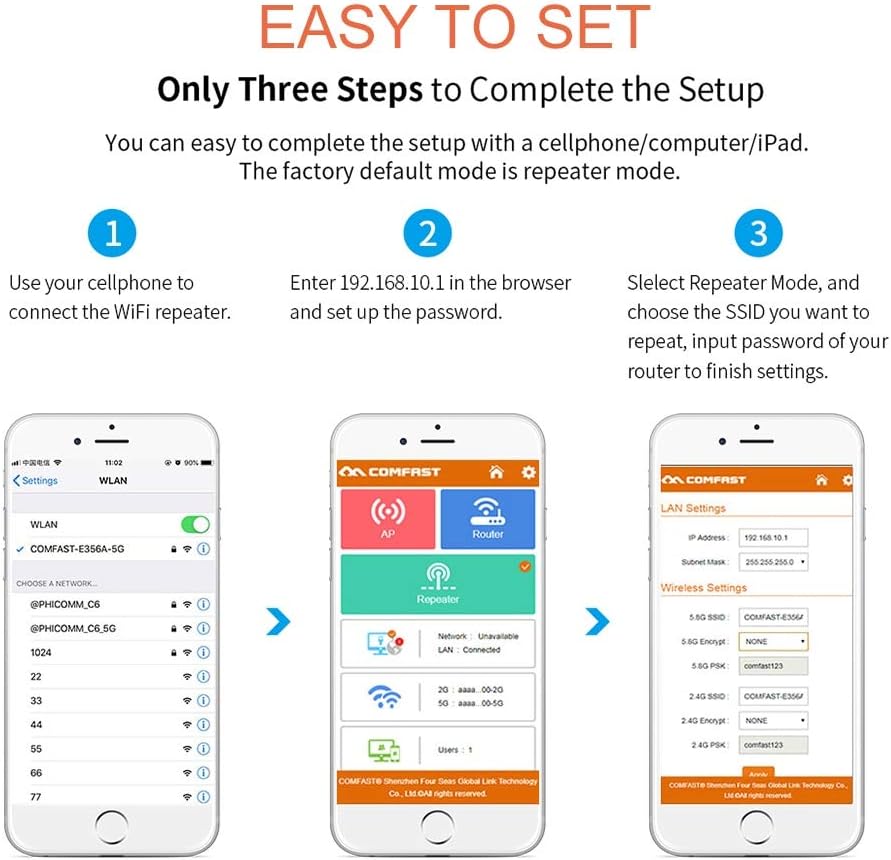
Image: The Comfast CF-WR754AC next to a bar chart comparing Wi-Fi speeds: 150Mbps, 600Mbps, and 1200Mbps, emphasizing the device's high-speed capability at 2.4G & 5.8G.
Good Heat Dissipation & Stable Performance
The device incorporates an isolated side heat dissipation design. This prevents dust accumulation and allows for rapid heat dissipation, ensuring stable and reliable performance over long periods of operation.

Image: The Comfast CF-WR754AC with arrows indicating airflow through its dissipating heat holes design, highlighting its effective heat management for stable performance.
Intelligent Signal Indicator
The built-in signal indicator helps you find the best placement for the Wi-Fi repeater. By observing the indicator's changes, you can optimize the device's location for maximum signal strength and coverage.
Automatic Setting Memory
Once successfully configured, the device remembers its settings. There is no need to repeat the setup process if you unplug the Wi-Fi signal booster and move it to another location within your home or office.

Image: The Comfast CF-WR754AC plugged into a wall outlet, with arrows indicating it can be moved to different rooms (Bedroom, Living Room, Kitchen, Balcony, Washing Room) after being set up once, demonstrating its automatic setting memory feature.
Maintenance
To ensure the longevity and optimal performance of your Comfast CF-WR754AC, follow these general maintenance guidelines:
- Keep Clean: Regularly wipe the device with a soft, dry cloth to prevent dust accumulation, especially around the heat dissipation vents.
- Proper Ventilation: Ensure the device is placed in a location with adequate airflow and that its ventilation holes are not obstructed.
- Avoid Extreme Conditions: Do not expose the device to extreme temperatures, high humidity, direct sunlight, or corrosive environments.
- Power Off When Not in Use: If you plan not to use the device for an extended period, it is advisable to power it off and unplug it.
Troubleshooting
If you encounter issues with your Comfast CF-WR754AC, consider the following troubleshooting steps:
- Cannot Access Setup Page (192.168.10.1):
Ensure your device (phone/laptop) is connected to the repeater's Wi-Fi network (e.g., "COMFAST-E356A-5G") and not your main router's network. Try clearing your browser's cache or using a different browser.
- Weak Signal After Setup:
Relocate the repeater. Use the intelligent signal indicator to find a spot that is within good range of your main router but also closer to the area where you need extended coverage. The ideal location is typically halfway between your router and the Wi-Fi dead zone.
- No Internet Connection in Repeater Mode:
Double-check that you entered the correct Wi-Fi password for your main router during the setup process. Ensure your main router has an active internet connection. Try restarting both your main router and the Comfast repeater.
- WPS Button Not Working (iPhone):
As noted in the setup tips, iPhones do not support the WPS function. You will need to manually connect to the repeater's Wi-Fi network and configure it via the web interface (192.168.10.1).
- Device Unresponsive / Factory Reset:
If the device becomes unresponsive or you wish to reconfigure it from scratch, press and hold the Reset Button for approximately 5 seconds until the lights change, indicating a factory reset.
Specifications
| Feature | Detail |
|---|---|
| Brand | Comfast |
| Model | CF-WR754AC |
| Wireless Standard | 802.11a/g/n/ac |
| Data Transfer Rate | 1200 Megabits Per Second (Mbps) |
| Frequency Band Class | Dual-Band (2.4GHz & 5GHz) |
| Antennas | 4 x 3dBi Omnidirectional High Gain Antennas |
| Ethernet Ports | 2 x 10/100Mbps RJ-45 (LAN/WAN) |
| Special Features | Dual Band, Access Point Mode, Repeater Mode, Router Mode, WPS Button, Signal Indicator, Heat Dissipation Design |
| Manufacturer | Comfast |
| First Available | 17 May 2019 |
Warranty and Support
For information regarding product warranty, returns, or technical support, please refer to the official Comfast website or the documentation provided with your purchase. You may also contact the seller directly for assistance.
Always ensure you are using the latest firmware for your device, which can typically be found on the manufacturer's support page, to benefit from performance improvements and security updates.
Related documentsCF-WR754AC


Ask a question about this manual
Ask about setup, troubleshooting, compatibility, parts, safety, or missing instructions. Manuals+ will review the question and use this page’s manual context to help answer it.