
1. Introduction
This manual provides essential instructions for the proper setup, operation, and maintenance of your Ultimaxx 650-1300mm Telephoto Zoom Lens. This lens is designed for long-distance photography, offering a versatile focal range suitable for nature, wildlife, and astrophotography. It features multi-coated, anti-reflection optics for clear images and a robust, lightweight aluminum alloy construction.
2. Package Contents
Please verify that all the following items are included in your package:
- Ultimaxx 650-1300mm Telephoto Zoom Lens
- T-Mount Adapter for Canon DSLR Cameras
- 2X Teleconverter
- UV Filter
- Professional Backpack
- 50-inch Tripod
- Lens Cleaning Pen
- Microfiber Cleaning Cloth

Figure 2.1: Ultimaxx 650-1300mm Telephoto Zoom Lens with Carrying Case
3. Setup Guide
3.1 Attaching the T-Mount Adapter
- Align the red dot on the T-mount adapter with the red dot on your Canon DSLR camera body.
- Insert the T-mount adapter into the camera's lens mount and rotate it clockwise until it clicks into place, securing it to the camera body.

Figure 3.1: Lens with T-mount adapter and camera body outline
3.2 Attaching the Lens to the T-Mount Adapter
- Remove the rear cap from the telephoto zoom lens.
- Carefully screw the rear of the lens onto the T-mount adapter attached to your camera body. Turn clockwise until it is finger-tight. Do not overtighten.
3.3 Attaching the 2X Teleconverter (Optional)
To double the focal length of your lens (to 1300-2600mm), you can attach the 2X teleconverter:
- First, attach the T-mount adapter to the 2X teleconverter.
- Then, attach the teleconverter (with T-mount) to your camera body as described in section 3.1.
- Finally, screw the telephoto lens onto the front of the 2X teleconverter.
3.4 Mounting on a Tripod
Due to the lens's size and focal length, a tripod is highly recommended for stable imaging.
- Locate the tripod collar on the lens barrel.
- Attach the quick-release plate from the 50-inch tripod to the tripod collar's mounting screw.
- Secure the quick-release plate to the tripod head. Ensure the lens and camera are balanced on the tripod.

Figure 3.2: Lightweight camera tripod
3.5 Installing the UV Filter
The UV filter helps protect the front element of your lens and can reduce haze in outdoor shots.
- Carefully screw the UV filter onto the front threading of the lens.
- Ensure it is securely attached but do not overtighten.

Figure 3.3: Hand holding a UV filter
4. Operating Instructions
4.1 Manual Focus
This lens features a fully manual focusing ring. Your camera should be set to manual focus (MF) mode.
- Look through your camera's viewfinder or use Live View on the LCD screen.
- Rotate the focusing ring on the lens until your subject appears sharp. For critical focus, use your camera's focus peaking or magnification features if available.
4.2 Aperture Control
The lens operates within an aperture range of f/8.0-16. This is a manual aperture lens, meaning you will need to adjust your camera's exposure settings (shutter speed, ISO) to compensate for the fixed aperture.
4.3 Zoom Adjustment
To adjust the focal length between 650mm and 1300mm, gently extend or retract the lens barrel. The lens has markings to indicate the current focal length.
4.4 General Usage Tips
- Stability: Always use a sturdy tripod to minimize camera shake, especially at longer focal lengths.
- Lighting: This lens performs best in bright, well-lit conditions due to its aperture range. Consider shooting during daylight hours or using external lighting for optimal results.
- Shutter Speed: Use a fast shutter speed to freeze motion and reduce blur, particularly when hand-holding (though not recommended for this lens).
5. Maintenance and Care
5.1 Cleaning the Lens
Regular cleaning helps maintain optical clarity.
- Use the lens cleaning pen to gently brush away dust and loose particles from the lens elements. The carbon tip can be used for smudges.
- For fingerprints or stubborn marks, lightly dampen the microfiber cleaning cloth with a lens cleaning solution (not included) and gently wipe the lens surface in a circular motion.
- Avoid using abrasive materials or harsh chemicals.
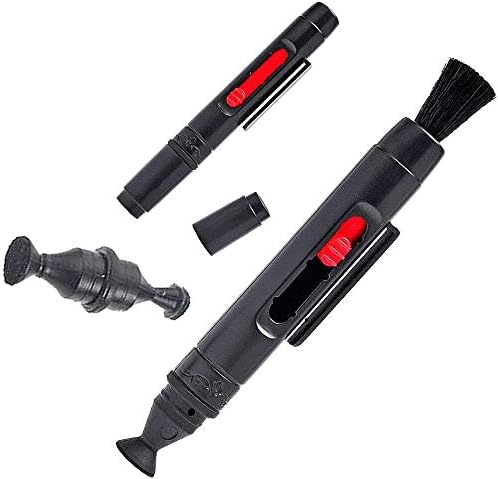
Figure 5.1: Ultimaxx Lens Cleaning Pen
5.2 Storage
When not in use, store the lens in the provided professional backpack.
- Ensure lens caps are on both ends of the lens.
- Store in a cool, dry place away from direct sunlight and extreme temperatures.
- The backpack's padded interior and adjustable dividers help protect the lens and accessories from impact.

Figure 5.2: Ultimaxx Professional Backpack
5.3 General Care
- Avoid dropping or subjecting the lens to harsh impacts.
- Keep the lens away from water and excessive humidity.
6. Troubleshooting
6.1 Blurry Images
- Manual Focus: Ensure the lens is precisely focused on your subject. Manual focus requires careful adjustment.
- Camera Shake: Use a sturdy tripod and a remote shutter release or timer to minimize camera movement, especially at long focal lengths.
- Lighting Conditions: Inadequate light can lead to blurry images or noise. Shoot in bright conditions or increase ISO if necessary.
6.2 Lens Not Attaching to Camera
- T-Mount Compatibility: Verify that the T-mount adapter is specifically designed for your Canon DSLR camera model.
- Secure Attachment: Ensure the T-mount adapter is correctly aligned and fully rotated onto the camera body until it locks. Then, ensure the lens is properly screwed onto the T-mount.
6.3 Low Light Performance
- This lens has a fixed aperture range of f/8.0-16, which limits light gathering. It is not ideal for low-light environments.
- Consider using higher ISO settings on your camera or supplementing with external lighting if shooting in dim conditions.
7. Product Specifications
| Brand | Ultimaxx |
| Model Number | UM-ZL650W |
| Focal Length | 650-1300mm |
| Lens Type | Telephoto Zoom |
| Aperture Range | f/8.0-16 |
| Compatible Mountings | Canon EF (with T-mount adapter) |
| Item Weight | 7.88 pounds |
| Package Dimensions | 18.11 x 12.83 x 8.58 inches |
| Manufacturer | Ultimaxx |
8. Warranty and Support
For warranty information, technical support, or service inquiries regarding your Ultimaxx 650-1300mm Telephoto Zoom Lens, please contact Ultimaxx directly through their official website or customer service channels. Keep your purchase receipt as proof of purchase for any warranty claims.