
ZZIPP TXZZ580
ZZIPP TXZZ580 UHF 48-Channel Wireless Microphone System User Manual
Model: TXZZ580
Introduction
This manual provides detailed instructions for the proper setup, operation, and maintenance of your ZZIPP TXZZ580 UHF 48-Channel Wireless Microphone System. Please read this manual thoroughly before using the product to ensure optimal performance and longevity.
Product Overview
What's in the Box
- Two Handheld Microphones (Transmitters)
- Receiver Unit
- Power Adapter for Receiver
- Audio Connection Cable
- User Manual
Key Features
- UHF Wireless Technology
- 48 Selectable Channels
- Manual and IR Configuration
- Designed for Karaoke and other vocal applications
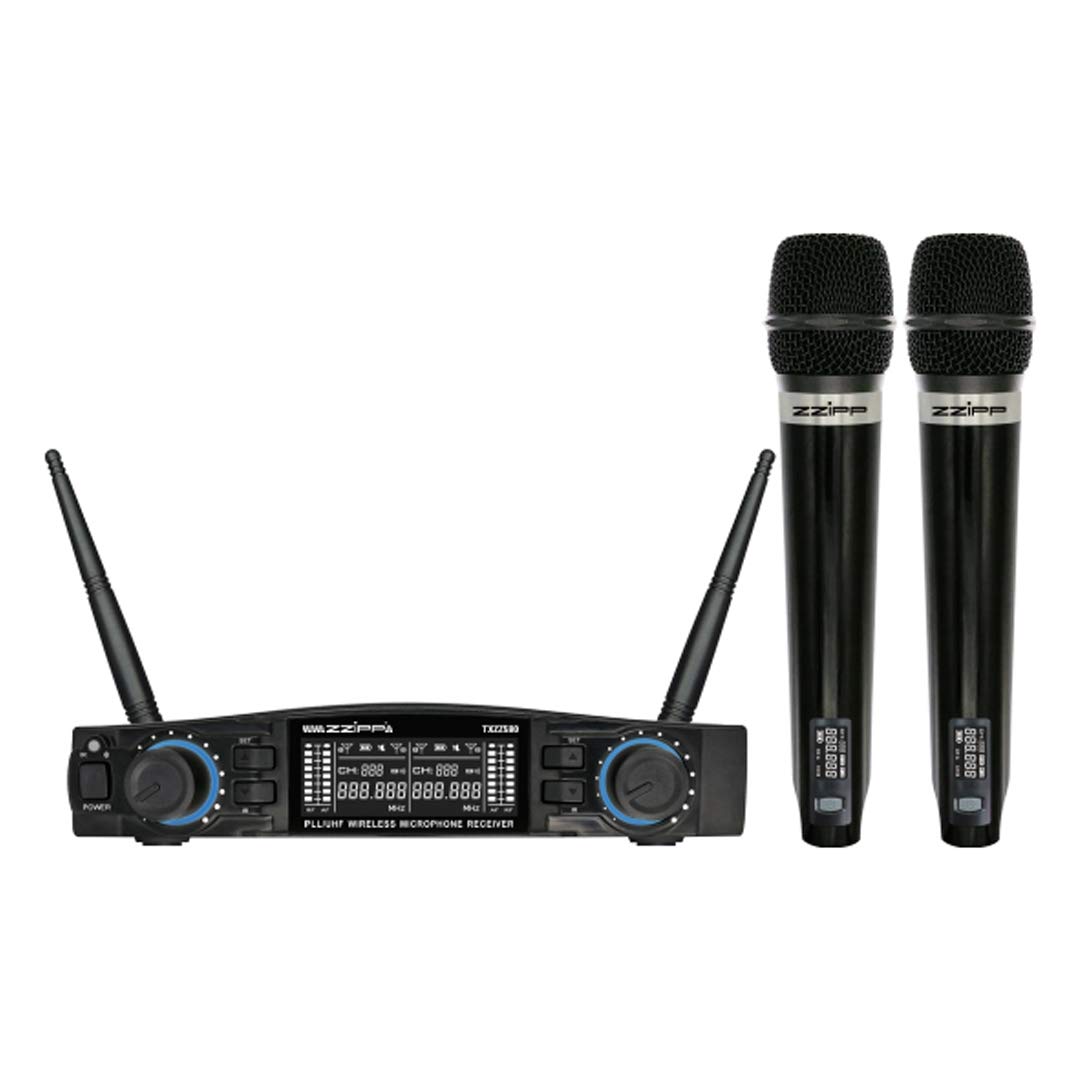
Figure 1: Overview of the ZZIPP TXZZ580 Wireless Microphone System, showing the receiver unit and two handheld microphones.
Setup
- Unpack Components: Carefully remove all items from the packaging.
- Receiver Placement: Place the receiver unit on a stable surface, away from potential sources of interference such as computers, Wi-Fi routers, or other wireless devices. Ensure good line-of-sight to the area where the microphones will be used.
- Connect Power: Connect the provided power adapter to the receiver's DC input and then plug it into a suitable power outlet.
- Connect Audio Output: Connect the receiver's audio output (e.g., 3.5mm Jack) to the input of your mixer, amplifier, or sound system using the supplied audio cable.
- Install Batteries in Transmitters: Open the battery compartment of each handheld microphone and insert the required batteries (typically AA, not always included). Observe correct polarity.
- Power On: Turn on the receiver unit and then each handheld microphone.
- Channel Synchronization (Manual/IR):
- Manual Configuration: Refer to the receiver's display and controls to manually select a desired channel for each microphone. Ensure each microphone is set to a unique channel to avoid interference.
- IR Synchronization: For automatic synchronization, align the IR sensor on the microphone with the IR sensor on the receiver. Activate the IR sync function on the receiver, and the microphone will automatically pair to the selected channel.
- Test Sound: Speak into each microphone to test the audio output through your sound system. Adjust volume levels as needed.
Operating Instructions
Power On/Off
- Receiver: Press the power button on the front panel to turn the unit on or off.
- Microphones: Press and hold the power button on the microphone handle until the display illuminates (on) or turns off (off).
Channel Selection
The system offers 48 UHF channels. If you experience interference, change the operating channel. This can be done manually on the receiver and then synchronized with the microphone via IR, or directly on the microphone if it supports manual channel adjustment.
Volume Control
Adjust the output volume for each microphone using the dedicated volume knobs on the receiver's front panel. Further volume adjustments can be made on your connected mixer or amplifier.
Usage Tips
- Maintain a clear line of sight between the microphones and the receiver for optimal signal quality.
- Avoid placing the receiver near large metal objects or other electronic devices that may cause interference.
- Regularly check microphone battery levels to prevent unexpected power loss during use.
- For best sound quality, hold the microphone approximately 2-6 inches from your mouth.
Maintenance
Battery Replacement
When the microphone's battery indicator shows low power, replace the batteries immediately. Always use fresh batteries of the correct type (e.g., AA). Remove batteries if the microphones will not be used for an extended period to prevent leakage.
Cleaning
Clean the receiver and microphones with a soft, dry cloth. Do not use liquid cleaners or solvents, as these can damage the finish or internal components. For microphone grilles, a soft brush can be used to remove debris.
Storage
Store the system in a cool, dry place, away from direct sunlight and extreme temperatures. If possible, use the original packaging or a protective case for transport and storage.
Troubleshooting
| Problem | Possible Cause | Solution |
|---|---|---|
| No sound from microphone |
|
|
| Interference or static |
|
|
| Short operating range |
|
|
Specifications
- Brand: ZZIPP
- Model: TXZZ580
- Color: Black
- Wireless Type: UHF
- Number of Channels: 48
- Connectivity: 3.5 mm Jack
- Power Source: Corded Electric (for receiver)
- Special Feature: Manual and IR Configuration
- Recommended Use: Karaoke
- Components Included: Two Handheld Microphones, Receiver
Warranty and Support
For warranty information, technical support, or service inquiries, please refer to the documentation provided with your purchase or contact your retailer. Keep your proof of purchase for warranty claims.
Ask a question about this manual
Ask about setup, troubleshooting, compatibility, parts, safety, or missing instructions. Manuals+ will review the question and use this page’s manual context to help answer it.