1. Introduction
This manual provides instructions for the AULCMEET WD12414 replacement remote control. This remote is designed to be compatible with various SPELER TV models, offering a straightforward solution for controlling your television. No programming is required; simply install batteries to begin use.

Image 1.1: The AULCMEET WD12414 remote control in use with a SPELER TV.
2. Product Features
- Direct Replacement: Functions as a direct replacement for original SPELER TV remotes.
- No Programming Required: Ready to use after battery installation.
- Wide Compatibility: Compatible with SPELER TV models SP-LED22, SP-LED22F, SP-LED24, SP-LED19, SP-LED19W, SP-LED32.
- Ergonomic Design: Comfortable to hold and operate.
- Infrared (IR) Connectivity: Standard IR signal for reliable control.
- Standard Button Layout: Features 30 buttons for comprehensive TV control.
3. Setup: Battery Installation
Follow these steps to install batteries in your AULCMEET WD12414 remote control:
- Open the Battery Cover: Locate the battery compartment on the back of the remote control and slide the cover downwards to open it.
- Install Batteries: Insert two (2) AAA alkaline batteries into the compartment, ensuring the positive (+) and negative (-) terminals align correctly with the markings inside.
- Close the Battery Cover: Slide the battery cover back into place until it clicks securely.
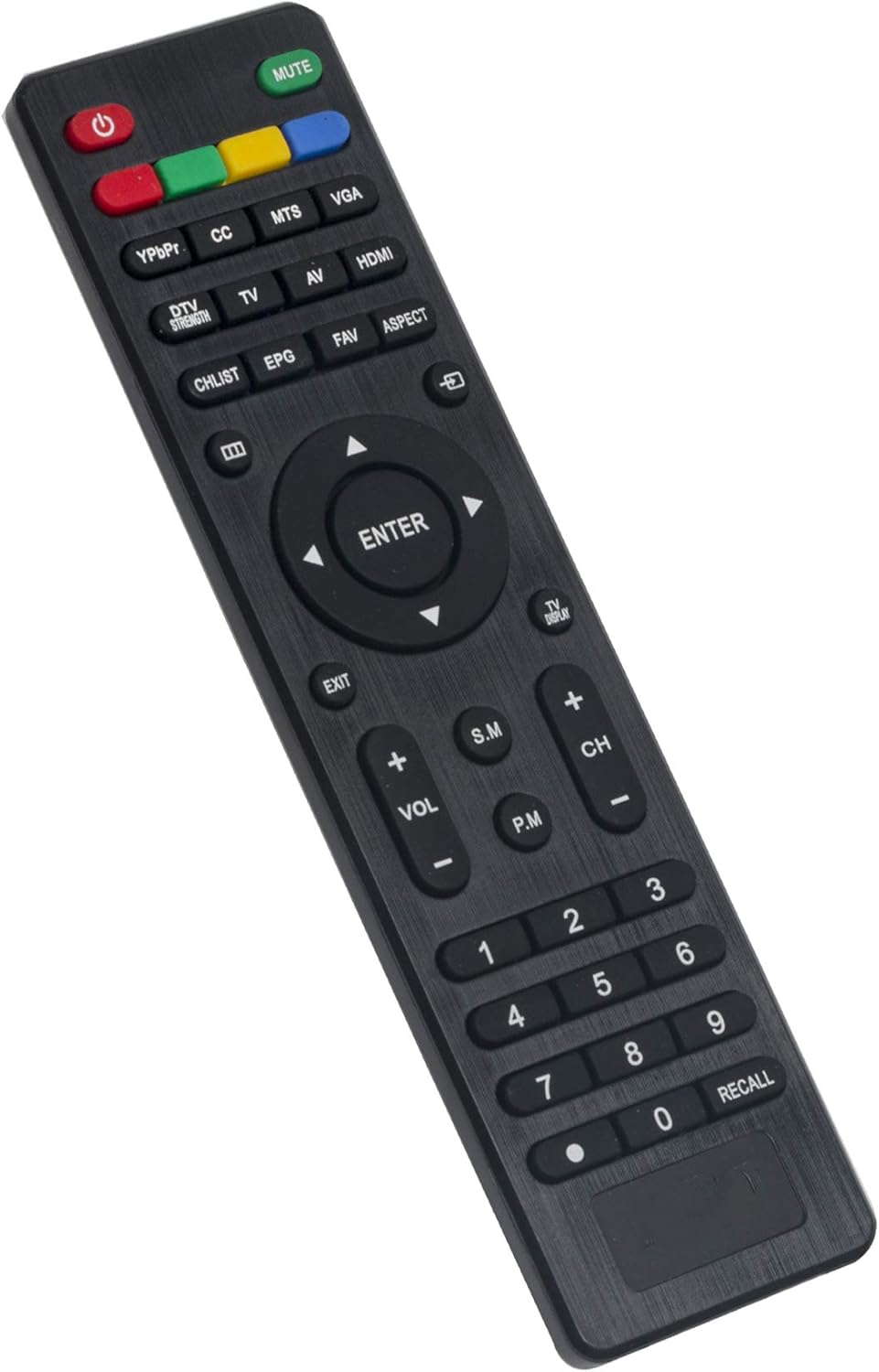
Image 3.1: Rear view of the remote control with the battery cover open, ready for battery insertion.
Video 3.1: A demonstration of opening the battery compartment and installing batteries in a similar remote control.
4. Operating Instructions
After installing the batteries, your remote control is ready for use with your compatible SPELER TV. Ensure there are no obstructions between the remote control and the TV's infrared (IR) sensor.

Image 4.1: Front view of the AULCMEET WD12414 remote control.
Basic Functions:
- Power Button (Power Symbol): Turns the TV on or off.
- Volume Up/Down (VOL+/-): Adjusts the sound volume.
- Channel Up/Down (CH+/-): Changes TV channels.
- Mute Button (MUTE): Silences or restores TV audio.
- Number Buttons (0-9): Directly select channels.
- Navigation Buttons (Up, Down, Left, Right, OK): Navigate through TV menus and confirm selections.
- Input Button (INPUT): Cycles through available input sources (HDMI, AV, etc.).
- Menu Button (MENU): Accesses the TV's main menu.
- Exit Button (EXIT): Exits the current menu or function.
5. Product Specifications
| Feature | Specification |
|---|---|
| Brand | AULCMEET |
| Model Number | WD12414 |
| Compatible Devices | SPELER Television (SP-LED22, SP-LED22F, SP-LED24, SP-LED19, SP-LED19W, SP-LED32) |
| Connectivity Technology | Infrared (IR) |
| Controller Type | Button Control |
| Number of Buttons | 30 |
| Power Source | 2 x AAA Batteries (Alkaline recommended) |
| Maximum Range | 33 Feet (approx. 10 meters) |
| Color | Black |
| Item Dimensions (L x W x H) | 5"L x 1"W x 0.5"H (approx. 12.7cm x 2.54cm x 1.27cm) |
6. Troubleshooting
Remote Not Responding:
- Check Batteries: Ensure batteries are inserted correctly with the correct polarity (+/-). Replace old or depleted batteries with fresh AAA alkaline batteries.
- Line of Sight: Make sure there are no objects blocking the path between the remote control and the TV's IR sensor. The sensor is usually located on the front panel of the TV.
- Remote Distance: Operate the remote within its maximum range of approximately 33 feet (10 meters) from the TV.
- TV Compatibility: Verify that your SPELER TV model is listed as compatible with the WD12414 remote control.
7. Maintenance
- Cleaning: Use a soft, dry cloth to clean the remote control. Do not use liquid cleaners or abrasive materials.
- Storage: Store the remote control in a cool, dry place away from direct sunlight and extreme temperatures.
- Battery Replacement: If the remote control becomes unresponsive or its range decreases, replace the batteries promptly. Remove batteries if the remote will not be used for an extended period to prevent leakage.
8. Warranty and Support
For any questions or issues regarding your AULCMEET WD12414 replacement remote control, please refer to the seller's contact information or the product listing on the platform where it was purchased. Keep your purchase receipt for warranty claims, if applicable.