
1. Product Overview
The ForeverPRO WR55X10409 Temp Sensor is a high-quality replacement part designed for various GE, Hotpoint, and RCA appliances, including specific Sears/Kenmore models. This component is crucial for the proper temperature regulation within your appliance, ensuring optimal performance.
It replaces original part numbers 1092902, AH966886, EA966886, PS966886, WR55X10406, and WR55X10457.
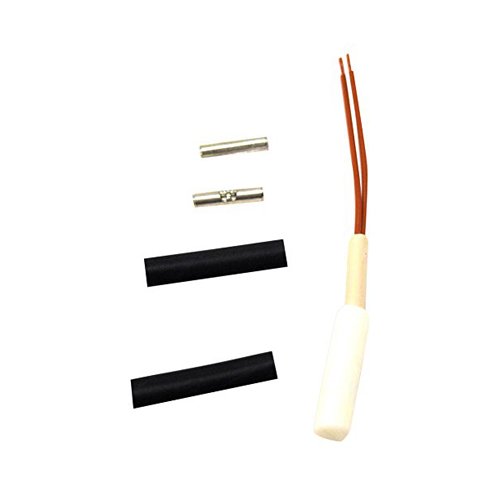
Image: The ForeverPRO WR55X10409 Temp Sensor, featuring a white cylindrical sensor body, two brown wires extending from one end, and separate metal connectors and black heat shrink tubing for installation.
2. Compatibility
This temperature sensor is compatible with a wide range of GE, Hotpoint, and RCA appliances. It also fits various Sears/Kenmore appliance models. Please verify your appliance's model number against the list below or consult your appliance's original manual to ensure compatibility.
Partial list of compatible models:
- PCR06WATDSS
- ZDBI240HAII, ZDBI240WBII, ZDBI240WCII, ZDBI240WIIA
- ZDBR240HABS, ZDBR240HAPS, ZDBR240PABS, ZDBR240PBBS, ZDBR240PCBS
- ZDBT240PABS, ZDBT240PBBS, ZDBT240PCBS
- ZDOD240HASS, ZDOD240PALSS, ZDOD240PASS, ZDOD240PBLSS, ZDOD240PBSS
- ZDWI240HAII, ZDWI240WBII, ZDWI240WIIA
- ZDWR240HABS, ZDWR240PABS, ZDWR240PBBS, ZDWR240PCBS
- ZDWT240PABS, ZDWT240PCBS
- ZIBI240HAII, ZIBI240PAII, ZIBI240PBII, ZIBI240PCII
- ZIBS240HASS, ZIBS240PASS, ZIBS240PBSS, ZIBS240PCSS
- ZIC30GNDAII, ZIC30GNHAII, ZIC30GNNAII, ZIC30GNZAII, ZIC30GNZBII
- ZIDI240HAII, ZIDI240PAII, ZIDI240PBII, ZIDI240WBII
- ZIDS240HASS, ZIDS240PASS, ZIDS240PBSS, ZIDS240WBSS
- ZIFI240HAII, ZIFI240PAII, ZIFI240PALII, ZIFI240PBII, ZIFI240PBLII
- ZIFS240HASS
Note: This is not a GE OEM product. Any use of manufacturer brand names or model designations is for demonstrating compatibility only.
3. Installation (Setup)
Replacing a temperature sensor typically involves working with electrical components. It is highly recommended that installation be performed by a qualified technician. Always ensure the appliance is disconnected from its power source before beginning any repair work.
- Safety First: Disconnect the appliance from the main power supply (unplug it or turn off the circuit breaker).
- Access the Sensor: Locate the existing temperature sensor within your appliance. This may require removing panels or components. Refer to your appliance's service manual for specific access instructions.
- Disconnect Old Sensor: Carefully disconnect the wiring from the old sensor. Note the orientation and connection points.
- Install New Sensor: Connect the new ForeverPRO WR55X10409 Temp Sensor using the provided connectors and heat shrink tubing if necessary. Ensure connections are secure and insulated.
- Secure Sensor: Mount the new sensor in the same location and orientation as the old one.
- Reassemble: Reinstall any panels or components that were removed.
- Restore Power: Reconnect the appliance to the power supply.
- Test Functionality: Verify that the appliance is operating correctly and maintaining the desired temperature.
4. Operating Principle
The temperature sensor (thermistor) monitors the internal temperature of your appliance. It sends resistance readings to the control board, which then adjusts the cooling or heating cycles to maintain the set temperature. A properly functioning sensor ensures efficient operation and prevents issues like over-cooling or insufficient cooling/heating.
5. Maintenance
The ForeverPRO WR55X10409 Temp Sensor is a sealed component and does not require routine maintenance. However, it is good practice to periodically inspect the wiring and connections for any signs of wear, corrosion, or damage during other appliance maintenance tasks. Ensure the sensor itself is free from excessive dust or debris that could impede its ability to accurately read temperature.
6. Troubleshooting
If your appliance is experiencing temperature-related issues after replacing the sensor, consider the following:
- Incorrect Temperature Readings: If the appliance is too warm or too cold, the sensor might be faulty, or its connections might be loose.
- Appliance Not Cycling Correctly: An erratic or non-functioning sensor can prevent the appliance from turning on or off as needed.
- Error Codes: Some modern appliances display specific error codes related to temperature sensor malfunctions. Consult your appliance's user manual for error code definitions.
- Loose Connections: Recheck all electrical connections to the sensor to ensure they are secure and properly insulated.
- Sensor Placement: Verify the sensor is correctly positioned according to your appliance's specifications.
If issues persist, it is advisable to consult a professional appliance repair technician.
7. Specifications
| Attribute | Detail |
|---|---|
| Brand Name | ForeverPRO |
| Model Number | WR55X10409 (FP-WR55X10409) |
| Part Number | WR55X10409 |
| Replaces Part Numbers | 1092902, AH966886, EA966886, PS966886, WR55X10406, WR55X10457 |
| Mounting Type | Flange Mount |
| UPC | 194878256598 |
| First Available | December 14, 2019 |
8. Warranty and Support
ForeverPRO stands by the quality of its products. This temperature sensor comes with a "No Questions Asked Money Back Guarantee". For any inquiries or support, please contact ForeverPRO directly through their official channels or the retailer from whom the product was purchased.
ForeverPRO is a USA-based company committed to providing PRO Grade Premium Temp Sensors that meet or exceed OEM Specifications Quality.