
Product Overview
The HONWELL H600-1G is a cordless, rechargeable painting light designed to illuminate artwork, pictures, dartboards, and other displays. It features 28 SMD LEDs with three selectable lighting modes and adjustable brightness, controlled via a remote or manual switch.
Key features include:
- 200 Lumens output from 28 SMD LEDs.
- Three lighting modes: 3000K (warm white), 4300K (natural white), and 8000K (cool white).
- Flexible goose neck and 180° rotatable light head for adjustable illumination direction.
- Remote control with ON/OFF, timer (15/30/60/120 minutes), and dimming functions (50% or 100% brightness, increase/decrease).
- USB rechargeable battery, providing up to 24 hours of lighting on a 5-6 hour full charge.
- Two installation options: detachable clip mount and screw mount.
Package Contents
Please verify that all items are present in the package:
- 1 x HONWELL H600-1G Painting Light
- 1 x Remote Control (with CR2025 button cell battery installed)
- 1 x Micro-USB Charging Cable
- 3 x Screws
- 1 x User Manual
Specifications
| Feature | Specification |
|---|---|
| Brand | HONWELL |
| Model Number | H600-1G |
| Color | Gold |
| Material | Plastic |
| Light Source Type | LED (28 SMD LEDs) |
| Brightness | 200 Lumens |
| Color Temperature | 3000K (Warm White), 4300K (Natural White), 8000K (Cool White) |
| Power Source | 2*2200mAh Lithium Rechargeable Battery |
| Charging Time | 5-6 hours for full charge |
| Run Time | Up to 24 hours |
| Control Method | Remote Control, Manual Switch |
| Product Dimensions | 3.94"L x 8.43"W x 4.13"H |
| Item Weight | 1.17 pounds (0.53 Kilograms) |
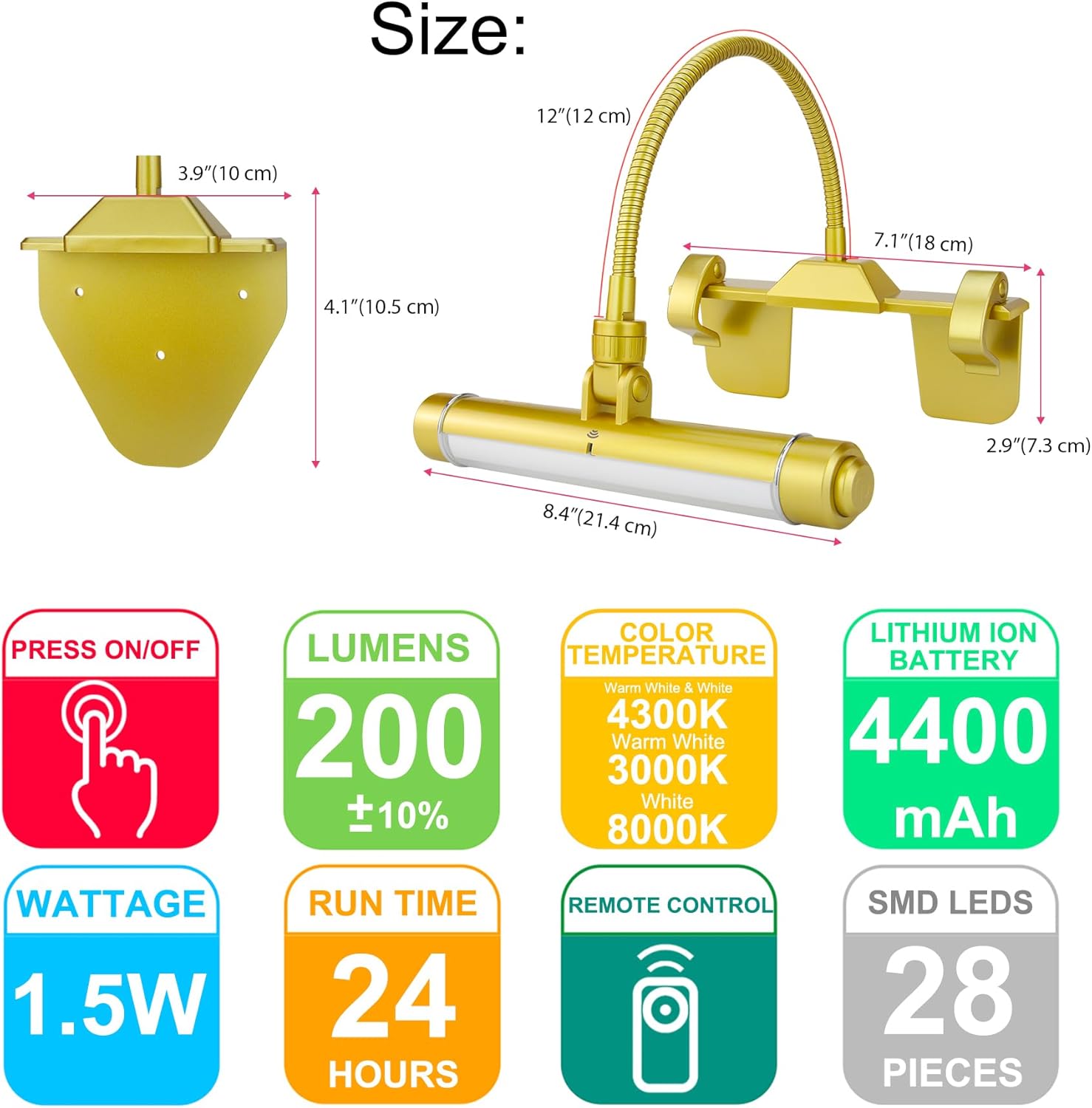
Image: Product dimensions and key specifications.
Installation
The HONWELL H600-1G offers two primary installation methods: a detachable clip mount and a detachable screw mount bracket.
Method 1: Detachable Clip Mount
- Attach the detachable clip mount bracket to the light by turning the clip bracket clockwise until it is tight. Hand tighten only.
- Open the clips to attach the detachable clip mount bracket to your picture frame. This method is suitable for frames 1/2" to 1-1/4" thick.
- Adjust the flexible neck and tilt the light head to the desired position for optimal illumination.
Method 2: Detachable Screw Mount Bracket
- Remove the detachable clip mount bracket from the flexible neck by rotating it counter-clockwise until loose.
- Place the screw end of the flexible neck into the screw mount bracket. Hand tighten only. Avoid over-tightening.
- Position the screw mount bracket over the top of the frame with the screw holes facing the back of the frame.
- Drill a pilot hole for each screw. Insert up to three (3) screws (included) through the holes in the screw mount bracket to secure it properly.
- Adjust the flexible neck and tilt the light head to the desired position.

Image: Installation options for the light.
Operating Instructions
Charging the Light
The picture light is powered by a USB rechargeable battery. A full charge takes approximately 5-6 hours and can provide up to 24 hours of lighting. The LED indicator will automatically turn off once the batteries are fully charged.
- The goose neck and light head can be unscrewed for easier charging.
- Use the provided Micro-USB charging cable to connect the light to any USB port, power bank, laptop, or computer charger (charger not included).

Image: Charging the light via Micro-USB.
Light Control (Manual)
The light can be operated manually using the ON/OFF switch located on the lamp head:
- Press the switch to cycle through the three lighting modes: 3000K (warm white), 4300K (natural white), and 8000K (cool white).
- You can also adjust the brightness level of each color mode by holding the ON/OFF switch.
Light Control (Remote)
The included remote control allows for convenient operation of the light from up to 20 feet away. One remote can control up to 10 lights.

Image: Remote control functions and light color temperatures.
Remote functions include:
- ON/OFF: Turns the light on or off.
- Dimmer: Adjusts brightness (50% or 100% preset buttons, or +/- for fine adjustment).
- LED Color: Selects between 3000K (warm white), 4300K (natural white), and 8000K (cool white).
- Timer: Sets the light to automatically turn off after 15, 30, 60, or 120 minutes.
Remote Control Battery Replacement
To replace the CR2025 button cell battery in the remote control:
- Unscrew the screw on the back of the remote control.
- Pull out the battery box.
- Replace the old battery with a new CR2025 button cell battery, ensuring correct polarity.
- Slide the battery box back in and secure it with the screw.
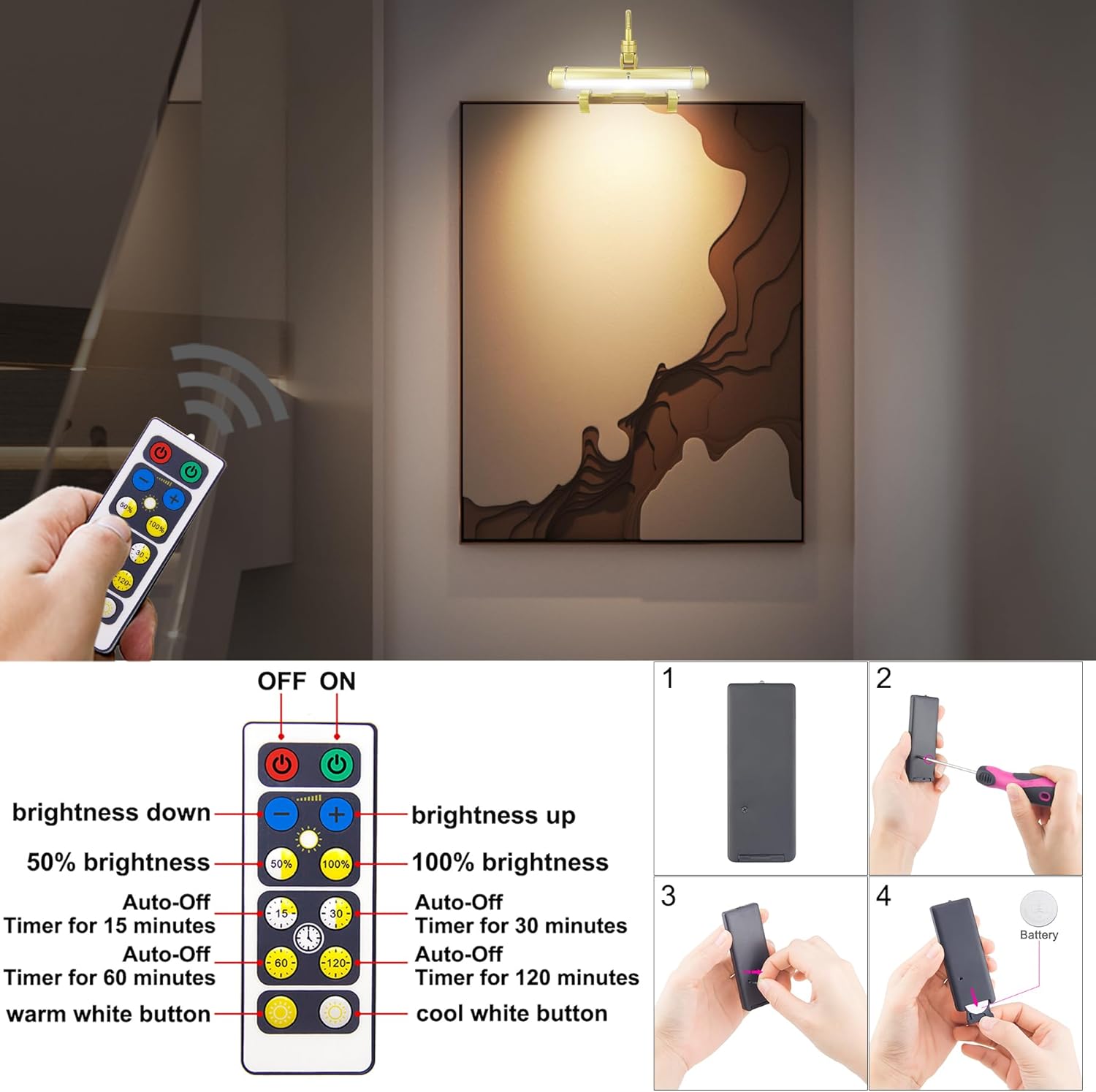
Image: Remote control details and battery replacement guide.
Maintenance
To ensure the longevity and optimal performance of your HONWELL H600-1G painting light, follow these maintenance guidelines:
- Cleaning: Wipe the light and its components with a soft, dry cloth. Avoid using abrasive cleaners or solvents, as these can damage the finish.
- Battery Care: Recharge the battery regularly, even if the light is not in frequent use, to maintain battery health. Avoid fully depleting the battery for extended periods.
- Storage: If storing the light for a long time, ensure it is fully charged and store it in a cool, dry place.
- Environmental Conditions: This product is designed for indoor use and is not water resistant. Avoid exposure to moisture or extreme temperatures.
Troubleshooting
If you encounter issues with your HONWELL H600-1G painting light, consider the following common solutions:
- Light not turning on: Ensure the battery is charged. Connect the light to a power source using the Micro-USB cable and check if the charging indicator lights up.
- Remote control not working: Check the remote control battery. Replace the CR2025 battery if necessary, following the instructions in the Operating Instructions section. Ensure there are no obstructions between the remote and the light.
- Light dimming unexpectedly: The battery may be low. Recharge the light fully.
- Light not holding charge: Ensure the charging cable and power source are functioning correctly. If the issue persists, the battery may need service.
Warranty and Support
For warranty information or technical support, please contact HONWELL customer service. Refer to the product packaging or the official HONWELL website for contact details.


