1. Introduction
This manual provides detailed instructions for the installation, maintenance, and troubleshooting of the 10L0L Golf Cart Rear Wheel Hub. This replacement part is designed to ensure proper wheel function and safety for compatible golf cart models.
2. Product Compatibility
The 10L0L Rear Wheel Hub (OEM# JW1-G6542-00, JW1-G65420-10) is compatible with the following golf cart models:
- Yamaha Drive G29 Electric Golf Cart: 2007 to 2016 models.
- Fits both gas and electric models.
- Can be installed on either the driver or passenger side.
3. Product Features
The 10L0L Rear Wheel Hub is engineered with the following characteristics:
- Durable Construction: Made from alloy steel, designed for high strength and wear resistance.
- Corrosion Protection: Features an aging-resistant, wear-resistant, and rust-proof finish.
- Precision Fit: Manufactured to the same size as the original equipment manufacturer (OEM) part for a direct replacement.
- Enhanced Safety: Tested to provide cushioning against wheel knocks and ensure vehicle safety.
- Spline Design: Equipped with a 24-teeth spline for secure axle engagement.

Figure 3.1: Key features of the 10L0L Rear Wheel Hub.

Figure 3.2: Detailed view of the hub's construction and 24-teeth spline.
4. Package Contents
Upon opening the package, verify that all components are present:
- 1x 10L0L Golf Cart Rear Wheel Hub
- 4x Lug Nuts

Figure 4.1: Contents of the Rear Wheel Hub package.
5. Installation Instructions
Safety Warning: Always ensure the golf cart is securely supported on jack stands and the battery is disconnected (for electric models) before beginning any work. Wear appropriate personal protective equipment.
- Prepare the Golf Cart: Park the golf cart on a level surface. Engage the parking brake. For electric carts, disconnect the main battery. Loosen the lug nuts on the wheel to be removed.
- Lift the Cart: Safely lift the rear of the golf cart using a jack and secure it with jack stands.
- Remove the Wheel: Fully remove the lug nuts and then remove the wheel from the hub.
- Access the Hub: Depending on your specific Yamaha G29 model, you may need to remove additional components to access the rear wheel hub. Refer to your golf cart's service manual for detailed steps on accessing the axle and hub assembly.
- Remove the Old Hub: Carefully remove the retaining components (e.g., nuts, bolts, clips) that secure the old hub to the axle shaft. Slide the old hub off the axle.
- Inspect the Axle: Inspect the axle shaft for any damage, wear, or corrosion. Ensure the spline teeth on the axle are in good condition.
- Install the New Hub: Slide the new 10L0L Rear Wheel Hub onto the axle shaft, ensuring the spline teeth align correctly. Secure the hub with the appropriate retaining components.
- Reinstall the Wheel: Place the wheel back onto the new hub. Hand-tighten the new lug nuts (provided).
- Lower the Cart: Carefully lower the golf cart from the jack stands.
- Final Tightening: Torque the lug nuts to the manufacturer's specified settings (refer to your golf cart's service manual for exact torque specifications).
- Test: Reconnect the battery (if applicable) and test the golf cart at a low speed in a safe area to ensure proper function and no abnormal noises.

Figure 5.1: Exploded view of the rear axle assembly, highlighting the hub.

Figure 5.2: Visual representation of the hub's installed location on a golf cart.
Installation Video Guide
Video 5.1: A short demonstration of the 10L0L Golf Cart Rear Wheel Hub, showing its physical characteristics and rotation. This video can assist in understanding the product before installation.
6. Maintenance
Regular inspection and maintenance can extend the life of your golf cart's wheel hubs:
- Periodic Inspection: Regularly check the wheel hubs for any signs of wear, damage, or corrosion.
- Lug Nut Torque: Periodically verify that the lug nuts are tightened to the correct torque specifications. Loose lug nuts can lead to hub damage or wheel detachment.
- Cleanliness: Keep the hub area clean from dirt, debris, and corrosive materials.
- Bearing Check: While this product is a hub, the wheel bearings are critical. If you notice any play in the wheel or hear grinding noises, inspect the wheel bearings and replace them if necessary.
7. Troubleshooting
If you experience issues with your golf cart's rear wheels, consider the following common problems related to the wheel hub or axle:
| Symptom | Possible Cause | Solution |
|---|---|---|
| Unable to keep a straight line | Worn or damaged axle shaft or hub. | Inspect axle and hub for damage; replace if necessary. |
| Body shaking or vibration | Loose or damaged wheel hub, worn wheel bearings, or unbalanced wheel. | Check lug nut torque, inspect hub and bearings, balance wheels. |
| Abnormal noise (e.g., grinding, clunking) | Damaged wheel bearings, loose hub, or worn axle components. | Inspect and replace worn components. |
| Visible damage to parts | Impact damage, corrosion, or material fatigue. | Replace damaged components immediately. |

Figure 7.1: Signs that may indicate a need to replace the rear axle shaft or hub.
8. Specifications
| Attribute | Value |
|---|---|
| Brand | 10L0L |
| Model Number | JW1-G6542-00 |
| Material | Alloy Steel |
| Wheel Size (Hub) | 5 Inches |
| Pitch Circle Diameter | 5 Inches |
| Item Weight | 2.54 pounds (1.16 Kilograms) |
| Product Dimensions | 4.92 x 4.92 x 3.15 inches |
| Spline Teeth | 24-teeth |
| Vehicle Service Type | Golf Cart |
| OEM Part Numbers Replaced | JW1-G6542-00, JW1-G65420-10 |
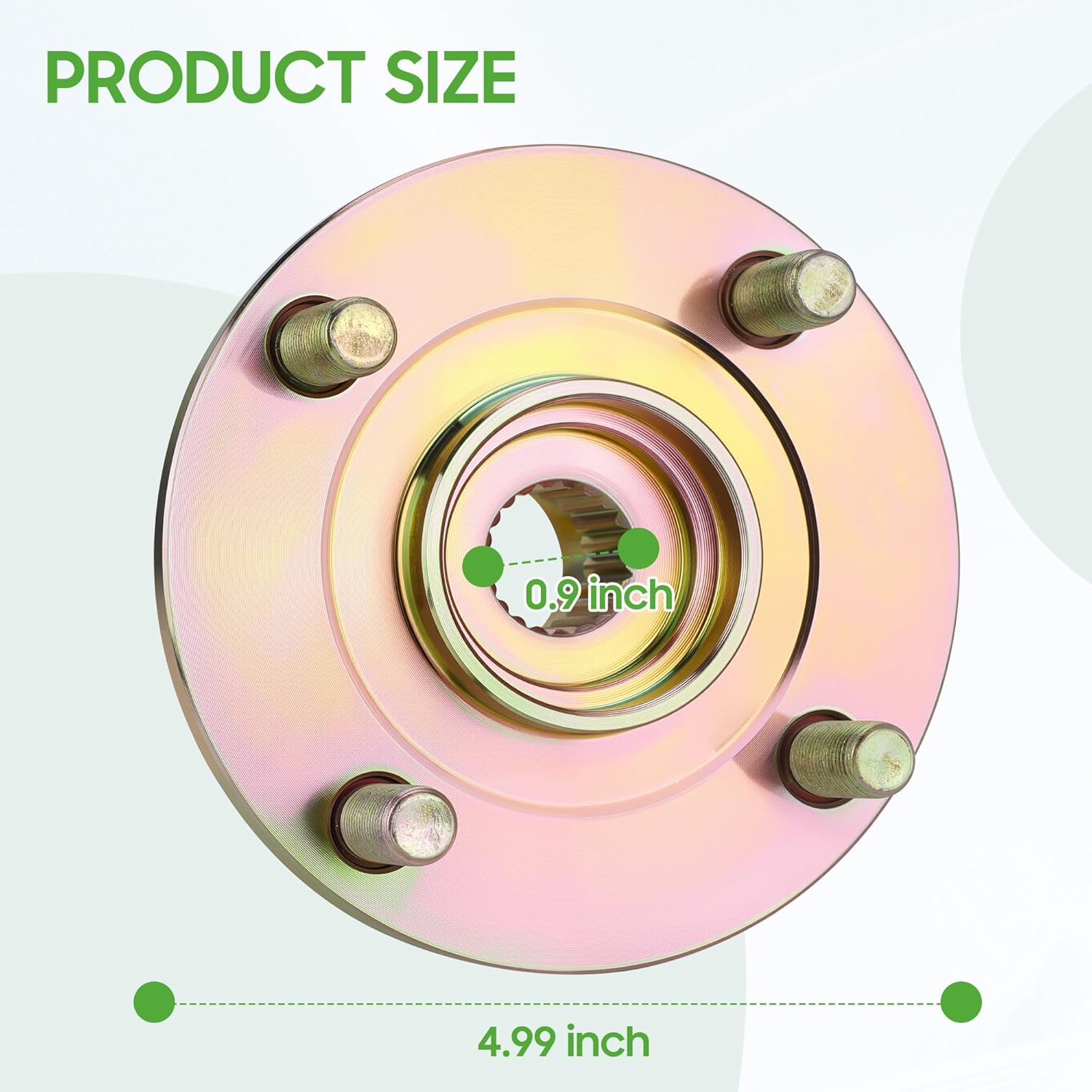
Figure 8.1: Key dimensions of the 10L0L Rear Wheel Hub.

Figure 8.2: Comprehensive dimensional diagram of the wheel hub.
9. Warranty and Support
For warranty information or technical support, please refer to the official 10L0L website or contact their customer service directly. Keep your purchase receipt for warranty claims.
You can visit the 10L0L Store for more products and information: 10L0L Official Store


