
1. Introduction
The Dibea G12 Rampage is a versatile and lightweight cordless stick vacuum cleaner designed for efficient cleaning across various surfaces in your home. Featuring powerful suction, a long-lasting rechargeable battery, and multiple attachments, it offers convenient and thorough cleaning without the hassle of a cord.
2. Product Overview
2.1 Key Features
- Cordless Convenience: Enjoy freedom of movement with a rechargeable battery and ergonomic handle.
- Powerful Suction: Delivers up to 14,000Pa MAX suction for deep cleaning.
- Two Speed Control: Adjust suction power for different cleaning tasks.
- LED Lighting: Wide floor brush features LED lights to illuminate dust in dark areas.
- Multi-Surface Cleaning: Suitable for wooden floors, carpets, tiles, cars, and upholstery.
- Multi-stage Cyclone Separation: Efficiently separates dust and debris.
- Large Capacity Dust Bucket: 0.55-liter dustbin for extended cleaning sessions.
- Wall Docking Station: Convenient storage and charging.
- Lightweight Design: Easy to maneuver and carry.
2.2 Included Components
The Dibea G12 Rampage package includes the following items:
- 1 x Main Machine (Motor & Dustbin Assembly)
- 1 x Aluminum Tube (Extension Wand)
- 1 x Electric Brush (Motorized Floor Head)
- 1 x Power Adapter (Charger)
- 1 x Long Brush (Crevice Tool)
- 1 x Square Brush (Upholstery Tool)
- 1 x Hanging Rack (Wall Mount)
- 1 x Screws (for Wall Mount)
- 4 x Patch (for Wall Mount)
2.3 Product Visuals

Figure 1: Main unit of the Dibea G12 Rampage, showing the motor, transparent dustbin, and ergonomic handle.

Figure 2: The motorized brush head, featuring a roller brush and LED lights for enhanced visibility during cleaning.

Figure 3: A selection of accessory brushes, including the long brush (crevice tool) and square brush (upholstery tool), for specialized cleaning tasks.
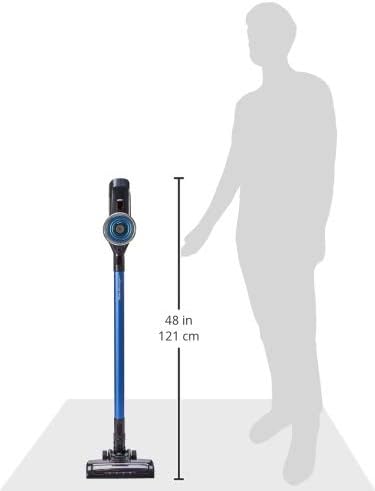
Figure 4: Diagram illustrating the approximate height of the Dibea G12 Rampage in stick mode, which is 121 cm (48 inches).
3. Setup
3.1 Assembly
- Attach the Aluminum Tube: Align the aluminum tube with the main machine's intake and push until it clicks securely into place.
- Connect the Electric Brush: Attach the electric brush head to the other end of the aluminum tube, ensuring it clicks firmly.
- Install Wall Docking Station (Optional): Use the provided screws and patches to mount the hanging rack in a convenient location for storage and charging.
3.2 Initial Charging
Before first use, fully charge the vacuum cleaner. Connect the power adapter to the charging port on the main unit or the wall docking station. The power indicator lights will show the charging status. A full charge typically takes a few hours.
4. Operating Instructions
4.1 Powering On/Off
Press the power button on the handle to turn the vacuum cleaner on. Press it again to turn it off.
4.2 Suction Speed Control
The Dibea G12 features two speed control settings. Use the control button on the handle to switch between standard and maximum suction modes, depending on your cleaning needs.
4.3 Using Attachments
To use different attachments, press the release button on the aluminum tube or main unit to detach the current accessory. Then, firmly attach the desired accessory (e.g., long brush for crevices, square brush for upholstery) until it clicks into place.
4.4 LED Lighting
The wide floor brush is equipped with LED lights that automatically illuminate when the vacuum is in operation, helping to reveal hidden dust and debris under furniture or in dimly lit areas.
5. Maintenance
Regular maintenance ensures optimal performance and extends the lifespan of your Dibea G12 Rampage vacuum cleaner.
5.1 Emptying the Dust Bin
- Ensure the vacuum cleaner is turned off.
- Locate the dust bin release button (usually near the bottom of the main unit).
- Press the button to open the dust bin flap and empty contents into a trash receptacle.
- Close the dust bin flap securely until it clicks.
5.2 Cleaning Filters
The Dibea G12 features a multi-stage cyclone separation system and a handwashing high-efficiency HEPA filter. It is recommended to clean the filters regularly.
- Twist and pull to remove the filter assembly from the main unit.
- Separate the stainless steel mesh filter and the HEPA filter.
- Tap off loose dust from both filters.
- Rinse both filters under cold running water until the water runs clear. Do not use detergents.
- Allow filters to air dry completely for at least 24 hours before reassembling and placing them back into the vacuum cleaner. Ensure they are completely dry to prevent damage and maintain suction power.
5.3 Cleaning the Brush Head
Periodically check the electric brush head for tangled hair or debris.
- Turn off the vacuum cleaner and detach the electric brush head.
- Use scissors or a small tool to carefully cut and remove any tangled hair or fibers from the roller brush.
- Wipe the brush head and roller with a damp cloth if necessary. Ensure all parts are dry before reattaching.
6. Troubleshooting
| Problem | Possible Cause | Solution |
|---|---|---|
| Vacuum does not turn on | Battery is depleted Power button not pressed correctly | Charge the battery fully Ensure the power button is pressed firmly |
| Reduced suction power | Dust bin is full Filters are clogged Brush head is tangled Blockage in the tube/nozzle | Empty the dust bin Clean or wash the filters Remove tangled hair/debris from brush head Check and clear any blockages |
| Battery not charging | Power adapter not connected properly Faulty power adapter/outlet | Ensure power adapter is securely connected Try a different outlet or contact support for a replacement adapter |
| Brush head not rotating | Brush head is jammed Connection issue | Clear any obstructions from the brush head Ensure the brush head is securely attached to the tube |
7. Specifications
| Feature | Detail |
|---|---|
| Model | G12 Rampage |
| Power (Max) | 150W |
| Suction Power (Max) | 14,000Pa |
| Run Time (Max) | 40 minutes |
| Voltage | 22.2 Volts |
| Dust Bin Capacity | 0.55 Liters |
| Item Weight | 2.2 Kilograms |
| Form Factor | Handheld / Stick |
| Filter Type | Multistage cyclone and handwashing high-efficiency HEPA filter |
| Power Source | Battery Powered (Rechargeable) |
| Cordless | Yes |
| Surface Recommendation | Upholstery, Hard Floor, Carpet |
8. Warranty and Support
8.1 Warranty Information
The Dibea G12 Rampage Cordless Stick Vacuum Cleaner comes with a 2-year manufacturer's guarantee. Please retain your proof of purchase for warranty claims. The warranty covers defects in materials and workmanship under normal use.
8.2 Customer Support
For any questions, technical assistance, or warranty claims, please contact Dibea customer support through your retailer or the official Dibea website. Ensure you have your product model and purchase details ready.
9. Official Product Videos
There are no official product videos from the seller available for the Dibea G12 Rampage Cordless Stick Vacuum Cleaner at this time.


