
Overview
The SatelliteSale Auxiliary 3.5mm Audio/Video Jack to 3 RCA Digital Stereo Composite Aux Cable is designed to facilitate audio and video connections between various electronic devices. This universal wire allows you to connect equipment with a 3.5mm (AUX) output to devices that utilize RCA inputs, ensuring high-quality signal transmission for both audio and video.

Image: The SatelliteSale 3.5mm to 3 RCA cable, neatly coiled, showcasing its 3.5mm jack and three color-coded RCA connectors (yellow, white, red).
Key Features
- Universal Compatibility: Connects audio and video equipment with Right/Left and Center RCA ports to devices with a 3.5mm Jack Plug.
- High-Quality Signal: Delivers optimal audio and video resolution signals to connected equipment.
- Durable Construction: Features a PVC-protected jacket for increased durability and gold-plated connectors for oxidation resistance.
- Bi-directional Transmission: Supports data transmission in both directions without distortion or signal loss.
- Versatile Use: Ideal for connecting smartphones, laptops, tablets to subwoofers, audio receivers, speakers, soundbars, home theater systems, and Hi-Fi systems.
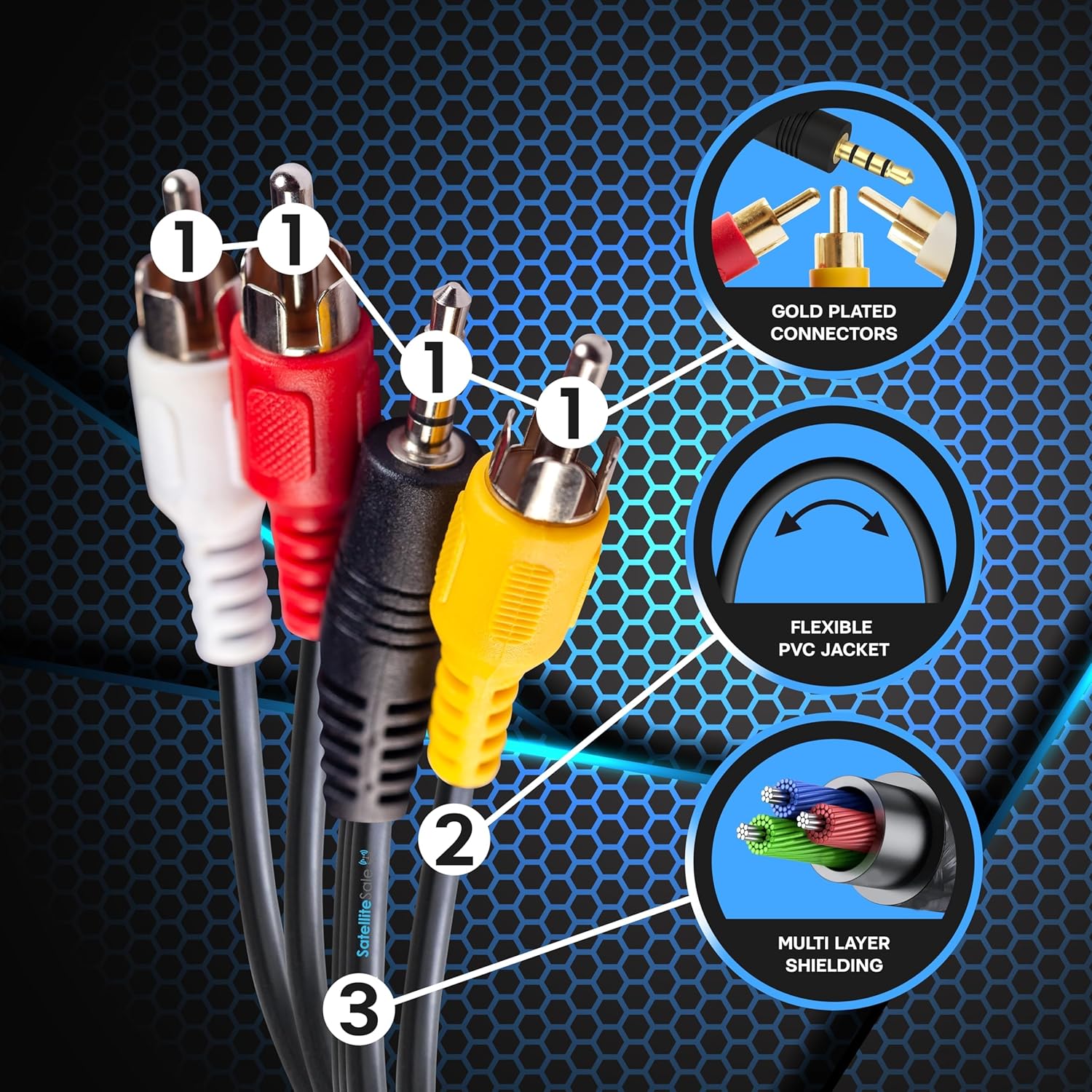
Image: A detailed view highlighting the cable's construction, including gold-plated connectors, flexible PVC jacket, and multi-layer shielding for enhanced durability and signal integrity.
Setup Guide
Connecting Your Devices
- Identify Ports: Locate the 3.5mm (AUX) output port on your source device (e.g., smartphone, laptop) and the corresponding RCA input ports (typically yellow for video, white for left audio, red for right audio) on your display or audio device (e.g., TV, receiver).
- Connect 3.5mm Jack: Insert the 3.5mm jack end of the SatelliteSale cable into the 3.5mm AUX output port of your source device.
- Connect RCA Plugs: Match the color-coded RCA plugs to the corresponding input ports on your display or audio device.
- Yellow plug for video input.
- White plug for left audio input.
- Red plug for right audio input.
- Power On Devices: Ensure both your source device and the display/audio device are powered on.
- Select Input: On your display or audio device, select the correct input source (e.g., "AV," "Video 1," "Component") that corresponds to the RCA ports you used.

Image: A visual guide illustrating the connection process, from inserting the 3.5mm jack into a device to connecting the color-coded RCA plugs into their respective ports on a display unit.
Video: An official demonstration video from SatelliteSale showing the connection of the 3.5mm Jack to 3-RCA cable to various devices, illustrating its ease of use and functionality.
Operating Instructions
Once the cable is correctly connected and the appropriate input source is selected on your display or audio device, the signal from your source device will be transmitted. Play your desired audio or video content from your source device, and it should be displayed or played through the connected system.

Image: The SatelliteSale cable connected to a television, demonstrating its use with a camcorder and a retro gaming console to display content on a larger screen.
Compatible Devices
This cable is designed for broad compatibility with a range of devices. It serves as a simple and convenient way to connect devices with 3.5mm video outputs to compatible RCA displays.
- Source Devices: Smartphones (Samsung, Asus, Nokia, Motorola, OnePlus, Sony, HTC, iPhone), Laptops, Tablets, Camcorders, DVD Players, Retro Gaming Consoles, Media Players.
- Display/Audio Devices: Projectors, Audio/Video Receivers, Monitors, Televisions, Home Theater Systems, VHS/DVD Players, Speakers, Soundbars, Hi-Fi Systems.

Image: An illustrative diagram categorizing various source devices (camcorder, DVD players, retro gaming consoles, media players) and a display device (TV) that are compatible with the SatelliteSale cable.
Troubleshooting
| Issue | Possible Cause / Solution |
|---|---|
| No video or audio signal. |
|
| Distorted or poor quality signal (audio/video). |
|
| Cracking sounds when moving the cable. |
|
| Colors on screen are incorrect or missing. |
|
Specifications
| Attribute | Detail |
|---|---|
| Brand | SatelliteSale |
| Connector Type | RCA |
| Cable Type | Composite |
| Special Feature | ROHS Compliant, Round shape cord, Composite cable |
| Recommended Uses For Product | Indoor, Outdoor, Universal |
| Color | Black |
| Connector Gender | Male-to-Male |
| Shape | Round |
| Number of Pins | 3 |
| Unit Count | 1 Count |
| Specification Met | RoHS |
| Indoor/Outdoor Usage | Outdoor, Indoor |
| Number of Items | 1 |
| Customer Package Type | Flat Free Package (FFP) |
| Outer Material | Polyvinyl Chloride (PVC) |
| Manufacturer | SatelliteSale |
| UPC | 855115008904 |
| Package Dimensions | 5.2 x 2.48 x 1.42 inches |
| Item Weight | 2.89 ounces |
| ASIN | B082P948Q6 |
| Item model number | 855115008904 |
| Date First Available | December 12, 2019 |
| Country of Origin | China |
Maintenance
To ensure the longevity and optimal performance of your SatelliteSale Auxiliary 3.5mm to 3 RCA cable, follow these simple maintenance guidelines:
- Cleaning: Gently wipe the cable and connectors with a soft, dry cloth to remove dust or debris. Avoid using harsh chemicals or abrasive materials.
- Storage: When not in use, coil the cable loosely to prevent kinks and tangles. Store it in a cool, dry place away from direct sunlight and extreme temperatures.
- Handling: Always grasp the connector ends when plugging or unplugging the cable. Avoid pulling directly on the cable itself, as this can damage the internal wiring.
- Protection: Keep the cable away from sharp objects, heavy furniture, or areas where it might be stepped on or crushed.
Warranty and Support
All SatelliteSale products are ensured with an unbeatable lifetime warranty! This warranty covers defects in materials and workmanship under normal use. For warranty claims or technical support, please contact SatelliteSale customer service through their official website or the retailer where the product was purchased.
For further assistance, please visit the SatelliteSale Store on Amazon or refer to the contact information provided with your purchase.