1. Introduction
This manual provides instructions for the safe and efficient operation of your Astron RS-20M-AP Desktop Linear Power Supply. The RS-20M-AP is designed to provide a stable 13.8VDC output with a continuous current rating of 16 Amps and a peak current of 20 Amps. It features separate voltage and amperage meters, along with both screw-type terminals and Anderson Power Poles for output connections.
2. Safety Information
Read all safety instructions before operating the power supply. Failure to follow these instructions may result in electric shock, fire, or damage to the unit or connected equipment.
- Indoor Use Only: This unit is designed for indoor use in a dry environment. Do not expose to rain or moisture.
- Ventilation: Ensure adequate ventilation around the power supply. Do not block ventilation openings.
- Power Source: Connect the power supply only to a 105-125VAC, 50/60Hz grounded outlet.
- Grounding: The power supply must be properly grounded to prevent electric shock.
- Overload Protection: Do not exceed the rated output current of 16 Amps continuous or 20 Amps peak. The unit features fold-back current limiting for protection.
- Servicing: Refer all servicing to qualified service personnel. Do not open the power supply casing.
- Temperature: Operate within the specified temperature range of -10 to 55°C.
3. Product Features
- Output Voltage: 13.8VDC ±0.05 volts (internally adjustable from 11-15VDC).
- Continuous Duty: 16 Amps.
- Intermittent Communication Service (ICS): 20 Amps.
- Output Terminals: 1/4"-20 Screw Type and Anderson Power Poles.
- Metering: Separate analog meters for voltage and amperage.
- Protection: Solid-state electronically regulated, fold-back current limiting, and crowbar over-voltage protection.
- Regulation: Maintains regulation and low ripple at low line input voltage.
- Ripple: Less than 5mV peak to peak (full load and low line).
- Load Regulation: 0.08% from 0 to full continuous load.
- Efficiency: 77%.
- Cooling: No fan required for normal operation.
4. Setup
Follow these steps to set up your power supply:
- Unpacking: Carefully remove the power supply from its packaging and inspect for any damage.
- Placement: Place the power supply on a stable, level surface with adequate clearance for ventilation. Do not place it near heat sources or in direct sunlight.
- AC Power Connection: Ensure the power supply's ON/OFF switch is in the OFF position. Connect the supplied three-conductor power cord to the AC input receptacle on the rear of the unit, then plug the other end into a grounded 105-125VAC, 50/60Hz wall outlet.
- DC Output Connection:
- Screw Terminals: For screw-type connections, loosen the terminal screws, insert the positive (+) wire into the red terminal and the negative (-) wire into the black terminal. Tighten the screws securely. Ensure proper polarity.
- Anderson Power Poles: For Anderson Power Pole connections, ensure your equipment's connectors are correctly crimped and polarized. Connect the red (positive) and black (negative) Anderson Power Pole connectors to the corresponding receptacles on the power supply.
- Initial Power On: With no load connected, switch the power supply ON. The voltage meter should display approximately 13.8VDC.
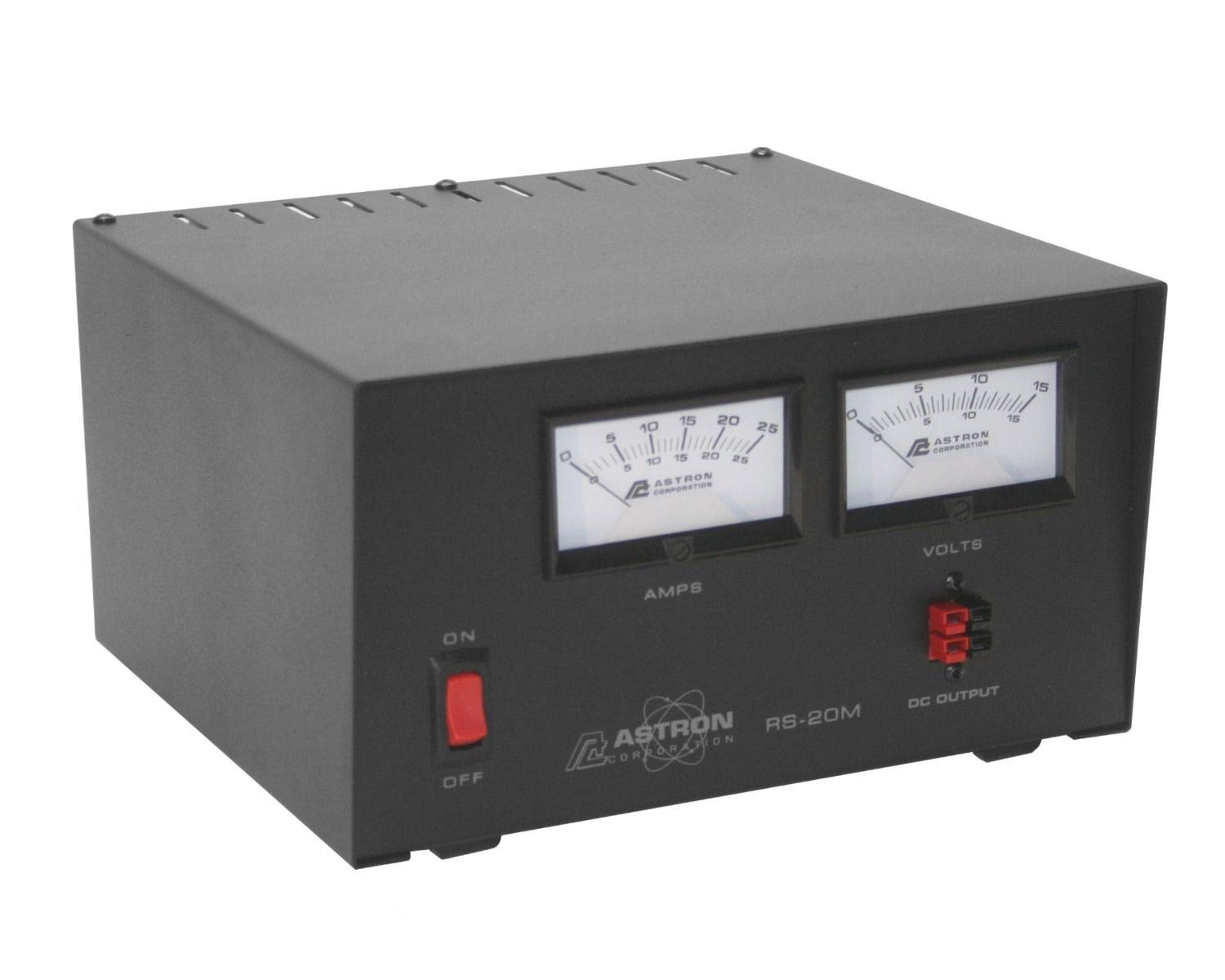
Figure 1: Front view of the Astron RS-20M-AP power supply, showing the voltage and amperage meters, power switch, and output terminals including Anderson Power Poles.
5. Operating Instructions
Once the power supply is set up, follow these guidelines for operation:
- Power On/Off: Use the front panel switch to turn the unit ON or OFF.
- Voltage Monitoring: The analog voltage meter displays the output voltage. Under normal operation, this will be approximately 13.8VDC.
- Amperage Monitoring: The analog amperage meter displays the current being drawn by the connected load. Ensure the current draw does not exceed 16 Amps for continuous operation or 20 Amps for intermittent peaks.
- Internal Voltage Adjustment: The output voltage is internally adjustable from 11-15VDC. This adjustment should only be performed by qualified personnel using a small screwdriver and a precise voltmeter. Access to the adjustment potentiometer is typically through a small opening on the unit, often on the rear or bottom. Refer to the service manual or contact Astron support for detailed instructions if adjustment is necessary.
- Load Connection: Connect your DC-powered equipment to the output terminals, observing correct polarity.
- Overload Protection: If the current draw exceeds the unit's capacity, the fold-back current limiting feature will activate, reducing the output voltage to protect the power supply. Reduce the load immediately if this occurs.
6. Maintenance
The Astron RS-20M-AP is designed for reliable operation with minimal maintenance. However, periodic checks can ensure longevity:
- Cleaning: Keep the unit clean and free of dust. Use a soft, dry cloth to wipe the exterior. Do not use liquid cleaners or solvents.
- Ventilation: Periodically check that the ventilation openings are not obstructed by dust or debris. Use compressed air to clear any blockages if necessary, ensuring the unit is unplugged first.
- Connections: Ensure all AC and DC connections remain secure. Loose connections can cause overheating or intermittent operation.
- Internal Servicing: There are no user-serviceable parts inside. Do not open the casing.
7. Troubleshooting
If you encounter issues with your power supply, refer to the following troubleshooting guide:
| Problem | Possible Cause | Solution |
|---|---|---|
| No output voltage, meters off. | No AC input power; Power switch off; Blown fuse (internal). | Check AC power cord and wall outlet; Ensure power switch is ON; If fuse is suspected, contact qualified service personnel. |
| Low or fluctuating output voltage. | Overload condition; Loose DC connections; Faulty load equipment. | Reduce load current; Check and secure DC connections; Disconnect load and test power supply independently. |
| High current reading with no load. | Short circuit in output wiring or connected equipment. | Immediately disconnect load. Inspect wiring and equipment for shorts. |
| Unit feels excessively hot. | Inadequate ventilation; Prolonged overload. | Ensure clear airflow around the unit; Reduce load current. |
If the problem persists after attempting these solutions, contact Astron customer support.
8. Specifications
| Parameter | Value |
|---|---|
| Input Voltage | 105-125VAC |
| Output Voltage | 13.8VDC ±0.05V (Internally adjustable 11-15VDC) |
| Continuous Current | 16 Amps |
| Peak Current (ICS) | 20 Amps |
| Ripple | Less than 5mV Peak to Peak |
| Load Regulation | 0.08% (0 to Full Continuous Load) |
| Efficiency | 77% |
| Operating Temperature | -10 to 55°C |
| Item Weight | 18.25 pounds (8.28 kg) |
| Product Dimensions (L x W x H) | 10.5 x 9 x 5 inches (26.7 x 22.9 x 12.7 cm) |
| Connector Type | 1/4"-20 Screw Type and Anderson Power Poles |
9. Warranty and Support
Astron products are manufactured to high-quality standards. For specific warranty information, please refer to the warranty card included with your product or visit the official Astron website. For technical support, service, or parts, please contact Astron customer service through their official channels.
Contact Information: Please refer to the manufacturer's website or product packaging for the most current contact details.


