
1. Introduction
Thank you for purchasing the Makita CL181FDZ 18V Cordless Capsule & Cyclone Vacuum Cleaner. This manual provides essential information for the safe and effective operation, maintenance, and troubleshooting of your new vacuum cleaner. Please read this manual thoroughly before use and keep it for future reference.
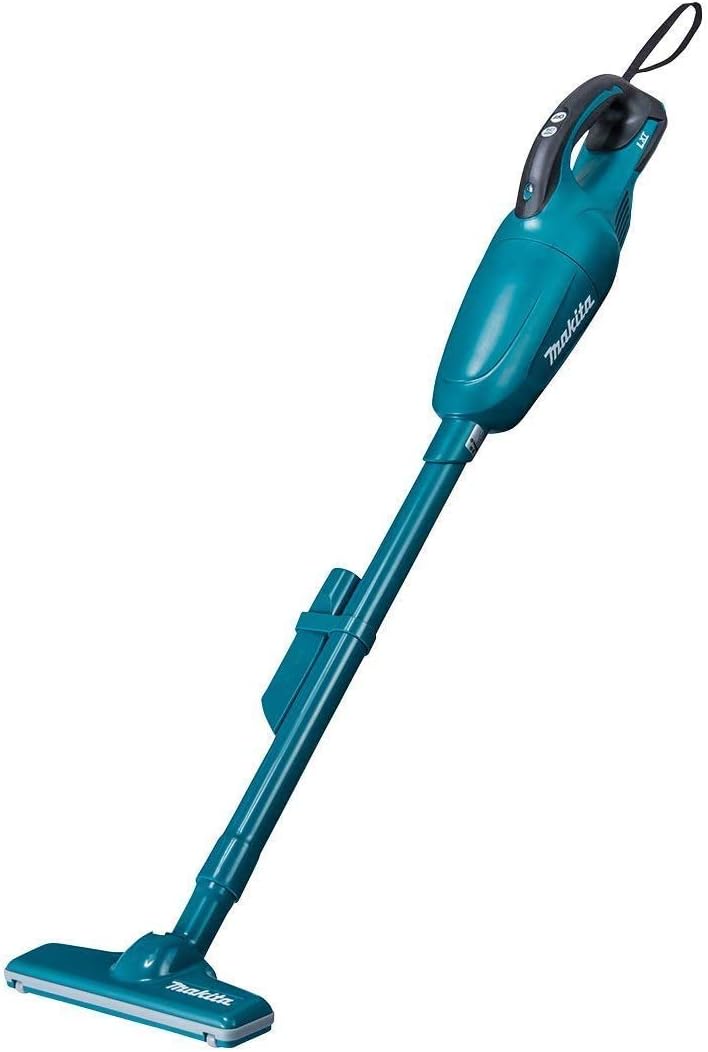
Image 1.1: The Makita CL181FDZ 18V Cordless Capsule & Cyclone Vacuum Cleaner in blue, shown fully assembled.
2. Safety Information
Always observe basic safety precautions to reduce the risk of fire, electric shock, and personal injury when using this appliance. This vacuum cleaner is designed for dry vacuuming only. Do not use it to pick up water or other liquids.
- Battery Safety: Use only Makita 18V Li-ion batteries and chargers. Do not expose batteries to heat or fire. Do not short-circuit the battery terminals.
- Operation Area: Keep the work area well-lit and clear of clutter. Do not operate in explosive atmospheres, such as in the presence of flammable liquids, gases, or dust.
- Personal Safety: Do not allow children to operate the vacuum cleaner. Keep hair, loose clothing, fingers, and all parts of the body away from openings and moving parts.
- Maintenance: Disconnect the battery pack before making any adjustments, changing accessories, or storing the appliance.
3. Product Overview
The Makita CL181FDZ is a powerful 18V cordless vacuum cleaner featuring a capsule-type dust collection system and an optional cyclone attachment for enhanced fine dust separation. It offers a one-touch switch for continuous operation, providing convenience for cleaning various areas.
Components

Image 3.1: Diagram illustrating the main components of the vacuum cleaner. Key parts include the Switch, Hand strap, Handle, Light, Capsule, Battery, Exhaust port, Straight pipe, Sash (crevice) nozzle, and Nozzle.
- Switch: Controls power and suction mode.
- Hand Strap: For secure handling.
- Handle: Ergonomic grip for comfortable use.
- Light: Illuminates the cleaning area.
- Capsule: Dust collection container.
- Battery: 18V Li-ion battery (sold separately).
- Exhaust Port: Air outlet.
- Straight Pipe: Extension for floor cleaning.
- Sash (Crevice) Nozzle: For narrow spaces.
- Nozzle: Standard floor cleaning attachment.
Optional Cyclone Attachment
The cyclone attachment (Image 3.2) is designed to separate fine dust from the airflow before it reaches the main filter, extending filter life and maintaining suction power. It attaches between the main unit and the dust capsule.

Image 3.2: The optional cyclone attachment, shown separately. This unit helps to centrifugally separate dust.
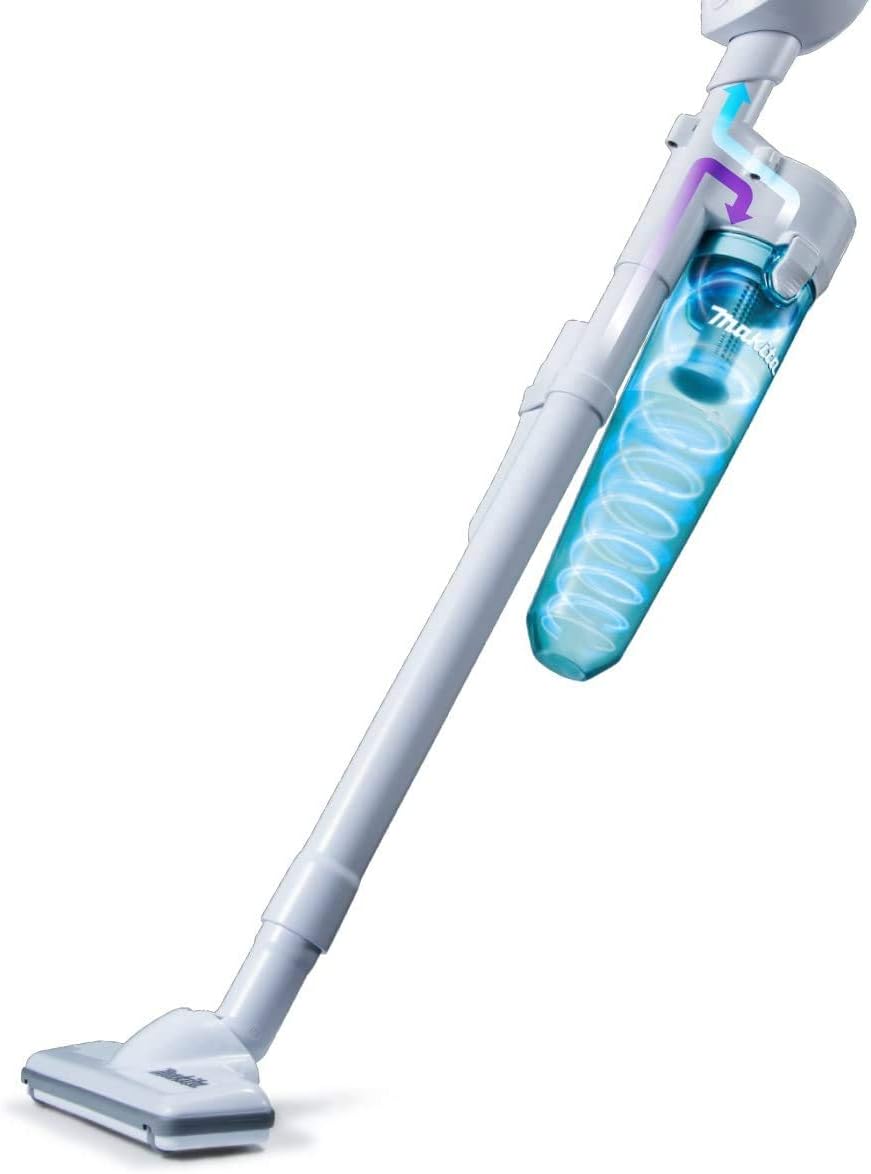
Image 3.3: The Makita CL181FDZ vacuum cleaner with the cyclone attachment installed, showing the airflow path.
4. Setup
4.1 Attaching the Battery
- Ensure the battery is fully charged.
- Align the battery pack with the battery housing on the main unit.
- Slide the battery into place until it clicks securely.
4.2 Assembling Attachments
Depending on your cleaning needs, attach the desired accessories:
- For Floor Cleaning: Insert the straight pipe into the main unit, then attach the nozzle to the end of the straight pipe.
- For Crevices/Narrow Spaces: Attach the sash (crevice) nozzle directly to the main unit or to the end of the straight pipe.
- With Cyclone Attachment: Attach the cyclone unit to the main unit, then attach the dust capsule to the cyclone unit. Proceed to attach the straight pipe and nozzle as needed.
5. Operating Instructions
5.1 Power On/Off and Suction Adjustment
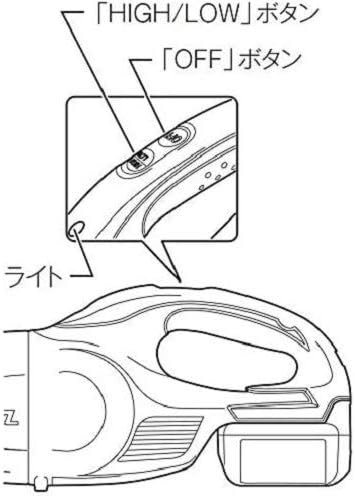
Image 5.1: Close-up view of the control buttons on the handle, showing the 'HIGH/LOW' button, 'OFF' button, and the Light.
- To Turn On: Press the 'HIGH/LOW' button to start the vacuum cleaner. The default mode is usually 'LOW'.
- To Adjust Suction: Press the 'HIGH/LOW' button again to switch between 'HIGH' and 'LOW' suction modes.
- To Turn Off: Press the 'OFF' button.
- Continuous Operation: The one-touch switch allows for continuous operation without needing to hold the button down.
5.2 Cleaning Applications
- General Floor Cleaning: Use the straight pipe and nozzle for efficient cleaning of various floor types.
- Handheld Cleaning: For quick clean-ups or hard-to-reach areas, use the main unit with just the nozzle or crevice tool (Image 5.2).

Image 5.2: Demonstrates using the vacuum cleaner in handheld mode with the nozzle for cleaning surfaces like tables.
- Stairs and Elevated Areas: The lightweight design and continuous operation feature make it comfortable for cleaning stairs (Image 5.3) and high places.

Image 5.3: Illustrates using the vacuum cleaner with the straight pipe and nozzle to clean stairs.
- Narrow Spaces and Car Interiors: Utilize the sash (crevice) nozzle for effective cleaning in tight spots, such as car seats (Image 5.4) or room corners (Image 5.5).
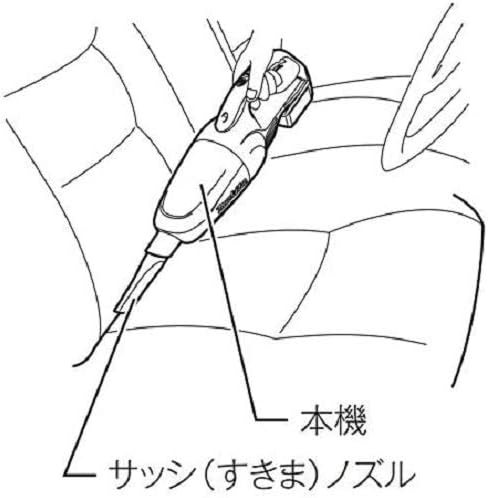
Image 5.4: Shows the vacuum cleaner with the crevice nozzle being used to clean a car interior.
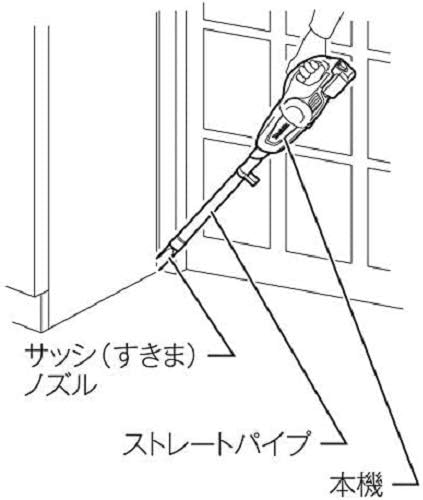
Image 5.5: Depicts the vacuum cleaner with the straight pipe and crevice nozzle cleaning a room corner.
6. Maintenance
Regular maintenance ensures optimal performance and extends the life of your vacuum cleaner. Always remove the battery before performing any maintenance.
6.1 Emptying the Dust Capsule
Empty the dust capsule regularly, especially when the dust level reaches the maximum fill line. This prevents loss of suction power.
- Twist and remove the dust capsule from the main unit.
- Open the capsule and empty the collected dust into a waste bin (Image 6.1).
- Close the capsule securely and reattach it to the main unit.

Image 6.1: A hand holding the transparent dust capsule, showing dust being emptied into a receptacle.
6.2 Cleaning the Filter
The standard high-performance filter should be cleaned periodically to maintain suction efficiency. Tap off loose dust or rinse with water if heavily soiled. Ensure the filter is completely dry before reinserting.
6.3 Cleaning the Cyclone Attachment (if used)
If using the cyclone attachment, regularly check and empty its dust collection chamber. Clean any accumulated debris from the cyclone cone to ensure proper centrifugal separation.
7. Troubleshooting
| Problem | Possible Cause | Solution |
|---|---|---|
| No power / Does not start | Battery not inserted correctly Battery discharged | Reinsert battery securely Charge the battery |
| Low suction power | Dust capsule full Filter clogged Nozzle/pipe blocked Cyclone attachment clogged | Empty dust capsule Clean or replace filter Remove blockage Clean cyclone attachment |
| Unusual noise | Foreign object in nozzle/pipe Motor issue | Check and remove foreign object Contact Makita service center |
8. Specifications
| Feature | Specification |
|---|---|
| Brand | Makita |
| Model Number | CL181FDZ |
| Power Source | 18V Cordless (Battery and Charger sold separately) |
| Dust Collection Method | Capsule Type & Cyclone Attachment |
| Dust Collection Capacity | 650 mL |
| Suction Power (Strong/Standard) | 37W / 10W |
| Filter Type | Cartridge |
| Recommended Use | Various floors |
| Color | Blue |
9. Warranty and Support
For warranty information, service, or technical support, please refer to the documentation included with your purchase or visit the official Makita website. Warranty terms and conditions may vary by region and retailer.
Official Makita Website: www.makita.com


