
1. Introduction
This manual provides detailed instructions for the safe and efficient operation, maintenance, and troubleshooting of your Sumeve Multifunction Automatic Powder Filling Machine. This machine is designed for precise and efficient subpackaging of dry powder and particulate materials. Please read this manual thoroughly before operating the machine to ensure optimal performance and longevity.
The Sumeve Powder Filling Machine is suitable for filling dry powders such as flour, milk powder, coffee powder, and chemical powders. For dry particulate matter, the round hopper model is recommended. It is not suitable for thick, moist, or sticky powders, nor for products that generate static electricity or are excessively heavy.

Figure 1.1: Sumeve Multifunction Automatic Powder Filling Machine (200g-Powder model).
2. Safety Information
Always adhere to the following safety precautions to prevent injury or damage to the machine:
- Ensure the machine is placed on a stable, level surface to prevent tipping during operation.
- Verify the power supply voltage matches the machine's requirements (110V/60Hz).
- Do not operate the machine with wet hands or in wet conditions.
- Keep hands and loose clothing away from moving parts during operation.
- Unplug the machine before cleaning, maintenance, or when not in use.
- Do not attempt to modify or repair the machine yourself. Contact qualified personnel for service.
- Use only dry, free-flowing powders or particulates. Avoid wet, sticky, or clumpy materials.
- Ensure proper ventilation when operating, especially with fine powders.
3. Product Components
Familiarize yourself with the main components of your powder filling machine:
- Hopper: Top-mounted container for holding the material to be filled. The 200g-Powder model typically comes with a square hopper, suitable for dry powder products.
- Control Panel: Front-mounted interface with digital displays and buttons for setting parameters and controlling operation.
- Discharge Chute: Outlet where the filled material is dispensed.
- Power Input: Rear connection for the power cable.
- Foot Pedal Port: Rear port for connecting an optional foot pedal for manual control.

Figure 3.1: Illustration of different hopper types. The 200g-Powder model uses a square hopper for powders.
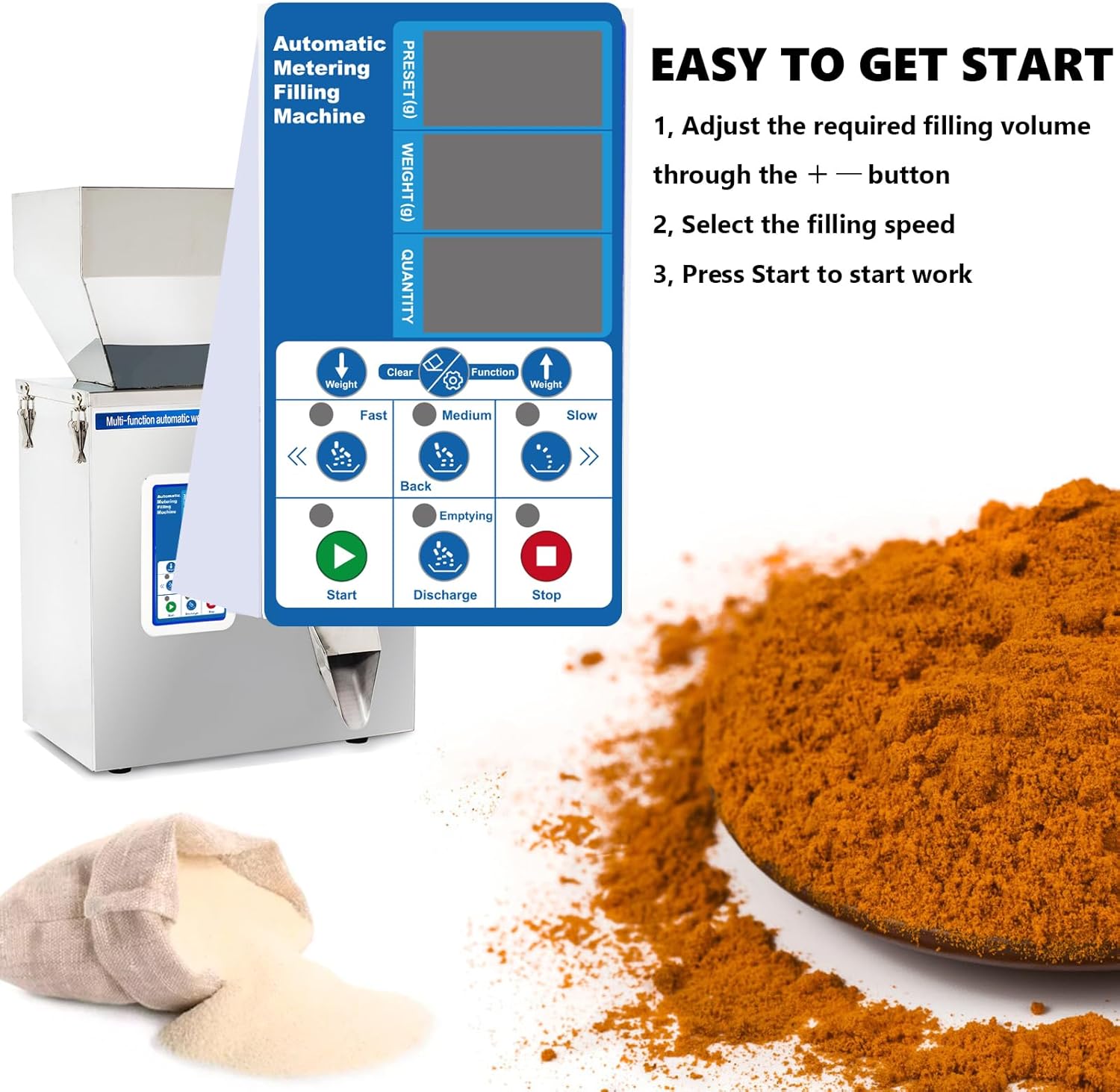
Figure 3.2: Close-up of the control panel with various settings.

Figure 3.3: Rear view showing the AC 110V power input and fuse location.
4. Setup
Follow these steps to set up your machine for first use:
- Unpacking: Carefully remove the machine from its packaging.
- Stabilization: Place the machine on a sturdy, flat, and level surface. Ensure there is adequate space around it for operation and ventilation.
- Secure the Hopper: Ensure the hopper is securely attached to the top of the machine.
- Power Connection: Connect the power cord to the machine's power input at the rear and then plug it into a grounded 110V/60Hz electrical outlet.
- Foot Pedal (Optional): If using the foot pedal for control, plug it into the designated port at the rear of the machine. The default operation mode is infrared sensing.

Figure 4.1: The machine supports both infrared sensing (default) and foot pedal control.
5. Operating Instructions
Operating the Sumeve Powder Filling Machine is straightforward:
- Power On: Flip the power switch to the 'On' position. The control panel displays will illuminate.
- Set Filling Weight: Use the '+' and '-' buttons on the control panel to adjust the desired filling weight (PRESET) in grams. The machine has a packing range of 1-200g (0.44 lbs).
- Select Filling Speed: Choose the desired filling speed (Fast, Medium, or Slow) using the corresponding buttons. The speed controls the vibration intensity of the pan, affecting how quickly material is dispensed.
- Load Material: Pour the dry powder or particulate material into the hopper. Ensure the material is free-flowing and within the recommended size (φ < 15mm).
- Start Operation: Press the 'Start' button to begin the filling process.
- Dispensing: Place your container (bag, bottle, etc.) under the discharge chute. The machine will automatically dispense the set weight using infrared sensing. If using the foot pedal, press it to initiate dispensing.
- Emptying: To empty the hopper, press the 'Emptying' button.
- Stop: Press the 'Stop' button to halt operation at any time.
The machine uses electronic weighing technology for high filling accuracy (Error ± 0.3g). Packing speed is approximately 12-15 bags/min.

Figure 5.1: The machine efficiently dispenses powder into containers.
6. Maintenance
Regular maintenance ensures the longevity and optimal performance of your machine:
- Cleaning: The machine is made of stainless steel, making it easy to clean. After each use, especially when changing materials, wipe down all contact surfaces with a dry or slightly damp cloth. Ensure no moisture enters the electronic components.
- Hopper Cleaning: Remove any residual material from the hopper. For thorough cleaning, the hopper can be detached.
- Dust Removal: Periodically blow out any accumulated dust from internal components, especially around the weighing mechanism, using compressed air.
- Storage: When not in use, store the machine in a dry, clean environment, covered to protect it from dust and debris.
- Inspection: Regularly inspect the power cord for any signs of damage. Check all connections and moving parts for wear.
7. Troubleshooting
This section addresses common issues you might encounter:
| Problem | Possible Cause | Solution |
|---|---|---|
| Machine does not power on. | No power, loose connection, blown fuse. | Check power cord connection, wall outlet. Inspect and replace fuse if necessary. |
| Inaccurate filling weight. | Unstable surface, material clumping, sensor obstruction, calibration needed. | Ensure stable surface. Use dry, free-flowing material. Clean sensors. Refer to control panel instructions for calibration. |
| Material not dispensing or dispensing slowly. | Hopper empty, material clumping, discharge chute blocked, vibration setting too low. | Refill hopper. Break up clumps. Clear chute. Increase speed setting. |
| Machine is excessively noisy. | High speed setting, internal component vibration. | Reduce speed setting. Ensure all panels are securely fastened. If noise persists, contact support. |
| Infrared sensor not working. | Sensor dirty, clear bag material, foot pedal connected. | Clean sensor. Use opaque bags or switch to foot pedal control. Disconnect foot pedal if not in use. |
Materials Not Suitable for This Machine:
- Heavy products (e.g., glass beads, steel beads)
- Wet or clumpy products
- Sticky products (e.g., soft candy)
- Some powders that generate static electricity and adhere to the machine
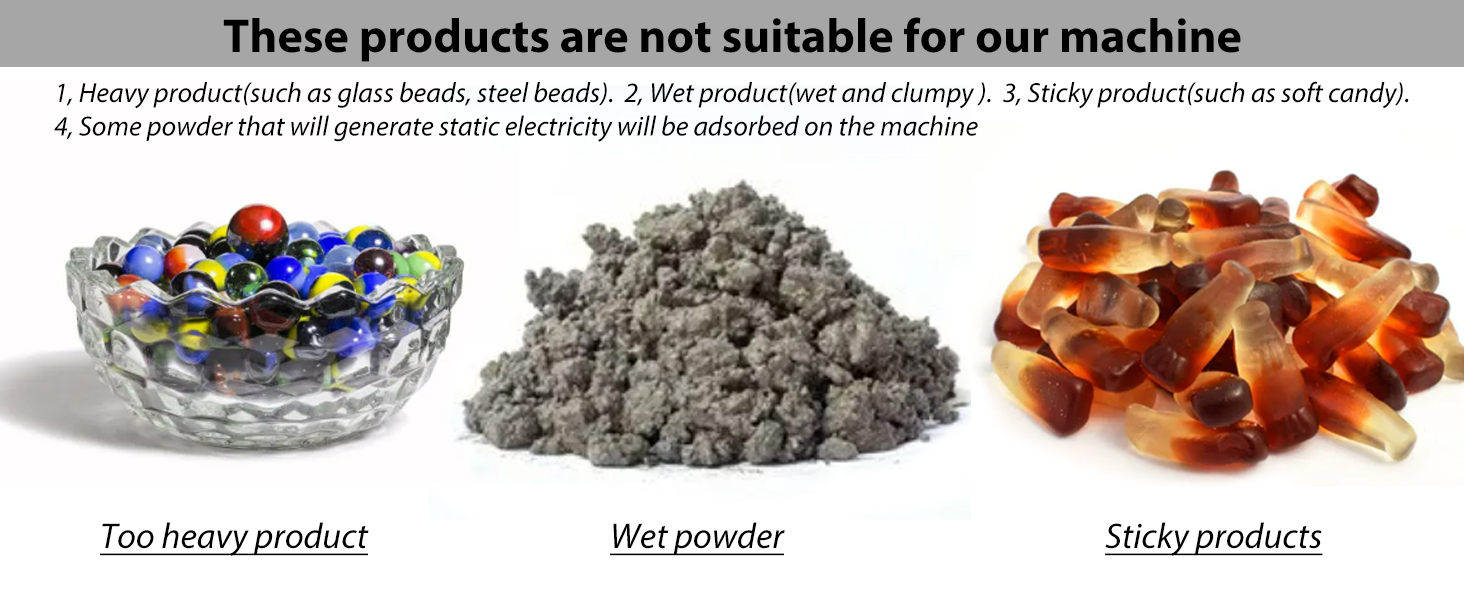
Figure 7.1: Examples of materials that are not suitable for this machine.
8. Specifications
| Feature | Specification |
|---|---|
| Model | 200g-Powder |
| Packing Range | 1-200g (0.44 lbs) |
| Filling Material Size | φ < 15mm |
| Packing Speed | 12-15 bags/min |
| Voltage | 110V/60Hz |
| Filling Accuracy | ± 0.3g |
| Material | Stainless Steel |
| Item Weight | 26.6 pounds |
| Package Dimensions | 26.93 x 17.02 x 11 inches |
9. Warranty and Support
For warranty information, technical support, or service inquiries, please contact Sumeve customer service through the retailer where you purchased the product or visit the official Sumeve website. Please have your product model number and purchase date available when contacting support.
For more information, you can visit the Sumeve Store on Amazon.